MongoDB aggregation cheat sheet
Every pipeline stage, expression operator, and copy-paste pattern in one page: 47 stages, 207 operators, and 16 patterns. Covers MongoDB 3.2 through 8.3.
Updated 11 September 2026
Basic pipeline
db.orders.aggregate([
  { $match: { status: "shipped", total: { $gte: 100 } } },
  { $group: {
    _id: "$region",
    revenue: { $sum: "$total" },
    count: { $sum: 1 }
  } },
  { $sort: { revenue: -1 } }
])
Filter with $match, aggregate with $group, order with $sort.
Most pipelines are variations of this pattern.
SQL to aggregation
If you know SQL, you already know the concepts. Each SQL clause maps to an aggregation stage.
| SQL | Aggregation stage |
|---|---|
| SELECT a, b | $project |
| SELECT *, a+b AS c | $addFields / $set |
| WHERE | $match |
| GROUP BY | $group |
| HAVING | $match (after $group) |
| ORDER BY | $sort |
| LIMIT / OFFSET | $limit / $skip |
| JOIN | $lookup |
| CROSS JOIN UNNEST(arr) | $unwind |
| UNION ALL | $unionWith |
| VALUES (...) | $documents |
| COUNT(*) | $count |
| DISTINCT | $group |
| WINDOW / OVER | $setWindowFields |
| INSERT INTO ... SELECT | $merge / $out |
| CASE WHEN | $cond / $switch |
| COALESCE | $ifNull |
| CAST | $convert / $toInt / ... |
| EXISTS (subquery) | $lookup + $match |
| LATERAL JOIN | $lookup (pipeline) |
| CREATE MATERIALIZED VIEW | $merge / $out |
How the pipeline works
Documents flow left to right through stages. Each stage transforms the stream and passes results to the next.
The document count can shrink ($match, $group), stay the same ($addFields, $sort, $project), grow ($unwind, $unionWith), or fan out into named sub-results in one document ($facet). Place stages that reduce document count early to keep later stages fast.
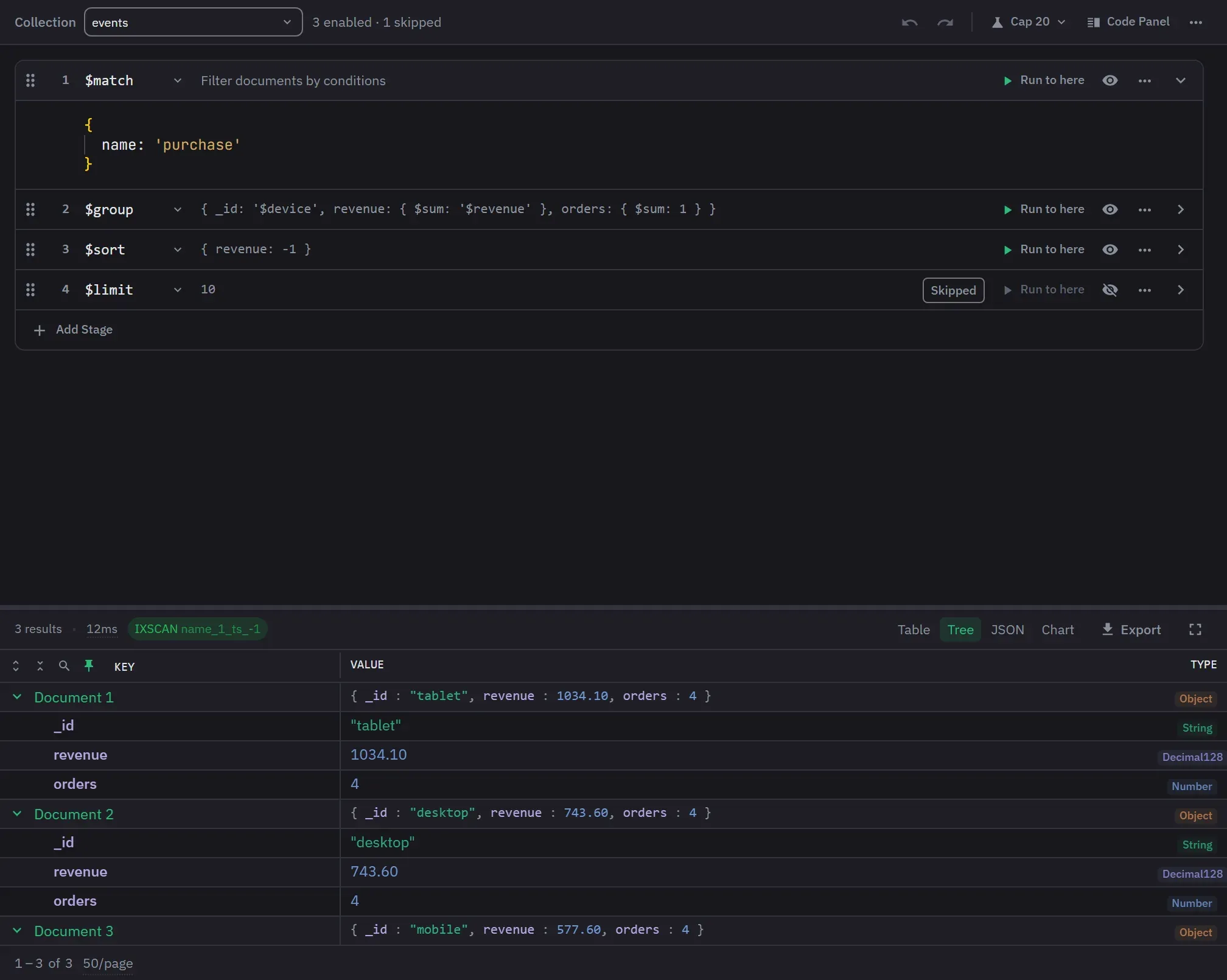
Monghoul's aggregation builder shows this flow visually with per-stage output previews and "Run to here" controls. See how it works →
Pipeline stages
Filtering
Filters documents. Same query syntax as find().
{ $match: { status: "active", age: { $gte: 18 } } }Example data
[
  { name: "Alice", status: "active", age: 25 },
  { name: "Bob", status: "inactive", age: 30 },
  { name: "Carol", status: "active", age: 15 }
][
{ name: "Alice", status: "active", age: 25 }
]Randomly selects N documents from the input.
{ $sample: { size: 5 } }Projection
Includes, excludes, or computes fields. 1 to include, 0 to exclude.
{ $project: { name: 1, total: { $multiply: ["$price", "$qty"] } } }Example data
[
  { _id: 1, name: "Widget", price: 25, qty: 4, sku: "W1" }
][
{ _id: 1, name: "Widget", total: 100 }
]Adds new fields or overwrites existing ones. $set is an alias for $addFields.
{ $addFields: { totalPrice: { $multiply: ["$price", "$qty"] } } }Example data
[
  { _id: 1, price: 25, qty: 4, sku: "W1" }
][
{ _id: 1, price: 25, qty: 4, sku: "W1", totalPrice: 100 }
]Removes fields. Shorthand for $project with exclusions.
{ $unset: ["tempField", "internal.debug"] }Replaces the entire document with a specified sub-document or expression.
{ $replaceRoot: { newRoot: "$address" } }
// or equivalently:
{ $replaceWith: "$address" }
Example data
[
  { _id: 1, name: "Alice", address: { city: "NYC", zip: "10001" } }
][
{ city: "NYC", zip: "10001" }
]Array handling
Deconstructs an array field into one document per element.
{ $unwind: "$tags" }
// with options:
{ $unwind: { path: "$tags", preserveNullAndEmptyArrays: true } }
Example data
[
  { _id: 1, item: "Shirt", tags: ["cotton", "sale"] }
][
{ _id: 1, item: "Shirt", tags: "cotton" },
{ _id: 1, item: "Shirt", tags: "sale" }
]Grouping
Groups documents by a key and applies accumulators.
{ $group: {
  _id: "$department",
  total: { $sum: "$salary" },
  count: { $sum: 1 },
  avgSalary: { $avg: "$salary" }
} }
Example data
[
  { name: "Alice", department: "eng", salary: 120 },
  { name: "Bob", department: "eng", salary: 100 },
  { name: "Carol", department: "sales", salary: 90 }
][
{ _id: "eng", total: 220, count: 2, avgSalary: 110 },
{ _id: "sales", total: 90, count: 1, avgSalary: 90 }
]Returns a document with the count of input documents. As a stage, not the accumulator of the same name.
{ $count: "totalDocuments" }Example data
// 142 input documents[ { totalDocuments: 142 } ]Groups documents into buckets by value ranges.
{ $bucket: {
  groupBy: "$price",
  boundaries: [0, 50, 100, 200, Infinity],
  default: "other",
  output: { count: { $sum: 1 } }
} }
Example data
[
  { item: "A", price: 10 },
  { item: "B", price: 75 },
  { item: "C", price: 150 }
][
{ _id: 0, count: 1 },
{ _id: 50, count: 1 },
{ _id: 100, count: 1 }
]Automatically divides documents into a specified number of evenly distributed buckets.
{ $bucketAuto: { groupBy: "$score", buckets: 5 } }Example data
// 10 documents with scores 10-99[
{ _id: { min: 10, max: 38 }, count: 2 },
{ _id: { min: 38, max: 64 }, count: 2 },
{ _id: { min: 64, max: 85 }, count: 2 },
{ _id: { min: 85, max: 95 }, count: 2 },
{ _id: { min: 95, max: 99 }, count: 2 }
]Groups by a field and sorts by count descending. Shorthand for $group + $sort.
{ $sortByCount: "$category" }Example data
[
  { item: "A", category: "food" },
  { item: "B", category: "food" },
  { item: "C", category: "tech" }
][
{ _id: "food", count: 2 },
{ _id: "tech", count: 1 }
]Sorting
Orders documents. 1 for ascending, -1 for descending.
{ $sort: { createdAt: -1, name: 1 } }Example data
[
  { name: "Bob", createdAt: "2024-01-01" },
  { name: "Alice", createdAt: "2024-03-15" },
  { name: "Carol", createdAt: "2024-02-10" }
][
{ name: "Alice", createdAt: "2024-03-15" },
{ name: "Carol", createdAt: "2024-02-10" },
{ name: "Bob", createdAt: "2024-01-01" }
]Joining
Left outer join to another collection in the same database.
// basic form:
{ $lookup: {
  from: "orders",
  localField: "_id",
  foreignField: "userId",
  as: "userOrders"
} }

// pipeline form (correlated sub-query):
{ $lookup: {
  from: "orders",
  let: { uid: "$_id" },
  pipeline: [
    { $match: {
      $expr: { $eq: ["$userId", "$$uid"] }
    } },
    { $sort: { date: -1 } },
    { $limit: 5 }
  ],
  as: "recentOrders"
} }
Example data
// users collection:
[{ _id: 1, name: "Alice" }]
// orders collection:
[{ userId: 1, total: 50 }, { userId: 1, total: 80 }][
{ _id: 1, name: "Alice",
userOrders: [
{ userId: 1, total: 50 },
{ userId: 1, total: 80 }
] }
]Recursive lookup for tree and graph structures (org charts, categories, social graphs).
{ $graphLookup: {
  from: "employees",
  startWith: "$managerId",
  connectFromField: "managerId",
  connectToField: "_id",
  as: "reportingChain",
  maxDepth: 5,
  depthField: "level"
} }
Example data
// employees collection (pipeline starts with { $match: { name: "Alice" } }):
[
  { _id: 1, name: "Alice", managerId: 2 },
  { _id: 2, name: "Bob", managerId: 3 },
  { _id: 3, name: "Carol", managerId: null }
][
{ _id: 1, name: "Alice", managerId: 2,
reportingChain: [
{ _id: 2, name: "Bob", managerId: 3, level: 0 },
{ _id: 3, name: "Carol", managerId: null, level: 1 }
] }
]Appends documents from another collection to the pipeline. Like SQL UNION ALL.
{ $unionWith: { coll: "archivedOrders" } }
// with a pipeline:
{ $unionWith: {
  coll: "archivedOrders",
  pipeline: [{ $match: { status: "shipped" } }]
} }
Example data
// currentOrders (pipeline source):
[{ _id: 1, item: "Laptop", status: "active" }]
// archivedOrders (joined via $unionWith):
[{ _id: 99, item: "Mouse", status: "shipped" }][
{ _id: 1, item: "Laptop", status: "active" },
{ _id: 99, item: "Mouse", status: "shipped" }
]Window functions
Adds fields computed over a window of documents (running totals, ranks, moving averages).
{ $setWindowFields: {
  partitionBy: "$department",
  sortBy: { salary: -1 },
  output: {
    rank: { $rank: {} },
    runningTotal: {
      $sum: "$salary",
      window: { documents: ["unbounded", "current"] }
    }
  }
} }

// window forms. Omit window entirely and you get the
// whole partition, which is rarely what you meant.
window: { documents: ["unbounded", "current"] }  // running total
window: { documents: [-3, 0] }                   // this row + 3 before
window: { documents: [0, "unbounded"] }          // this row to the end
window: { range: [-6, "current"], unit: "day" }  // 7 calendar days
window: { range: [-100, 100] }                   // ±100 of the sortBy value

// range counts by the sortBy VALUE, documents counts by
// position. On a series with gaps they disagree, and
// range is almost always the honest one for dates.
Example data
[
  { department: "eng", name: "Alice", salary: 120 },
  { department: "eng", name: "Bob", salary: 100 },
  { department: "sales", name: "Carol", salary: 90 }
][
{ department: "eng", name: "Alice", salary: 120,
rank: 1, runningTotal: 120 },
{ department: "eng", name: "Bob", salary: 100,
rank: 2, runningTotal: 220 },
{ department: "sales", name: "Carol", salary: 90,
rank: 1, runningTotal: 90 }
]Multi-pipeline
Runs multiple sub-pipelines in parallel on the same input. Returns one document with each pipeline result as a field.
{ $facet: {
  priceRanges: [
    { $bucket: { groupBy: "$price", boundaries: [0, 50, 100, 500] } }
  ],
  topRated: [
    { $sort: { rating: -1 } },
    { $limit: 5 }
  ],
  totalCount: [
    { $count: "count" }
  ]
} }
Example data
// all input documents are sent
// to each sub-pipeline[
{
priceRanges: [{ _id: 0, count: 3 }, ...],
topRated: [{ name: "A", rating: 5 }, ...],
totalCount: [{ count: 42 }]
}
]Output
Writes pipeline results to a collection, replacing its contents. Must be the last stage.
{ $out: "monthlySummary" }
// cross-database (4.4+):
{ $out: { db: "reporting", coll: "monthlySummary" } }
Example data
// pipeline result:
[
  { _id: "US-East", revenue: 18400 },
  { _id: "EU-West", revenue: 9300 }
]
// monthlySummary before (any prior contents):
[ { _id: "OLD", revenue: 999 } ]// monthlySummary after $out (fully replaced):
[
{ _id: "US-East", revenue: 18400 },
{ _id: "EU-West", revenue: 9300 }
]Merges pipeline results into a collection. More flexible than $out: it can insert, merge, replace, or fail on a match, and it leaves the target and its indexes in place. Must be the last stage. Any field named in on needs a unique index.
{ $merge: {
  into: "monthlySummary",      // or { db, coll }
  on: "_id",                   // default; needs a unique index
  whenMatched: "merge",        // merge | replace | keepExisting
                               // | fail | [ update pipeline ]
  whenNotMatched: "insert"     // insert | discard | fail
} }

// custom merge logic: only ever grow the stored total
{ $merge: {
  into: "monthlySummary",
  whenMatched: [
    { $set: { revenue: { $max: ["$revenue", "$$new.revenue"] } } }
  ]
} }
Example data
// pipeline result:
[
  { _id: "US-East", revenue: 18400 },
  { _id: "EU-West", revenue: 9300 }
]
// monthlySummary before:
[
  { _id: "US-East", revenue: 15000 },
  { _id: "APAC", revenue: 5000 }
]// monthlySummary after $merge:
[
{ _id: "US-East", revenue: 18400 }, // matched, merged
{ _id: "APAC", revenue: 5000 }, // untouched
{ _id: "EU-West", revenue: 9300 } // inserted
]Search (Atlas)
Full-text search using Atlas Search indexes. Must be the first stage.
{ $search: {
  index: "default",
  text: { query: "coffee", path: "description" }
} }Returns metadata about Atlas Search results (facet counts, total hits). Must be the first stage.
{ $searchMeta: {
  index: "default",
  facet: {
    operator: { text: { query: "coffee", path: "description" } },
    facets: { categories: { type: "string", path: "category" } }
  }
} }Semantic similarity search using vector embeddings. Must be the first stage. Set numCandidates well above limit — roughly 10× — or recall drops.
{ $vectorSearch: {
  index: "vectorIndex",
  path: "embedding",
  queryVector: [0.1, 0.2, 0.3],
  numCandidates: 100,
  limit: 10
} }Lists the Atlas Search indexes on a collection, with build status. Must be the first stage. Errors outside Atlas from 7.1 on.
{ $listSearchIndexes: {} }
// or one index:
{ $listSearchIndexes: { name: "default" } }Hybrid search. Runs several sub-pipelines, then blends their results by rank using reciprocal rank fusion. The usual reason to reach for it: combine $search with $vectorSearch so keyword and semantic matches rank together.
{ $rankFusion: {
  input: {
    pipelines: {
      keyword: [
        { $search: { text: { query: "espresso", path: "desc" } } },
        { $limit: 20 }
      ],
      semantic: [
        { $vectorSearch: {
          index: "vectorIndex", path: "embedding",
          queryVector: [0.1, 0.2, 0.3],
          numCandidates: 200, limit: 20
        } }
      ]
    }
  },
  combination: { weights: { keyword: 1, semantic: 2 } }
} }Blends sub-pipelines by their scores rather than their ranks. Normalize first — raw scores from different searches are not on the same scale.
{ $scoreFusion: {
  input: {
    pipelines: { keyword: [ ... ], semantic: [ ... ] },
    normalization: "sigmoid"   // none | sigmoid | minMaxScaler
  },
  combination: { method: "avg" }
} }Computes a new relevance score from an expression and stores it as score metadata, optionally normalized to 0–1. Read it back with { $meta: "score" }.
{ $score: {
  score: { $multiply: [{ $meta: "score" }, "$popularity"] },
  normalization: "minMaxScaler"
} }
Other stages
Restricts document content based on field-level conditions. Returns "$$DESCEND", "$$PRUNE", or "$$KEEP".
{ $redact: {
  $cond: {
    if: { $eq: ["$level", "public"] },
    then: "$$DESCEND",
    else: "$$PRUNE"
  }
} }
Example data
[
  { _id: 1, level: "public", title: "News",
    section: { level: "secret", body: "hidden" } },
  { _id: 2, level: "secret", title: "Internal" }
][
{ _id: 1, level: "public", title: "News" }
// nested "secret" section pruned
// doc 2 pruned entirely
]Fills gaps in a sequence (dates, numbers) by inserting missing documents.
{ $densify: {
  field: "date",
  range: { step: 1, unit: "day", bounds: "full" }
} }
Example data
[
  { date: ISODate("2024-03-01"), visits: 120 },
  { date: ISODate("2024-03-03"), visits: 95 },
  { date: ISODate("2024-03-05"), visits: 140 }
][
{ date: ISODate("2024-03-01"), visits: 120 },
{ date: ISODate("2024-03-02") }, // filled
{ date: ISODate("2024-03-03"), visits: 95 },
{ date: ISODate("2024-03-04") }, // filled
{ date: ISODate("2024-03-05"), visits: 140 }
]Fills null or missing field values using a specified method.
{ $fill: {
  sortBy: { date: 1 },
  output: {
    temperature: { method: "linear" },
    status: { value: "unknown" }
  }
} }
Example data
[
  { date: "2024-03-01", temperature: 10, status: "ok" },
  { date: "2024-03-02", temperature: null },
  { date: "2024-03-03", temperature: 16 }
][
{ date: "2024-03-01", temperature: 10, status: "ok" },
{ date: "2024-03-02", temperature: 13, status: "unknown" },
{ date: "2024-03-03", temperature: 16, status: "unknown" }
]Creates documents from expressions. Two restrictions catch everyone: it must be the first stage, and it only works on a database-level pipeline — db.aggregate(), never db.collection.aggregate().
// works
db.aggregate([
  { $documents: [
    { name: "Alice", role: "admin" },
    { name: "Bob", role: "user" }
  ] }
])

// fails: $documents is not valid on a collection
db.users.aggregate([{ $documents: [ ... ] }])Returns a cursor over real-time change events on a collection. Must be the first stage.
{ $changeStream: {
  fullDocument: "updateLookup",
  startAtOperationTime: Timestamp(1690000000, 1)
} }Splits change events over 16 MB into fragments instead of failing with BSONObjectTooLarge. Only valid in a $changeStream pipeline, only once, and must be the last stage. Try trimming the event with $project first.
db.orders.watch(
  [{ $changeStreamSplitLargeEvent: {} }],
  { fullDocument: "required",
    fullDocumentBeforeChange: "required" }
)
// each fragment carries splitEvent: { fragment: 1, of: 3 }
Admin and diagnostics
Returns storage and query-execution statistics for the collection. Must be the first stage.
{ $collStats: {
  storageStats: {},
  count: {},
  queryExecStats: {}
} }Returns usage statistics for each index on the collection. Must be the first stage.
{ $indexStats: {} }Example data
// no input documents; reads index metadata[
{ name: "status_1", accesses: { ops: 142, since: ISODate("2024-01-01") } },
{ name: "_id_", accesses: { ops: 9800, since: ISODate("2024-01-01") } }
]Returns plan cache entries for the collection. Useful for diagnosing slow queries.
{ $planCacheStats: {} }Returns documents describing active and/or dormant operations on the server. Run on the admin database.
{ $currentOp: { allUsers: true, idleSessions: false } }Lists sessions recorded in config.system.sessions across the cluster. Run on the config database.
{ $listSessions: { allUsers: true } }Lists sessions held in memory on the node you are connected to. $listSessions is the cluster-wide view; this one is local and current.
{ $listLocalSessions: { allUsers: true } }Runtime metrics grouped by query shape: execution count, time, docs examined, whether a sort or a disk spill happened. The closest thing to a "slowest queries" list. Atlas M10 and up, admin database, first stage. Its output shape is explicitly unsupported, so read it, do not build on it.
db.getSiblingDB("admin").aggregate([
  { $queryStats: {} }
])

// hash namespaces and field names before exporting
{ $queryStats: {
  transformIdentifiers: {
    algorithm: "hmac-sha-256",
    hmacKey: BinData(8, "...")
  }
} }Returns the queries sampled for analyzeShardKey, so you can see what shard-key analysis is working from. Not available on standalones, and on a sharded cluster it must run through mongos.
db.aggregate([
  { $listSampledQueries: { namespace: "social.post" } }
])Lists every collection in the cluster with its creation options, shard key and balancing settings. Run on admin for the whole cluster, or on one database for that database. First stage only, and its output shape is unsupported.
db.getSiblingDB("admin").aggregate([
  { $listClusterCatalog: { shards: true, balancingConfiguration: true } }
])Returns cluster-wide query settings added with setQuerySettings — index hints, query framework, rejection filters. Must be first, and runs on a database-level pipeline.
db.aggregate([
  { $querySettings: { showDebugQueryShape: true } }
])Expressions and operators
Expression operators transform values inside stages like $project and $addFields. Query operators (used inside $match) are included at the end for quick reference.
Accumulators (used in $group, $setWindowFields)
Items marked window only work inside $setWindowFields.
Sum of numeric values.
{ $sum: "$qty" } Average of numeric values.
{ $avg: "$price" } Lowest value.
{ $min: "$score" } Highest value.
{ $max: "$score" } First value in the group.
{ $first: "$name" } Last value in the group.
{ $last: "$name" } Array of all values (including duplicates).
{ $push: "$tag" } Array of unique values.
{ $addToSet: "$tag" } Count of documents in the group. Accumulator form; for a top-level total, use the $count stage instead.
{ $count: {} } Top document by sort order.
{ $top: { sortBy: { score: -1 }, output: "$name" } } Top N documents by sort order.
{ $topN: { n: 3, sortBy: { score: -1 }, output: "$name" } } Bottom document by sort order.
{ $bottom: { sortBy: { score: -1 }, output: "$name" } } Bottom N documents by sort order.
{ $bottomN: { n: 3, sortBy: { score: -1 }, output: "$name" } } Array of first N values.
{ $firstN: { n: 3, input: "$item" } } Array of last N values.
{ $lastN: { n: 3, input: "$item" } } Median value (50th percentile).
{ $median: { input: "$score", method: "approximate" } } Value at a given percentile.
{ $percentile: { input: "$score", p: [0.9], method: "approximate" } } Sample standard deviation.
{ $stdDevSamp: "$score" } Population standard deviation.
{ $stdDevPop: "$score" } Exponential moving average. Smooths a time series by weighting recent points more heavily.
{ $expMovingAvg: { input: "$price", N: 3 } } Example data
[
  { day: 1, price: 100 },
  { day: 2, price: 110 },
  { day: 3, price: 105 }
][
{ day: 1, price: 100, ema: 100 },
{ day: 2, price: 110, ema: 105 },
{ day: 3, price: 105, ema: 105 }
]Array of N smallest values.
{ $minN: { n: 3, input: "$score" } } Array of N largest values.
{ $maxN: { n: 3, input: "$score" } } Rank of the document within the partition. Ties get the same rank and the next rank skips.
{ $rank: {} } Example data
[
  { name: "Alice", score: 95 },
  { name: "Bob", score: 95 },
  { name: "Carol", score: 80 }
][
{ name: "Alice", score: 95, rank: 1 },
{ name: "Bob", score: 95, rank: 1 },
{ name: "Carol", score: 80, rank: 3 } // gap after tie
]Rank within the partition without gaps after ties.
{ $denseRank: {} } Example data
[
  { name: "Alice", score: 95 },
  { name: "Bob", score: 95 },
  { name: "Carol", score: 80 }
][
{ name: "Alice", score: 95, rank: 1 },
{ name: "Bob", score: 95, rank: 1 },
{ name: "Carol", score: 80, rank: 2 } // no gap
]Position of the document in the partition (1-based, no ties).
{ $documentNumber: {} } Value from a document at a relative offset. Use negative for previous, positive for next.
{ $shift: { output: "$price", by: -1, default: 0 } } Example data
[
  { date: "2024-03-01", price: 100 },
  { date: "2024-03-02", price: 110 },
  { date: "2024-03-03", price: 108 }
][
{ date: "2024-03-01", price: 100, prev: 0 },
{ date: "2024-03-02", price: 110, prev: 100 },
{ date: "2024-03-03", price: 108, prev: 110 }
]Rate of change over the window (required in $setWindowFields). Pair with a range window for time-based rates.
{ $derivative: { input: "$distance", unit: "hour" }, window: { documents: [-1, 0] } } Example data
[
  { t: ISODate("2024-03-01T00:00Z"), distance: 0 },
  { t: ISODate("2024-03-01T01:00Z"), distance: 60 },
  { t: ISODate("2024-03-01T02:00Z"), distance: 130 }
][
{ ..., speed: null }, // first doc has no prior
{ ..., speed: 60 }, // 60 miles / hour
{ ..., speed: 70 }
]Fill nulls with linear interpolation between known points.
{ $linearFill: "$temperature" } Example data
[
  { x: 1, y: 10 },
  { x: 2, y: null },
  { x: 3, y: 30 }
][
{ x: 1, y: 10 },
{ x: 2, y: 20 }, // interpolated
{ x: 3, y: 30 }
]Custom accumulator with init, accumulate, merge JS functions.
{ $accumulator: { init: "function() { ... }", ... } } Run a custom JavaScript function as an expression.
{ $function: { body: "function(name) { ... }", args: ["$name"], lang: "js" } } Numeric integral (area under the curve) over a window. Pass unit only when the sortBy field is a date. Omit window and you integrate the whole partition, so every document gets the same total.
{ $integral: { input: "$speed" }, window: { documents: ["unbounded", "current"] } } Example data
[
  { t: 0, speed: 10 },
  { t: 1, speed: 20 },
  { t: 2, speed: 30 }
][
{ t: 0, ..., total: 0 },
{ t: 1, ..., total: 15 }, // trapezoid area
{ t: 2, ..., total: 40 }
]Rescales values in the window to a fixed range, 0 to 1 by default. The smallest value becomes the minimum, the largest becomes the maximum, everything else lands proportionally between.
{ $minMaxScaler: { input: "$score", min: 0, max: 100 } } Example data
[{ a: 1 }, { a: 5 }, { a: 13 }, { a: 21 }][
{ a: 1, scaled: 0 },
{ a: 5, scaled: 0.2 },
{ a: 13, scaled: 0.6 },
{ a: 21, scaled: 1 }
] // { $minMaxScaler: "$a" }Sample covariance of two expressions.
{ $covarianceSamp: ["$x", "$y"] } Population covariance of two expressions.
{ $covariancePop: ["$x", "$y"] } Last observation carried forward. Fills nulls with the previous non-null value.
{ $locf: "$temperature" } Example data
[
  { date: "2024-03-01", temperature: 12 },
  { date: "2024-03-02", temperature: null },
  { date: "2024-03-03", temperature: 18 }
][
{ date: "2024-03-01", temperature: 12 },
{ date: "2024-03-02", temperature: 12 }, // carried forward
{ date: "2024-03-03", temperature: 18 }
]Query operators (in $match)
$match takes the same syntax as find(). Comparison operators ($eq, $gt, $lt and friends) work here too, in their query form: { age: { $gte: 18 } } rather than the array form used in expressions.
Matches any value in a list. Not the same as the $in expression operator.
{ field: { $in: ["a", "b", "c"] } } Matches none of the values in a list.
{ status: { $nin: ["deleted", "archived"] } } Matches documents where field exists (or not).
{ email: { $exists: true } } Matches strings by regular expression.
{ name: { $regex: /^test/i } } Matches array element satisfying all conditions.
{ scores: { $elemMatch: { $gte: 80, $lt: 90 } } } Matches arrays containing all specified elements.
{ tags: { $all: ["mongodb", "aggregation"] } } Inverts the effect of a query operator.
{ price: { $not: { $gt: 100 } } } Joins query clauses with logical NOR.
{ $nor: [{ price: 0 }, { deleted: true }] } Full-text search on text-indexed fields.
{ $text: { $search: "coffee shop" } } Use aggregation expressions in $match. Against a constant it can still use an index; comparing two fields cannot.
{ $expr: { $gt: ["$qty", "$minQty"] } } Matches by BSON type. The way to tell an explicit null from an absent field, and to find numbers stored as strings.
{ price: { $type: "string" } } Matches arrays of exactly this length. Takes a literal number only — no ranges. For ranges, store the length or use $expr with $size.
{ tags: { $size: 3 } } Matches when a field divided by the divisor leaves the given remainder. The expression operator of the same name returns the remainder instead.
{ qty: { $mod: [4, 0] } } Matches documents against a JSON Schema. The same operator collection validators use, so you can find the rows a validator would reject.
{ $jsonSchema: { required: ["email"] } } Keeps each document with the given probability. Cheaper than $sample, which has to hold an exact count, but the number returned varies run to run.
{ $match: { $sampleRate: 0.33 } } Matches when every named bit is 1. $bitsAnySet, $bitsAllClear and $bitsAnyClear cover the other three cases.
{ flags: { $bitsAllSet: [1, 5] } } Matches points inside a shape. No index required, unlike $near.
{ loc: { $geoWithin: { $centerSphere: [[-73.99, 40.73], 0.0008] } } } Matches geometry that intersects a GeoJSON shape.
{ area: { $geoIntersects: { $geometry: { type: "Point", coordinates: [-73.99, 40.73] } } } } Matches sorted by distance, nearest first. Needs a geospatial index, and cannot be combined with $geoNear in the same pipeline. $nearSphere does the same on a sphere.
{ loc: { $near: { $geometry: { type: "Point", coordinates: [-73.99, 40.73] }, $maxDistance: 5000 } } } Conditional
If-then-else expression.
{ $cond: { if: { $gte: ["$score", 90] }, then: "A", else: "B" } } Example data
{ score: 95 }
{ score: 72 }{ grade: "A" }
{ grade: "B" }Multi-branch switch expression.
{ $switch: {
  branches: [
    { case: { $eq: ["$status", 1] },
      then: "active" }
  ],
  default: "unknown"
} }
Example data
{ status: 1 }
{ status: 5 }{ label: "active" }
{ label: "unknown" }Returns the first non-null value. Like SQL COALESCE.
{ $ifNull: ["$nickname", "$name", "anonymous"] } Example data
[
  { nickname: "Al", name: "Alice" },
  { name: "Bob" },
  {}
][
{ shown: "Al" },
{ shown: "Bob" },
{ shown: "anonymous" }
]Comparison
Equal.
{ $eq: ["$status", "active"] } Not equal.
{ $ne: ["$status", "deleted"] } Greater than.
{ $gt: ["$age", 18] } Greater than or equal.
{ $gte: ["$score", 90] } Less than.
{ $lt: ["$qty", 10] } Less than or equal.
{ $lte: ["$price", 100] } Three-way comparison (-1, 0, 1).
{ $cmp: ["$a", "$b"] } Array
Select matching array elements.
{ $filter: { input: "$items", as: "i", cond: { $gte: ["$$i.price", 50] } } } Example data
{ items: [{ name: "A", price: 30 }, { name: "B", price: 80 }, { name: "C", price: 55 }] }{ result: [{ name: "B", price: 80 }, { name: "C", price: 55 }] }Transform each element.
{ $map: { input: "$items", as: "i", in: "$$i.name" } } Example data
{ items: [{ name: "A", price: 30 }, { name: "B", price: 80 }] }{ names: ["A", "B"] }Fold array to a single value.
{ $reduce: { input: "$items", initialValue: 0, in: { $add: ["$$value", "$$this.qty"] } } } Example data
{ items: [{ qty: 5 }, { qty: 10 }, { qty: 3 }] }{ totalQty: 18 }Length of an array.
{ $size: "$items" } True if value is in array.
{ $in: ["admin", "$roles"] } Element at index. Negative indices count from the end.
{ $arrayElemAt: ["$arr", 0] } Example data
{ arr: ["a", "b", "c", "d"] }{ first: "a", last: "d" } // index 0 vs -1First element of an array (expression, not accumulator).
{ $first: "$items" } Last element of an array (expression, not accumulator).
{ $last: "$items" } First N elements of an array. The array-expression twin of the $firstN accumulator; $lastN, $minN and $maxN pair up the same way, and each pair shares one docs page.
{ $firstN: { n: 3, input: "$items" } } Subarray by position and count.
{ $slice: ["$arr", 0, 3] } Example data
{ arr: [10, 20, 30, 40, 50] }{ result: [10, 20, 30] } // $slice: ["$arr", 0, 3]Concatenate arrays.
{ $concatArrays: ["$a", "$b"] } Example data
{ a: [1, 2], b: [3, 4] }{ result: [1, 2, 3, 4] }True if value is an array.
{ $isArray: "$field" } Sort an array by a field or expression.
{ $sortArray: { input: "$items", sortBy: { price: -1 } } } Example data
{ items: [
  { name: "C", price: 30 },
  { name: "A", price: 80 },
  { name: "B", price: 50 }
] }{ sorted: [
{ name: "A", price: 80 },
{ name: "B", price: 50 },
{ name: "C", price: 30 }
] }Index of first match.
{ $indexOfArray: ["$tags", "urgent"] } Reverse an array.
{ $reverseArray: "$arr" } Example data
{ arr: ["a", "b", "c"] }{ result: ["c", "b", "a"] }Generate an array of integers [start, end) with optional step.
{ $range: [0, 10, 2] } Example data
// no input fields needed{ result: [0, 2, 4, 6, 8] } // $range: [0, 10, 2]Merge arrays element-wise into arrays of pairs.
{ $zip: { inputs: ["$keys", "$values"] } } Example data
{ keys: ["a", "b", "c"], values: [1, 2, 3] }{ result: [["a", 1], ["b", 2], ["c", 3]] }Union of arrays (unique).
{ $setUnion: ["$a", "$b"] } Example data
{ a: [1, 2, 3], b: [2, 3, 4] }{ result: [1, 2, 3, 4] }Intersection of arrays.
{ $setIntersection: ["$a", "$b"] } Example data
{ a: [1, 2, 3], b: [2, 3, 4] }{ result: [2, 3] }Elements in first but not second.
{ $setDifference: ["$a", "$b"] } Example data
{ a: [1, 2, 3], b: [2, 3, 4] }{ result: [1] }True if two arrays have the same distinct elements.
{ $setEquals: ["$a", "$b"] } True if all elements of the first array appear in the second.
{ $setIsSubset: ["$a", "$b"] } True if no element is false, 0, null, or undefined.
{ $allElementsTrue: ["$flags"] } True if any element is not false, 0, null, or undefined.
{ $anyElementTrue: ["$flags"] } String
Concatenate strings.
{ $concat: ["$first", " ", "$last"] } Substring by byte index and length. Use $substrCP for unicode-safe operations.
{ $substr: ["$name", 0, 3] } Example data
{ name: "Alice Smith" }{ result: "Ali" } // start 0, length 3Uppercase.
{ $toUpper: "$name" } Lowercase.
{ $toLower: "$email" } Split string into array.
{ $split: ["$fullName", " "] } Example data
{ fullName: "Alice Marie Johnson" }{ parts: ["Alice", "Marie", "Johnson"] }Remove leading/trailing whitespace, or specified characters.
{ $trim: { input: "$name" } } Example data
{ name: " Alice " }{ result: "Alice" }True if string matches regex. Add options: "i" for case-insensitive.
{ $regexMatch: { input: "$email", regex: /@example\.com$/ } } First regex match with captures. Add options: "i" for case-insensitive.
{ $regexFind: { input: "$text", regex: /\d+/ } } Example data
{ text: "Order #1234 from 2024" }{ match: { match: "1234", idx: 7, captures: [] } }All regex matches with captures.
{ $regexFindAll: { input: "$text", regex: /\d+/ } } Example data
{ text: "Order #1234 and #5678" }{ matches: [
{ match: "1234", idx: 7, captures: [] },
{ match: "5678", idx: 17, captures: [] }
] }Replace first occurrence of a search string.
{ $replaceOne: { input: "$str", find: "foo", replacement: "bar" } } Example data
{ str: "foo bar foo baz" }{ result: "bar bar foo baz" }Replace all occurrences of a search string.
{ $replaceAll: { input: "$str", find: "foo", replacement: "bar" } } Example data
{ str: "foo bar foo baz" }{ result: "bar bar bar baz" }String length in code points (characters).
{ $strLenCP: "$name" } Index of substring in code points. Returns -1 if not found.
{ $indexOfCP: ["$name", "world"] } Substring by code-point index and length. Unicode-safe alternative to $substr.
{ $substrCP: ["$name", 0, 5] } Strip leading whitespace or specified characters.
{ $ltrim: { input: "$str", chars: " \t" } } Strip trailing whitespace or specified characters.
{ $rtrim: { input: "$str", chars: " \t" } } Case-insensitive comparison. Returns -1, 0, or 1.
{ $strcasecmp: ["$a", "$b"] } Substring by byte index and length.
{ $substrBytes: ["$name", 0, 5] } String length in bytes.
{ $strLenBytes: "$name" } Byte index of substring. Returns -1 if not found.
{ $indexOfBytes: ["$name", "world"] } Arithmetic
Add numbers or add milliseconds to a date.
{ $add: ["$price", "$tax"] } Subtract numbers or dates.
{ $subtract: ["$total", "$discount"] } Multiply numbers.
{ $multiply: ["$price", "$qty"] } Divide numbers.
{ $divide: ["$total", "$count"] } Remainder of division.
{ $mod: ["$num", 2] } Round to decimal place.
{ $round: ["$avg", 2] } Round up to nearest integer.
{ $ceil: "$price" } Round down to nearest integer.
{ $floor: "$price" } Absolute value.
{ $abs: "$change" } Random float between 0 and 1.
{ $rand: {} } Raise to a power.
{ $pow: ["$base", 2] } Square root.
{ $sqrt: "$variance" } Log in a specified base.
{ $log: ["$val", 10] } Log base 10.
{ $log10: "$val" } Natural logarithm.
{ $ln: "$val" } Euler's number (e) raised to a power.
{ $exp: "$val" } Truncate to integer or specified decimal place.
{ $trunc: ["$price", 2] } Date
Format date as string.
{ $dateToString: { format: "%Y-%m-%d", date: "$created" } } Example data
{ created: ISODate("2024-03-15T14:30:00Z") }{ dateStr: "2024-03-15" }Parse string to date.
{ $dateFromString: { dateString: "2024-01-15" } } Add interval to date.
{ $dateAdd: { startDate: "$created", unit: "day", amount: 30 } } Example data
{ created: ISODate("2024-03-15") }{ later: ISODate("2024-04-14") } // +30 daysSubtract interval from date.
{ $dateSubtract: { startDate: "$created", unit: "month", amount: 3 } } Difference between two dates.
{ $dateDiff: { startDate: "$start", endDate: "$end", unit: "day" } } Example data
{ start: ISODate("2024-03-01"), end: ISODate("2024-03-15") }{ days: 14 }Extract year.
{ $year: "$created" } Extract month (1-12).
{ $month: "$created" } Extract day of month (1-31).
{ $dayOfMonth: "$created" } Extract hour (0-23).
{ $hour: "$created" } Extract minute (0-59).
{ $minute: "$created" } Extract second (0-59).
{ $second: "$created" } Week of year (0-53).
{ $week: "$created" } Day of week (1=Sun, 7=Sat).
{ $dayOfWeek: "$created" } Truncate date to a unit (day, week, month, etc.).
{ $dateTrunc: { date: "$created", unit: "month" } } Example data
{ created: ISODate("2024-03-15T14:30:00Z") }{ start: ISODate("2024-03-01T00:00:00Z") } // unit: "month"Build a date from individual components.
{ $dateFromParts: { year: 2024, month: 6, day: 15 } } Example data
// no input fields needed{ date: ISODate("2024-06-15T00:00:00Z") }Break a date into year, month, day, hour, minute, second, millisecond.
{ $dateToParts: { date: "$created" } } Example data
{ created: ISODate("2024-03-15T14:30:00Z") }{ parts: {
year: 2024, month: 3, day: 15,
hour: 14, minute: 30, second: 0, millisecond: 0
} }Extract millisecond (0-999).
{ $millisecond: "$created" } Day of year (1-366).
{ $dayOfYear: "$created" } ISO week number (1-53).
{ $isoWeek: "$created" } ISO week-numbering year.
{ $isoWeekYear: "$created" } ISO day of week (1=Mon, 7=Sun).
{ $isoDayOfWeek: "$created" } Seconds from a BSON Timestamp value.
{ $tsSecond: "$ts" } Ordinal increment from a BSON Timestamp value.
{ $tsIncrement: "$ts" } Type and object
BSON type of a field.
{ $type: "$field" } Convert value to a specified type. onError covers a failed conversion; onNull covers null or missing input. They are separate, and neither is a default for the other.
{ $convert: { input: "$val", to: "int", onError: 0, onNull: -1 } } Example data
[
  { val: "42" },
  { val: "abc" },
  { val: null },
  { val: null }   // same input, no onNull set
][
{ result: 42 },
{ result: 0 }, // onError fired
{ result: -1 }, // onNull fired
{ result: null } // without onNull, null input returns null
]Convert to integer.
{ $toInt: "$str" } Convert to double.
{ $toDouble: "$str" } Convert to string.
{ $toString: "$num" } Convert to boolean.
{ $toBool: "$val" } Convert to date.
{ $toDate: "$timestamp" } Convert to ObjectId.
{ $toObjectId: "$idString" } Convert to 64-bit integer.
{ $toLong: "$str" } Convert to 128-bit decimal.
{ $toDecimal: "$str" } Convert a string to a UUID. Errors on anything that is not a string.
{ $toUUID: "$idString" } Parse a JSON array string, or unpack a binData vector, into an array.
{ $toArray: "$jsonList" } Parse a JSON object string into a document.
{ $toObject: "$jsonBlob" } Generate a fresh random ObjectId. Takes an empty object and nothing else. Useful for giving documents in a view a stable _id.
{ $createObjectId: {} } Binary hash of a string or binData. algorithm is required: "md5", "sha256", or "xxh64".
{ $hash: { input: "$filename", algorithm: "sha256" } } Same as $hash but returns a hex string instead of binData.
{ $hexHash: { input: "$filename", algorithm: "sha256" } } Hashes a value the way a hashed index does. Unlike $hash it ignores collation, and it hashes null and missing to a number rather than returning null.
{ $toHashedIndexKey: "$val" } Merge multiple objects into one.
{ $mergeObjects: ["$defaults", "$overrides"] } Example data
{ defaults: { color: "blue", size: "M" }, overrides: { size: "L", qty: 2 } }{ result: { color: "blue", size: "L", qty: 2 } }Convert object to array of {k, v} pairs. Pair with $arrayToObject to transform unknown keys.
{ $objectToArray: "$metadata" } Example data
{ metadata: { name: "Alice", role: "admin" } }{ pairs: [
{ k: "name", v: "Alice" },
{ k: "role", v: "admin" }
] }Convert array of {k, v} pairs to object. Useful for building dynamic field names.
{ $arrayToObject: "$pairs" } Example data
{ pairs: [
  { k: "name", v: "Alice" },
  { k: "role", v: "admin" }
] }{ result: { name: "Alice", role: "admin" } }Get field value by name. Supports keys containing dots or starting with $.
{ $getField: { field: "price.usd", input: "$data" } } Example data
{ data: { "price.usd": 9.99, "price.eur": 8.50 } }{ price: 9.99 } // dotted key, no nested lookupSet field value by name. Lets you write keys containing dots or starting with $.
{ $setField: { field: "price.usd", input: "$data", value: 9.99 } } Example data
{ data: { name: "A" } }{ data: { name: "A", "price.usd": 9.99 } }Define variables for use in a sub-expression. Keeps complex projections readable.
{ $let: { vars: { total: { $multiply: ["$price", "$qty"] } }, in: { $gt: ["$$total", 100] } } } Example data
{ price: 25, qty: 6 }{ isExpensive: true } // 25 * 6 = 150 > 100Return a value without parsing. Use when a value looks like an expression (starts with $).
{ $literal: "$notAFieldRef" } True if value is an integer, double, long, or decimal.
{ $isNumber: "$age" } Remove a field by name (supports dots and $ prefixes).
{ $unsetField: { field: "temp", input: "$$ROOT" } } Access text search score or index key.
{ $meta: "textScore" } Trigonometry
Sine (input in radians).
{ $sin: "$angle" } Cosine (input in radians).
{ $cos: "$angle" } Tangent (input in radians).
{ $tan: "$angle" } Arcsine. Returns radians.
{ $asin: "$val" } Arccosine. Returns radians.
{ $acos: "$val" } Arctangent. Returns radians.
{ $atan: "$val" } Arctangent of y/x. Returns radians.
{ $atan2: ["$y", "$x"] } Hyperbolic sine.
{ $sinh: "$val" } Hyperbolic cosine.
{ $cosh: "$val" } Hyperbolic tangent.
{ $tanh: "$val" } Inverse hyperbolic sine.
{ $asinh: "$val" } Inverse hyperbolic cosine.
{ $acosh: "$val" } Inverse hyperbolic tangent.
{ $atanh: "$val" } Convert degrees to radians.
{ $degreesToRadians: "$angleDeg" } Convert radians to degrees.
{ $radiansToDegrees: "$angleRad" } Data size
BSON byte size of a document or field.
{ $bsonSize: "$$ROOT" } Byte size of a string or binary value.
{ $binarySize: "$data" } Scoring and vectors
For relevance tuning and vector maths, mostly alongside $score, $rankFusion and $vectorSearch.
Squashes any number into the range 0 to 1. Use it to put scores from different searches on a comparable scale before combining them.
{ $sigmoid: { input: "$rawScore" } } Example data
[{ score: 1 }, { score: 5 }, { score: 13 }][
{ score: 1, scaled: 0.7310585786 },
{ score: 5, scaled: 0.9933071491 },
{ score: 13, scaled: 0.9999977397 }
]Cosine similarity between two vectors: how aligned their directions are, ignoring length. Raw result runs -1 to 1; pass score: true to normalize to 0 to 1.
{ $similarityCosine: ["$a", "$b"] } Example data
[
  { _id: 1, a: [1, 2, 3], b: [1, 2, 3] },
  { _id: 2, a: [1, 2, 3], b: [3, 2, 1] }
][
{ _id: 1, raw: 1 },
{ _id: 2, raw: 0.7142857142857143 }
]Dot product of two vectors. Sensitive to magnitude, so it rewards long vectors as well as aligned ones.
{ $similarityDotProduct: ["$a", "$b"] } Straight-line distance between two vectors, turned into a similarity. Closer means higher.
{ $similarityEuclidean: ["$a", "$b"] } Encrypted strings
Queryable Encryption only, and only on fields indexed for the matching query type. Prefix, suffix and substring queries were still in preview in 8.2 — do not enable them in production. On plain fields use the ordinary string operators.
True if an encrypted string field starts with a prefix.
{ $encStrStartsWith: { input: "$lastName", prefix: "Pear" } } True if an encrypted string field ends with a suffix.
{ $encStrEndsWith: { input: "$lastName", suffix: "son" } } True if an encrypted string field contains a substring.
{ $encStrContains: { input: "$lastName", substring: "earso" } } Equality on an encrypted string after Unicode normalization, so the one-code-point é and the e-plus-accent é compare equal where $eq would not. Needs a text search index.
{ $encStrNormalizedEq: { input: "$lastName", string: "Béatrice" } } System variables
Two dollar signs, not one. "$price" is a field on the current document; "$$ROOT" is a variable.
Getting this wrong is the most common reason an expression silently returns nothing.
The whole document as it entered the current stage. The usual way to keep a document intact through a $group.
{ $group: { _id: "$userId", latest: { $first: "$$ROOT" } } }The document at this point in the expression. Identical to $$ROOT unless you rebound it with $let or an operator like $map, which is why $$ROOT is the safer habit.
{ $project: { fieldCount: { $size: { $objectToArray: "$$CURRENT" } } } }Assign it to a field and the field is omitted from the output. The only way to drop a field conditionally, per document.
{ $project: {
  name: 1,
  ssn: { $cond: { if: "$isAdmin", then: "$ssn", else: "$$REMOVE" } }
} }The current datetime. Evaluated once per aggregation, so every document in one run sees the same instant — that is what makes it safe for computing ages and deltas.
{ $addFields: { ageMs: { $subtract: ["$$NOW", "$createdAt"] } } }The current timestamp from the cluster. Replica sets and sharded clusters only; a standalone server has none.
{ $addFields: { seenAt: "$$CLUSTER_TIME" } }The roles held by the user running the pipeline. Lets a view filter its own rows by who is asking.
{ $match: { $expr: { $in: ["admin", "$$USER_ROLES.role"] } } }The three answers $redact accepts. DESCEND checks the level below, PRUNE drops this subtree, KEEP takes it whole without looking further.
{ $redact: { $cond: {
  if: { $eq: ["$level", "public"] },
  then: "$$DESCEND", else: "$$PRUNE"
} } }Metadata from the $search stage in the same pipeline — facet counts and total hits — readable from any later stage.
{ $addFields: { totalHits: "$$SEARCH_META.count.lowerBound" } }Inside a $merge whenMatched pipeline, the incoming document. The stored document is the plain field path, so "$revenue" is what is already there and "$$new.revenue" is what just arrived.
whenMatched: [
  { $set: { revenue: { $max: ["$revenue", "$$new.revenue"] } } }
]The index of the current array element inside $map, $filter or $reduce, starting at 0. Available only when you leave out the arrayIndexAs field.
{ $map: {
  input: "$items",
  in: { $concat: [{ $toString: "$$IDX" }, ": ", "$$this.name"] }
} }Variables you define with $let, with the as field of $map, $filter and $reduce, or with the let of $lookup and of the aggregate command. Always two dollar signs on use, none on definition.
{ $lookup: {
  from: "orders",
  let: { uid: "$_id" },                        // define
  pipeline: [{ $match: { $expr: { $eq: ["$userId", "$$uid"] } } } ] ,  // use
  as: "orders"
} } 01 Pagination with total count
Get one page of results and the total count in a single query using $facet.
db.products.aggregate([
  { $match: { category: "electronics" } },
  { $facet: {
    data: [
      { $sort: { createdAt: -1 } },
      { $skip: 20 },
      { $limit: 10 }
    ],
    total: [
      { $count: "count" }
    ]
  } }
])[
{
data: [
{ _id: 21, name: "USB-C Hub",
price: 39, createdAt: "2024-03-14" },
{ _id: 22, name: "Webcam",
price: 79, createdAt: "2024-03-13" }
// ... up to 10 documents
],
total: [{ count: 184 }]
}
] 02 Left join with $lookup
Join two collections. The pipeline form lets you filter and shape the joined documents before they land in the array.
db.users.aggregate([
  { $lookup: {
    from: "orders",
    let: { userId: "$_id" },
    pipeline: [
      { $match: {
        $expr: { $eq: ["$userId", "$$userId"] }
      } },
      { $sort: { date: -1 } },
      { $limit: 5 },
      { $project: { _id: 0, date: 1, total: 1 } }
    ],
    as: "recentOrders"
  } }
])[
{
_id: 1, name: "Alice",
recentOrders: [
{ date: "2024-03-15", total: 120 },
{ date: "2024-03-01", total: 85 }
]
},
{
_id: 2, name: "Bob",
recentOrders: []
}
] 03 Running total with $setWindowFields
Calculate a cumulative sum partitioned by a group field. Requires MongoDB 5.0+.
db.transactions.aggregate([
  { $setWindowFields: {
    partitionBy: "$accountId",
    sortBy: { date: 1 },
    output: {
      runningBalance: {
        $sum: "$amount",
        window: { documents: ["unbounded", "current"] }
      }
    }
  } }
])[
{ accountId: "A1", date: "2024-03-01",
amount: 500, runningBalance: 500 },
{ accountId: "A1", date: "2024-03-05",
amount: -120, runningBalance: 380 },
{ accountId: "A1", date: "2024-03-12",
amount: 200, runningBalance: 580 }
] 04 Top N per group
Get the top 3 products by revenue in each category.
db.sales.aggregate([
  { $group: {
    _id: "$category",
    topProducts: {
      $topN: {
        n: 3,
        sortBy: { revenue: -1 },
        output: { name: "$product", revenue: "$revenue" }
      }
    }
  } }
])[
{
_id: "electronics",
topProducts: [
{ name: "Laptop", revenue: 45000 },
{ name: "Phone", revenue: 38000 },
{ name: "Tablet", revenue: 22000 }
]
},
{
_id: "clothing",
topProducts: [
{ name: "Jacket", revenue: 12000 },
{ name: "Shoes", revenue: 9500 }
]
}
] 05 Pivot data (rows to columns)
Turn distinct field values into object keys. Useful for report-style output.
db.survey.aggregate([
  { $group: {
    _id: "$question",
    answers: { $push: { k: "$respondent", v: "$answer" } }
  } },
  { $addFields: { answers: { $arrayToObject: "$answers" } } },
  { $replaceRoot: {
    newRoot: { $mergeObjects: [{ question: "$_id" }, "$answers"] }
  } }
])// input: 6 rows, 2 questions × 3 respondents
// [
// { question: "color", respondent: "alice", answer: "blue" },
// { question: "color", respondent: "bob", answer: "red" },
// ...
// ]
[
{ question: "color",
alice: "blue", bob: "red", carol: "green" },
{ question: "size",
alice: "M", bob: "L", carol: "S" }
] 06 De-duplication
Keep only the first document for each unique key. The $sort before the $group decides which document wins. Sort and group by the same field and use nothing but $first or $last, and the $group can read the winner straight from the index instead of scanning each group.
db.events.aggregate([
  { $sort: { timestamp: -1 } },
  { $group: {
    _id: "$userId",
    latestEvent: { $first: "$$ROOT" }
  } },
  { $replaceRoot: { newRoot: "$latestEvent" } }
])// given 5 events from 2 users:
[
{ _id: "evt_3", userId: "u1",
type: "click",
timestamp: "2024-03-15T10:00:00Z" },
{ _id: "evt_5", userId: "u2",
type: "purchase",
timestamp: "2024-03-14T18:30:00Z" }
] 07 Date-based grouping (by day, week, month)
Group documents into time buckets using $dateToString or $dateTrunc.
// group by day:
db.orders.aggregate([
  { $group: {
    _id: {
      $dateToString: {
        format: "%Y-%m-%d", date: "$createdAt"
      }
    },
    total: { $sum: "$amount" },
    count: { $sum: 1 }
  } },
  { $sort: { _id: 1 } }
])

// group by month (5.0+):
db.orders.aggregate([
  { $group: {
    _id: {
      $dateTrunc: { date: "$createdAt", unit: "month" }
    },
    total: { $sum: "$amount" }
  } }
])// by-day result:
[
{ _id: "2024-03-14", total: 3800, count: 15 },
{ _id: "2024-03-15", total: 4200, count: 18 },
{ _id: "2024-03-16", total: 2900, count: 11 }
] 08 Time-zone-aware date grouping
Group by day or month in a specific time zone. Without the timezone option, $dateTrunc and $dateToString use UTC, which shifts results for users in other zones.
db.orders.aggregate([
  { $group: {
    _id: {
      $dateTrunc: {
        date: "$createdAt",
        unit: "day",
        timezone: "America/New_York"
      }
    },
    revenue: { $sum: "$amount" },
    orders: { $sum: 1 }
  } },
  { $sort: { _id: 1 } }
])[
{ _id: ISODate("2024-03-08T05:00:00Z"), // EST, UTC-5
revenue: 4200, orders: 18 },
{ _id: ISODate("2024-03-14T04:00:00Z"), // EDT, UTC-4
revenue: 3800, orders: 15 }
]
// _id is still UTC, but boundaries align to
// midnight in America/New_York. The offset
// changes across the March 10 DST switch,
// which is exactly what a fixed -5 would miss. 09 Gap-free time series with $densify
Fill missing dates so charts have no gaps. $densify inserts empty documents for missing intervals, then $fill sets default values. $densify needs MongoDB 5.1+, $fill needs 5.3+.
db.dailyStats.aggregate([
  { $densify: {
    field: "date",
    range: {
      step: 1,
      unit: "day",
      bounds: [
        ISODate("2024-03-01"),
        ISODate("2024-03-08")
      ]
    }
  } },
  { $fill: {
    output: {
      visits: { value: 0 },
      revenue: { value: 0 }
    }
  } },
  { $sort: { date: 1 } }
])// before: 5 documents (March 2, 4, 5 missing)
// after: 7 documents, one per day
[
{ date: "2024-03-01", visits: 120, revenue: 800 },
{ date: "2024-03-02", visits: 0, revenue: 0 },
{ date: "2024-03-03", visits: 95, revenue: 650 },
// ...every day present
] 10 Rolling window over dates
Compute a 7-day moving average using $setWindowFields with a date-based range window. Requires MongoDB 5.0+.
db.dailyMetrics.aggregate([
  { $setWindowFields: {
    sortBy: { date: 1 },
    output: {
      avg7d: {
        $avg: "$revenue",
        window: {
          range: [-6, "current"],
          unit: "day"
        }
      }
    }
  } }
])[
{ date: "2024-03-01", revenue: 800,
avg7d: 800 },
{ date: "2024-03-02", revenue: 650,
avg7d: 725 },
{ date: "2024-03-03", revenue: 920,
avg7d: 790 },
// avg7d smooths daily fluctuations
] 11 Multi-collection union
Combine documents from multiple collections into one result set, applying per-collection filters.
db.currentOrders.aggregate([
  { $match: { status: "active" } },
  { $unionWith: {
    coll: "archivedOrders",
    pipeline: [{ $match: { status: "active" } }]
  } },
  { $sort: { createdAt: -1 } }
])// documents from both collections, merged:
[
{ _id: 5, item: "Laptop", status: "active",
createdAt: "2024-03-15" },
{ _id: 88, item: "Monitor", status: "active",
createdAt: "2024-02-20" },
{ _id: 2, item: "Keyboard", status: "active",
createdAt: "2024-01-10" }
] 12 Conditional aggregation
Compute different values based on a condition within a group.
db.orders.aggregate([
  { $group: {
    _id: "$region",
    totalRevenue: { $sum: "$amount" },
    onlineRevenue: {
      $sum: {
        $cond: [
          { $eq: ["$channel", "online"] },
          "$amount", 0
        ]
      }
    },
    storeRevenue: {
      $sum: {
        $cond: [
          { $eq: ["$channel", "store"] },
          "$amount", 0
        ]
      }
    }
  } }
])[
{ _id: "US-East",
totalRevenue: 18400,
onlineRevenue: 12200,
storeRevenue: 6200 },
{ _id: "EU-West",
totalRevenue: 9300,
onlineRevenue: 7100,
storeRevenue: 2200 }
] 13 Recursive graph traversal
Walk a parent-child hierarchy (org chart, category tree, social graph) up to a specified depth.
db.employees.aggregate([
  { $match: { name: "Alice" } },
  { $graphLookup: {
    from: "employees",
    startWith: "$managerId",
    connectFromField: "managerId",
    connectToField: "_id",
    as: "chain",
    maxDepth: 10,
    depthField: "level"
  } }
])[
{ _id: 4, name: "Alice", managerId: 2,
chain: [
{ _id: 2, name: "Bob",
managerId: 1, level: 0 },
{ _id: 1, name: "Carol",
managerId: null, level: 1 }
] }
] 14 Materialized view with $merge
Incrementally refresh a summary collection. $merge inserts new documents and updates existing ones, so you only reprocess the delta.
db.orders.aggregate([
  { $match: {
    updatedAt: { $gte: ISODate("2024-03-01") }
  } },
  { $group: {
    _id: {
      region: "$region",
      month: {
        $dateTrunc: { date: "$createdAt", unit: "month" }
      }
    },
    revenue: { $sum: "$amount" },
    orders: { $sum: 1 }
  } },
  { $merge: {
    into: "monthly_summary",
    on: "_id",
    whenMatched: "replace",
    whenNotMatched: "insert"
  } }
])// monthly_summary collection after merge:
[
{ _id: { region: "US-East",
month: ISODate("2024-03-01") },
revenue: 18400, orders: 142 },
{ _id: { region: "EU-West",
month: ISODate("2024-03-01") },
revenue: 9300, orders: 87 }
] 15 Flatten nested arrays
Merge arrays of arrays into a single flat array using $reduce with $concatArrays.
db.departments.aggregate([
  { $project: {
    name: 1,
    allSkills: {
      $reduce: {
        input: "$teams.skills",
        initialValue: [],
        in: { $concatArrays: ["$$value", "$$this"] }
      }
    }
  } }
])[
{
_id: 1,
name: "Engineering",
allSkills: ["go", "rust", "react", "typescript", "python", "ml"]
}
] 16 Dynamic field names
Process documents with unknown keys by converting objects to arrays, transforming, and converting back.
db.configs.aggregate([
  { $project: { entries: { $objectToArray: "$settings" } } },
  { $unwind: "$entries" },
  { $match: { "entries.v": { $ne: null } } },
  { $group: {
    _id: "$_id",
    settings: { $push: { k: "$entries.k", v: "$entries.v" } }
  } },
  { $addFields: { settings: { $arrayToObject: "$settings" } } }
])// input: { settings: { theme: "dark", lang: "en", beta: null } }
[
{ _id: 1,
settings: { theme: "dark", lang: "en" } }
]Common gotchas
Subtle pitfalls that cost real engineering time. Worth a skim before you ship a long pipeline.
BSON document size limit (16 MB)
A single output document cannot exceed 16 MB. $group with $push, $facet that returns a large result, and $out / $merge target documents all hit this limit. If $push might grow unboundedly, use $topN or chunk by a partition key.
// risky: tags array can exceed 16 MB across the dataset
{ $group: { _id: null, allTags: { $push: "$tag" } } }

// safer: cap with $topN
{ $group: {
  _id: null,
  topTags: { $topN: { n: 1000, sortBy: { count: -1 }, output: "$tag" } }
} }
$lookup foreign field must be indexed
Without an index on the foreign field, every input document triggers a full collection scan of the target. On 100k × 100k joins this is millions of scans. Always confirm with .explain() that $lookup uses an index.
$expr only defeats indexes for field-to-field comparisons
The common advice that "$expr forces a collection scan" is out of date. Since MongoDB 5.0, $eq, $lt, $lte, $gt and $gte inside $expr use an index when one side is a constant. What genuinely cannot use an index is comparing two fields of the same document, and $expr never uses a multikey, partial or sparse index. Inside $lookup sub-pipelines $expr is required, because that is the only way to reference an outer $$variable.
$unwind silently drops documents
If the path is missing, null, or an empty array, $unwind removes the document entirely. A pipeline that counts orders per user quietly loses every user with no orders. Pass preserveNullAndEmptyArrays: true when absence is meaningful.
// 3 users in, 2 out: the one with tags: [] disappears
{ $unwind: "$tags" }

// 3 users in, 3 out
{ $unwind: { path: "$tags", preserveNullAndEmptyArrays: true } }
$unwind multiplies document count
An array of N elements becomes N documents. Pipelines that $unwind then $group can briefly hold 10× the working set. When you only need to transform an array, use $filter, $map, or $reduce in place.
$group does not preserve order
A $sort before $group orders the input, which is how $first and $last pick a winner, but it says nothing about the order of the groups that come out. If you need ordered results, $sort again after the $group.
db.events.aggregate([
  { $sort: { timestamp: -1 } },        // picks the winner per group
  { $group: { _id: "$userId", latest: { $first: "$$ROOT" } } },
  { $sort: { "latest.timestamp": -1 } } // orders the groups
])
$project cannot mix inclusion and exclusion
One $project is either an include list or an exclude list. Mixing the two errors, with the single exception of _id, which you may exclude from an include list. To keep everything and drop a couple of fields, use $unset.
// error: cannot mix
{ $project: { name: 1, internal: 0 } }

// fine: _id is the exception
{ $project: { name: 1, _id: 0 } }

// keep everything, drop two fields
{ $unset: ["internal", "debug"] }
Accumulators skip what they cannot add
$sum ignores non-numeric and missing values and returns 0 for a group with none, so a typo in a field path yields a confident 0 rather than an error. $avg ignores nulls and missing values too, which means it divides by the count of present values, not the count of documents. Guard with $ifNull when the missing values should count as zero.
// docs: [{ n: 10 }, { n: null }, { }]
{ $avg: "$n" }                  // 10, divided by 1
{ $avg: { $ifNull: ["$n", 0] } } // 3.33, divided by 3
null and missing are the same thing to $match
{ field: null } matches documents where the field is null AND documents where it does not exist. To tell them apart, pair it with $exists, or compare BSON types with $type.
{ field: null }                   // null or absent
{ field: { $type: "null" } }      // null only
{ field: { $exists: false } }     // absent only
UTC by default for date operators
$dateTrunc, $dateToString, and $dateAdd use UTC unless you pass timezone. "Group by day" without timezone shifts boundaries for users in other zones. Either pass timezone explicitly or store dates already normalized to the relevant zone.
$out replaces, $merge upserts
$out destroys the target collection on every run, including its indexes. $merge is incremental and preserves the target. Use $out only when you genuinely want a fresh snapshot.
The 100 MB limit no longer fails your query
Every guide written before MongoDB 6.0 says a stage over 100 MB errors unless you pass allowDiskUse: true. Since 6.0 the server parameter allowDiskUseByDefault is true, so those stages spill to disk on their own and the query succeeds, slowly. The limit is also per blocking stage ($group, $sort, $bucket, $bucketAuto, $sortByCount, $setWindowFields), not per stage: streaming stages buffer nothing. Pass allowDiskUse: false if you would rather fail fast than run slow.
$replaceRoot errors on a missing newRoot
If newRoot resolves to a missing field the stage fails the whole pipeline, it does not skip the document. Any collection where the field is optional needs a fallback.
// fails the moment one document has no address
{ $replaceRoot: { newRoot: "$address" } }

// substitutes an empty document instead
{ $replaceRoot: { newRoot: { $ifNull: ["$address", {}] } } }
$count appears in two places with different shapes
Stage form: { $count: "fieldName" } returns one document with that field. Accumulator form: { $count: {} } inside $group, added in 5.0. They are not interchangeable. Neither is faster: the stage is shorthand that MongoDB expands into exactly the $group and $project you would have written.
Performance tips
- Place $match as early as possible. It can use indexes and reduces the document count for every stage that follows.
- $sort immediately after $match on the same fields can piggyback on a compound index, avoiding an in-memory sort.
// index: { status: 1, createdAt: -1 } db.orders.aggregate([ { $match: { status: "shipped" } }, // uses the compound index, no in-memory sort { $sort: { createdAt: -1 } } ]) - Do not add an early $project just to drop fields. MongoDB already works out which fields the pipeline needs and reads only those, so the stage buys nothing — and it costs you, because a $sort cannot use an index once a $project, $unwind or $group sits in front of it. Keep $project at the end, for shaping what the client receives.
// the $sort uses the { createdAt: -1 } index { $match: { status: "shipped" } }, { $sort: { createdAt: -1 } }, { $project: { name: 1, createdAt: 1 } } // same fields, in-memory sort: the $project blocks the index { $match: { status: "shipped" } }, { $project: { name: 1, createdAt: 1 } }, { $sort: { createdAt: -1 } } - Blocking stages get 100 MB of RAM each: $group, $sort, $bucket, $bucketAuto, $sortByCount, $setWindowFields. Since MongoDB 6.0 they spill to disk past that instead of failing, because allowDiskUseByDefault is true. Streaming stages ($match, $project, $unwind) hold nothing. A spill is still slow, so read it as a signal to filter earlier.
// 6.0+: spills to disk on its own db.orders.aggregate([ { $group: { _id: "$customerId", total: { $sum: "$amount" } } }, { $sort: { total: -1 } } ]) // force the old behaviour: fail instead of spilling db.orders.aggregate(pipeline, { allowDiskUse: false }) // pre-6.0, or a server with the default flipped off: db.orders.aggregate(pipeline, { allowDiskUse: true }) - In $lookup, make sure the foreign field (foreignField or the field matched inside the sub-pipeline) is indexed. An unindexed $lookup is effectively a nested collection scan.
- Prefer $filter or $reduce over $unwind + $group when you only need to transform an array in place. $unwind creates N documents per array element.
- Use $merge instead of $out for incremental materialized views. $merge can insert, update, or replace on match, while $out replaces the entire target collection.
- Run .explain("executionStats") on your pipeline. Check whether the first $match uses an index (IXSCAN, not COLLSCAN) and how many documents each stage examines.
db.orders .explain("executionStats") .aggregate([ { $match: { status: "shipped", createdAt: { $gte: ISODate("2024-01-01") } } }, { $group: { _id: "$region", total: { $sum: "$amount" } } } ]) - Avoid $sort on unindexed fields with large result sets. Past 100 MB the sort spills to disk, and a disk sort is far slower than an index walk. With allowDiskUse: false it fails outright.
- A $sort before a $limit is not a full sort. The optimizer folds the limit into the sort, so it only ever holds k documents in memory. Stages in between are fine as long as they do not change the document count — a $project keeps the optimization, a $unwind or $group loses it. A $skip in between also keeps it; the limit simply grows by the skip.
// top-k sort: holds 10 documents, not the collection db.orders.aggregate([ { $sort: { total: -1 } }, { $project: { name: 1, total: 1 } }, // still coalesces { $limit: 10 } ]) // $unwind changes the count, so this is a full sort db.orders.aggregate([ { $sort: { total: -1 } }, { $unwind: "$items" }, { $limit: 10 } ]) - $count is shorthand, not an optimization. MongoDB expands { $count: "n" } to { $group: { _id: null, n: { $sum: 1 } } } followed by { $project: { _id: 0 } }. Write whichever reads better; the plan is the same. For a plain total with no pipeline, countDocuments() can use a count scan and beats both.
- Avoid deep pagination with $skip. Skip is O(n): page 1000 of 50/page makes the server walk 50,000 documents before discarding them. For deep pages, use range-based pagination on an indexed field.
// slow at high offsets: db.orders.aggregate([ { $sort: { _id: 1 } }, { $skip: 50000 }, { $limit: 50 } ]) // fast: use the last _id from the previous page db.orders.aggregate([ { $match: { _id: { $gt: lastSeenId } } }, { $sort: { _id: 1 } }, { $limit: 50 } ]) - What blocks the index under $expr is comparing two fields, not $expr itself. Since MongoDB 5.0, $eq, $lt, $lte, $gt and $gte inside $expr use an index when one side is a constant. A field-to-field comparison cannot, and multikey, partial and sparse indexes are never used under $expr.
// collection scan: neither side is a constant { $match: { $expr: { $gt: ["$qty", "$threshold"] } } } // 5.0+: uses the { qty: 1 } index { $match: { $expr: { $gt: ["$qty", 100] } } } // same plan, less typing, and works pre-5.0 { $match: { qty: { $gt: 100 } } } - A $unwind immediately after a $lookup, on that lookup's own as field, is folded into the lookup. The joined array is never built as one document, which is the fix when a join blows the 16 MB limit. A $match on an as subfield right after gets folded in too, so it filters during the join instead of after it. This one really does need the stages adjacent.
// no intermediate array, and "shipped" filters inside the join
db.users.aggregate([
  { $lookup: { from: "orders", localField: "_id",
    foreignField: "userId", as: "order" } },
  { $unwind: "$order" },
  { $match: { "order.status": "shipped" } }
])
Aggregate options
The second argument to aggregate(), and the half of the API most pipelines never touch.
db.orders.aggregate(pipeline, {
  maxTimeMS: 30000,
  comment: "monthly-rollup",
  let: { minTotal: 100 },
  hint: { status: 1, createdAt: -1 },
  collation: { locale: "en", strength: 2 }
})| Option | What it does |
|---|---|
| allowDiskUse | Whether blocking stages may spill past 100 MB to disk. True by default since 6.0. Set it false to fail fast instead of running slow. |
| maxTimeMS | Cap on server-side execution time, in milliseconds. The single most useful guard against a runaway pipeline in production. |
| hint | Force an index by name or key pattern. Ignored once the pipeline has a $out or $merge. |
| collation | Locale, case and accent rules for string comparison. Affects $match, $sort and $group keys alike, so "Ä" and "A" can group together or not. |
| let 5.0+ | Variables usable as $$name anywhere in the pipeline. Keeps a parameter out of the pipeline body, which means the shape stays cacheable. |
| comment | A string attached to the operation. It shows up in the profiler, currentOp and the logs, which is how you find your own query later. |
| batchSize | Documents per cursor batch. Tuning it changes round trips, not total work. |
| bypassDocumentValidation | Lets $out and $merge write documents the target collection's validator would reject. |
| readConcern | Consistency level for the read, for example "majority" or "snapshot". |
| explain | Return the plan instead of results. Prefer .explain("executionStats") on the collection, which reports what each stage actually did. |
Frequently asked questions
What MongoDB version introduced the aggregation pipeline?
MongoDB 2.2 (2012). Each release since has added stages and operators: $setWindowFields in 5.0, $densify and $fill in 5.1 and 5.3, $documents in 6.0, $vectorSearch on Atlas from 6.0.11 and 7.0.2, $toUUID and $rankFusion in 8.0, $score in 8.2, and $scoreFusion, $toArray, $toObject and the vector similarity operators in 8.3. Every entry on this page carries the version that introduced it; no badge means it predates 3.2.
What is the default memory limit per stage?
Blocking stages get 100 MB of RAM each. Since MongoDB 6.0 a stage that needs more writes temporary files to disk and the query still succeeds, because the allowDiskUseByDefault server parameter defaults to true. Before 6.0, or on a server with that parameter turned off, the query fails instead unless you pass { allowDiskUse: true }. Either way a spill is slow. The fix is fewer documents reaching the blocking stage — an indexed $match at the front, or a narrower group key — not an early $project, which the optimizer already does for you.
Can I use aggregation inside a transaction?
Yes. The aggregate command runs inside a multi-document transaction (transactions shipped in 4.0 for replica sets, 4.2 for sharded clusters). Nine stages are not allowed: $out, $merge, $unionWith, $collStats, $indexStats, $planCacheStats, $currentOp, $listSessions, and $listLocalSessions. $lookup is allowed, and from MongoDB 8.0 it may target a sharded collection; $graphLookup is allowed but still cannot target one. Transactions have their own size and time limits, so keep pipelines short.
How do I debug a long pipeline?
Build incrementally: start with the first stage, check its output, add the next stage, and repeat. In the mongo shell, comment out later stages. In Monghoul, use the aggregation builder's per-stage preview and "Run to here" to see intermediate results without touching later stages.
What is the difference between $project and $addFields?
$project controls exactly which fields appear in the output. If you include field A, all other fields are excluded (except _id). $addFields keeps every existing field and adds or overwrites the ones you specify. Use $project when you want a strict shape, $addFields when you want to enrich documents.
When should I use $merge instead of $out?
$out replaces the entire target collection on every run, which makes it all-or-nothing. $merge can insert new documents and update existing ones based on a match key, which is better for incremental updates (e.g., daily roll-ups that add to a running summary).
$lookup is slow. What can I do?
First, index the foreign field. An unindexed foreign field turns every lookup into a collection scan. Second, add a $match inside the lookup pipeline to reduce the joined set. Third, if you only need a count or a single field, project inside the sub-pipeline to avoid pulling full documents.
Does stage order matter for performance?
Yes, though less than people assume. The optimizer already moves each $match filter in front of every projection stage it does not depend on, folds a $limit into a preceding $sort, and reads only the fields the pipeline actually uses. What it cannot do is reorder around a stage that changes the documents. So: put $match first, where it can use an index; leave $project for the end, where it shapes the output; and keep $unwind and $group as late as you can, because everything after them has lost its indexes. Check the result with .explain(), which prints the pipeline as the optimizer rewrote it.
Why does my pipeline behave differently on Atlas than on my laptop?
Four stages only exist on Atlas: $search, $searchMeta, $vectorSearch and $listSearchIndexes. They run in a separate process (mongot) alongside the database, which is also why $search is not bound by the 100 MB stage limit. From MongoDB 7.1, $listSearchIndexes errors off Atlas rather than quietly returning nothing. Everything else on this page runs anywhere, including a local single-node replica set.
How do I combine keyword search with vector search?
Use $rankFusion (MongoDB 8.0+). It runs a $search pipeline and a $vectorSearch pipeline side by side, then merges them by rank using reciprocal rank fusion, so a document that both pipelines liked rises to the top. Weight the inputs with combination.weights. If you would rather blend the raw relevance scores than the ranks, $scoreFusion (8.3+) does that — normalize first with sigmoid or minMaxScaler, because scores from different search engines are not on the same scale.
When should I avoid aggregation?
For simple lookups, use find(). The aggregation pipeline has higher per-query overhead than find() and is harder to reason about. Reach for it when you need joins, grouping, window functions, computed fields, or multi-stage transformations. A query like "give me one user by id" should always be find(), not a pipeline.
Build pipelines visually in Monghoul
Drag-and-drop stages, per-stage preview, and autocomplete for every operator on this page. 14-day Pro trial, no card required.