Features
Everything Monghoul can do, in detail.
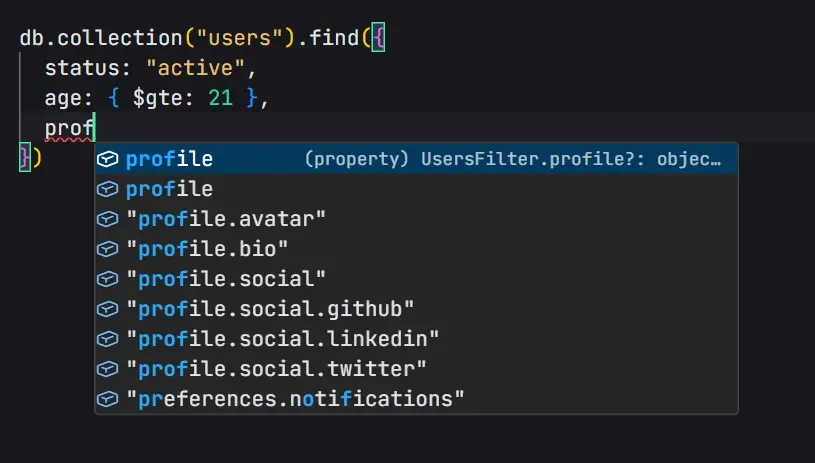
Query Editor
A full Monaco editor with schema-aware autocomplete over the MongoDB Node driver.
- Context-aware completions: field paths, operators, pipeline stages, accumulators, expressions
- Progressive nested field disclosure. Type "address." to see child fields only
- Pipeline-accumulated fields. $addFields and $group output feeds later stages
- $lookup pulls in the foreign collection's schema, nested paths included
- Enum value suggestions from schema analysis
- JavaScript sandbox with BSON constructors, fetch, crypto, Faker, Luxon, Day.js, Lodash, and Zod
- Console and print output lands next to the result
- Queries and Markdown notes autosave. Format on demand with Ctrl/Cmd+S
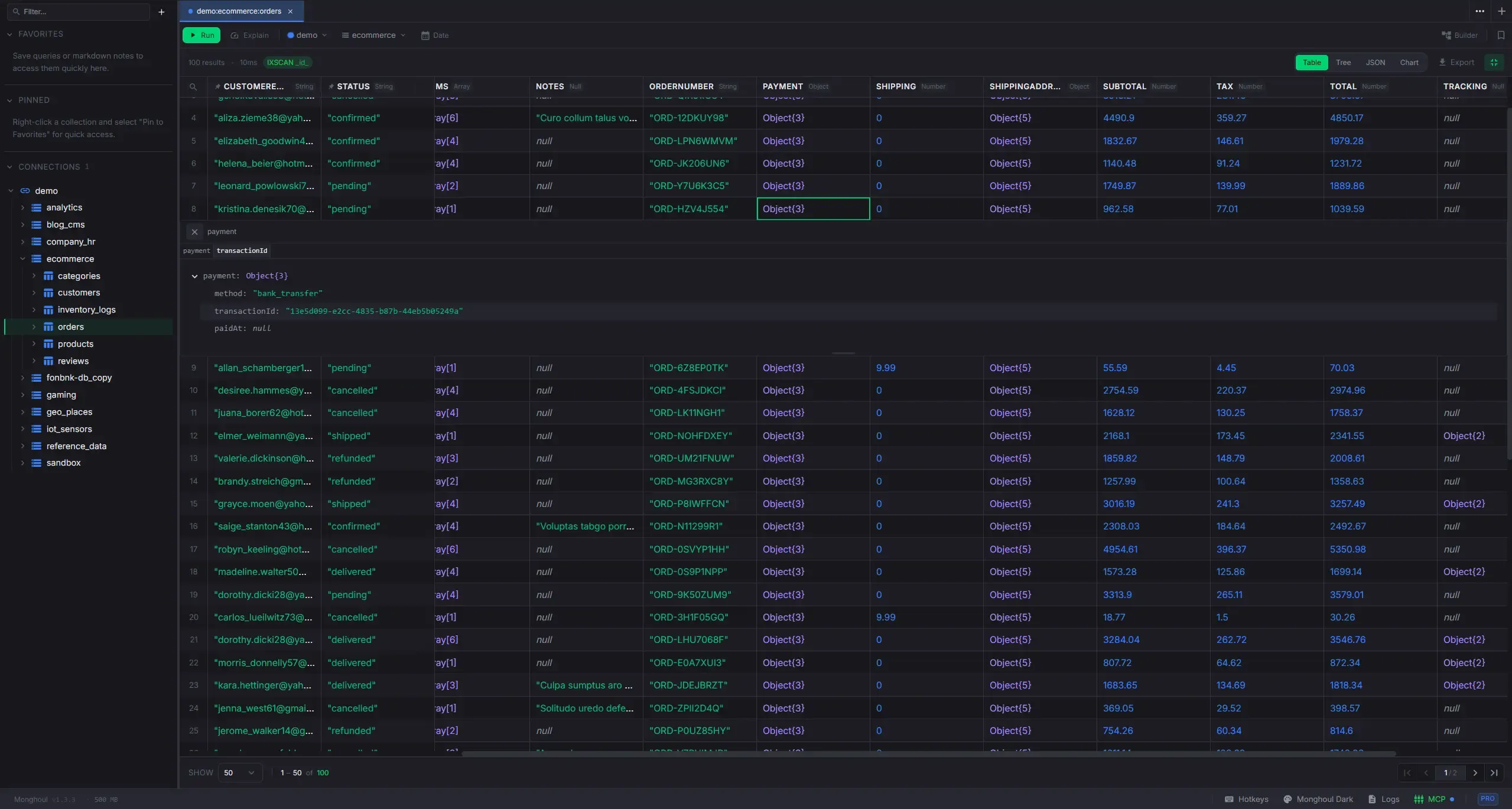
Result Viewer
Six view modes for query results, with inline editing and export.
- Table: virtualized spreadsheet with column pinning, sorting, resize, auto-fit, reorder, and multi-select
- Tree: hierarchical document viewer with type badges, resizable columns, and sticky document headers
- JSON: the whole result as formatted, syntax-highlighted text
- Result: a write outcome or single value as a card of copyable metrics
- Explain: performance grade, execution plan tree, and index suggestions
- Chart (Pro): 8 chart types with dual axis, date aggregation, trend lines, and PNG export
- Cross-page search with cell-level match highlighting
- Preview drawer (Ctrl/Cmd+I) follows row focus and shows the document as formatted JSON
- Export the loaded results or every matching document, as Extended JSON, CSV, or Excel (Pro)
Pro
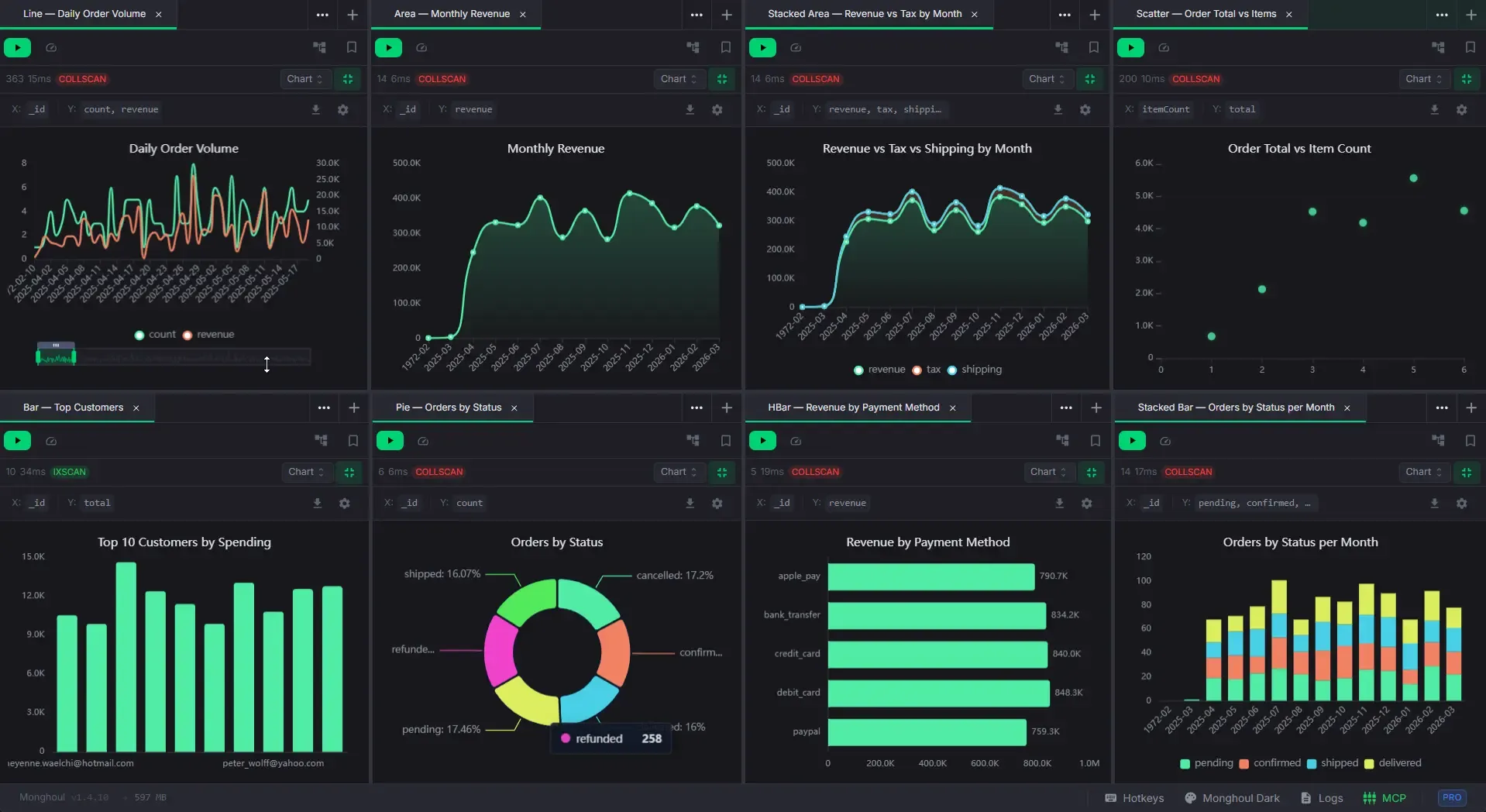
Charts
Plot a result set without leaving the tab.
- Bar, horizontal bar, line, area, pie, and scatter, with stacking for bar and area
- Eight guided presets, from time series to correlation to top values
- Advanced config: field mapping, several measures, grouping, sorting, legends, colors, dual axes
- Aggregate with sum, count, average, minimum, or maximum
- Group dates by hour, day, week, month, quarter, or year
- Linear trend line on scatter charts
- Export as high-resolution PNG with a background that matches the theme
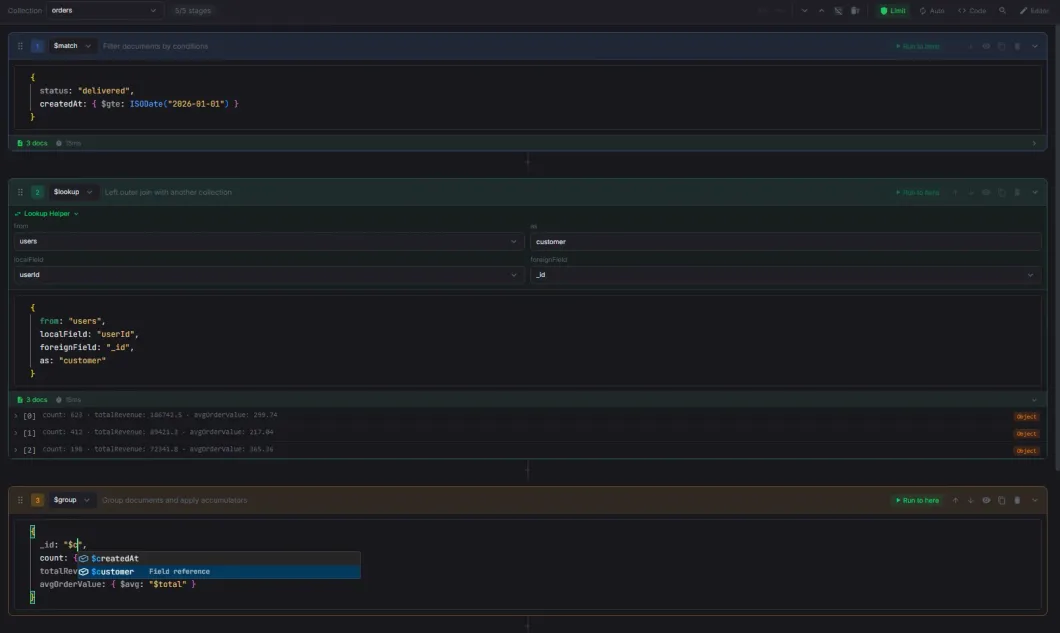
Aggregation Builder
Visual pipeline builder with drag-and-drop, live stage previews, and code sync.
- The whole stage catalog in a searchable picker, with stages your server version cannot run marked
- Drag-and-drop reordering, and a "+" between every pair of stages
- Per-stage enable/disable, collapse, duplicate, clear, and "Run to here"
- Index-aware autocomplete the main editor does not have: indexed fields rank first in $match and $sort
- A collapsed stage prints its body on one line, so a folded pipeline still reads
- Live previews with an optional 20-document safety limit, cancellable from the footer
- Errors name the root cause instead of the server's wrapper chain
- $lookup form helper, synced both ways with the stage body
- $out and $merge are marked destructive and honor write protection
- Undo/redo up to 50 entries, and code that stays in step with the visual pipeline
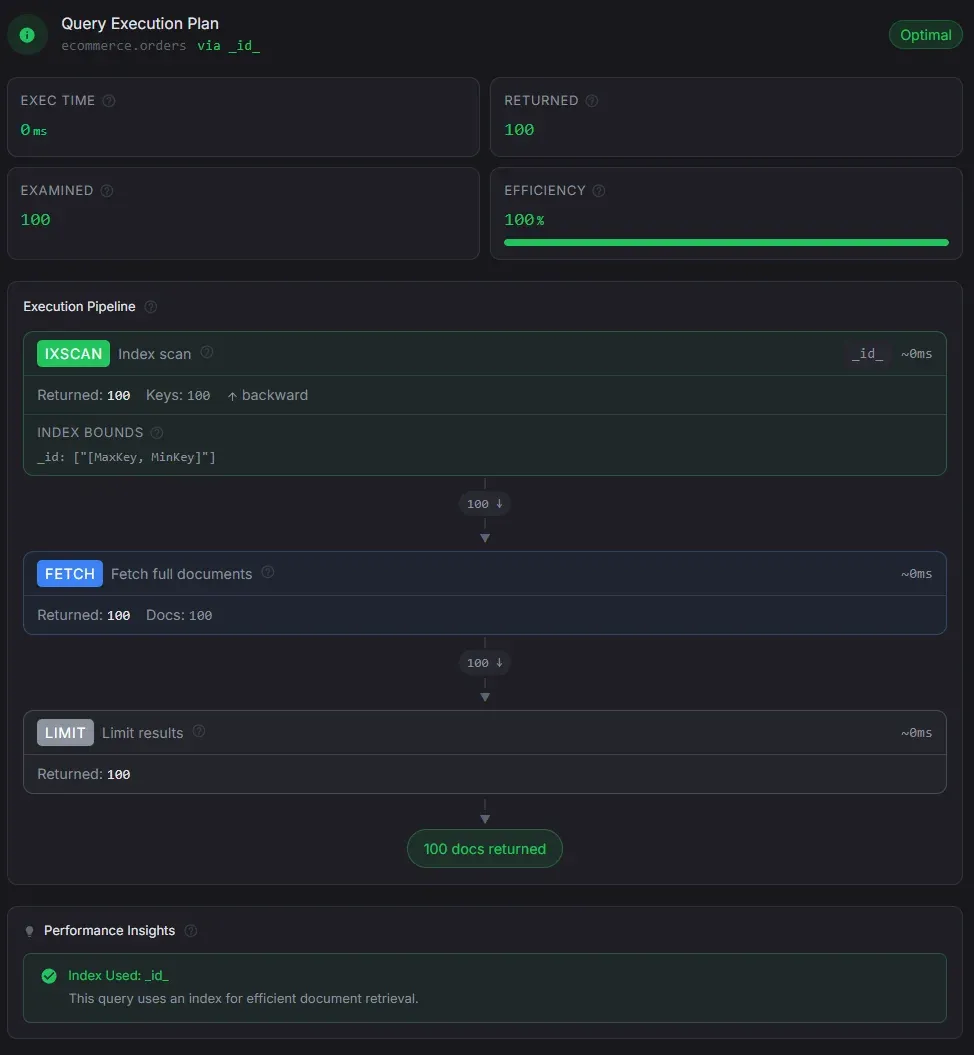
Explain View
Understand query performance at a glance, for both find and aggregation queries.
- Performance grade with execution time, docs returned and examined, keys examined, scan type, and index name
- Per-stage row counts and elapsed time across the whole pipeline, sub-pipelines included
- Data flow funnel showing document counts shrinking through each stage
- Index suggestions ordered by the ESR rule, extending your current index instead of replacing it
- It skips the noise: synthesized fields, identity indexes, and indexes already in place
- Warnings for collection scans, in-memory sorts, disk spills, and misplaced limits
- Flags an Atlas $search or $vectorSearch stage that is not first in the pipeline
- Auto-explain after every read query. On by default, switchable off per connection
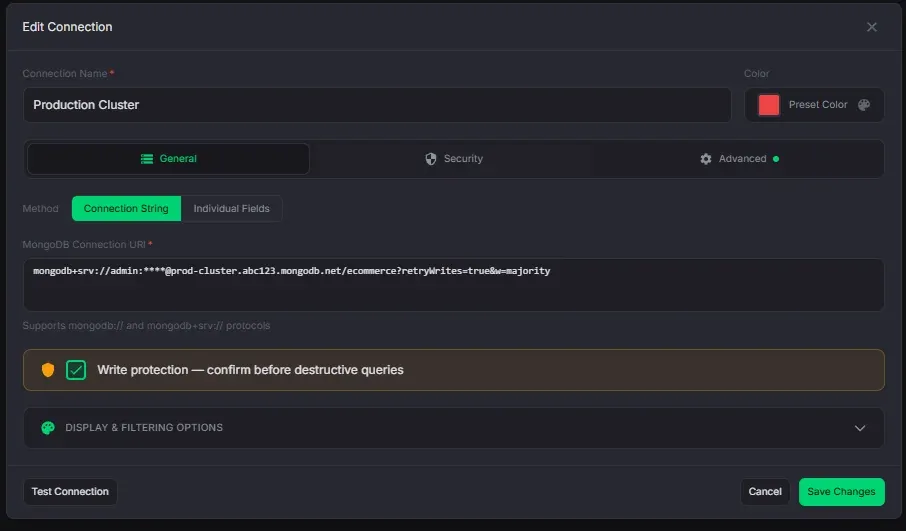
Connection Management
Connect to any MongoDB instance with full protocol support.
- 8 auth methods: no auth, username/password, SCRAM-SHA-1/256, and X.509, LDAP, Kerberos, AWS IAM on Pro
- Turn off "save password" and it never touches disk. Monghoul asks once per app session
- SSH tunneling with password or private key authentication
- SSL/TLS with a custom CA certificate and an option to allow invalid certificates
- Write protection over writes, drops, renames, index changes, and $out/$merge, scoped per database or collection
- Database and collection filters to tidy the tree. They are not a permission boundary
- Connectivity and credentials are tested before a connection saves
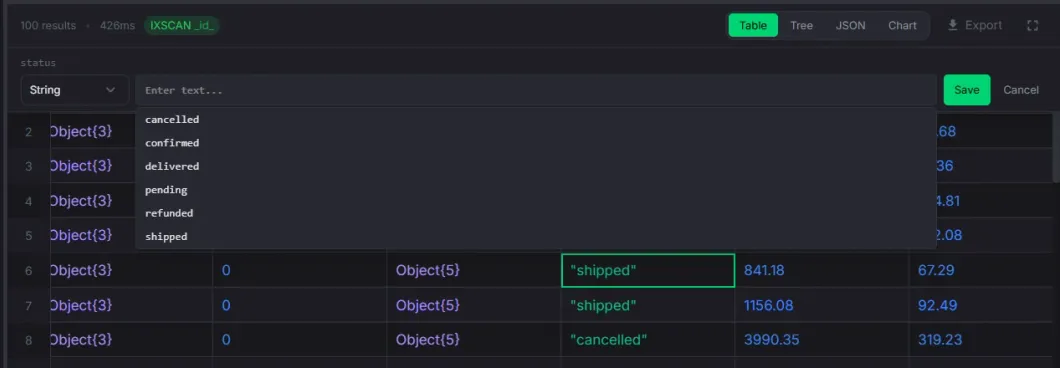
Inline Editing
Edit document values directly in the table or tree view without opening a separate editor.
- Double-click any cell to edit: strings, numbers, booleans, dates, ObjectIds, null
- Type selector dropdown to change the field type where the conversion is valid
- Date picker with calendar, time spinners, quick presets, and time zones
- Enum combobox suggests known values from schema analysis while allowing custom input
- Write protection confirmation on protected connections before saving
- A value the chosen type cannot hold is refused with the limit named. Nothing is written
- Optimistic updates. The edited value appears immediately and rolls back on failure
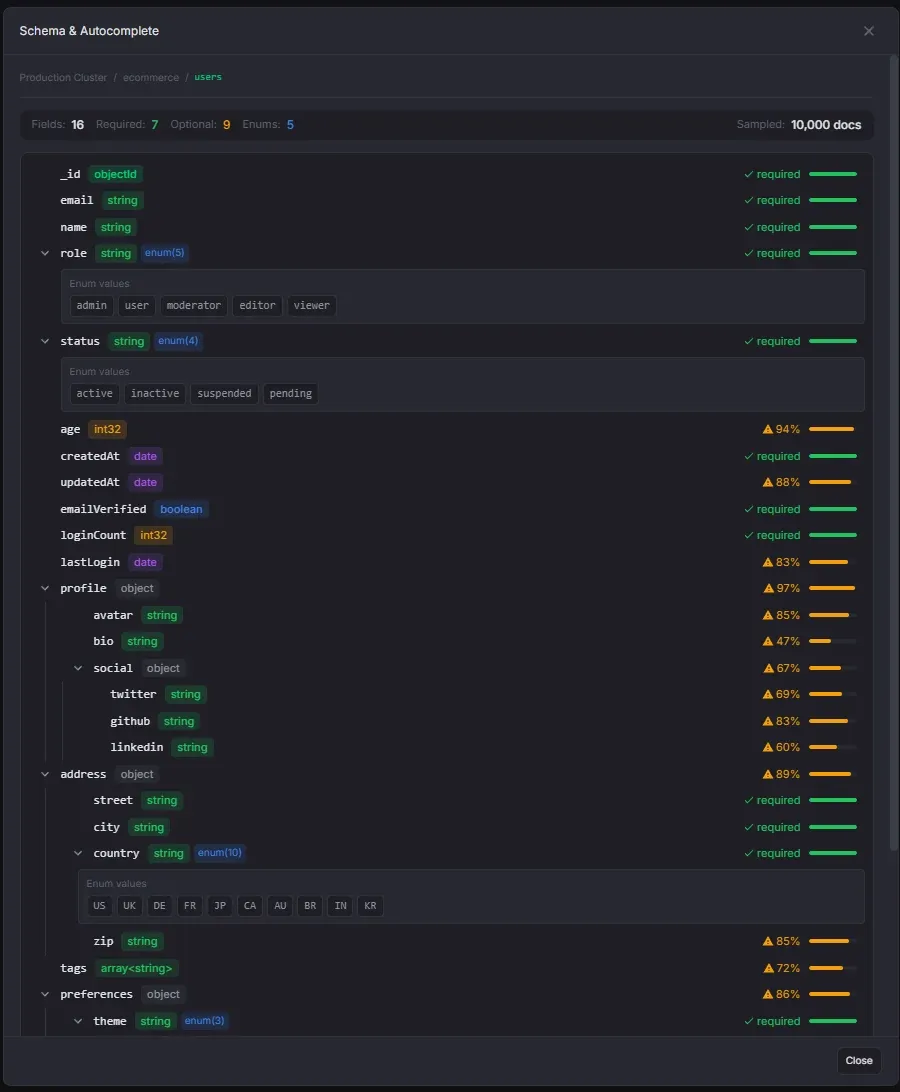
Schema Analysis
Sample-based schema analysis with enum detection and editor integration.
- Configurable sample size with presets. Free analyzes up to 500 documents per run
- Hierarchical field tree with type badges, array element types, and occurrence bars
- Automatic enum detection with configurable thresholds, plus field paths you can force
- Manual enum editing, and enum values feed autocomplete in the query editor
- Automatic analysis is global, and each connection can override it on or off
- Collections a query reaches through $lookup or $unionWith get analyzed too
- Schema banner generates a missing schema in one click, right from the editor
- Field search, cancellable runs, and results cached across sessions
Pro
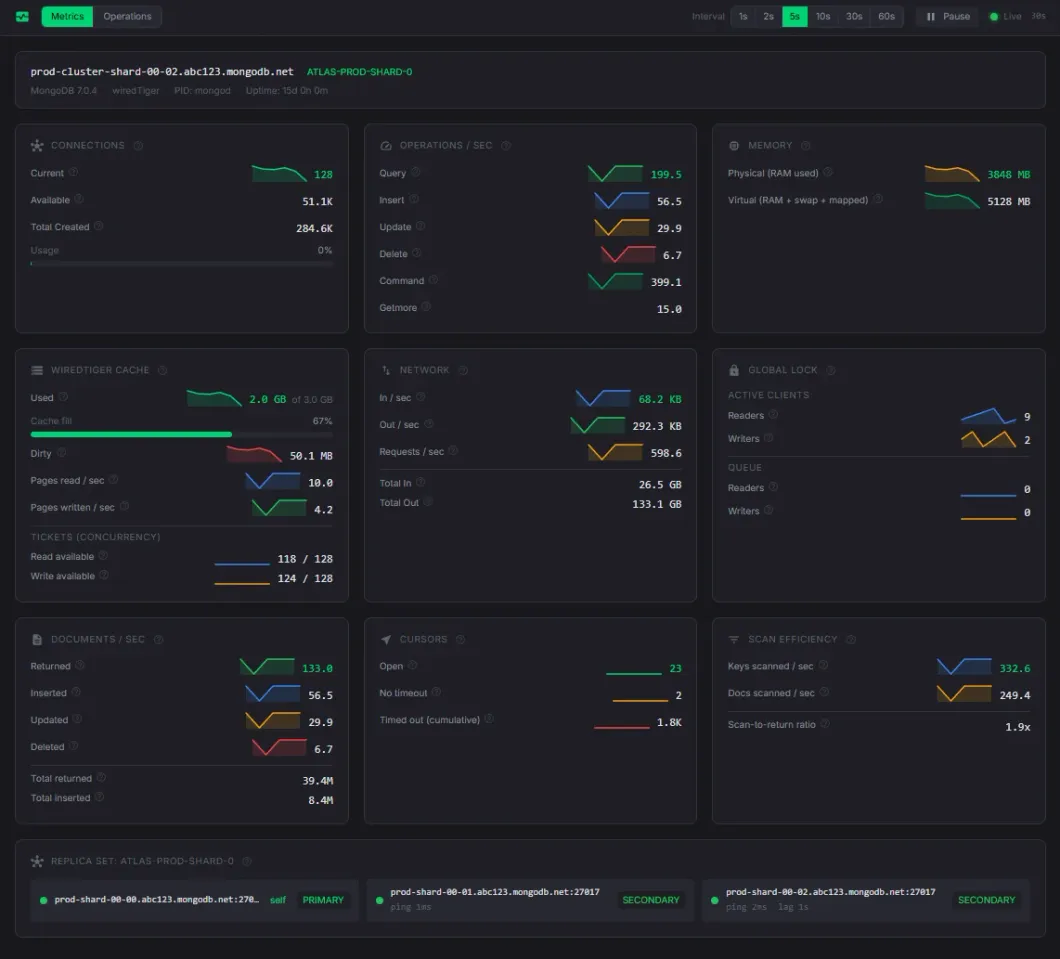
Cluster Monitoring
Live server metrics, trend charts, current operations, and the database profiler.
- Connections, op and document rates, memory and cache, network, locks, cursors, and scan efficiency
- Replica-set member health, latency, and lag
- Health strip rating cache, connections, replica lag, lock queue, and active ops as healthy, warning, or critical
- Sparkline trend charts with time-aware hover values
- Live operations with duration and namespace filters, scan warnings, and confirmed kill
- History keeps 200 operations of one second or longer for the tab session
- Profiler set to off, slow-only, or all, with collection summaries and JSON/CSV export
- Refresh every 1, 2, 5, 10, 30, or 60 seconds, with pause and resume
Pro
Users & Roles
Manage MongoDB users and custom roles, on self-hosted deployments and on Atlas.
- List, filter, create, edit, and delete users. Generate, reveal, and copy a secure password
- Custom roles with resource-scoped privileges, grouped actions, and inherited roles
- Role detail pane: flattened privileges marked granted or inherited, and who holds them
- The create forms show the equivalent mongosh command, with passwordPrompt() in place of the password
- Atlas connects with a project API key or a service account. The secret is stored encrypted on the device
- On Atlas the forms adapt: cluster scopes, temporary-user expiry, and only the actions Atlas can grant
- Deleting the last user administrator warns first. Mutations are logged, passwords never are
Pro
MCP Server (AI Tools)
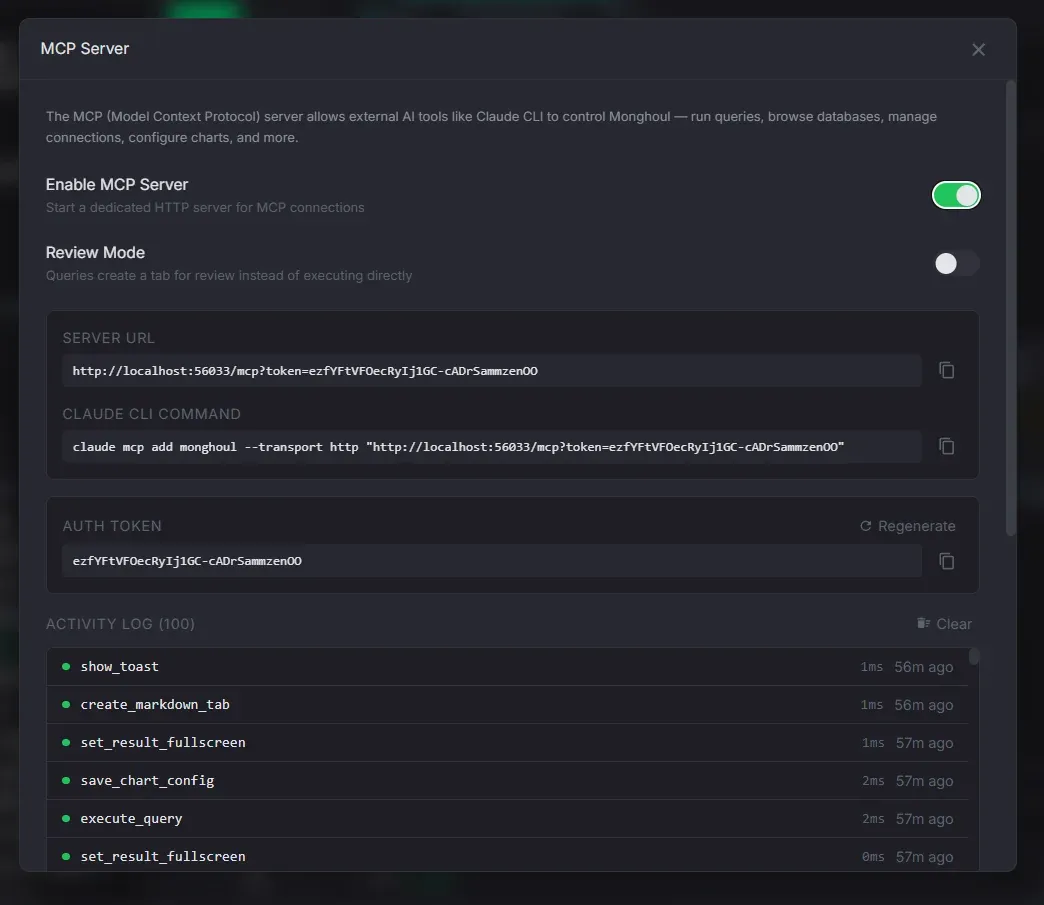
70+ Model Context Protocol tools so an AI assistant can drive the app.
- Ten essential tools are always on, from list_connections and execute_query to create_query_tab
- The client switches the rest on itself with discover_tools, enable_tools, and disable_tools
- Capability groups for queries, schema, indexes, import/export, tabs, panels, windows, charts, and logs
- Configurable port and a regenerable auth token, with snippets for the common AI clients
- Review mode holds an AI-initiated query until you approve it
- Access can be limited to chosen connections and databases. Anything else is hidden and refused
- Access log keeps the 100 most recent calls. Tool parameters are not recorded
Import & Export
Move data in and out of MongoDB in any format.
- Import JSON, Extended JSON, gzipped JSON, CSV, and TSV. NDJSON and Excel on Pro
- Picking a file sets the format, suggests the collection name, and fixes the delimiter
- Write strategies: insert, upsert by identity, or drop then insert
- Type inference for numbers, booleans, null, and JSON cells. Dates only from a leading YYYY-MM-DD
- Export Extended JSON (canonical or relaxed, array or NDJSON, gzip), CSV, or Excel (Pro)
- CSV and Excel columns come from a sample of the export, not just its first document
- Copy a collection to another database or connection, with optional index replication (Pro)
- Import or export a whole database, one file per collection (Pro)
- Progress and cancellation from the footer on every long transfer
Index Management
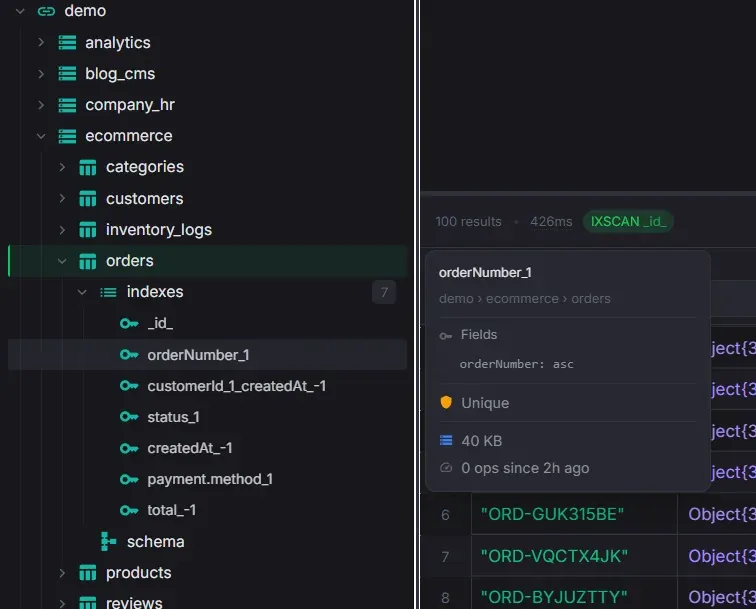
Create, inspect, and manage indexes with usage statistics and index suggestions.
- Create compound indexes with ordered fields and an ascending/descending toggle
- Options for name, unique, sparse, and a partial filter expression
- The exact createIndex() command is previewed before creation
- Explain recommendations prefill the Create Index form in one click
- Visual indicators for unique, sparse, partial, and TTL indexes
- Per-index size and usage count from $indexStats, color-coded by activity
- Drop or rebuild individual indexes, and refresh statistics from the server
Workspace & Tabs
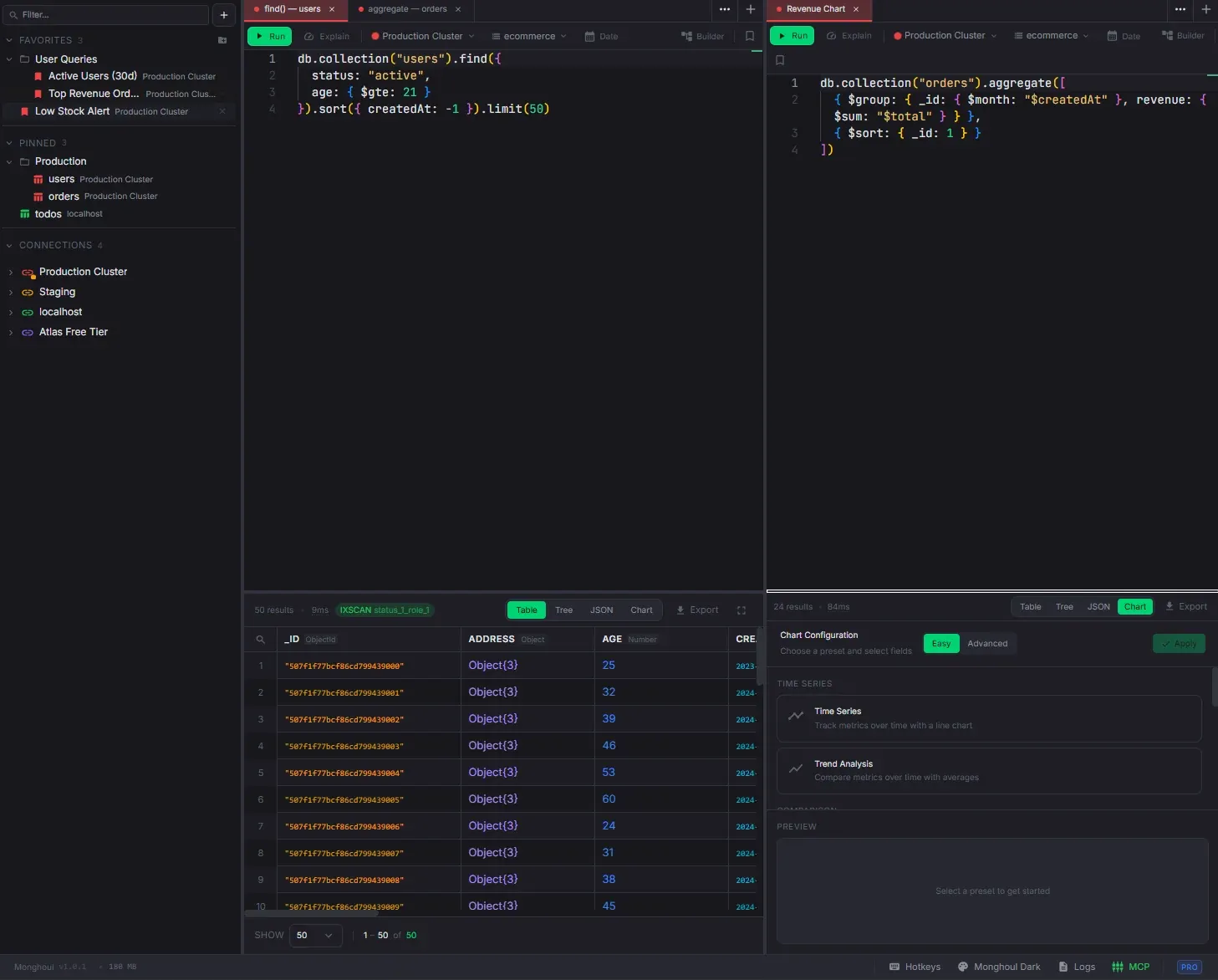
Multi-panel layout, detached windows, and a command palette.
- Query, Markdown, and JSON Viewer tabs, plus Cluster Monitor and User Management on Pro
- Markdown tabs with a split view, formatting toolbar, GitHub-flavored Markdown, and autosave
- Drag-and-drop tab reordering within and across panels, with full state carried along
- Split panels horizontally or vertically with nested splits and named panels
- The 100 most recently closed tabs can be restored, newest first, with their full state
- Leaving a tab does not cancel its query. Background work stays cancellable from the footer
- Detach any tab into its own window and reattach it later (Pro)
- Command palette (Ctrl/Cmd+K) with fuzzy search across everything
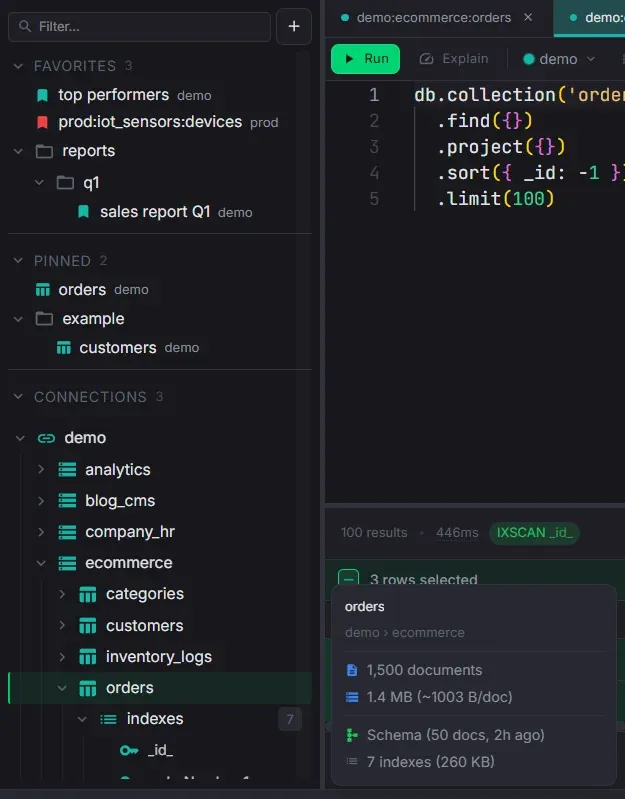
Sidebar Organization
Folders, pinned collections, favorites, and drag-to-reorder across all sections.
- Create folders and nested subfolders in Connections, Pinned, and Favorites
- Drag items into folders or back to root with VSCode-style three-zone drop detection
- Collapse/expand folders with item count badges. State persists across sessions
- Pinned collections open a pre-formatted find query on double-click
- Customizable snippets. Edit templates, reorder, and set the default query
- Favorites saved with Ctrl/Cmd+Shift+S, keeping view type, chart config, and page size
- Markdown notes can be saved as favorites too
- Hover preview cards for connections, databases, collections, indexes, and schemas
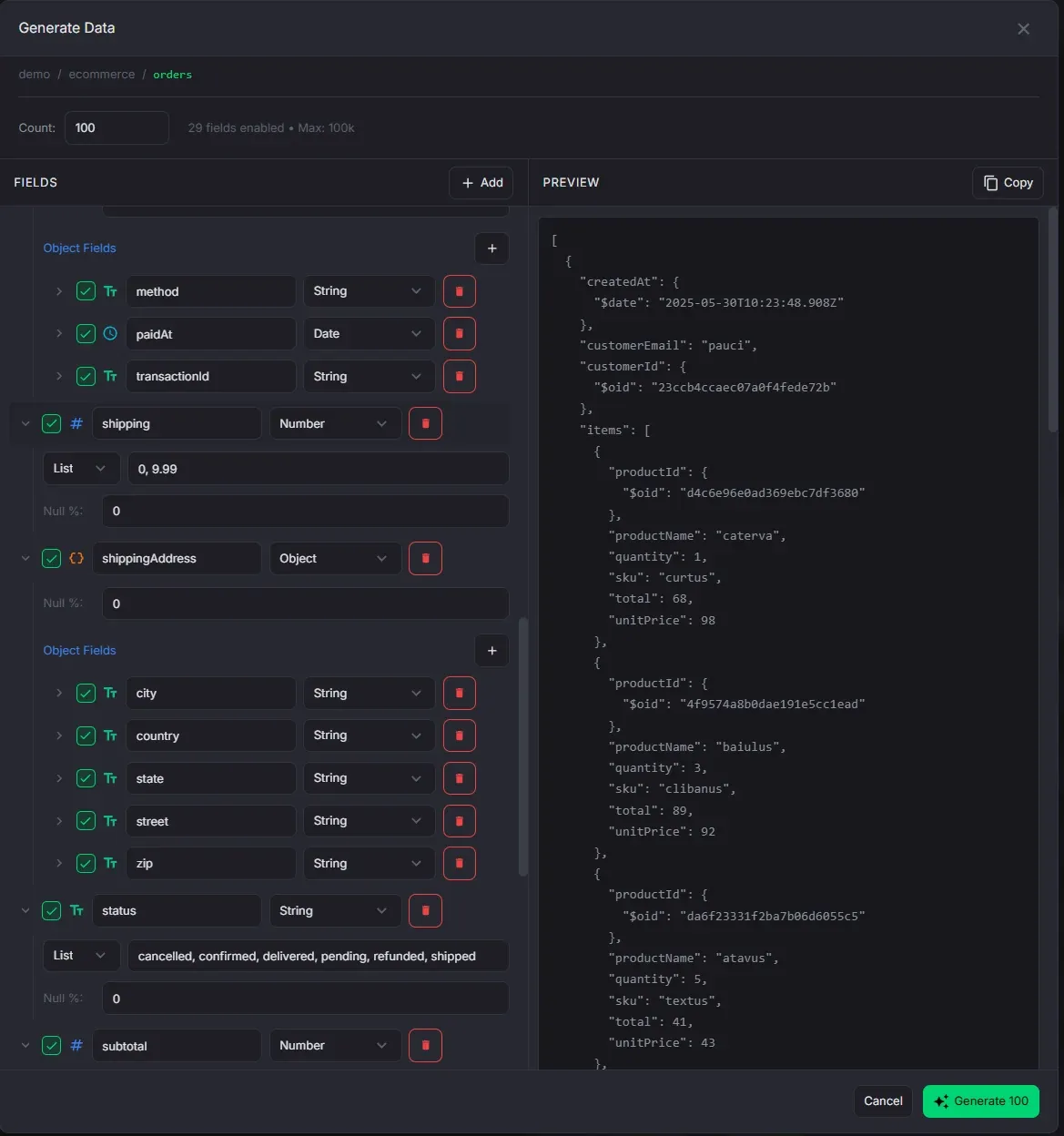
Data Generation
Generate synthetic documents with Faker for testing and development.
- 100+ Faker providers across 16 categories: names, emails, addresses, commerce, finance, and more
- Value modes: Faker, literal, list, or numeric range, with per-field null probability
- Nested objects and configurable arrays
- Seed the tree from a real collection and it keeps each field's type, Decimal128 included
- A field under a unique index gets no repeats, and GeoJSON coordinates come out valid
- Preview a sample document before generating
- Up to 100,000 documents per run on Pro, 500 on Free
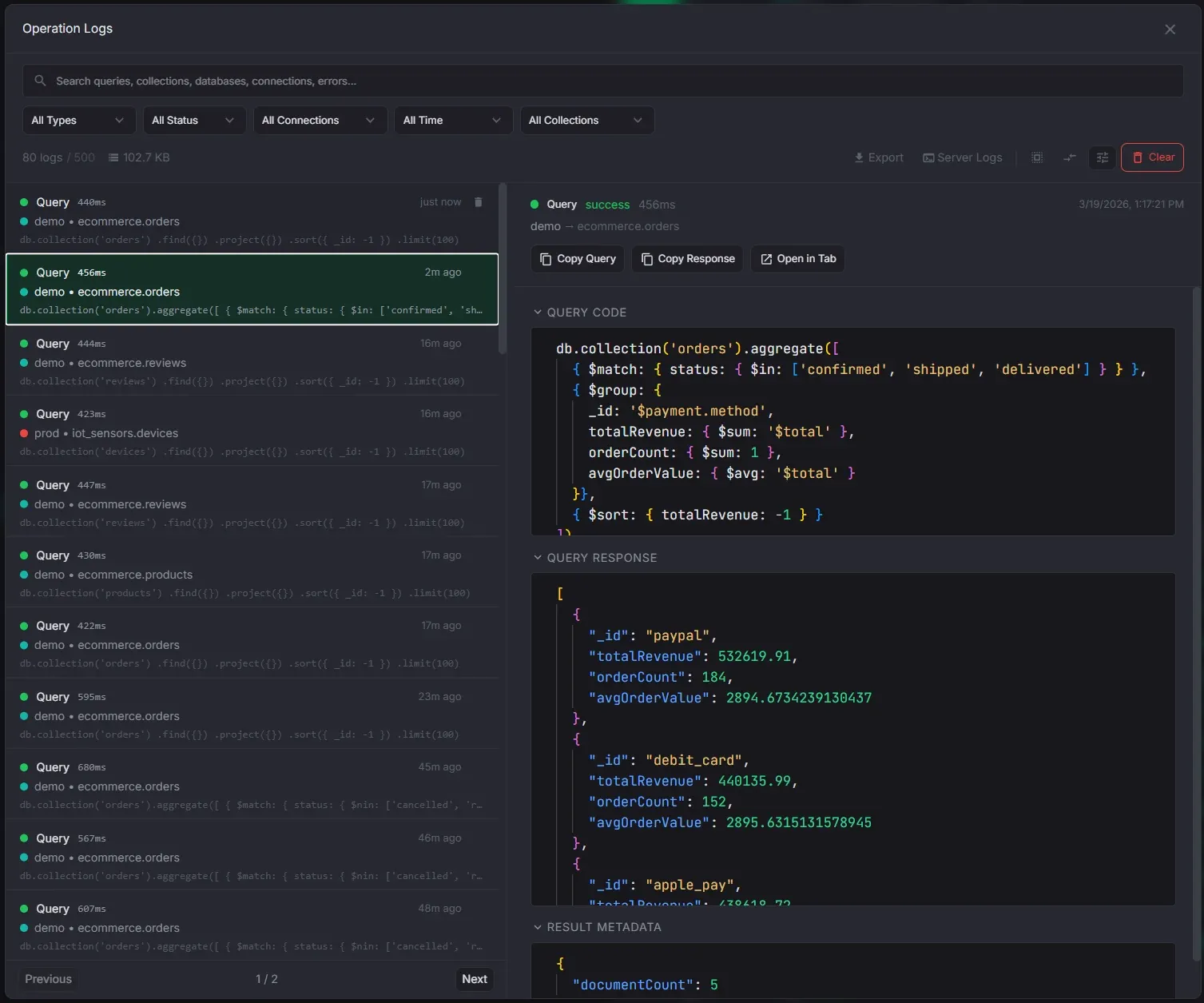
Operation Logs
Full audit trail of every operation, doubling as a past queries search tool.
- Search query text, connection, database, collection, and error messages
- Filters for operation type, status, connection, collection, and time range
- Compare two query logs side by side, or reopen one as a query tab
- Retention of 100 to unlimited entries, 250 on Free
- Response storage of none, stripped (the default), or full, capped between 5 KB and 1 MB
- Full storage keeps the response unredacted on this device, and says so before you pick it
- Export the filtered set, or export server logs for a support report
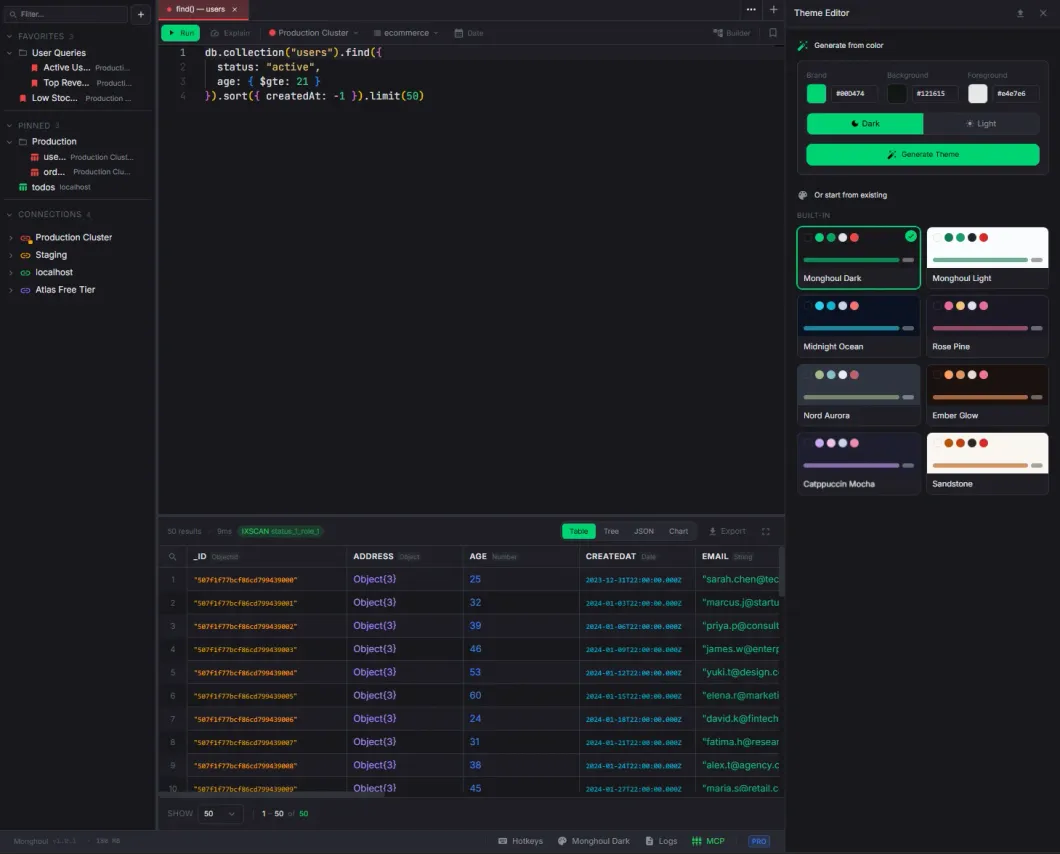
Themes
11 built-in themes and a theme editor that derives a full palette from three colors.
- Monghoul Dark (default), Monghoul Light, Midnight Ocean, Rosé Pine, Nord Aurora, Ember Glow
- Catppuccin Mocha, Sandstone, Arctic Light, Ink, and Paper
- Every built-in theme meets WCAG AA contrast: 4.5:1 for text, 3:1 for chart series and other indicators
- Chart series stay distinguishable from each other within a theme
- Build a custom light or dark theme from three colors, previewed live (Pro)
- Custom themes reach editor syntax, MongoDB value types, result views, and index badges (Pro)
- Import and export themes as JSON (Pro)
Pro
Document Diff
Compare any two documents side by side with line-level change highlighting.
- Pick any two from a selection of two or more documents
- JSON formatting with syntax highlighting on both sides
- Swap button to flip left and right
- Configurable label field for the document dropdowns
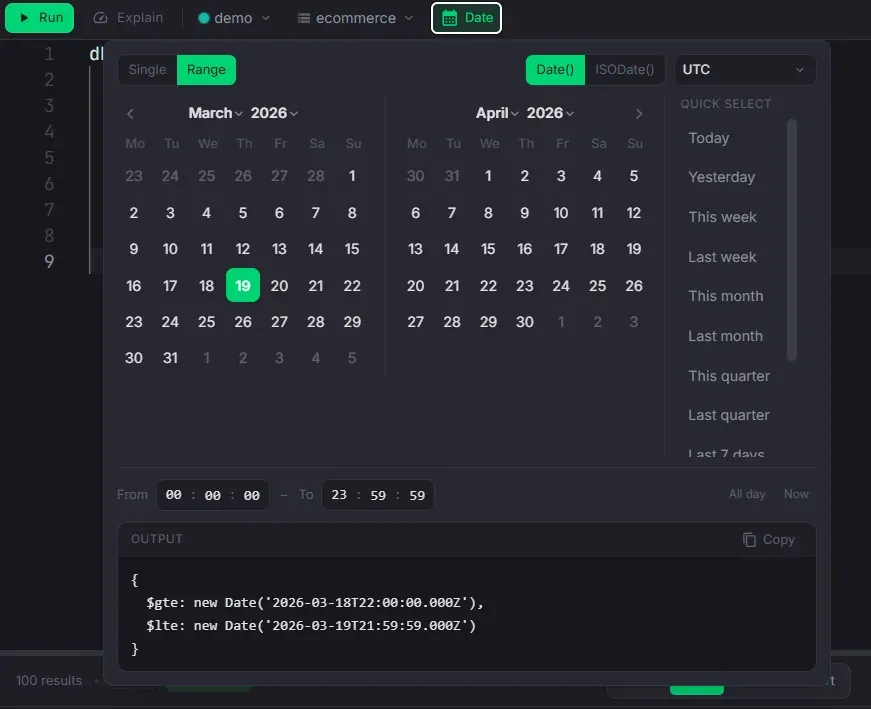
Date Helper
Build date expressions visually instead of typing ISODate strings by hand.
- Single date or range mode, with independently selectable endpoints
- Presets evaluated in the selected time zone: today, this week, last month, last 7 days, and more
- Named time zones and UTC offsets
- Shortcuts for the current moment, midnight, a whole day, and now as a range end
- Copies the expression to the clipboard as either new Date or ISODate
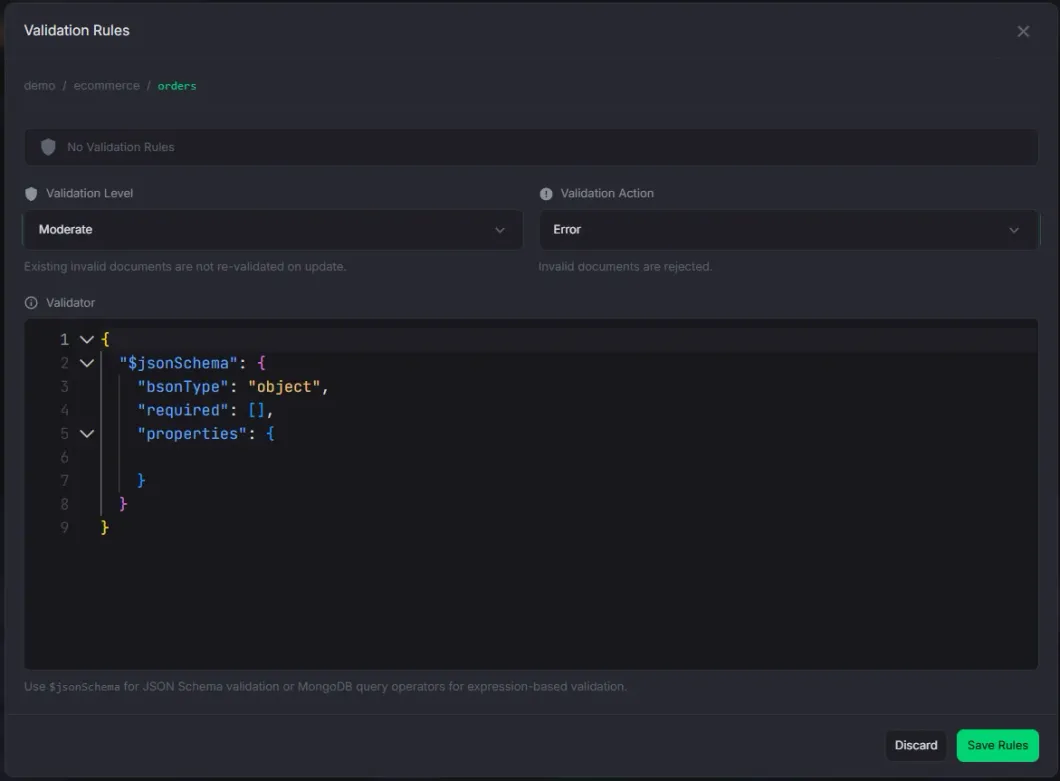
Validation Rules
View, create, and edit MongoDB collection validators.
- Monaco JSON editor for the validator expression
- $jsonSchema scaffold insertion with one click
- Validation level (off, moderate, strict) and action (error, warn) controls
- Clearing the validator and saving removes the rules, with a confirmation
- Validation node in the sidebar tree with level and action badges
Complete Feature Reference
Every capability in Monghoul, grouped by area. Anything marked Pro needs a Pro license or the 14-day trial.
Connections & Security
- 8 authentication methods: no auth, username/password, SCRAM-SHA-1, SCRAM-SHA-256, and on Pro X.509, LDAP, Kerberos, and AWS IAM
- Configurable authentication source for any of them
- Connect from a URI or from individual fields. Pasting a URI fills in host, port, credentials, auth, TLS, replica set, and read preference
- Both mongodb:// and mongodb+srv:// are supported
- Save password can be turned off for username/password and SCRAM. The password is then written nowhere on disk, and Monghoul asks for it once per app session
- SSL/TLS with a custom CA certificate and an option to allow invalid certificates for self-signed setups
- SSH tunneling with password or private key file, and a tunnel that closes with its connection
- Direct or replica-set topology with read preference: primary, primaryPreferred, secondary, secondaryPreferred, nearest
- Per-connection result cap, default 1,000 documents. An explicit .limit() wins over the cap even when it is larger
- Auto-explain per connection. Read queries collect plan statistics automatically
- Automatic query execution the first time a tab is opened in a session, per connection
- Cancellable queries. Stopping one, by hand or by timeout, also ends the operation on the server
- Configurable connection timeout, default 30 seconds
- Database and collection filtering in ignore (hide listed) or allow (show only listed) mode. System databases are filtered by default
- Those filters are organizational, not a security boundary. They do not change MongoDB permissions or stop raw query code from naming a hidden collection
- Write protection scoped to a connection, or to selected databases and collections. It covers inserts, updates, deletes, bulk writes, drops, renames, index changes, and aggregation output stages
- Protected operations require explicit confirmation, at every entry point including the keyboard
- Protected connections, databases, and collections are marked in navigation and previews
- Connectivity and credentials are tested before a new connection saves, and any connection can be re-tested on demand
- Unique connection names, generated from host, port, and database when you do not supply one
- Connection color coding with 12 presets and a custom picker. The color propagates to tabs and sidebar entries
- Deleting a connection closes its tabs and removes its pins and favorites. Its log history is kept
Sidebar & Navigation
- Hierarchical tree: Connections > Databases > Collections > Indexes, Schema, Validation, with lazy-loading expansion
- Collections sorted alphabetically within each database
- Instant search over the whole hierarchy. Matches auto-expand, the field reports how many matched, and clearing it restores the previous expansion state
- One click focuses a collection, a double-click opens it in a query tab
- Refresh pulls a collection with its statistics and indexes. With nothing focused, the active query tab is the target
- Hover preview cards on connections: host with credentials masked, database and collection counts, data size, topology, auth method, transport security, and write-protection scope
- Hover preview cards on collections: document count, data size with average per doc, schema status, index count and size, and validator info
- Hover preview cards on databases, indexes, and schema nodes with their own relevant detail
- Previews follow the keyboard cursor as well as the pointer
- Right-click context menus at every level, from create database and refresh down to rename, clear, and drop
- Pro context actions: Cluster Monitor, user management, database import, and database export
- Customizable snippets submenu. Add, remove, drag-to-reorder, and edit query templates, then star one as the default double-click query
- Pinned collections in a dedicated section, keeping the same context menu and hover preview as regular collections
- Favorite queries saved with Ctrl+Shift+S / Cmd+Shift+S. Preserves code, view type, chart config, table state, page size, and read preference
- Markdown notes can be saved as favorites too, and reopen as markdown tabs
- Folders for all three sections, nested to any depth, with rename in place and item count badges
- Deleting a folder returns its contents to the section root rather than deleting them
- Drag-to-reorder connections, favorites, and folders with three-zone drop detection
- Drag a collection or database onto another destination to open a copy modal with it preselected (Pro)
- Sticky headers keep connection and database rows visible while scrolling their descendants
- The active tab's collection is marked in the tree, and a disconnected connection is dimmed
- Pin and favorite changes appear in every open Monghoul window
- Resizable sidebar (5-80%) with width, order, and expansion state persisted. Toggle with Ctrl+B / Cmd+B
- Reaching a Free capacity limit explains the Pro upgrade instead of failing quietly
Command Palette
- Open with Ctrl+K / Cmd+K from anywhere in the app
- Fuzzy search over open tabs, recently closed tabs, connections, databases, collections, and favorites
- Pinned collections rank above unpinned ones
- Tab and favorite search covers query code as well as titles, and shows the matching excerpt
- Filter results by category, with a live count per category
- With no search term it shows recent and relevant items
- Choosing an item switches to it, opens it, restores it, or reveals it in the sidebar
- Full keyboard navigation, with the selected action named before it runs
Query Editor & Environment
- Full Monaco (VS Code) editor with JavaScript syntax highlighting, configurable font size, and theme-aware styling
- Inline syntax and type errors, checked against the query environment's own declarations
- The environment is the MongoDB Node driver, not the mongo shell. A projection passed as find's second argument is refused rather than quietly ignored
- db.orders is shorthand for db.collection('orders'), and it yields to real driver methods, so stats, admin, and command need the explicit form
- A single expression returns its value automatically. A multi-statement script runs in order and returns an explicit result
- A query is not reported finished until the database operations it started have finished
- Sandbox globals: db, ObjectId, the id() shorthand, ISODate, NumberLong/Int/Decimal, Extended JSON helpers, print, sleep, URL, encoding, crypto, and fetch
- Bundled libraries: Faker, Luxon, Day.js, Lodash, Lodash FP, and Zod
- BSON numeric constructors keep their type and precision. A value the type cannot hold is rejected, not truncated
- Console and print output appears with the result, warnings emphasized, capped at 500 entries per run
- Code formatting with Prettier via Ctrl/Cmd+S, a floating button, or Shift+Alt+F inside the editor
- Method chains break onto separate lines without changing behavior, and generated code is formatted on tab creation
- Run with Ctrl+Enter / Cmd+Enter / Cmd+R, plus Explain and Stop buttons and an elapsed timer
- Cancellation stays available while the connection is still being established
- Result timing separates query, connection, server, and total duration
- Changing a tab's connection keeps the selected database only when the new connection has one by that name
- Save to, sync with, or remove from favorites straight from the toolbar. Queries and notes autosave
Schema-Aware Autocomplete
- Field path suggestions with type annotations (String, Number, ObjectId, Date) derived from schema analysis
- Progressive nested field disclosure shows only the current nesting level
- Pipeline-accumulated fields. $addFields, $group, $project, and $lookup output feeds autocomplete in later stages
- Reshaping stages replace the field list, removal stages filter out dropped fields, and disabled stages are skipped
- $lookup resolves the foreign collection's schema for nested paths like customer.address.city
- All MongoDB query operators, update operators, and 40+ collection and cursor methods with inline documentation
- All aggregation stages, accumulators, and 50+ expression operators
- Stage-aware string completions. $lookup.from suggests collections, $unwind suggests array fields, $group._id suggests field references
- $facet branches expose sub-pipeline output, and $unionWith merges the other collection's schema
- Enum value suggestions inside $in, $nin, $eq, $ne, and direct field comparisons
- Type-aware operators: $regex for strings, $gt/$lt for numbers and dates, $size/$elemMatch for arrays
- $expr context switching. Inside $expr in $match, autocomplete moves to aggregation expressions
- System variables ($$ROOT, $$NOW, $$REMOVE) and variables from $let, $map, $filter, and $reduce, in scope only
- BSON constructors with snippet placeholders: ObjectId(), NumberLong(), NumberDecimal(), UUID(), BinData(), Timestamp()
- $jsonSchema keyword suggestions inside validator expressions
- Suggestions are advisory. They never block execution, and stale schema data degrades them without breaking MongoDB language completions
- Index-aware ranking is an aggregation builder feature. The main editor does not have it
Aggregation Builder
- Visual builder with the whole stage catalog ($match, $group, $lookup, $facet, $graphLookup, $setWindowFields, $densify, $search, $vectorSearch, and more) in a searchable, categorized picker
- Server version gating. Stages your server cannot run are marked and unavailable; the raw editor stays ungated
- Color-coded stage badges by category: Filter & Sort, Transform, Group & Aggregate, Join & Combine, Output, Other
- New stages start with useful templates, updated when you change the operator
- Quick-start templates for empty pipelines: Filter & Sort, Group & Count, Join Collections, Reshape Fields
- Insert a stage anywhere from the "+" on the connector between every pair
- Reorder by drag-and-drop or with Move Up / Move Down
- Per-stage enable/disable, collapse, duplicate, clear, delete, and Run To Here
- Expand, collapse, enable, disable, or clear every stage in the pipeline in one action
- A collapsed stage prints its own body on one line, so a folded pipeline can be read without expanding it
- Syntax errors are caught before execution and shown on the stage itself, expanded or collapsed
- Schema-, type-, index-, variable-, and pipeline-aware autocomplete per stage editor
- Index awareness the main query editor does not have: indexed fields and valid compound-index continuations rank first in $match and $sort
- $lookup form helper with From, Local/Foreign field, and As dropdowns, synced both ways with the stage body
- Explain plan button that runs on the current pipeline without modifying the code
- Stage previews inline, on collapsed cards as well as expanded ones, with an optional 20-document safety limit
- Auto-preview mode re-runs after each edit, and previews are cancellable from the current-operations panel
- An edit discards previews from that stage downward, so a card never shows an older pipeline's result as current
- A failed preview names its root cause rather than the server's wrapper chain, with the original message copyable
- $out and $merge are visibly marked destructive and honor connection write protection
- Stage search appears once a pipeline has four or more stages. Filter by operator name, description, or body
- Undo/redo over structural changes, up to 50 history entries
- Visual and code modes round-trip. The generated code sits in a togglable side panel and is copyable in place
- Pipeline structure, enabled and collapsed state, collection, and editor mode persist with the tab
Result Views
- Six view modes: Tree, Table, JSON (the result as formatted text), Result (a write outcome or single value as a card of copyable metrics), Explain, and Chart (Pro)
- Active mode persists per tab. Set Tree or Table as the default for new queries, or restore automatic selection
- Fullscreen: Tab (results fill the tab) or Window (results fill the app), exit with Escape
- Collapsible result panel and a resizable editor/result split, both persisted per tab
- Preview drawer (Ctrl/Cmd+I) follows row focus in Tree and Table, showing the document as formatted JSON
- Tree view: keyboard expand and collapse, MongoDB-aware type badges, resizable columns, and sticky document headers you can switch off per tab
- Table view: column sorting, resize, auto-fit, pinning, and reorder, persisted per tab and in favorites
- Headers identify the predominant column type
- Ctrl/Cmd+F searches the loaded result set, highlighting individual matches in keys, cells, and nested values
- Crossing a page boundary moves to the next loaded match. It does not issue a server-side search or fetch past the result cap
- Hover preview for Object and Array values, with formatted JSON after 400ms
- Expand complex values inline with a nested tree, breadcrumb path, editable leaves, and a resizable panel
- Result cap with cursor pagination. Load 5K / 10K / All when capped, offering only the choices above the current cap
- Loading everything warns first that a large collection may be slow
- Auto-explain badge on every result: green IXSCAN with index name, or red COLLSCAN, with the full plan on hover
- Empty result sets still show timing and explain information
- Pagination with previous, next, and direct page entry. Page sizes 10 to 1,000, or any value from 1 to 10,000
Document Actions & Result Export
- Edit Document hotkey (Ctrl/Cmd+E) on the focused Tree or Table row. No right-click required
- Inline editing for strings, numbers, booleans, dates, ObjectIds, and null, with a type selector and enum combobox
- Write protection confirmation before an inline change, and optimistic updates that roll back on failure
- A value the chosen type cannot hold is refused with the limit named, and nothing is written
- Right-click menu: Edit Value, Filter by Value, Unset Field, Clone, Copy Value/Key/Path/Column/Document, Edit, Delete, Insert
- Tabs generated from a result open next to their source tab
- Multi-select by item, range, or whole page, with a floating bar for Copy, Delete, Show Diff, and Cancel
- Bulk delete with a confirmation listing the identifiers it will remove, or open it as an editable query instead
- Deleted rows leave the result immediately and come back if the server rejects the delete
- Document diff on any two of a 2+ row selection, with a swap button and configurable label field (Pro)
- Export in two steps, scope then format: the loaded results or every matching document, then Extended JSON, CSV, or Excel (Pro)
- The all-matching scope re-runs the query with .limit(), .skip(), and the result cap dropped, keeping limits inside nested pipelines
- It warns that the read is unbounded and asks for confirmation, and asks again when the query could mutate data
- All-matching Extended JSON writes one document per line; a loaded-results export writes one indented array
- A result that cannot be re-read as documents says why the all-matching scope is unavailable
Charts & Visualization (Pro)
- 8 chart types: Bar, Horizontal Bar, Line, Area, Pie, Scatter, Stacked Bar, and Stacked Area
- Eight guided presets: Time Series, Category Breakdown, Distribution, Multi-Series, Trend Analysis, Correlation, Stacked, and Top Values
- Advanced mode with manual X/Y fields, several Y-axis series, grouping, and the full option set
- Aggregation methods: sum, count, average, minimum, maximum
- Date aggregation grouping by hour, day, week, month, quarter, or year
- Dual Y-axis for comparing values at different scales
- Customizable title, legend, labels, sort order, data limit, series colors, stacking, and filters
- Chart theming follows the active app theme, with series guaranteed distinguishable within it
- Fullscreen (Tab and Window) consistent with every other view type
- Export as high-resolution PNG (4x pixel ratio) with a theme-appropriate background
- Chart configurations saved per tab and persisted with favorites
Tabs & Workspace
- Tab types: Query, Markdown, and JSON Viewer (read-only tree), plus Cluster Monitor and User Management on Pro
- Markdown tabs with editing, a side-by-side split, or preview, a formatting toolbar, GitHub-flavored Markdown, task lists, and sanitized embedded HTML
- Markdown tabs autosave, and save to favorites the way query tabs do
- An empty markdown tab opens in the editor; one with content opens in preview
- Drag-and-drop tab reordering within a panel and across panels
- Tab context menu: Execute/Stop Query, Clone, Reveal in Sidebar, Rename, Split Right/Down, Move to Panel, Open in New Window, Close, Close Others
- Inline rename by double-clicking the title, a connection color indicator per tab, and middle-click to close
- Restore up to the 100 most recently closed tabs, newest first, with complete state
- Moving a tab between panels preserves its editor, result, pagination, preview, and toolbar state
- Leaving a tab does not cancel a running query or a background operation
- Background work stays cancellable from the footer, and inactive tabs pause their own polling and timers
- Multi-panel layout: horizontal, vertical, and nested splits, resizable dividers, and custom panel names
- Detach any tab into a floating window and reattach it later, with size and position persisted (Pro)
- Main window bounds saved and restored on launch
Import & Export
- Import JSON (array, Extended JSON, gzip) and CSV/TSV with configurable delimiter, header handling, and per-column type mapping
- NDJSON and Excel (.xlsx/.xls) import on Pro. An Excel import reads the first sheet and takes row one as the column names
- Choosing a file sets the format from its extension, suggests the collection name, and picks the tab delimiter for a .tsv
- Write strategies: Insert, Upsert by identity, or Drop & Insert
- Drop & Insert into a write-protected target requires confirmation before the drop
- Stop on the first error or skip invalid records and continue
- Type inference for numbers, booleans, null, and cells holding a JSON object or array. An empty cell imports as null
- Dates only from an ISO-style leading YYYY-MM-DD, so order-1, sku-2, and Q1-2024 stay text
- Import an entire database from a directory, one collection per file, with the file count reported up front (Pro)
- Export Extended JSON (canonical or relaxed, array or NDJSON, optional formatting and gzip) or CSV (custom delimiter, array flattening, gzip)
- Excel export on Pro, with Extended JSON aware serialization
- CSV and Excel columns are the union of fields in a sample of the export, so a field only some documents carry still gets one
- A field that first appears after that sample gets no column, and the export reports which fields those were
- Export scope narrowed by a document limit and a MongoDB filter
- Copy a collection to another database or connection, with Insert, Upsert, or Insert Only (Pro)
- Collection copy can carry non-identity indexes and preserve their supported options (Pro)
- Export or duplicate a whole database with indexes, over every collection or ones picked from a searchable list (Pro)
- A database export writes one Extended JSON or CSV file per collection into a directory you choose (Pro)
- Long transfers report progress and cancel from the footer. A cancelled export removes its file; a cancelled import or copy keeps what it wrote
Schema Analysis
- Sample a configurable number of documents, with presets for the common sizes. Free analyzes up to 500 per run
- Real-time progress with cancellation, listed in the footer under its collection name
- Hierarchical field tree covering nested objects and arrays
- Color-coded type badges for every detected BSON type, with arrays showing element types like array<number|string>
- Per-field occurrence bar. Fields present in 100% of the sample are marked required
- Stats summary: total fields, required, optional, enum count, sample size, and analysis time
- Automatic enum detection with configurable thresholds: max distinct values (default 20) and max ratio (default 0.2)
- Optional numeric enum support, and named field paths you can force to count as enums regardless
- Manual enum editing. Add values, hover a chip to remove it, and edits persist immediately
- Enum values drive autocomplete inside $in, $nin, $eq, $ne, and direct comparisons
- Field search filters the tree by name and auto-expands the parents it needs
- Automatic analysis and sample size are global settings, and each connection can inherit or override them
- Per-connection overrides force automatic analysis on or off and set the sample to 50, 100, or 500 documents
- Collections reached through $lookup.from, $graphLookup.from, $unionWith, $merge.into, or $out are analyzed automatically
- Schema banner at the bottom of the editor generates a missing schema in one click
- A collection with no documents says it has nothing to analyze, rather than reporting a missing schema
- Copy the full schema as JSON, and results cache across sessions with a relative last-analyzed timestamp
Data Generation
- Visual schema builder for the generated document structure
- Supported types: String, Number, Boolean, Date, ObjectId, Object (nested), Array (configurable length and element type)
- 100+ Faker providers across 16 categories: names, emails, addresses, phone numbers, companies, commerce, finance, lorem, dates, images, vehicles, and more
- Four value modes per field: Faker, Literal, List (random from a set), and Range (numeric min/max with decimal places)
- Per-field null probability from 0 to 100% for realistic sparse data
- Seed the tree from a sampled collection and it keeps each field's type: array element types, Long, Int32, Double, Decimal128, and fields only sometimes null
- A field a unique index covers is generated so no two documents in a run repeat a value
- A GeoJSON coordinates field is generated as valid pairs, so a 2dsphere index accepts it
- Preview and copy a sample document before generating
- Up to 100,000 documents per run on Pro, 500 on Free, with background progress
Index Management
- Create multi-field compound indexes with reorder buttons and an ascending/descending toggle
- Index options: custom name, unique, sparse, and partial filter expression (JSON)
- The exact createIndex() command is previewed before creation
- Explain suggestions open the Create Index form with fields already ordered by the ESR rule
- Per-index size and usage statistics from $indexStats, color-coded green (active) or muted (unused)
- Usage tracking start time alongside the operation count
- Visual indicators for unique, sparse, partial filter, and TTL indexes, with hover tooltips
- Index details: key fields with direction, flags, options, and size
- Drop or rebuild individual indexes, and refresh definitions and statistics from the server
- Indexes folder hover preview with total size, total access operations, and unique/sparse counts
Validation Rules
- Full Monaco JSON editor for the validator expression with syntax highlighting
- One-click $jsonSchema scaffold insertion
- Validation level: Off, Moderate (existing documents exempt), or Strict (all documents validated)
- Validation action: Error (reject invalid documents) or Warn (allow with a warning)
- Clearing the validator and saving removes the rules, with the same confirmation Remove asks for
- Sidebar tree node for collections with validators, showing level and action in a badge
- Refresh validator metadata from the server to pick up changes made outside the app
Cluster Monitoring (Pro)
- Live Cluster Monitor tab per connection, with host, MongoDB version, storage engine, uptime, and replica-set identity
- Metrics for connections and capacity, operation and document rates, memory and cache, network traffic, locks and queued work, cursors, and scan efficiency
- Replica-set member health, latency, and lag
- Health strip rating cache use, connection use, replica lag, lock queue, and active operations as healthy, warning, or critical
- Short trend charts with time-aware hover values on metrics that have history
- Operations view with Live, History, and Profiler modes
- Live mode: duration and namespace filters, sortable data, scan and lock warnings, command details, and confirmed termination
- History retains up to 200 operations of one second or longer for the tab session
- Profiler sets a database to off, slow-only, or all, and reports the threshold in effect
- Profiler mode shows the 200 most recent profiled operations, with collection summaries and JSON/CSV export
- Refresh interval of 1, 2, 5, 10, 30, or 60 seconds, with pause and resume
- Permission errors explain the MongoDB privileges the metric requires
- Monitoring stops after an error and resumes only when you retry
Users & Roles (Pro)
- Connection-scoped workspace for users and roles, using the connected account's effective permissions
- Users: list, filter, create, edit roles, change password, and delete
- Password users can generate, reveal, and copy a secure password
- Identities from normal authentication databases and from external authentication
- Role assignment distinguishes built-in from custom roles and shows cross-database scope
- Built-in roles are read-only. Custom roles can be created, edited, and deleted
- Custom roles support resource-scoped privileges, grouped action selection, and inherited roles
- An invalid cross-database or cluster privilege scope is refused, with the offending scope named
- Role detail pane: flattened effective privileges marked granted or inherited, the roles it inherits, and which users and roles hold it
- Create User and Create Role show the equivalent mongosh command, collapsed and copyable, with passwordPrompt() instead of the typed password
- Atlas connects with a project API key or a service account authenticated by OAuth2
- The secret half is stored encrypted on this device and can be disconnected at any time
- A service account secret shows its expiry date and warns within 30 days of it
- On Atlas the user form adds a description, temporary-user expiry, and scopes for the clusters the user may reach
- On Atlas the role form offers only the actions Atlas can grant, and not anyResource
- The workspace adapts to available access: full administration, view-only, Atlas read-only until credentials are connected, or Atlas managed
- A deployment with no access control works too, with a warning
- Deleting the last user administrator warns that it appears to be the last one
- Every user and role mutation is recorded in operation logs. Passwords never are
Operation Logs
- Audit trail and query history over queries, imports, exports, copies, renames, creates, deletes, and other mutations
- Each record holds the operation, its connection, database and collection context, the query, duration, status, error, and result metadata
- Search across query text, connection, database, collection, and errors, matching any part of a value
- Filters for operation type, status, connection, collection, and time range
- The collection filter is picked from a list of names and matches exactly
- Keyboard navigation, single and multi-select, bulk delete, and export of the filtered set
- Compare two query logs side by side in a Monaco DiffEditor with line-level highlighting
- Reopen a log as a query tab when its connection still exists
- Query, response, error, and metadata sections copy and collapse independently, with full responses fetched on demand
- Response storage: none, stripped with representative content (the default), or full by explicit choice
- Any stored response is truncated above a size cap you set between 5 KB and 1 MB
- Full storage keeps sensitive data on this device, so choosing it carries a warning
- Passwords entered in Monghoul's own forms are never logged, but query text and response fields are not classified or redacted
- Retention of 100, 250, 500, 1,000, 2,000, 5,000, or unlimited entries, 250 on Free, applied immediately
- Approximate log storage shown, with a warning above 50 MB. The list paginates at 50 per page
- Export server logs, or attach app version, license tier, platform, and recent logs to an issue report
Current Operations
- One panel lists every operation the app runs against a server, from imports and exports to previews, connection tests, and inline edits
- Imports, exports, copies, generation, and requested schema analysis keep running whether their modal is open or not
- Each row names the operation and its connection, with a progress percentage where the work can be measured
- Operations started in another window, or by the AI assistant, appear here too
- Cancellation stops the work, not just its progress bar
- A cancelled export removes its incomplete file. A cancelled import, copy, or generation keeps what it wrote
- Only running operations can be cancelled. A finished one stays listed briefly with its outcome
- The footer shows how many operations are listed and aggregate progress while any are running
MCP Server (AI Integration, Pro)
- 70+ Model Context Protocol tools. Works with Claude, Cursor, Windsurf, and any MCP-compatible client
- Enable or disable the server, choose its port, and generate or replace its authentication token
- Ready-to-copy connection snippets for the common AI clients
- Ten essential tools always available: list_connections, sync_databases, sync_collections, execute_query, get_tab_result, create_query_tab, get_workspace, update_tab_code, activate_tab, show_toast
- The discover_tools, enable_tools, and disable_tools meta-tools are always available too
- The client discovers and toggles the optional capability groups itself. Essential and meta-tools cannot be switched off
- Capability groups for connections, queries, schema, statistics, import/export/copy, indexes, tabs, panels, windows, sidebar organization, favorites, pins, themes, charts, notifications, logs, background tasks, and replica-set status
- Review mode queues AI-initiated queries for manual approval before they run
- Access can be unrestricted or limited to selected connections and databases
- Under restriction, inaccessible items are hidden from discovery and any action targeting one is refused
- Connection-wide access includes databases discovered later. Database-specific access does not
- MCP access limits organize what the assistant reaches. They do not replace MongoDB permissions
- AI-initiated query and chart changes appear in the open app without a manual refresh
- Access log keeps the 100 most recent entries with tool name, outcome, duration, and timestamp
- Tool parameters are not recorded, and the log can be viewed or cleared
- Expired Pro access disables the server
Themes & Appearance
- 11 built-in themes: Monghoul Dark (default), Monghoul Light, Midnight Ocean, Rosé Pine, Nord Aurora, Ember Glow, Catppuccin Mocha, Sandstone, Arctic Light, Ink, and Paper
- Every built-in theme meets WCAG AA contrast on every surface it paints: 4.5:1 for text, 3:1 for non-text indicators such as chart series
- Chart series are guaranteed distinguishable from one another within a theme
- A brand accent for tier badges and highlights, kept distinct from the primary action and status colors
- Theme changes apply instantly across the app, with no restart
- Theme editor with 3-color generation. Pick Brand, Background, and Foreground to derive 40+ semantic tokens, previewed live (Pro)
- Custom themes cover app colors, semantic and interaction states, MongoDB value types, typography, editor syntax, result views, and index badges (Pro)
- 22 MongoDB type-specific colors for data type badges, customizable per theme (Pro)
- Monaco editor theming with custom token rules (Pro)
- Import and export themes as JSON files to share (Pro)
Interface & Display
- Hide the footer items, sidebar sections, result views, result-header actions, query-toolbar actions, and secondary context-menu actions you do not use
- The result header can go whole or item by item
- The connection tree and app-menu entry always stay available
- At least one non-chart result view must stay enabled, and hiding the active one selects another
- Hiding an action never removes an equivalent keyboard or command-palette path
- UI zoom from 50% to 200%, with reset and Ctrl/Cmd+scroll
- The status bar shows the current zoom and opens a control with step buttons, presets, and a reset that names its shortcut
- Result dates display as ISO, local, relative, or Unix
- Contextual tips can be turned on or off
- Automatic updates, telemetry, automatic schema analysis, and schema sample size are configurable
- Visibility and zoom settings persist per installation
Keyboard Shortcuts
- Ctrl+Enter / Cmd+Enter: run query (or Cmd+R)
- Ctrl+K / Cmd+K: open command palette
- Ctrl+N / Cmd+N: open the add-connection dialog
- Ctrl+S / Cmd+S: format the active query editor. Shift+Alt+F also formats, from inside the editor
- Ctrl+Shift+S / Cmd+Shift+S: save or update a favorite
- Ctrl+B / Cmd+B: toggle sidebar visibility
- Ctrl+W / Cmd+W: close active tab
- Ctrl+Shift+T / Cmd+Shift+T: restore last closed tab
- Ctrl+D / Cmd+D: clone active tab
- Ctrl+1-9 / Cmd+1-9: switch to tab by position
- Ctrl+Tab / Ctrl+Shift+Tab: next/previous tab
- Ctrl+Alt+Arrow / Cmd+Option+Arrow: next/previous panel
- Ctrl+Plus / Ctrl+Minus / Ctrl+0, numeric keypad included: zoom in, out, reset
- Ctrl+F / Cmd+F: search the focused sidebar or result view
- Ctrl+E / Cmd+E: edit the focused document. In a markdown tab, Ctrl/Cmd+E and Ctrl/Cmd+P switch editor and preview
- Ctrl+C / Cmd+C: copy the focused cell or selected rows
- Ctrl+A / Cmd+A: select every row in the focused result view
- Ctrl+I / Cmd+I: toggle the preview drawer
- Ctrl+Shift+R / Cmd+Shift+R: refresh the focused or active collection
- Escape: cancel or close the active transient UI
- Most global shortcuts can be searched and rebound, with conflicts confirmed before reassignment
- Rebinding replaces all of a command's defaults with the single new combination
- Reset one binding or all of them. Changes take effect immediately and persist per installation
- Escape, tab-index switching, the zoom scroll gesture, Shift+Alt+F, and in-view navigation keys are fixed
- Shortcut labels adapt to the operating system, and the active UI context decides which command receives a shared binding
- Result-view shortcuts work in both Table and Tree, and are rebindable in either
Extended JSON & BSON
- ObjectId, Date, Binary, Timestamp, UUID, MinKey, MaxKey, RegExp, Code, DBRef, and the numeric BSON types all get type-aware presentation
- Color-coded type badges stay consistent across Tree View, Table View, inline editors, and export output
- Shell-compatible constructors in the editor: ObjectId(), ISODate(), NumberLong(), NumberDecimal(), UUID(), BinData(), Timestamp()
- Copy, edit, insert, clone, and filter actions generate runnable constructor syntax when the decoded result kept its type and exact value
- Results display as relaxed Extended JSON, which is not a lossless round trip for every numeric subtype
- Int32 and Double arrive as JSON numbers, so values past JavaScript's safe integer range may be rounded. 64-bit integers keep their exact value
- Once relaxed decoding has dropped a subtype or precision it cannot be reconstructed, and generated actions use the decoded value
- Canonical Extended JSON import and export are the supported paths when subtype and precision have to round-trip losslessly
Database & Collection Operations
- Create databases and collections from the sidebar. Creating a database also creates its first collection, named _init by default
- Database names accept letters, numbers, underscores, and hyphens. Collection names also accept dots
- Rename, clear (remove all documents), and drop collections. Rename and drop databases
- A database rename preserves each collection's documents, indexes, validator, and creation options, and recreates views as views
- Copy or duplicate a database or collection, carrying documents and indexes (Pro)
- Per-database statistics: collection count, data size, storage size, index size
- Per-collection statistics: document count, average document size, data size, storage size, index count and size
- Destructive actions require explicit confirmation and honor connection write protection
Licensing & Trial
- 14-day Pro trial on eligible devices, once, with no payment and no signup
- Free capacity: 8 saved connections, 5 favorite queries, 5 pinned collections, and no tab limit
- Free authentication: no auth, username/password, SCRAM-SHA-1, and SCRAM-SHA-256
- Free soft limits: 500 sampled documents per schema analysis, 500 generated documents, and 250 operation-log entries
- Pro removes those limits and adds charts, Cluster Monitor, user and role management, and the MCP server
- Pro also adds detached windows, document comparison, custom themes, Excel import/export, NDJSON import, collection copy, and database-level import/export
- Pro auth methods: X.509, LDAP, Kerberos, and AWS IAM
- Sold monthly, annually, or as a lifetime license, active on up to 3 devices
- Devices inactive for 30 days can be removed automatically, and you can deactivate the current one without cancelling
- Subscriptions validate at startup, and a network failure does not remove access you already have
- An inactive subscription gets a three-day grace period before reverting to Free. A revoked license reverts at once
- Lifetime licenses include every future update, with no time limit, and activate on any version
- Gated menu items, view buttons, formats, auth choices, and settings identify their Pro requirement
- Soft-limited inputs show the Free maximum rather than accepting a value they will reject
Updates, Privacy & Support
- Automatic update check on launch with an in-app banner, one-click install and restart, and release notes afterwards
- A warning when the current build is no longer eligible for updates
- Footer access to settings, updates, the repository, current operations, shortcuts, themes, zoom, logs, MCP, and licensing
- Status and settings changes made in one window propagate to the others
- Non-blocking notifications for successful, failed, informational, and warning outcomes
- A failed optimistic change rolls back to the last confirmed state
- Component failures give a recoverable fallback with diagnostic export and a support contact
- Anonymous telemetry is opt-out on first launch and from settings, and excludes personally identifiable information
- Privacy Policy, Terms of Service, and EULA ship with the product
- Three landmark regions for assistive technology: the connection tree, the workspace, and the status bar
Missing something you need? Tell us on GitHub.