Monghoul against TablePlus
TablePlus measured against Monghoul on one machine: 422 MB against 106 MB on disk, 0.78 s against 0.07 s to a window, and 59 MB of memory against our 398.
On this page
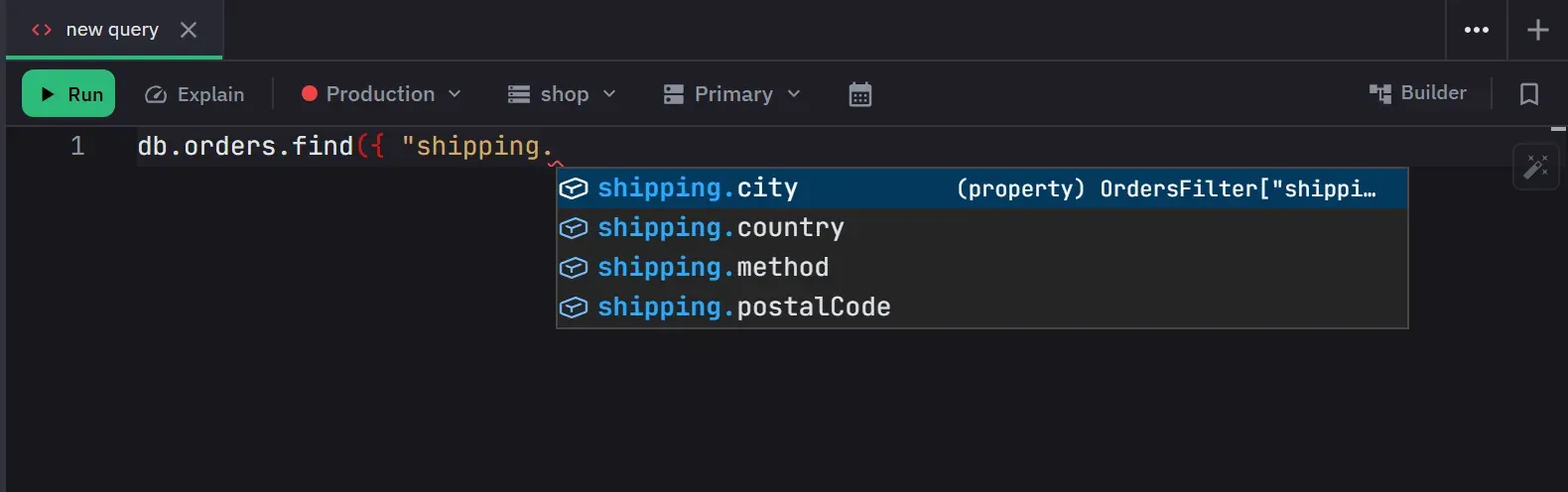
Monghoul is built for MongoDB and nothing else: autocomplete from your own field names and values, a visual aggregation builder you can run up to any stage, and a Database Map that opens the document behind an id. In our test its window appeared in 0.07 s against 0.78 s for TablePlus, and it took 105.6 MB on disk against 421.6 MB.
TablePlus is native and quick, and it covers eleven database engines in one window. It used far less memory than we did, and its own documentation lists its MongoDB support as “MongoDB (Beta)”.
What was measured
The numbers, and how they were taken:
- Machine
- One Windows 11 PC, both apps installed
- Runs
- 7 launches each from a full stop, median
- State
- Nothing connected, checked by the script
- Measured
- 12 September 2026, with the script
The full method
Both installed on the same Windows 11 machine and measured with the same script, published at github.com/Kontsedal/monghoul-public/tree/main/benchmarks/client-footprint. TablePlus 26.10.2 against Monghoul 1.12.0. Every figure is the median of 7 launches, each from a fully stopped state, with memory sampled 20 seconds after the window appeared. Memory is summed private working set, so a page shared between an app's processes is counted once rather than once per process. The script counts each app's own established connections, and neither app had a database connection open. Measured 12 September 2026.
- Time to the app window
-
- On disk
-
- Idle memory, nothing connected
-
Files installed: 168 against 7. Processes: 1 against 8. These describe each install, and fewer is not better.
Both were steady. TablePlus held 59 to 60 MB across the seven runs and reached its window between 0.770 and 0.789 s. Monghoul held 396 to 418 MB and 0.070 to 0.089 s.
TablePlus uses a seventh of the memory we do. 59 MB against 398 MB, measured the same way in the same sitting. That is the widest gap on this site in either direction, and it is not in our favour. TablePlus is one native process that draws its own interface. Monghoul is a native shell whose interface runs in the WebView2 that ships with Windows, which is six more processes and a browser engine’s worth of memory. That choice buys the startup and disk rows and costs this one.
About eleven times quicker to a window, and a quarter of the size on disk. Neither of us bundles a browser, so this is not the usual Electron comparison. It is two native apps that make different choices about what draws the pixels. Neither shows a splash screen, so the startup figures are the cleanest on the site.
Where Monghoul is ahead
Autocomplete from your data
The MongoDB 8.x operator surface, plus the active database’s real collection names, field paths, types and values, offered only where MongoDB accepts them. Inside a pipeline the suggestions follow the fields each stage adds or removes. Their MongoDB documentation does not cover autocomplete. The full behaviour.
A pipeline you build and run
A visual builder with eight quick starts, a preview at every stage, and a run up to any stage you pick. Their MongoDB documentation covers no aggregation builder. The aggregation builder.
A map of how your collections point at each other
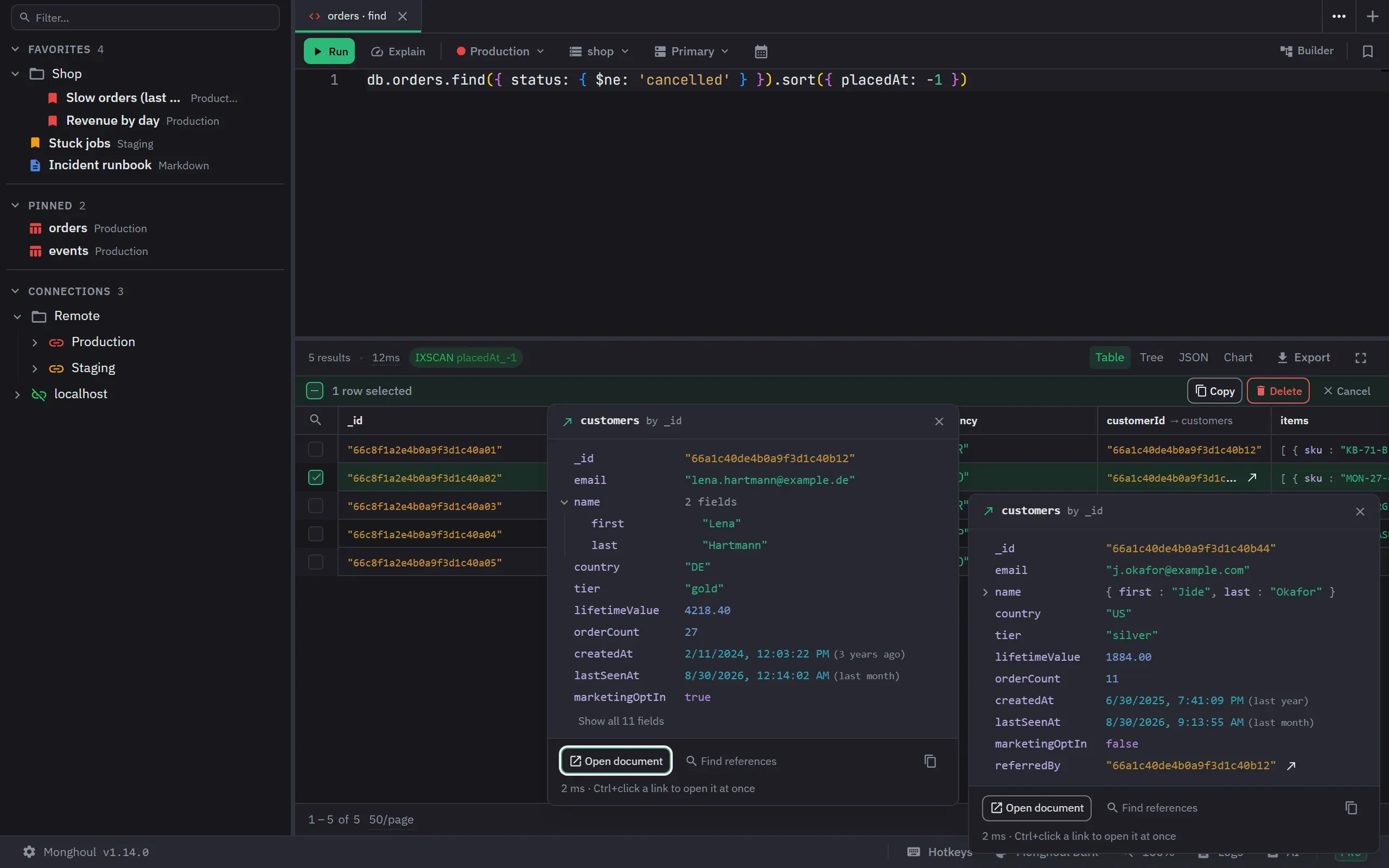
One scan finds the fields that point at other collections and checks them against the data. After
it, an id in a result opens the document it points to, and $lookup suggests the referenced
collection and its fields first. It is on the free tier.
How the Database Map works.
An explain plan that grades itself
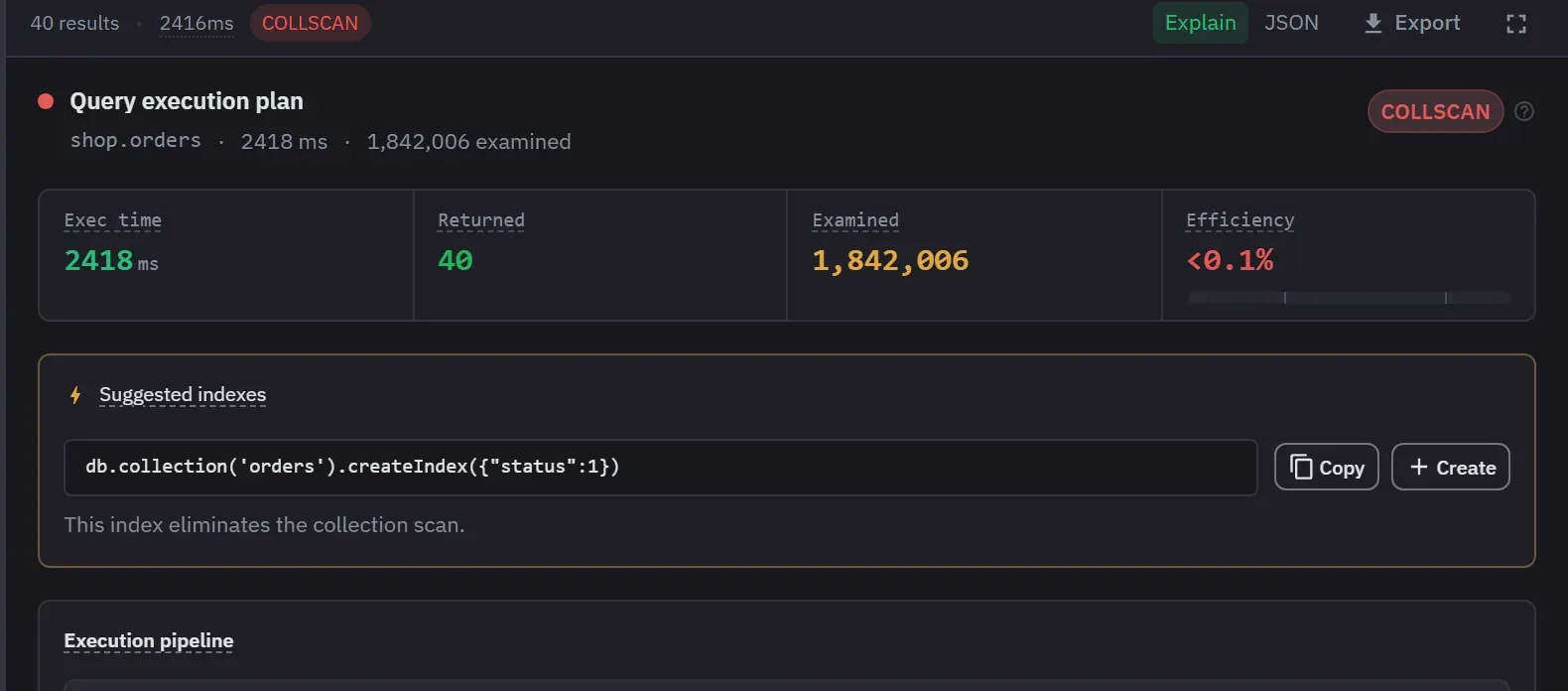
Run a find or an aggregation and its explain plan comes with it, graded as a collection scan, indexed, optimal or ungraded. For a pipeline, a chart shows how many documents each stage passes on. Their MongoDB documentation covers no explain view. Explain.
Write protection at the driver
Turn it on per connection, for everything or for named databases and collections. The check runs as each call executes, so a write spelled in a way the editor cannot see is still blocked. Where that check runs decides what it catches.
No tab limit on the free tier
Our free tier allows 8 saved connections and does not limit tabs or split panels. Detached windows are a Pro feature. TablePlus’s free version stops at two opened tabs and two opened windows.
Where TablePlus wins
Eleven engines in one window. PostgreSQL, MySQL, MariaDB, SQLite, SQL Server, Redshift, CockroachDB, Snowflake, Cassandra, Redis and Vertica, by their documentation. Monghoul speaks MongoDB only. If you open several kinds of database in a week, one application for all of them is a real saving.
The lowest macOS floor here. TablePlus runs on macOS 10.11, four releases below the next lowest and five below the macOS 11 we need. On a machine that cannot go past Catalina or Mojave, that decides it.
Memory at rest. 59 MB against our 398 MB, the row above.
A perpetual licence on every paid tier. Their paid tiers include a year of updates, and the vendor states that you can keep using the app after the year. We sell a subscription, and a lifetime licence beside it.
What each one costs to keep using
TablePlus’s free version has no time limit and a hard working limit: two opened tabs, two opened windows and two advanced filters at a time, with filters unavailable on the free Windows build. Its paid licences are perpetual.
Our free tier permits 8 saved connections and does not limit tabs or split panels, and detached windows are a Pro feature. It allows commercial use, has no time limit and needs no signup. Charts, cluster monitoring and AI access are the Pro features, and the Pro trial runs 14 days per device with no card.
The two limits constrain different things. Theirs limits how much you can have open at once. Ours limits how many servers you can save.
Capability by capability
Where their documentation does not cover something, this table says so rather than claiming the feature is missing.
- Yes
- A different approach
- Not in the documentation we read
- No
| TablePlus 26.10.2 | Monghoul 1.14.0 | |
|---|---|---|
| Scope | ||
| MongoDB status, by the vendor's own label | "MongoDB (Beta)" | The only engine there is |
| Other database engines | Yes. PostgreSQL, MySQL, MariaDB, SQLite, SQL Server, Redshift, CockroachDB, Snowflake, Cassandra, Redis, Vertica and more | No. None, on purpose |
| MongoDB tools | ||
| Visual aggregation builder | Not in the documentation we read. Not covered in their documentation | Yes. Yes, with eight quick starts |
| Explain plan view | Not in the documentation we read. Not covered in their documentation | Yes. Yes, with four plan grades |
| Schema-aware autocomplete | Not in the documentation we read. Not covered for MongoDB | Yes. From your sampled fields, types and values |
| Open the document an id points to, from a result | Not in the documentation we read. Not covered for MongoDB | Yes. Yes, after a Database Map scan |
| Connections and data | ||
| SSH tunnelling | Yes. Yes, an Over SSH option in the connection dialog | Yes. Yes |
| TLS | Yes. Yes, an SSL mode in the connection dialog | Yes. Yes, with client certificates |
| Backup and restore | A Backup and Restore item in the sidebar, not exercised against MongoDB | A different approach. Import and export, with Excel on Pro |
| Licence and platform | ||
| Free tier working limit | Two tabs, two windows, two filters | 8 saved connections, with no tab limit |
| Licence shape | Perpetual, plus a year of updates | Free tier, then subscription or lifetime |
| Minimum macOS | 10.11 | 11 |
The TablePlus column was read from the vendor's documentation and the running application, version 26.10.2, on 13 September 2026. It records whether a capability exists, not whether it is any good, which is not a thing a table can hold.
The first row is their word rather than ours. Beta is an honest label for a young integration, and it is also the difference between the two tools: TablePlus spreads its work across eleven engines, and Monghoul puts all of its work into one.
Which one to pick
Pick Monghoul if
- MongoDB is most of your work
- you want the parts their MongoDB documentation does not cover: suggestions from your data, a pipeline you build and run up to any stage, a graded explain plan, and ids that open their documents
It can sit beside TablePlus, which keeps your SQL work.
Pick TablePlus if
- you want one application for several engines
- you are on macOS older than 11
- low memory at rest matters most
- you want every paid tier to be a perpetual licence
Try both
A table cannot tell you how a tool feels, and both of these are trying to win on exactly that. TablePlus’s free version has no time limit and neither does ours, so running both against the same database for a week costs nothing.
Reproducing the numbers
git clone https://github.com/Kontsedal/monghoul-public
cd monghoul-public/benchmarks/client-footprint
.\measure.ps1 -Runs 7 -Only 'TablePlus|Monghoul'
It force-stops matching processes between runs, so close anything you care about first. TablePlus installs into Program Files and Monghoul installs per user, and the script’s paths assume that.
Questions people ask
- Does TablePlus support MongoDB?
- Yes, and its own documentation lists the engine as "MongoDB (Beta)". That is the vendor's label, read from docs.tableplus.com on 13 September 2026. The connection dialog takes a URL, an SSL mode and an over-SSH option.
- Is TablePlus free?
- There is a free version with no time limit, restricted to two opened tabs, two opened windows and two advanced filters at a time, and the vendor states that filters are not available on the free Windows build. Paid licences are perpetual and include one year of updates. Read on 13 September 2026.
- Does TablePlus have a MongoDB aggregation pipeline builder?
- Their documentation does not mention one, and it does not mention an explain view for MongoDB either. Undocumented is not the same as absent, which is why this states what the documentation covers rather than what the product lacks.
- What is the minimum macOS version for TablePlus?
- macOS 10.11, which is the lowest floor of any client compared on this site: four releases below the 10.15 that is the next lowest, and five below the macOS 11 that Monghoul requires. On Windows it needs 7 or newer with .NET 4.8.