Monghoul against MongoDB Compass
MongoDB Compass measured against Monghoul on one machine: 651 MB against 106 MB on disk, 1.26 s against 0.07 s to a window, 321 MB against 398 MB of memory.
On this page
Monghoul suggests the field names and values in your collections as you type, follows your fields through each stage of a pipeline, and opens the document behind an id in a result. In our test its window appeared in 0.07 s against 1.26 s for Compass, and it took 105.6 MB on disk against 650.6 MB.
Compass is MongoDB’s own client. It is free with no paid tier, it ships a build that cannot write, and it used less memory than we did. Both sides are below, measured or sourced.
What was measured
The numbers, and how they were taken:
- Machine
- One Windows 11 PC, both apps installed
- Runs
- 7 launches each from a full stop, median
- State
- Nothing connected, checked by the script
- Measured
- 12 September 2026, with the script
The full method
Both installed on the same Windows 11 machine and measured with the same script, published at github.com/Kontsedal/monghoul-public/tree/main/benchmarks/client-footprint. MongoDB Compass 1.50.0 against Monghoul 1.12.0. Every figure is the median of 7 launches, each from a fully stopped state, with memory sampled 20 seconds after the window appeared. Memory is summed private working set, so a page shared between an app's processes is counted once rather than once per process. The script counts each app's own established connections, and neither app had a database connection open. Measured 12 September 2026.
- Time to the app window
-
- On disk
-
- Idle memory, nothing connected
-
Files installed: 349 against 7. Processes: 5 against 8. These describe each install, and fewer is not better.
The spread across the seven runs was small: Compass 1.224 to 1.307 s and 317 to 326 MB, Monghoul 0.070 to 0.089 s and 396 to 418 MB.
Compass holds less memory than we do. 321 MB against 398 MB. Both render in a browser engine, and on this row the official client is the leaner one.
Time is to a window, not to the first query. The script waits for the app to own a window handle. That is a fair thing to compare, and it is not the same as being ready to work, so do not read 18x as how much sooner you get work done.
The disk difference comes from what each app ships. Compass bundles a Chromium runtime: the
measurement found libEGL, libGLESv2, d3dcompiler, icudtl and ffmpeg.dll in its folder.
Monghoul uses the WebView2 that Windows already has. That is a trade. Compass renders the same on
every machine, and we depend on the WebView2 the system has. Monghoul’s 105.6 MB is a 17.8 MB shell
and an 87.7 MB Bun sidecar that runs the queries.
Where Monghoul is ahead
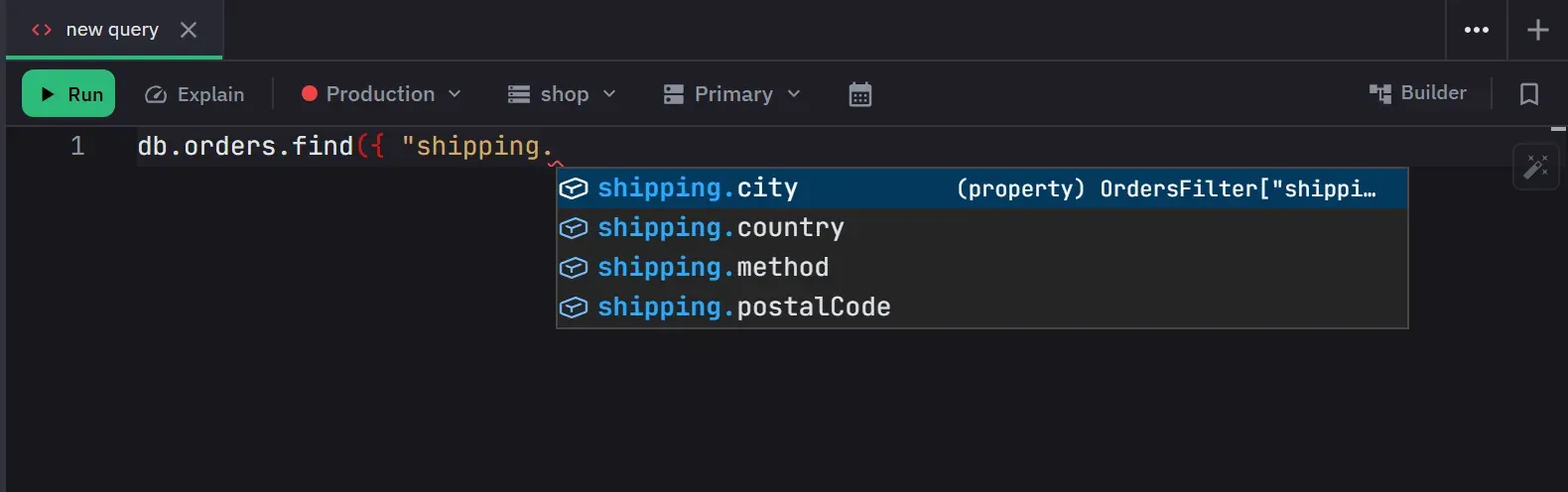
Autocomplete from your data
Completions come from the active database’s sampled field paths, types and values, so a field’s
known values appear where a value for that field belongs and nowhere else. Inside a pipeline the
suggestions follow the fields each stage adds or removes. Position decides what is offered: query
operators inside a $match, expressions inside a computed projection, the JSON Schema vocabulary
inside $jsonSchema, and an operator’s own option keys with the required ones first.
The full behaviour.
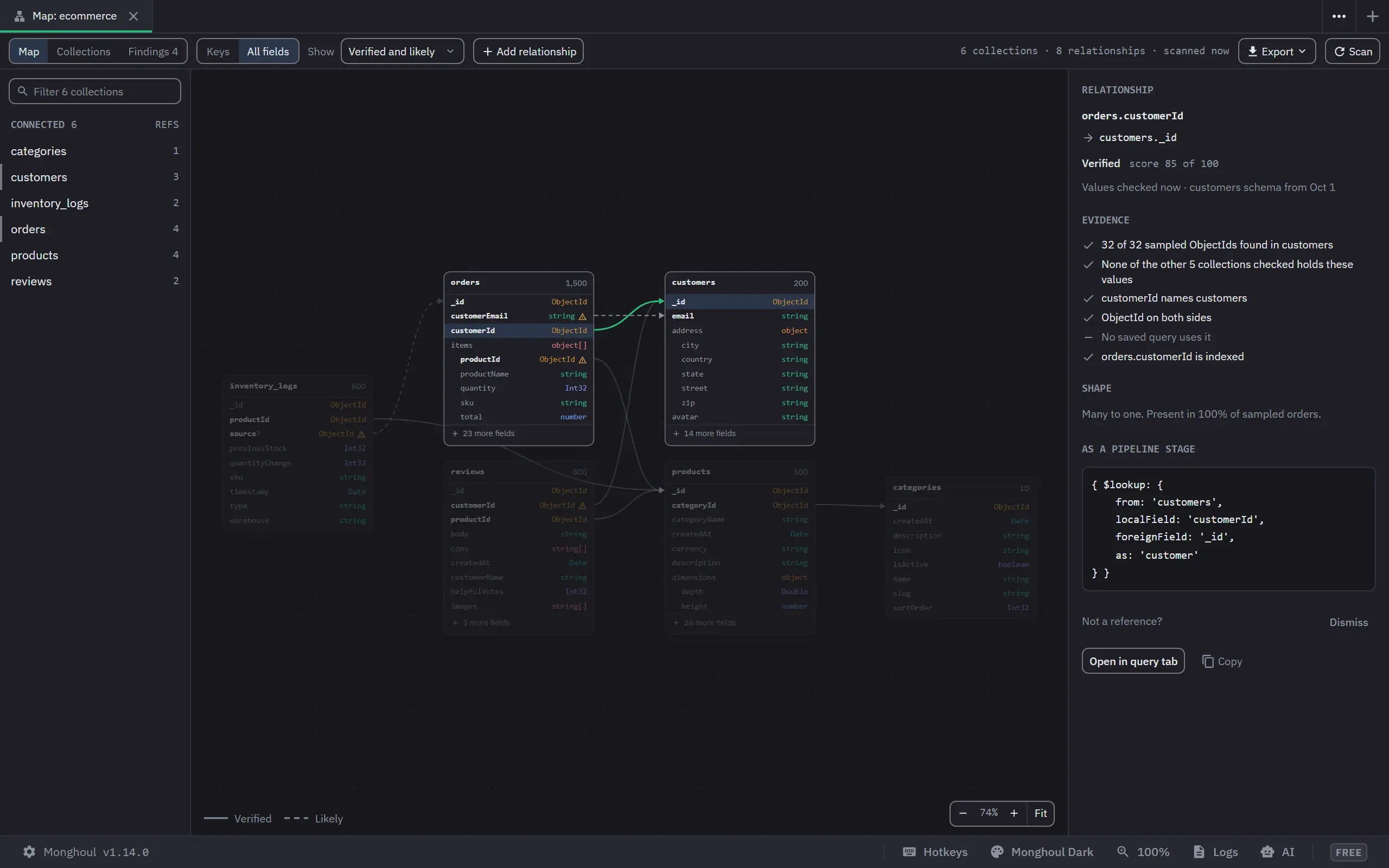
A map of how your collections point at each other
Compass draws an entity-relationship diagram in its Data Modeling view, and its documentation says
its relationships “are for annotation purposes only”. The Database Map checks each reference
against the data and says how sure it is. Then the app uses it: an id in a result opens the document
it points to, $lookup suggests the referenced collection and then the two fields that join them,
and on Pro an assistant can ask for the join path over MCP. The map itself is on the free tier.
How the Database Map works.
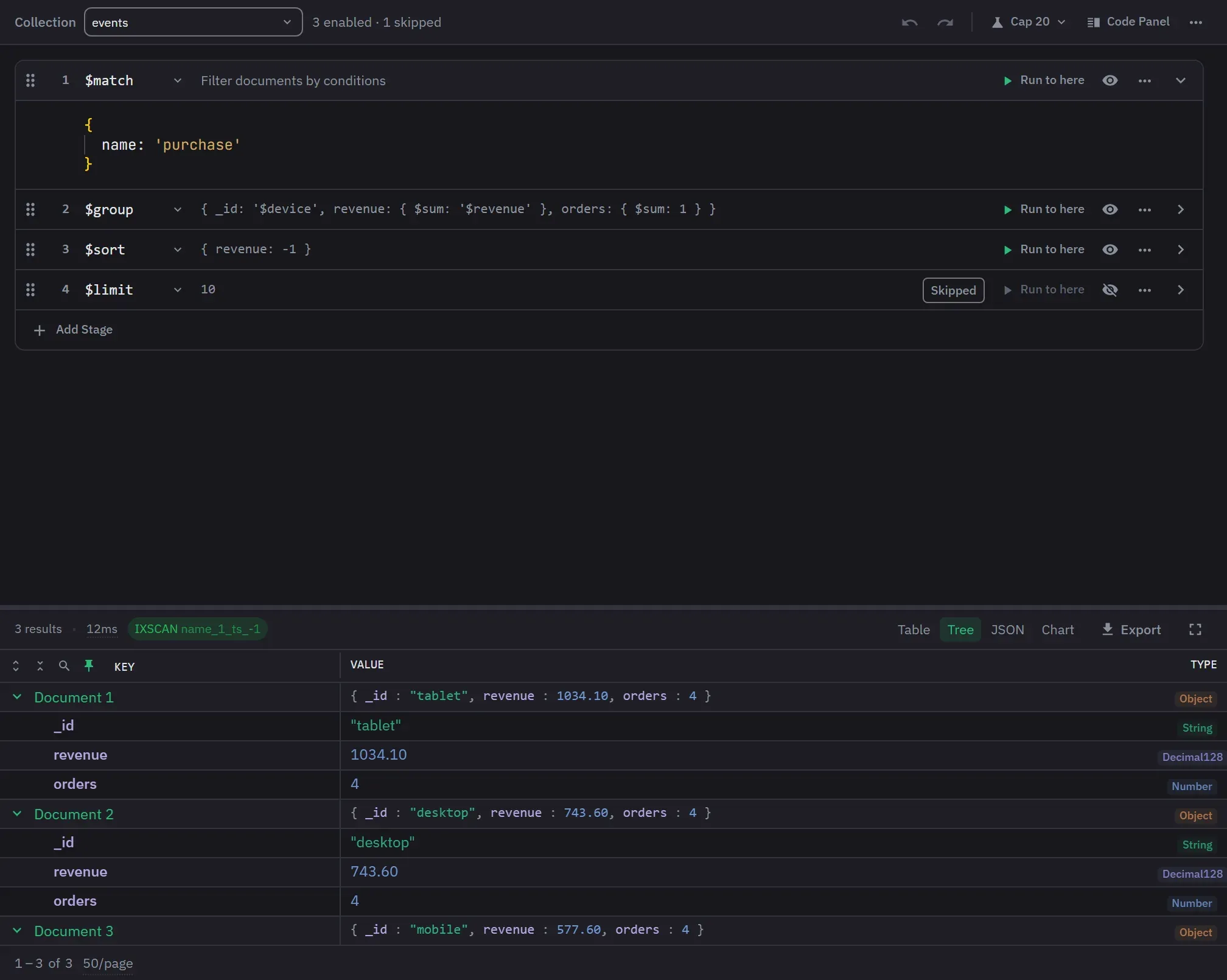
A builder that starts you off and checks your server
Both builders preview documents stage by stage. Monghoul’s also offers eight quick starts for the common shapes, and the stage picker names the server version a stage needs before you choose it. The aggregation builder.
Write protection at the driver
Turn it on per connection, for everything or for named databases and collections. The check runs as each call executes, so a write spelled in bracket notation or sent as a raw command is still blocked. Compass takes a different route with its Readonly Edition, which is covered below. Where that check runs decides what it catches.
The assistant you already use, over MCP
Compass generates queries from natural language inside the app. Monghoul Pro lets the assistant you already use call 80+ MCP tools behind a token. It reaches only the connections you allow, and its queries wait for your approval by default. How that is set up.
The window
11 themes, a command palette, rebindable shortcuts, tabs that persist across sessions and can be split or detached, and six result views. Compass covers everything the server does. Monghoul is built for the queries you write every day.
Where Compass wins
It is free, entirely. On 7 September 2026 there was no paid tier, no connection limit and no trial.
It ships two editions nobody else here does. A Readonly Edition with write and delete removed from the binary, and an Isolated Edition whose only network connection is to your MongoDB instance. Both were listed on the download page on 7 September 2026. A missing code path is easier to take to a security review than a setting, because a setting can be changed back. Check their release notes before you build a policy on either, because edition line-ups change.
It is made by MongoDB, the company that decides what the server does.
It uses less memory, 321 MB against our 398 MB in the table above.
Its diagram is built for planning. The Data Modeling view lets you add relationships by hand, set their cardinality and export the diagram, which suits designing a schema before the data exists.
Capability by capability
The Compass column comes from MongoDB’s own product page, read on 13 September 2026, and the three relationship rows from its Data Modeling documentation, read on 1 October 2026. Compass 1.50.0 was installed and measured for the table further up, but its capabilities were not driven one by one, so a cell says what MongoDB documents rather than what the application lacks. Undocumented is not the same as absent. Both tools cover the basics, so only the rows where they differ are listed.
- Yes
- A different approach
- Not in the documentation we read
- No
| MongoDB Compass 1.50.0 | Monghoul 1.14.0 | |
|---|---|---|
| Pipelines | ||
| Aggregation builder | Yes. Yes, "preview data as it progresses through each phase" | Yes. Yes, with Run to here on every stage |
| Pipeline quick starts | Not in the documentation we read. Not on the product page | Yes. Eight, from Filter & Sort to Multi-Facet Report |
| Stage gated on server version | Not in the documentation we read. Not on the product page | Yes. Yes, the picker names the version a stage needs |
| Relationships | ||
| Relationship diagram | Yes. Yes, Data Modeling, with relationships inferred from indexed fields or drawn by hand | Yes. Yes, the Database Map, with each reference checked against the data |
| What the relationships are used for | A different approach. "Annotation purposes only", per its documentation | Yes. Opening the document behind an id, $lookup suggestions, and the assistant's join path |
| Open the document an id points to, from a result | Not in the documentation we read. Not in its documentation | Yes. Yes, after a Database Map scan |
| Analysis | ||
| Visual explain plan | Yes. Yes | Yes. Yes, with four plan grades and a data-flow chart |
| Schema analysis | Yes. Yes | Yes. Yes, with enum detection feeding autocomplete |
| Assistance and protection | ||
| Natural language queries | Yes. Yes, generated in the app | A different approach. An assistant you already use, over MCP |
| Read-only build | Yes. Yes, a separate edition with the code path removed | A different approach. A per-connection setting enforced at the driver |
| Utilities and price | ||
| Test data generation | Not in the documentation we read. Not on the product page | Yes. A Faker catalog in seventeen categories |
| Charts over a result | No. Not in Compass. MongoDB Charts is a separate product | Yes. Six types, on Pro |
| Price | Free, with no paid tier | Free tier, and Pro |
The MongoDB Compass column was read from the vendor's own documentation, version 1.50.0, on 13 September 2026, with rows added on 1 October 2026. It records whether a capability exists, not whether it is any good, which is not a thing a table can hold.
The read-only row is the one to read twice, for the reason given above.
If you came here looking for a Compass alternative
Most people who search for one ask about startup, disk and memory, and the table above answers that with a script behind it. For daily query work, the sections above are our case. If what sent you here was SQL migration or single sign-on, look at Studio 3T. If it was a read-only build you can take to a security review, Compass already has the best answer in this category.
Which one to pick
Pick Monghoul if
- you write queries and pipelines most days and want suggestions from your own data
- you work in a database whose collections point at each other
- an assistant holds the connection and you want the write guard at the driver
The free tier covers all of it except the assistant, which is Pro.
Pick Compass if
- you need the Readonly or Isolated edition to pass a security review
- you want MongoDB's own client
- memory at rest matters more to you than startup and disk
Try both
A table cannot tell you how a tool feels after a week of work. Compass costs nothing, and Monghoul’s free tier has no signup and no time limit, so pointing both at the same database costs an afternoon.
Reproducing the numbers
git clone https://github.com/Kontsedal/monghoul-public
cd monghoul-public/benchmarks/client-footprint
.\measure.ps1 -Runs 7 -Only 'Compass|Monghoul'
It force-stops matching processes between runs, so close anything you care about first. The paths at the top of the script assume a per-user install of each app and will need adjusting otherwise.
Questions people ask
- Is MongoDB Compass free?
- Yes, entirely. MongoDB's download page lists no paid tier, no connection limit and no trial, and it also lists a Readonly Edition with write and delete removed and an Isolated Edition whose only network connection is to your MongoDB instance. Read on 7 September 2026.
- What is a good MongoDB Compass alternative?
- It depends on the requirement. Studio 3T lists SQL migration and OIDC single sign-on. DataGrip covers a dozen database engines in one window. TablePlus runs on macOS 10.11. Monghoul is built for daily query work: autocomplete from your own field names and values, a Database Map that opens the document behind an id, and a free tier you can use at work. It installs at 105.6 MB and reaches its window in 0.07 seconds, measured on this page.
- Does MongoDB Compass draw relationship diagrams?
- Yes. Its Data Modeling view draws an entity-relationship diagram of one database, with relationships inferred from indexed fields or added by hand. Its documentation says those relationships are for annotation purposes only. Read on 1 October 2026.
- How much memory does MongoDB Compass use?
- 321 MB of private working set at idle with nothing connected, measured over seven launches on one Windows 11 machine on 12 September 2026, against 398 MB for Monghoul 1.12.0. Compass installs 650.6 MB across 349 files and reaches its window in 1.26 seconds.