Import and export
JSON, CSV, Excel and NDJSON in and out, plus copying a collection between instances.
Every import, export, copy, duplication and generation appears in the footer’s current operations while it runs, and the operation log records it with its outcome.
Importing a file
Import starts in three places.
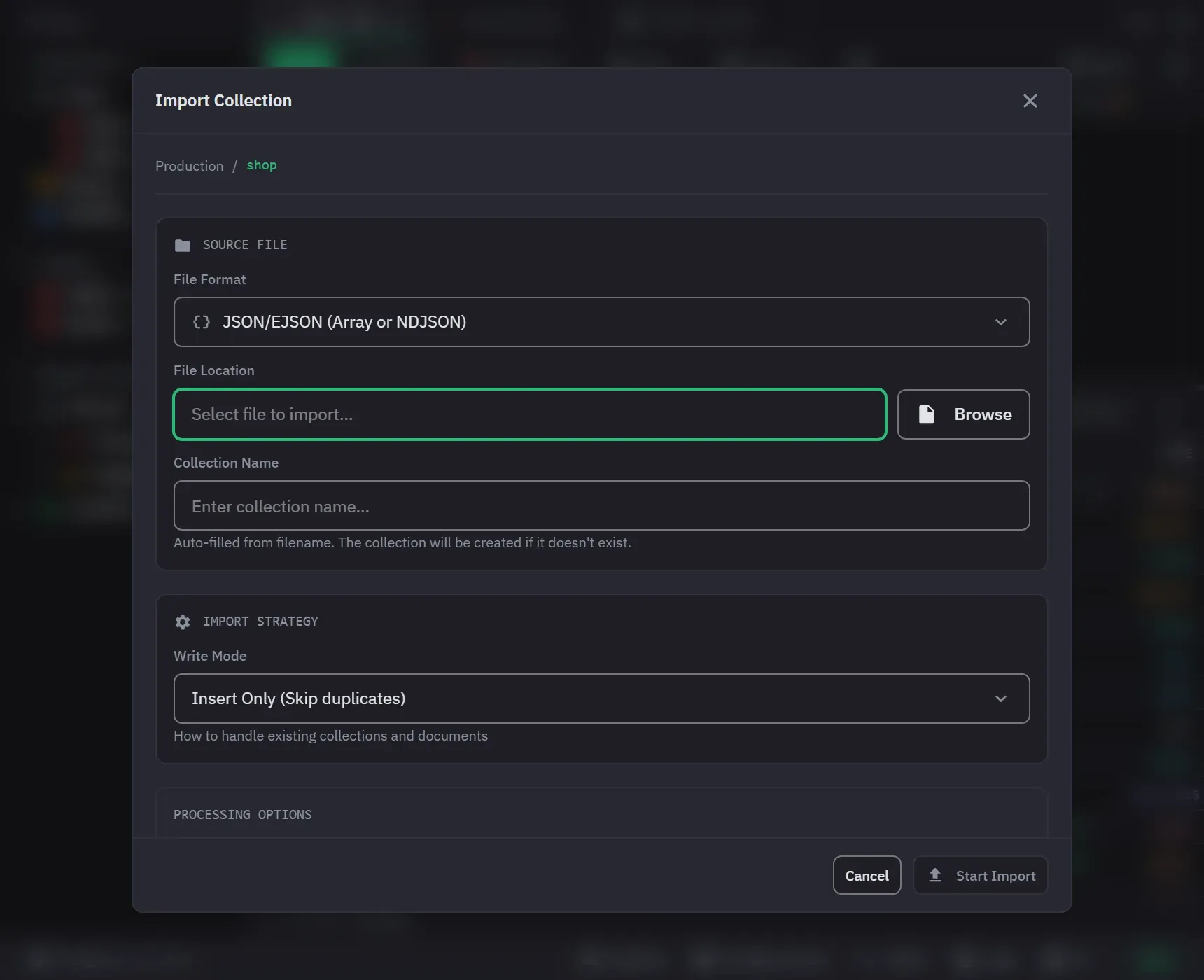
- Import Collection, in a database’s context menu, makes a new collection. The Collection Name field fills in from the file name. It fills in only while the field is empty, so a name you typed stays. The collection is created if it does not exist.
- Import into Collection, in a collection’s context menu, has no name field. The target is the collection you started from.
- On Pro, Import Database, in a connection’s context menu, imports a whole directory.
The File Format menu offers JSON/EJSON, CSV/TSV and Excel. Excel is Pro. On Free it is marked (PRO)
and does nothing. The file picker filters by format: .json, .jsonl, .ndjson and .gz for JSON,
.csv and .tsv for CSV, and .xlsx and .xls for Excel. Choosing a file sets the format from its
extension, suggests the collection name, and picks the tab delimiter for a .tsv. A file with an
extension Monghoul does not know leaves the format as it was.
JSON comes in as an array, as Extended JSON, as NDJSON, as concatenated documents, or gzipped. CSV and
TSV take a delimiter of comma, tab, semicolon or pipe. The checkbox First row contains column names
sets the header, and it is on by default. Without a header row, the columns are named field1, field2 and so on, in file
order. A row with more or fewer cells than the header is imported, not refused. Excel files import on
Pro. Monghoul reads the first sheet and takes row one as the column names.
A leading UTF-8 byte-order mark is removed from JSON, NDJSON, gzipped JSON, CSV and TSV files, so a file from Notepad, PowerShell or Excel’s “CSV UTF-8” gets its first field named correctly. A U+FEFF inside a value stays.
Size and streaming
JSON, NDJSON, CSV and TSV are streamed rather than read whole. Import memory does not grow with the file, and progress shows the share of the file read. Two kinds of file are the exception.
- Excel reads the whole workbook.
- A JSON file that is a single value or an array of plain values is read whole. Monghoul refuses it above 500 MB and tells you to split it. For a gzipped file the 500 MB is measured after decompression, so a small archive of very repetitive documents can still be refused.
Where the rows go
The Write Mode menu has three strategies. Insert Only is the default.
- Insert Only (Skip duplicates) inserts every document. The server refuses a document whose
_idthe collection already holds. Monghoul counts it as failed, and the rest of its batch still lands. - Upsert (Update or insert by _id) matches on
_id. A document that has no_idis inserted. - Drop & Insert (Clear collection first) empties the collection before it inserts. Monghoul reads the file first, so a file that cannot be read leaves the existing data in place. For an Excel workbook it also checks the sheet first. Into a write-protected target, this mode asks for confirmation before the drop.
Under Processing Options, Stop on First Error stops the import at the first failure. It is off by default, so invalid records are skipped and the import carries on. A JSON document that does not parse is skipped and counted, as a CSV row that does not convert is. A file in which every document fails to parse finishes with nothing imported.
Auto-convert Types is on by default. JSON does not offer it, because JSON already carries types. It converts numbers, Booleans, null, and cells that hold a JSON object or array. An empty cell imports as null. It never makes an ObjectId.
Dates are inferred only from an ISO-style leading YYYY-MM-DD. That rule is deliberately narrow, so
order-1, sku-2 and Q1-2024 stay text instead of becoming dates nobody asked for. With the
switch off, every cell imports as the text the file holds. An Excel cell that the workbook formats
as a date imports as a date, and a plain number stays a number.
Importing one collection and importing a database apply the same parsing and the same conversion to the same file.
Importing a database
On Pro, Import Database takes a Target Database, which can be new or existing, a Source Directory and a File Format. Each file becomes one collection, named after the file without its extension. Files with another extension are ignored. Monghoul reports the number of matching files before it writes anything, and it refuses to start when none match. Progress is weighted by file size. With Stop on First Error set, a failure in one file skips the files after it.
Progress and cancelling
Progress counts the documents imported and the documents that failed. Cancel stops the import, and the documents already imported stay. The operation log records a cancelled run as cancelled. A finished import says how many documents landed, and opens the collection when the import created it. The dialog closes shortly after a run finishes. If an import cannot start, the dialog stays open so you can fix the file, the name or the options.
Exporting
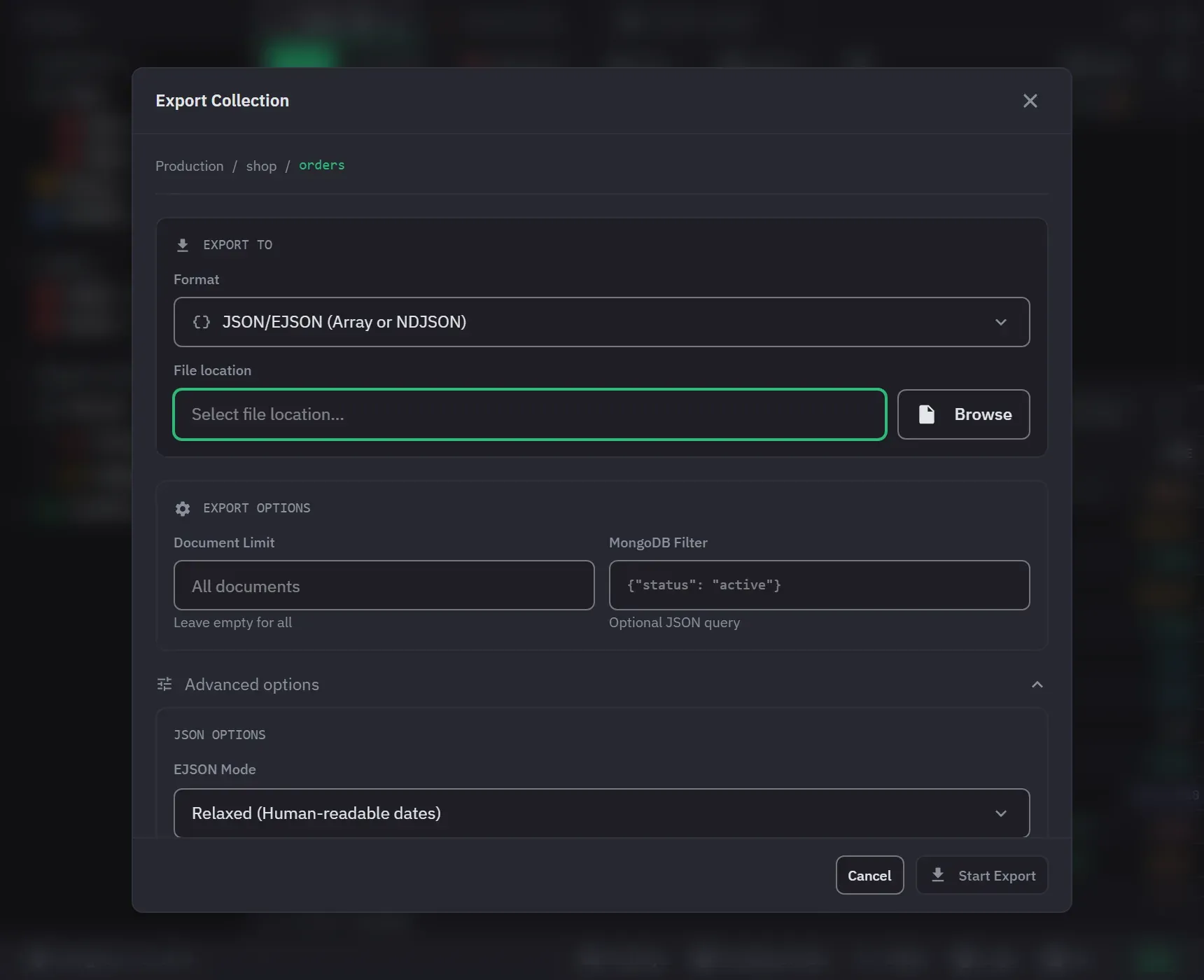
Export Collection, in a collection’s context menu, writes one file. Choose the format, then the file location. Format-specific options sit behind Show Advanced Options, which is closed when the dialog opens. Excel has no options of its own.
- JSON/EJSON exports Extended JSON as Canonical or Relaxed, as a JSON Array or as Newline-Delimited JSON. Pretty Print and Compress (.gz) are options. Relaxed is the default, and it loses precision for 64-bit integers above 2^53. See Extended JSON and BSON.
- CSV/TSV takes a delimiter of comma, tab, semicolon or pipe, Expand Arrays by Index, Compress (.gz) and UTF-8 BOM. The BOM is on by default, because Excel reads a non-ASCII file in the system codepage without it. In a compressed file the BOM is inside the archive.
- Excel Files is Pro. The sheet is named after the collection.
- Another Collection is Pro. It copies. See the next section.
Turning compression on or off rewrites the .gz ending of the file path you chose, so the two cannot
disagree. Pretty Print is on by default.
Neither CSV nor Excel carries BSON typing. Values are written as text and dates as ISO strings, so a round trip through either one loses the types.
CSV and Excel columns are the union of the fields in a sample of the export, in the order Monghoul
first sees them, so _id stays on the left and a field only some documents carry still gets a
column. A field that first appears after that sample gets none, and the export reports which fields
those were. Nested objects become dotted column names. Arrays are written as text unless Expand
Arrays by Index gives each element its own column.
Export scope can be narrowed with a Document Limit and a MongoDB Filter. A filter that is not valid JSON fails the export with a message that quotes it. See Export to CSV or Excel for a walk through.
A cancelled collection export removes its incomplete file.
Copying between databases
On Pro, Another Collection in the export dialog opens Copy Collection. Choose the target connection, database and collection, and a Write Mode.
- Insert appends all documents. The target refuses a duplicate identity. Monghoul reports those documents as skipped, with the number that landed.
- Upsert matches on
_idand sets the source document’s fields on the match. A field that the target has and the source does not is left in place. - Insert only skips documents that the target already holds, and does not report them as skipped.
Copy indexes carries the non-identity indexes and keeps their supported options. An index that the target refuses is skipped, and the copy continues. The copy creates the target with the source’s creation options: validator, capped settings, collation and TTL. A target that already exists keeps its own options. An empty source collection is created on the target. A view copies as the documents it returns now, into an ordinary collection, and the view is not recreated.
Copying a collection onto itself, with the same connection, database and name, is refused. A protected target asks for confirmation before the copy starts. The source is never asked about, because copying out of a protected connection writes nothing. See Write protection.
On Pro, dragging a collection or a database onto another connection in the sidebar, or a collection onto another database on the same connection, opens the copy dialog with that target filled in. A drop that would move nothing is refused. Free opens the upgrade prompt instead. The guide Copy a collection walks through it.
Whole databases
Export Database, in a database’s context menu, is Pro. It has two modes: Export to Files and Copy to Another Database. Both cover every collection or the ones you pick from a list. The list has a search box once the database holds more than five collections, and it offers select all and deselect all. The action cannot start with nothing selected.
- Export to Files writes one Extended JSON or CSV file for each collection into a directory you choose, named after the collection. Excel is not offered.
- Copy to Another Database duplicates the database with its indexes. The target name starts as the
source name with
_copyadded. Views are recreated as views, and each collection’s indexes are copied after its documents. An index that cannot be recreated is skipped.
Neither one carries the server’s own system.* collections.
A cancelled database export or duplication stops at the next collection boundary. It keeps the collections already finished and reports how many of how many it reached. A cancelled import, copy or duplication keeps what it had already written.
Export, import, generate and copy all run against the connection’s own credentials, including a connection saved with Save password turned off and one authenticating through AWS IAM.