Schema-aware autocomplete
Completions come from your collections, and they follow fields through the stages that reshape them.
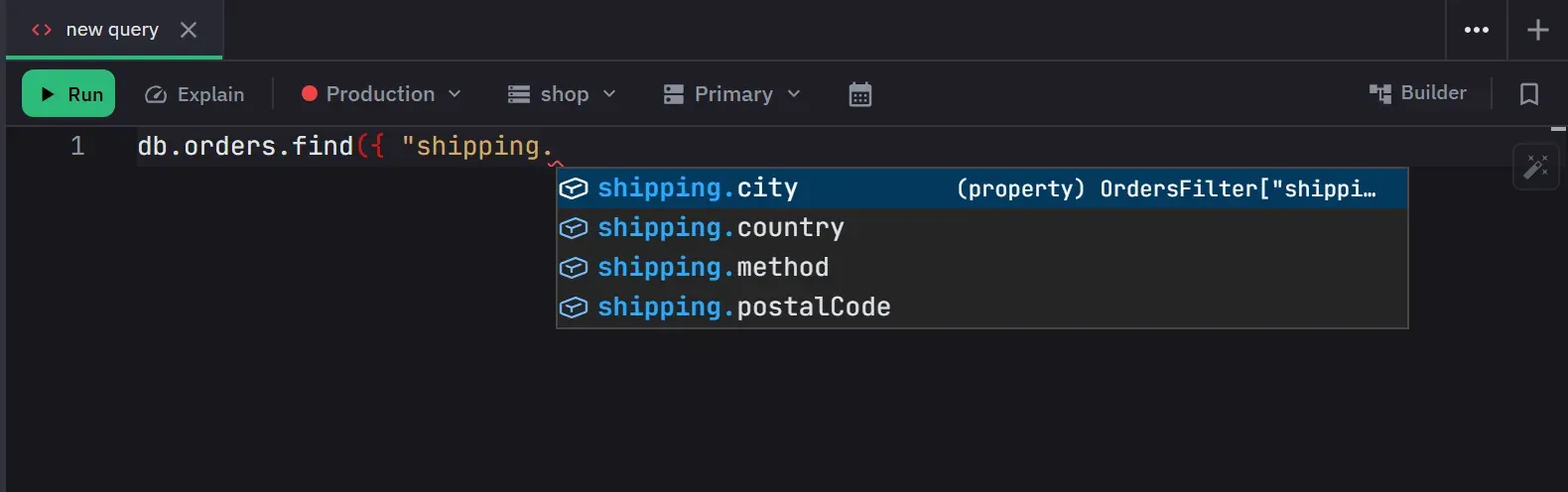
Completions come from your own collections. Monghoul analyzes a collection’s documents, learns the
field paths and their types, and offers those paths as you type, annotated with the type it found:
string, number, ObjectId, Date. Nested fields are disclosed one level at a time as a path is
typed.
In a filter, including a $match stage in the aggregation builder, a typed word also offers the
nested paths that contain it: payment offers payment.method and payment.paidAt after
payment. A dotted key goes in with the quotes it needs.
A completion shows the whole field name. Where the name and its type will not both fit, the type is
shortened and the name is left intact, so shipping.city never reads as shipping.c….
Following fields through a pipeline
The useful part is what happens after a stage reshapes a document. $addFields, $group,
$project and $lookup feed their output into the completions offered by later stages, so a field
you computed in stage two is suggested in stage five under the name you gave it.
Reshaping stages replace the field list. Removal stages filter out the fields they drop. A disabled stage is skipped, so turning one off changes what the stages after it offer.
$lookup resolves the foreign collection’s own schema, which is what makes a nested path like
customer.address.city available. $facet branches expose their sub-pipeline output, and
$unionWith merges the other collection’s schema in.
Joins from the Database Map
Once the Database Map has scanned a database, its relationships
order the $lookup suggestions. They change the order and the details of what is offered, and they
add nothing that a position would not otherwise take.
fromlists the collections related to the queried one first, in either direction, strongest first. Each one is marked as a verified, likely or confirmed reference.- Once
fromnames a related collection,localFieldandforeignFieldput the two fields of that relationship first. - Where a stage belongs, a
$lookupsnippet is offered for each relationship. “customers via customerId” writes the whole stage, and its “one document” variant adds an$unwindthat keeps the documents with no match. A relationship that points at the queried collection is offered as a reverse join, such as “payments of each order”. - The details of a suggestion say what the scan found, and that it came from the map.
The order applies only while the documents are still the collection’s own. It does not apply after
a stage that reshapes them, such as $group or $project, or inside a sub-pipeline. In the
aggregation builder, the same order applies to the stage editors and to the Lookup Helper’s
collection and field lists.
The editor reads the relationships when the tab has its database, and again when a scan or a verdict changes them. It does not read them on a keystroke. A database that was never scanned gets exactly the suggestions it would get without the map.
The MongoDB language
Every query and update operator is offered, along with the collection and cursor methods, each with
inline documentation. So is every aggregation stage, accumulator, expression operator and window
operator, up to the MongoDB 8.x surface. BSON constructors come with snippet placeholders, among them
ObjectId(), NumberLong(), NumberInt(), NumberDecimal(), UUID(), BinData() and
Timestamp().
Suggestions that read the position
Where a field name belongs, only fields are offered. An object key inside a pipeline does not list the surrounding JavaScript scope beside the fields learned from your documents.
Beyond that, the suggestion changes with the position. A position gets only what MongoDB accepts
there. A $match predicate gets query operators, a computed projection gets expression operators, a
$sort value gets only 1, -1 and $meta, and a replacement document or a document to insert
gets no operators:
- Inside an operator body, the editor offers that operator’s own options.
$lookupoffersfrom,localField,foreignField,let,pipelineandas, with the required ones first and marked. The options come from the innermost operator the cursor is in, and the builder’s stage editors offer the same keys. - An option with a fixed set of values suggests that set. Examples are merge behaviours, bucket
granularities, fill methods, date format specifiers, time zones and the metadata that
$metareads.from,intoandcollsuggest collections inside the stages that use them that way. - The second argument of
findsuggests the driver’s option keys, such asprojection,sortandlimit, and not field names. - A sub-pipeline gets only the stages it may hold.
$outand$mergenever appear in one. A pipeline on a database gets only the stages that need no collection. A stage that must be first is offered only first, and nothing is offered after$outor$merge. $lookup.fromsuggests collections,$unwindputs array fields first, and$group._idsuggests field references.- A string in a direct field comparison, after
$eqor$ne, or in an$inor$ninarray suggests the values the field actually holds, in the query editor and in the builder’s stage editors. These are the enum values that schema analysis found for that field, and they are never offered for another field or another collection. The value of a field in an update’s$setgets the same suggestions. - Operators that fit the field’s type come first:
$regexfor strings,$gtand$ltfor numbers and dates,$sizeand$elemMatchfor arrays. - Inside
$exprin a$match, completion switches to aggregation expressions. - System variables (
$$ROOT,$$NOW,$$REMOVE) are offered, and variables from$let,$map,$filter,$reduceand a$lookup’sletare offered only where they are in scope. $jsonSchemakeywords are offered inside a validator expression.
How suggestions are ordered and inserted
- A filter lists the collection’s fields with
_idfirst. Typing$puts the comparison operators first. A numeric field leads with the numeric comparisons. A pipeline position leads with$match. - Field matching is by substring, so
stoffersstatusandcustomerId. - Accepting a nested field replaces the whole dotted path. A field key is inserted in quotes where a
key is written, and bare inside a string. A field reference gets
$where MongoDB reads a reference. - A stage inserts a stage with a placeholder body. A comparison operator inserts a typed placeholder.
The insert replaces the brace and
$that you already typed. - Typing
{offers the same list as typing$, and typing$$inside a string offers the system variables. - Suggestions open on
.,$,:,(,'and", and on request. Nothing is suggested inside a string, a comment or a regular expression.
After the query runs
The editor types what a query returns, so a script that continues after it is offered the fields that
survived. A find projection narrows the document. A pipeline is followed stage by stage: $project,
$group, $count, $facet, $bucket and $unset reshape the result, and $addFields, $set and
$lookup add to it. Where the output of a stage cannot be worked out, such as a computed
$replaceRoot, the editor keeps the whole document and does not report valid code as an error.
What it does not do
Suggestions are advisory. They never block execution, and stale schema data makes them worse without breaking the MongoDB language completions, which do not depend on your data.
Index-aware ranking belongs to the aggregation builder, not to this editor. The builder puts indexed
fields and valid compound-index continuations first in $match and $sort.
A strip under the editor speaks about the schemas of the collections the query uses. It shows one state at a time, in the builder as well as in the code editor, and it never covers the code:
- While an analysis that you started runs, the strip shows the elapsed time and a Cancel button.
- A collection with no analyzed schema is named with an Analyze button, an Open schema button and the reason the last background try failed. A collection with no documents is reported as having nothing to analyze.
- When automatic analysis is off and a schema may be out of date, the strip names the reason and offers Re-analyze.
The strip names up to three collections and counts the rest. Dismiss hides a state until the schema behind it changes. Analyze from the strip samples at least 100 documents and appears in the current operations panel. A background analysis that Monghoul starts by itself shows no strip and no message. See Schema analysis for the sample size and the per-connection settings.
Each tab is completed against its own connection, database and schemas. A suggestion never comes from another open tab.
A badge in the editor’s top corner reads “IntelliSense loading…” until the editor has loaded the schema types, then “IntelliSense ready”, and hides 2 seconds later. It gives up after about 6 seconds instead of spinning.