Connection problems
The errors people actually hit when a connection will not open: server version, TLS, SRV lookups, Atlas IP access, and SSH tunnels.
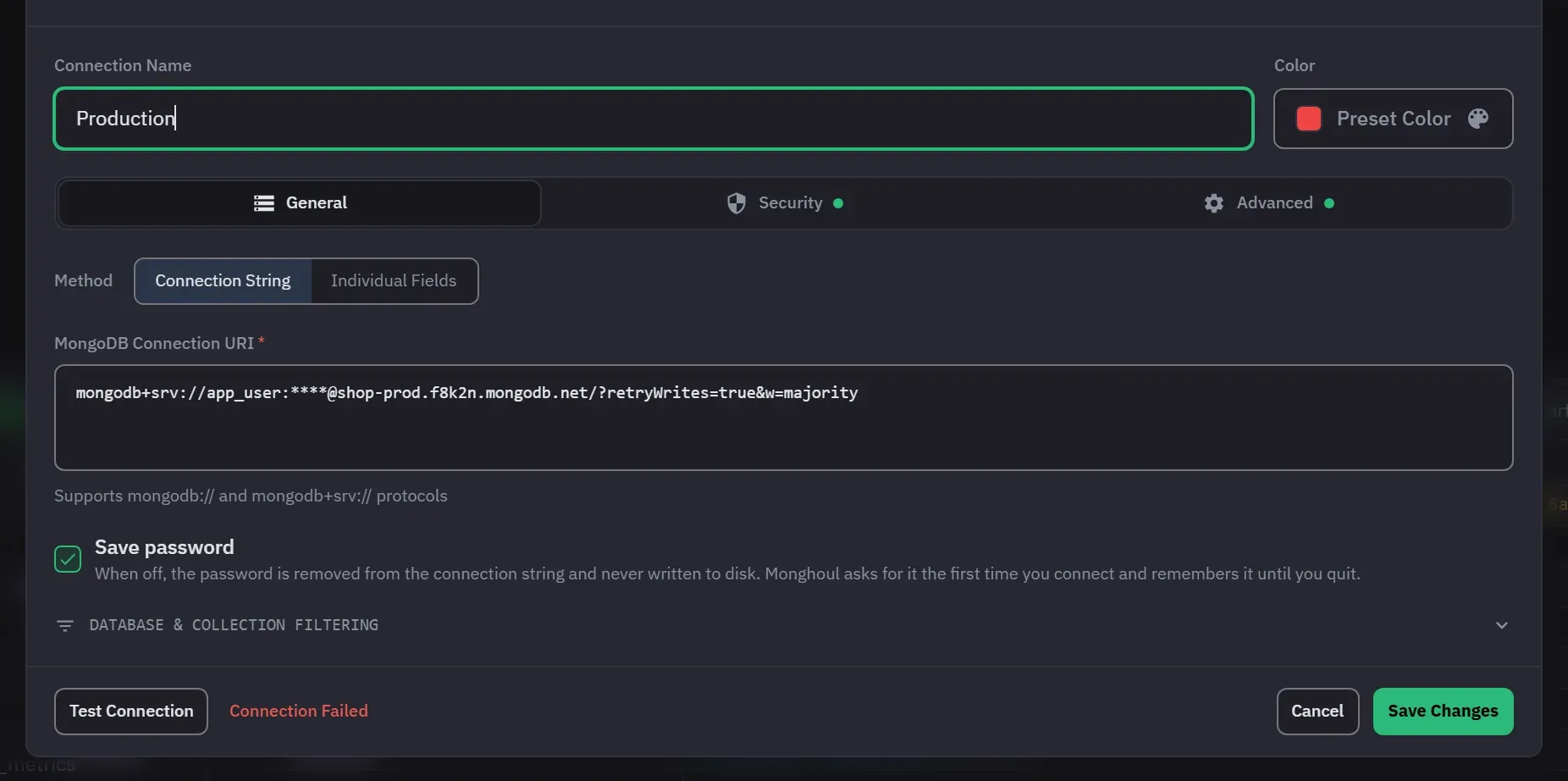
Monghoul tests connectivity and credentials before saving a new profile, so most problems show up at that point rather than on your first query. A failed test shows a toast, “Connection failed” from Test Connection or “Connection test failed” from Create Connection, with the server’s own message as the detail. Find that message below.
The test stops after the connection timeout, which is 30 seconds by default. A slow network or a blocked port ends as a timeout, not as a clear refusal. You can change the timeout under Timeout Duration on the Advanced tab.
A field is missing
Before it dials, Monghoul checks the fields the chosen method needs and names the first one that is empty. The messages are specific, for example:
- “Connection URI is required”, “URI must start with mongodb:// or mongodb+srv://” or “Host is required”
- “Username is required for SCRAM authentication” and “Password is required for SCRAM authentication”
- “X.509 certificate file not found” and the path
- “SSH host is required when SSH tunnel is enabled”, and the same for the SSH username, the SSH password and the private key path
- “Replica set name is required when connection type is replica-set”
- “AWS Access Key ID is required alongside a secret access key. Clear both to use the AWS credentials on this machine.”
Fill in the field the message names. Fields on the Security and Advanced tabs count too.
The server is older than 4.4
Monghoul requires MongoDB 4.4 or newer and refuses an older server with an explicit error rather than connecting and failing in unclear ways later. The message reads “Server at host:port reports wire version 8, but this version of the driver requires at least 9 (MongoDB 4.4).” The numbers depend on your server.
There is no workaround inside the app. Upgrade the server, or use a different client for that instance.
Authentication fails but the credentials are right
Check the Authentication Database field. It is a separate setting from the username and
password, and it is the database the credentials are defined in, which is very often admin rather
than the database you are trying to read.
If you connected from a URI, the source came from the URI’s authSource parameter, else from the
database in the URI path, else it is admin. Paste the URI
into the connection string parser to see what it actually says.
Monghoul keeps asking for the password
If Save password is off, Monghoul asks once for each app session. A wrong password is asked for again, up to three times for each connect, with a note that it was not accepted. Disconnecting forgets the password you typed, so reconnect to try again. If a connection that saves its password still asks, see Keychain and saved passwords.
An Atlas cluster times out
Two usual causes, in this order:
- IP access list. Atlas rejects connections from addresses that are not on the project’s access list, and it does that before authentication, so it looks like a timeout rather than an auth error. Add your address in the Atlas UI.
- SRV lookup. A
mongodb+srv://string needs a DNS SRV record resolved before anything connects. Monghoul asks the public DNS servers 8.8.8.8, 1.1.1.1 and 8.8.4.4 for it, not the resolver of your operating system. On a network that blocks outside DNS, behind some VPNs, or for a name that only your own DNS can answer, that lookup fails. Try the non-SRVmongodb://form with the hosts listed explicitly.
TLS fails against a self-signed certificate
On the Security tab, under SSL/TLS, set CA Certificate File to your CA certificate. That is the correct fix, and it keeps verification on. If the path is wrong, the test says “CA certificate file not found or not readable” and names the path.
The same tab has Allow invalid SSL certificates. It accepts self-signed and expired certificates, and also a certificate whose host name does not match. It exists for development setups. Do not use it against anything that matters, because it turns off the check that makes TLS worth having.
The SSH tunnel will not open
The tunnel settings are on the Security tab. A tunnel that cannot open stops the connection and gives its reason:
- “SSH connection failed: …” followed by the SSH client’s reason. Check the SSH host, port (default 22), user name and password.
- “Failed to read private key: …” means the SSH Private Key File path is wrong or you cannot read the file.
- “SSH tunnel creation failed: …” wraps the same reasons when the connection opens later.
The host and port of the connection are the ones the SSH server sees, not the ones your own machine sees. Connect through SSH has the steps.
The SSH tunnel opens and then drops
Tunnels close when their connection, or a connection test, ends. A tunnel that goes away when you disconnect is working as intended.
If it drops while the connection is still up, the usual cause is a server that closes idle sessions, and reconnecting the profile rebuilds it. A tunnel that never came up is different: it reports its own reason and the connection does not open at all, so you are not left guessing which half worked.
The connection is marked offline in the sidebar
A connection that is not open shows a different icon in the tree. That is a state, not an error. Monghoul opens a connection when you expand it or open a collection. To open it yourself, choose Connect from its context menu. If that fails, a toast reports the underlying error. Find that error on this page.
A saved password stopped working after copying a profile between machines
Stored secrets are encrypted on the device that saved them. A profile copied to another machine carries a secret that machine cannot decrypt, and Monghoul treats an undecryptable secret as empty.
That is deliberate, and it fails safely: the affected connection can still be edited and deleted, and the other connections are unaffected. Re-enter the password on the new machine.
Nothing above matches
Open the operation log (Logs in the status bar). It records every operation with its outcome, and
the failing one usually carries the server’s own error message.
If that does not resolve it, get in touch with the error text and your server version.