Connect to MongoDB through an SSH tunnel
ssh -L forwards the port by hand; the connection dialog opens the tunnel itself. Either way the host you name is the one the jump box sees.
If your MongoDB only accepts connections from inside a network, and you can SSH to a machine in that network, you do not need a VPN. A forwarded port is enough.
By hand, with ssh -L
ssh -L 27018:localhost:27017 you@jump-host -NThat forwards port 27018 on your machine to port 27017 as the jump host sees it, and -N says
run no remote command, just hold the tunnel open. Then connect to the local end:
mongosh "mongodb://localhost:27018"The host and port after -L are resolved on the jump host, not on your machine. If MongoDB runs
on the jump host itself, that is localhost:27017. If it runs on a third machine the jump host can
reach, it is that machine’s private name. Getting this backwards is the whole difficulty of SSH
tunnels, and the error it produces is a connection timeout that looks like a firewall.
Two more things the manual route costs you: the tunnel dies when the ssh process does, taking your
connection with it, and a replica set discovered through a tunnel will hand back internal hostnames
your machine cannot resolve. For a replica set, connect with directConnection=true or forward every
member’s port.
In the app
Monghoul opens the tunnel itself as part of the connection.
Set it up
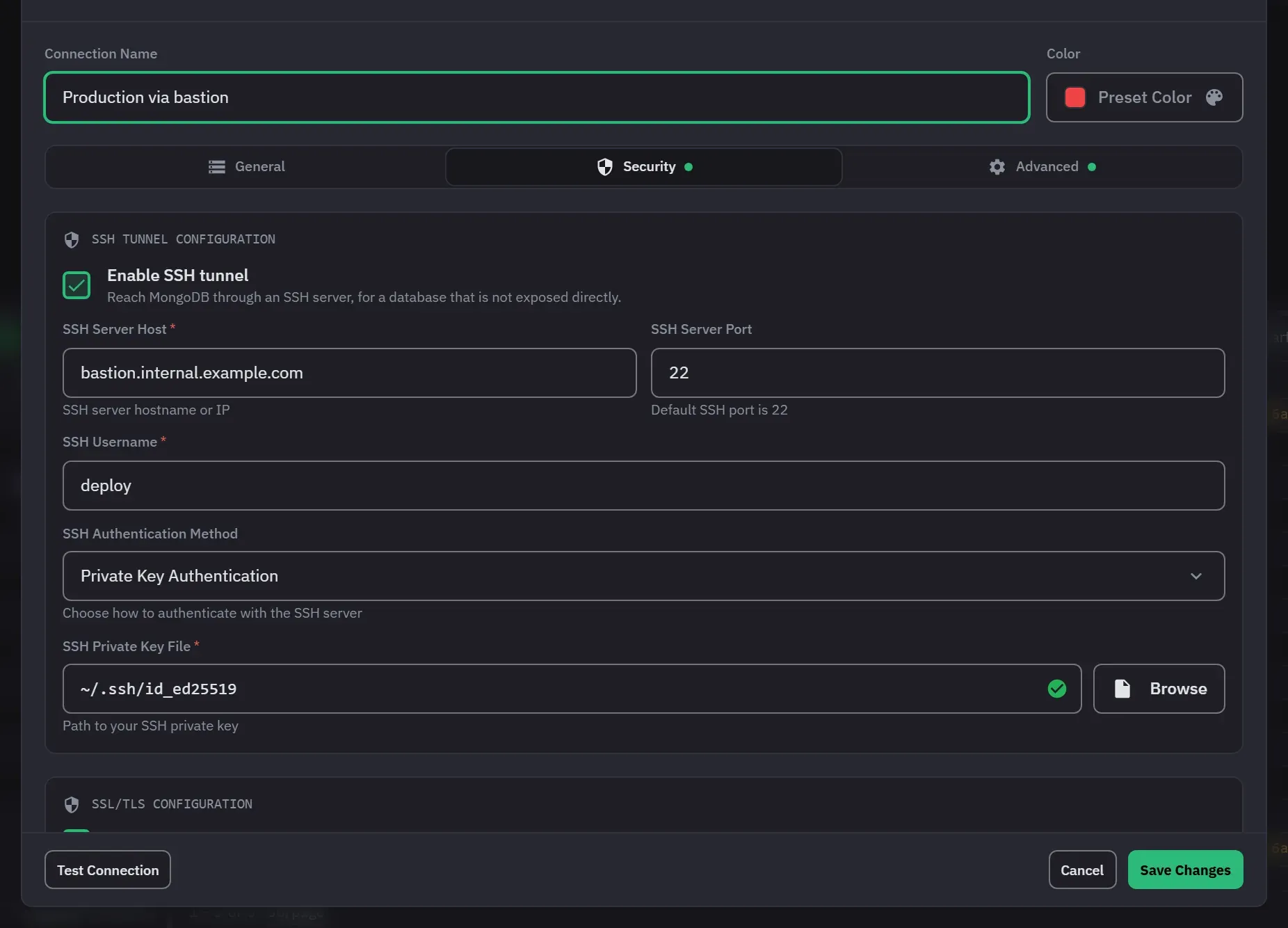
- Open the connection dialog with Add Connection in the sidebar, or edit a saved connection. Fill in the MongoDB host and port on the General tab. You can use a connection string or Individual Fields. The tunnel settings are separate and work with both.
- Enter the host and port as the jump host sees them. This is the part people get wrong: if
Mongo runs on the jump host itself, that is
localhost:27017, not the public name. The tunnel forwards the first host in the string only, so name one host. - Open the Security tab and tick Enable SSH tunnel.
- Fill in SSH Server Host, SSH Server Port (22 by default) and SSH Username.
- Set SSH Authentication Method to Password Authentication or Private Key Authentication. Then fill in SSH Password, or choose the SSH Private Key File. The app has no field for a key passphrase, so use a key that has none.
- For a replica set, open the Advanced tab and set Connection Type to Direct Connection (Single Server). The tunnel reaches one server, and the other members use names your machine cannot resolve.
- Click Test Connection. Connection Successful appears next to the button when the tunnel and the login both work. Create Connection also runs this test, and it does not save a connection that fails.
When it will not open
A tunnel that cannot be established reports the reason, and the connection does not open. The dialog shows Connection Failed, and a notification gives the reason. It does not fail halfway and leave you wondering which half worked. A cancelled attempt tears down a tunnel that had already come up.
The tunnel closes with the connection
Tunnels close when their owning connection, or a connection test, ends. That is intended: the tunnel is part of the connection rather than a separate thing you manage.
About stored secrets
Secrets are encrypted on the device that saved them. A connection profile copied to another machine carries a secret that machine cannot decrypt, and Monghoul treats it as empty rather than failing in a confusing way. Re-enter it on the new machine.
TLS on top
TLS and the tunnel are independent, and you can use both. On the Security tab, tick Enable SSL/TLS encryption and give the CA Certificate File rather than Allow invalid SSL certificates, which turns off the check that makes TLS useful.
Next
- Connection problems for what the failures look like
- Connections and security for the eight authentication methods