Aggregation builder
Build a pipeline stage by stage and preview each stage, or write it as code. The two views stay in sync.
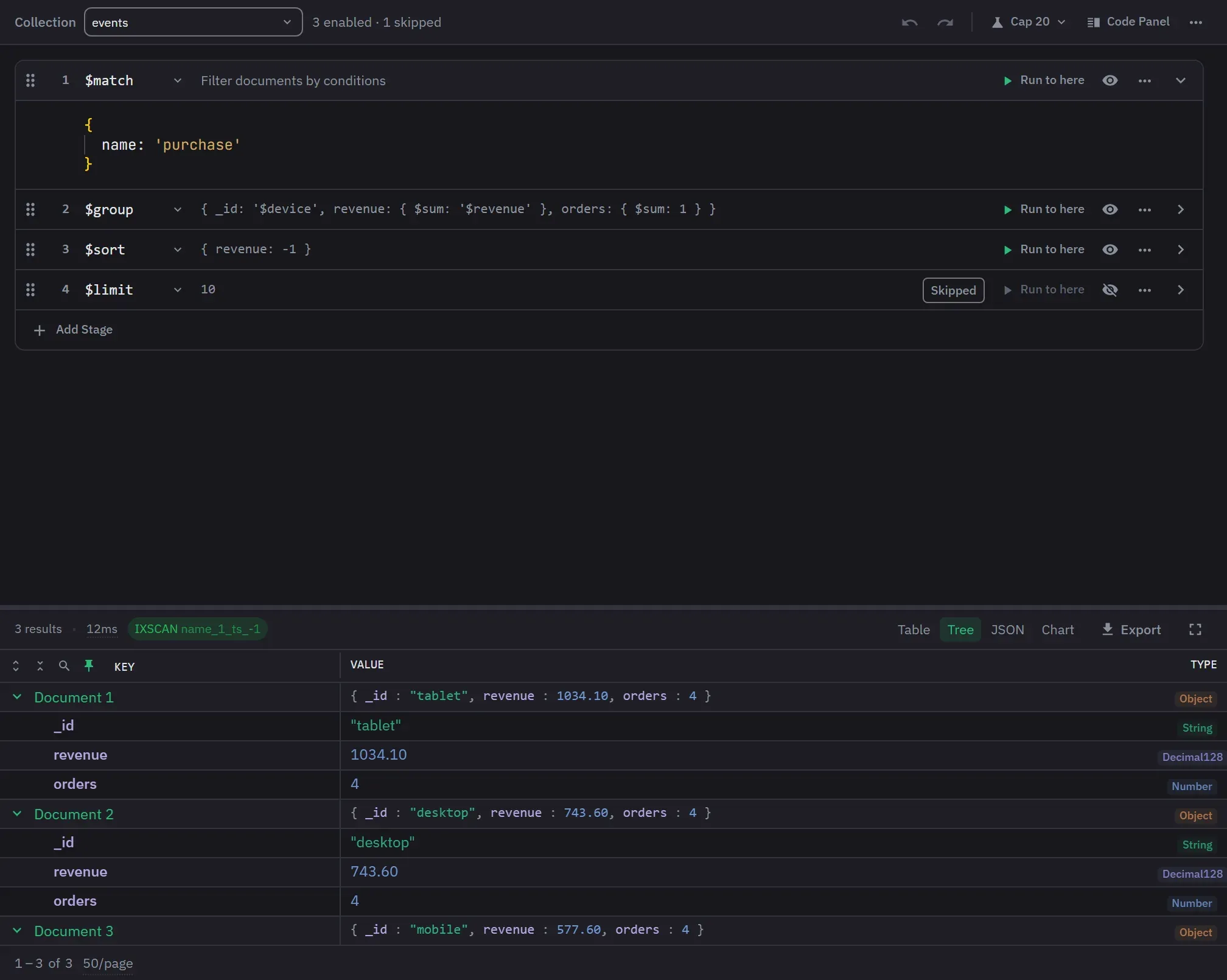
A pipeline can be built as an outline of stages or written as code, and the two are the same pipeline. The toolbar’s Builder button opens the builder and stays lit while it is open, and a second click returns to the code editor. Switching back writes your last edit into the code and formats it. The generated code also sits in a side panel that the header’s Code Panel toggle opens, and you can resize it and copy from it in place.
The builder is on every tier. The interface settings can hide its toolbar button.
Opening the builder
Opening the builder on an existing tab does not rewrite the tab’s query. Until your first edit, the code stays exactly as it was. The builder takes its pipeline from the first of these that applies:
- The pipeline the tab stored, if it still produces the tab’s code. The stored pipeline keeps what code cannot: skipped stages, collapsed state and stage identity.
- An aggregation call that the builder can read in the code.
- Only the collection name, when that is all it can read.
- The collection of the tab’s last result, or the first analyzed collection.
The pipeline runs on one collection. Choose it from the analyzed collections, or type it when none is analyzed. A name that is not in the list is kept.
Leaving the builder writes any change that is not yet in the code, so an edit made just before the switch is kept.
A pipeline the builder cannot fully read is cut down to the part it understood, and the cut is
written back on your first edit. These do not survive a trip through the builder: an aggregation on a
database and not a collection, a second options argument, a trailing explain call, an array that
holds anything but single-operator stage objects, and any other statement or comment around the
pipeline. Keep such a query in the code editor. The stage picker also leaves out the stages that run
only on a database, because the builder always builds a collection pipeline. Write those in the code
editor.
Building a pipeline
The stage picker carries every stage that runs on a collection, searchable and grouped by category:
$match, $group, $lookup, $facet, $graphLookup, $setWindowFields, $densify, $search,
$vectorSearch and the rest. The categories are Filter & Sort, Transform, Group & Aggregate, Join &
Combine, Output and Other, and a coloured dot beside each stage marks its category. The picker works
from the keyboard: the arrow keys move through the stages, Enter adds the highlighted one, and
Escape closes it.
Stages your server cannot run are marked with the version they need, and cannot be chosen. The same check covers a stage’s operator list and the quick starts. It applies only when the server’s version is known. The code editor has no such check, so you can still write a stage the picker will not offer you.
A new stage starts from a useful template. Changing a stage’s operator puts in the new template only while the body is still the old one, so a body you wrote is kept. The empty builder lists eight quick starts, each with the stages it adds: Filter & Sort, Group & Count, Join Collections, Top N per Group, Time Series, Distinct Values, Reshape & Clean, and Multi-Facet Report. Applying one replaces the whole pipeline, and it can be undone.
The pipeline is an outline with one row per stage. A row shows the stage’s number, its operator, its body on one line, its state and its controls, and a collapsed row is one line, so a long pipeline fits on one screen. The state is one word or number: Skipped, Syntax error, Running, Out of date, Failed, or the document count of the last preview, with “capped” when the output was cut short.
Run to here, the Skip toggle and the fold sit on the row. The row’s stage menu holds Insert Stage Above, Insert Stage Below, Duplicate, Move Up, Move Down and Remove, and the Add Stage row at the end of the outline adds a stage last. Stages also reorder by dragging their handle, with the mouse or the keyboard. The header’s pipeline menu expands, collapses, skips or includes every stage in one action, and its Clear Pipeline item empties the pipeline.
A collapsed stage prints its body on one line, so a folded pipeline is still readable. A collapsed
$facet names its branches and how many stages each one has. A $facet, and a $lookup with a
pipeline, offer Edit in Code Editor in their stage menu.
Writing a stage
Syntax errors are caught before execution. An open stage shows the full message under its editor, and a collapsed row says Syntax error, with the message on hover.
Each stage editor gets autocomplete that is aware of the schema, the types, the indexes, the
variables in scope and the pipeline so far. The index awareness is the part the main query editor
does not have: indexed fields and valid compound-index continuations rank first in $match and
$sort. A $match key also offers nested paths such as payment.method, quoted as needed, and a
string after $eq or $ne offers the values the field holds.
$lookup has a form, the Lookup Helper, with from, as, localField and foreignField fields that sync
both ways with the stage body. It shows while the stage is open, offers the database’s collections
and the fields on each side, and takes free text where no fields are analyzed. The form edits only
the value you change, so let, pipeline, comments and formatting stay as written, and it names the
other keys it keeps. When the body is not a plain object, the form turns off and says why.
Previews
A stage’s preview runs the enabled stages from the top down to that stage. Under an open stage it shows the first 10 documents as a tree, with the document count and the round-trip time. A collapsed row shows the count of its last preview, so Collapse All Stages folds the previews too. One preview runs at a time, and Ctrl+Enter (Cmd+Enter on macOS) runs one from inside a stage’s body.
The preview settings sit behind one header button whose label states both of them. Output cap adds
$limit: 20 to the end of a preview and is on by default. It adds nothing when the pipeline already
ends in $limit, $count, $merge or $out. With it off, a preview still reads at most 1,000
documents, and it reads at most 200 when the cap is on but its $limit was not added. When the output
was cut short, the count says so, because it is then a floor rather than a total.
Auto preview is off by default. Turned on, it runs a stage’s preview 1.5 seconds after you stop
typing in that stage. It never runs a preview that includes an enabled $out or $merge, and
turning it off cancels a preview already waiting. A preview is cancellable from the
current-operations panel.
An edit discards the previews from the changed stage downward, so a stage never shows an older pipeline’s result as if it were current. A body edit keeps that stage’s own preview on screen, marked Out of date with the key that runs it again, and typing the old body back makes it current again. Changing the collection, database or connection discards every preview.
A failed preview names its root cause instead of the server’s wrapper chain, and the full original message stays one click away and copyable. When the message names one stage operator and only one enabled stage above uses it, the preview says which stage that is. Known failures, such as an unknown stage name, come with a hint, and a preview you cancelled reads as cancelled.
The builder has no explain control of its own. The toolbar’s Explain runs the tab’s code without changing it, which in builder mode is the pipeline as last synchronized. Opening the builder does not change the tab’s code, so until you have edited the pipeline once, Explain explains the tab’s original query.
Safety, search and history
$out and $merge are marked destructive and honour the connection’s write protection. On a
write-protected connection, a preview that includes the writing stage asks for the same confirmation
a destructive query does.
From four stages, the header’s pipeline menu offers Filter Stages. The filter matches the operator name, the description or the body, and marks the matching stages in place.
Undo and redo cover structural changes, up to 50 history entries. Ctrl+Z undoes, and Ctrl+Shift+Z or Ctrl+Y redoes (Cmd+Z and Cmd+Shift+Z on macOS). In a text field or a stage editor, the keys undo that field’s typing instead. Typing in a stage body, collapsing a stage and changing the collection are not in the pipeline history.
Pipeline structure, enabled and collapsed state, the collection and the editor mode all persist with the tab. Previews, the undo history, the stage filter, the code panel and the preview settings last only until the tab leaves the builder.