Monghoul against NoSQLBooster
NoSQLBooster measured against Monghoul on one machine: 455 MB against 106 MB on disk, 0.71 s against 0.07 s to a window, 585 MB against 398 MB of memory.
On this page
Monghoul gives you a code editor and a visual aggregation builder in one window. Autocomplete suggests your own field names and values and follows them through each stage, and the free tier keeps import, export and the explain plan with no time limit. In our test its window appeared in 0.07 s against 0.71 s for NoSQLBooster, and it took 105.6 MB on disk against 454.9 MB.
NoSQLBooster is built for people who would rather type. It runs SQL SELECT queries with joins against MongoDB, even on its free edition, and its paid editions add a script debugger with breakpoints. Both sides are below.
What was measured
The numbers, and how they were taken:
- Machine
- One Windows 11 PC, both apps installed
- Runs
- 7 launches each from a full stop, median
- State
- Nothing connected, checked by the script
- Measured
- 12 September 2026, with the script
The full method
Both installed on the same Windows 11 machine and measured with the same script, published at github.com/Kontsedal/monghoul-public/tree/main/benchmarks/client-footprint. NoSQLBooster 11.1.6 against Monghoul 1.12.0. Every figure is the median of 7 launches, each from a fully stopped state, with memory sampled 20 seconds after the window appeared. The script counts each app's own established connections. NoSQLBooster reopens the session it had last, so it was measured with that session closed and nothing connected, which is the state every other client here was measured in. Memory is summed private working set, so a page shared between an app's processes is counted once rather than once per process. Measured 12 September 2026.
- Time to the app window
-
- On disk
-
- Idle memory, nothing connected
-
Files installed: 94 against 7. Processes: 6 against 8. These describe each install, and fewer is not better.
NoSQLBooster held 583 to 590 MB across the seven runs and reached its window in 0.67 to 0.73 s. Ours held 396 to 418 MB and 0.070 to 0.089 s.
It reopens your last session, and the benchmark had to account for that. NoSQLBooster reconnects to whatever database you had open when you closed it. That is a reasonable default, and it makes a memory figure hard to compare, because an open cursor is not an idle state. The script counts each app’s own established connections and reports the database it reached, so the figures above were taken with the session closed, which is the state every other client here was measured in.
Both of us render in a browser engine, and only one of us ships it. The measurement found five bundled Chromium artifacts in the NoSQLBooster directory and none in ours. It is an Electron application, so the browser is inside its 454.9 MB install. Monghoul uses the WebView2 already on Windows, which is why six of our eight processes are WebView2 ones.
0.71 s is quick for Electron. Compass takes 1.26 s on the same machine with the same script.
Where Monghoul is ahead
What the free tier keeps
After the 30 day trial, NoSQLBooster’s free edition drops import and export, the visual query builder and explain plan, the test data generator, the script debugger and the AI services, and its code completion becomes partial. Its edition comparison lists each one. Monghoul’s free tier has no trial to run out. It keeps JSON, Extended JSON, NDJSON and CSV import and export, the aggregation builder, the explain plan, the test data generator up to 500 documents, and the full autocomplete.
A code editor and a builder, both
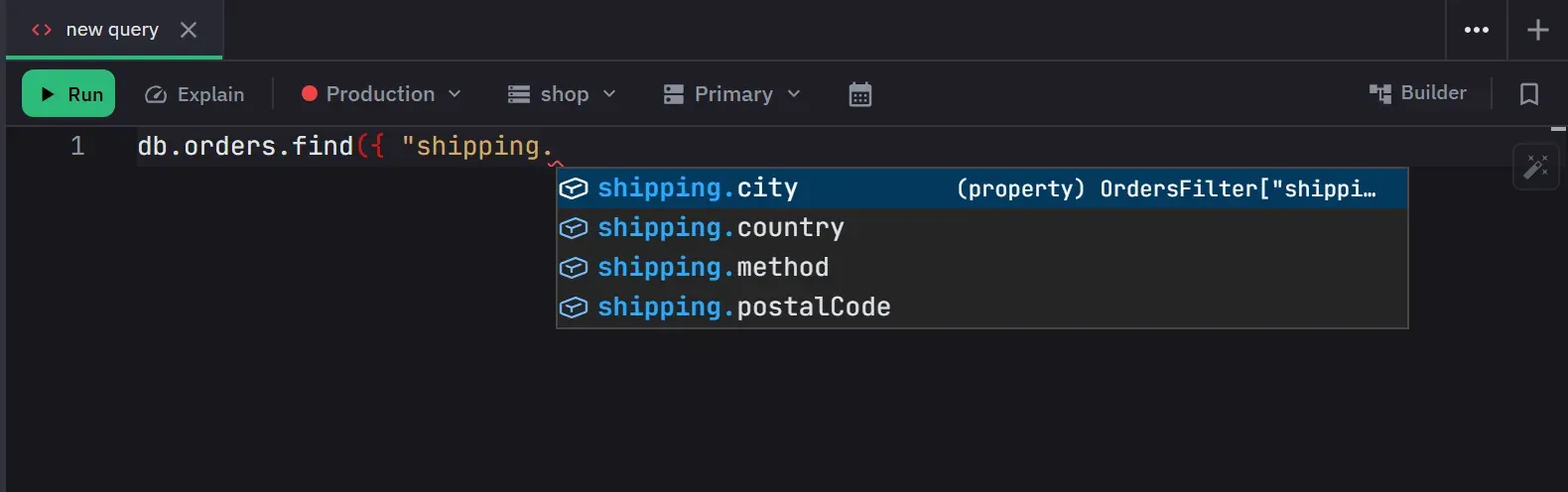
Monghoul has a Monaco code editor with a JavaScript sandbox, so you can type everything. It also has a visual builder that runs a pipeline up to any stage you pick, and the two convert into each other. The aggregation builder.
Autocomplete from your data
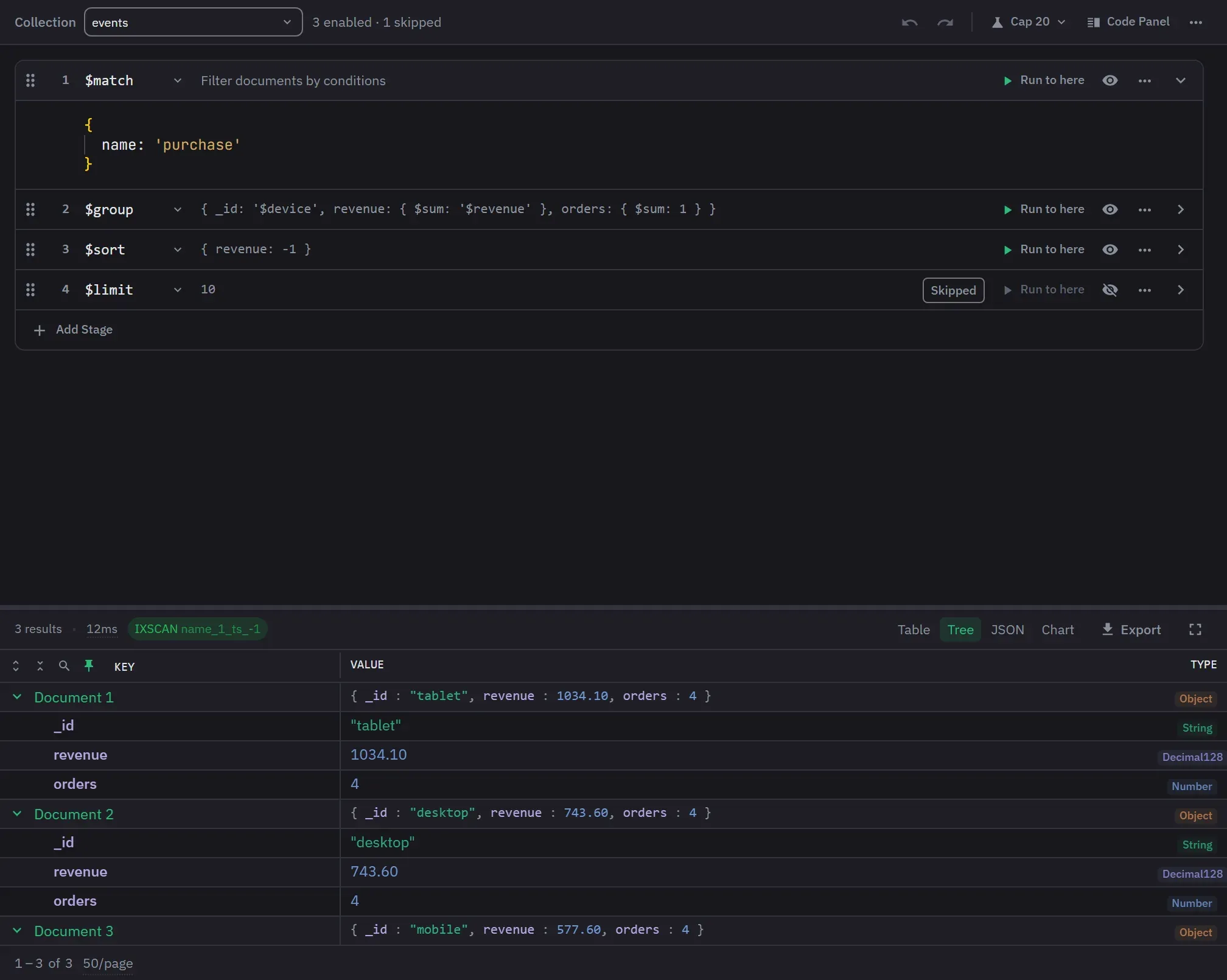
Completions come from the active database’s sampled field paths, types and values, and they stay correct deep inside a pipeline, where the fields change from stage to stage. A field name is never offered where a string value belongs, because accepting one would build a filter that matches the field’s own name. Sub-pipelines are offered only the stages they may contain. The full behaviour.
References found for you, and then used
NoSQLBooster 11 opens the document a DBRef points to in a new shell tab, and writes the $lookup
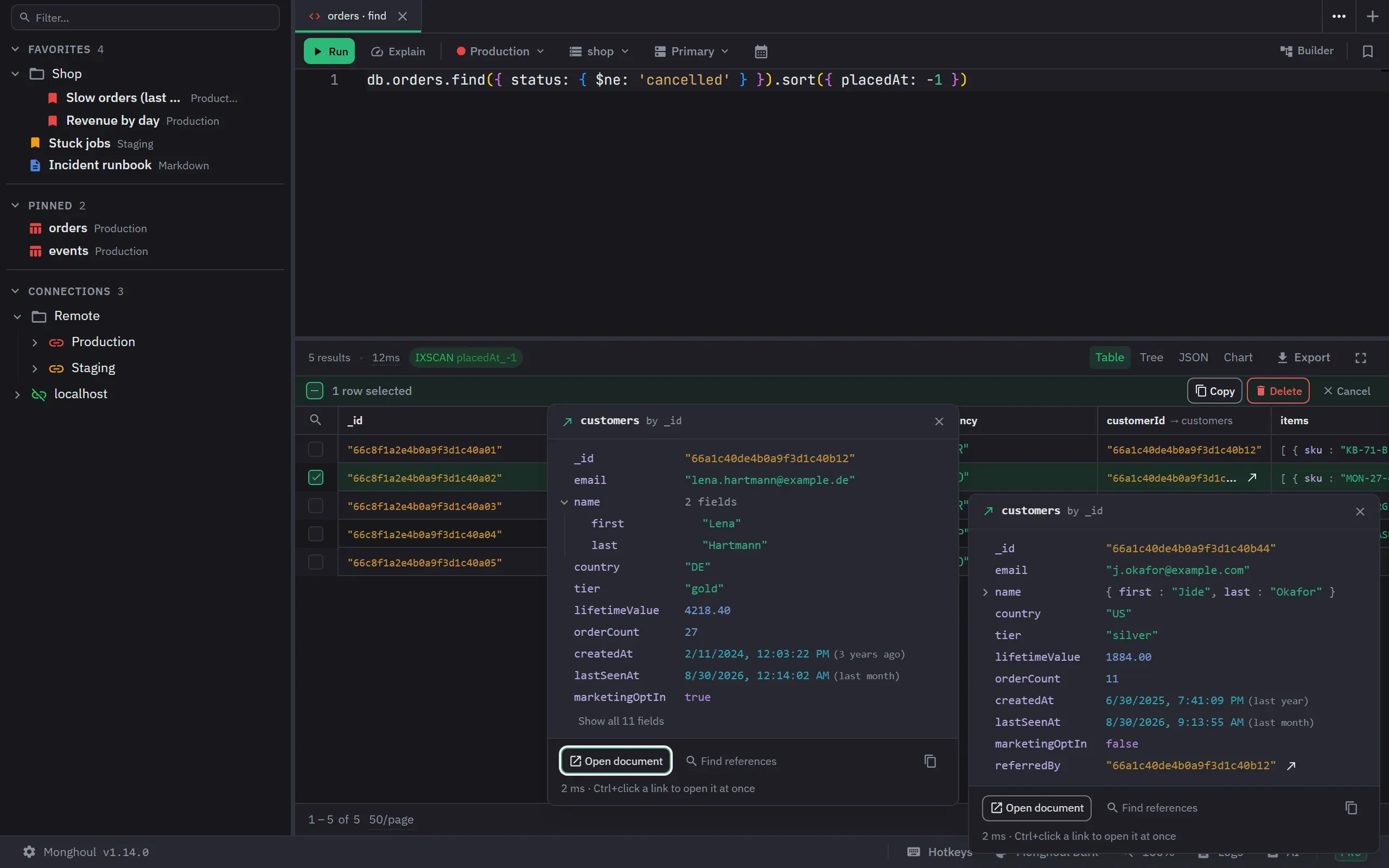
for it. Monghoul’s Database Map finds references by a scan, DBRefs and plain ids alike, checks each
one against the data and says how sure it is. After the scan, an id in a result opens its document,
$lookup suggests the referenced collection and then the two fields that join them, and the
Findings view lists references with no index and values that match nothing.
How the Database Map works.
Write protection at the driver
The check runs as the driver executes the call, so the way the text was written does not matter. It is scoped per connection, to everything or to named databases and collections. Where that check runs decides what it catches.
The assistant you already use, over MCP
NoSQLBooster puts an AI Chat panel in its window, and its AI services need active software assurance. Monghoul Pro exposes the app to the assistant you already use, as 80+ MCP tools behind a token. It reaches only the connections you allow, and its queries wait for your approval by default. How that is set up.
Speed
0.07 seconds to a window against 0.71. Theirs is quick for an Electron app, and ours is quick because it ships no browser: 105.6 MB against 454.9 MB on disk.
Where NoSQLBooster wins
SQL to MongoDB. Write a SELECT with a join and get a query back, on the free edition too. Compass has nothing like it and neither do we. For somebody who comes from SQL, this is often the whole decision.
A script debugger. The paid editions add breakpoints, step-by-step execution, a call stack and watched variables for shell scripts. Monghoul has no debugger.
The free edition permits commercial use. That is rarer here than it sounds. Studio 3T Community Edition is non-commercial only, so a working developer cannot use it at work at all.
A macOS floor of 10.15, where we require macOS 11. On older hardware that decides it.
One licence key works across Windows, macOS and Linux.
Capability by capability
The NoSQLBooster column comes from three places: its own features page, read on 13 September 2026; its edition comparison and its 11.0 release post, read on 1 October 2026; and the running application, version 11.1.6, whose toolbar reads Connect, Run, Debug, Stop, Import, Export, Monitor, Tasks, Mock Data, Schema, AI Chat. Our column comes from the feature specification.
- Yes
- A different approach
- No
| NoSQLBooster 11.1.6 | Monghoul 1.14.0 | |
|---|---|---|
| Queries and pipelines | ||
| SQL SELECT against MongoDB | Yes. Yes, with joins and expressions, on the free edition too | No. No. There is a free converter on this site |
| Visual aggregation pipeline builder | No. Not offered. The fluent query builder is written as code | Yes. Yes, with eight quick starts |
| Run a pipeline through one stage | No. Not offered | Yes. Yes, any stage you pick |
| Script debugger | Yes. Yes, with breakpoints, on the paid editions | No. No |
| Relationships and analysis | ||
| Open the document a reference points to | Yes. Yes, for DBRefs, since version 11 | Yes. Yes, after a Database Map scan finds and checks the reference |
| Visual explain plan | Yes. Yes, on the paid editions | Yes. Yes, with four plan grades, on the free tier too |
| Schema analysis | Yes. Yes, sampled with type percentages | Yes. Yes, sampled, with enum detection |
| Data and operations | ||
| Test data generation | Yes. Yes, over 100 templates, on the paid editions | Yes. Yes, a Faker catalog in seventeen categories |
| Server monitoring | Yes. Yes | Yes. Yes, on Pro |
| Import formats | Yes. JSON, BSON, CSV, TSV, SQL, on the paid editions | Yes. JSON, Extended JSON, NDJSON, gzip, CSV, TSV; Excel on Pro |
| Assistance, licence and platform | ||
| AI assistant | Yes. Yes, a chat panel in the window, with active software assurance | A different approach. Yes, on Pro, as MCP tools an outside assistant calls |
| Free edition usable at work | Yes. Yes, after the 30 day trial ends | Yes. Yes, with no time limit |
| Minimum macOS | 10.15 | 11 |
The NoSQLBooster column was read from the vendor's documentation and the running application, version 11.1.6, on 13 September 2026, with rows added on 1 October 2026. It records whether a capability exists, not whether it is any good, which is not a thing a table can hold.
Which one to pick
Pick Monghoul if
- you want a code editor and a visual pipeline you can run up to any stage, in one window
- you want autocomplete from your real schema
- you want a free tier that keeps import, export and the explain plan, with no time limit
Pick NoSQLBooster if
- SQL translation is the feature you came for
- you want a script debugger with breakpoints
- you are on macOS 10.15
Try both
A table cannot tell you how a shell feels under your hands, and that is the whole case for NoSQLBooster. Its trial is 30 days and our free tier has no time limit, so pointing both at the same database for a week costs an afternoon.
Reproducing the numbers
git clone https://github.com/Kontsedal/monghoul-public
cd monghoul-public/benchmarks/client-footprint
.\measure.ps1 -Runs 7 -Only 'NoSQLBooster|Monghoul'
It force-stops matching processes between runs, so close anything you care about first. Watch the
DbConnections field in the output. If NoSQLBooster reopens a saved session, that field names the
database it reached and the memory figure beside it is a connected one, not an idle one.
Questions people ask
- Is NoSQLBooster free after the trial?
- Yes. The installer runs as a 30 day trial of the full product, then becomes a free edition that permits personal and commercial use. Its edition comparison lists what the free edition drops, among them import and export, the visual query builder and explain plan, the script debugger, the test data generator and the AI services. Read on 1 October 2026.
- Does NoSQLBooster support SQL?
- Yes. Its features page claims SQL SELECT queries against MongoDB with support for SQL joins, functions, expressions and aggregation over nested objects and arrays, plus SQL to MongoDB conversion snippets. Its edition comparison lists SQL query with JOIN on the free edition too. Read on 13 September and 1 October 2026.
- Does NoSQLBooster reconnect when it opens?
- Yes. It reopens the session it had last, so it connects to the database you were using before you can ask it not to. This was measured rather than assumed: the benchmark counts each application's own established connections and reported the database it reached.
- What is the minimum macOS version for NoSQLBooster?
- macOS 10.15, against the macOS 11 that Monghoul requires.