Schema analysis
Sample a collection and get every field, its types, and how often each one appears.
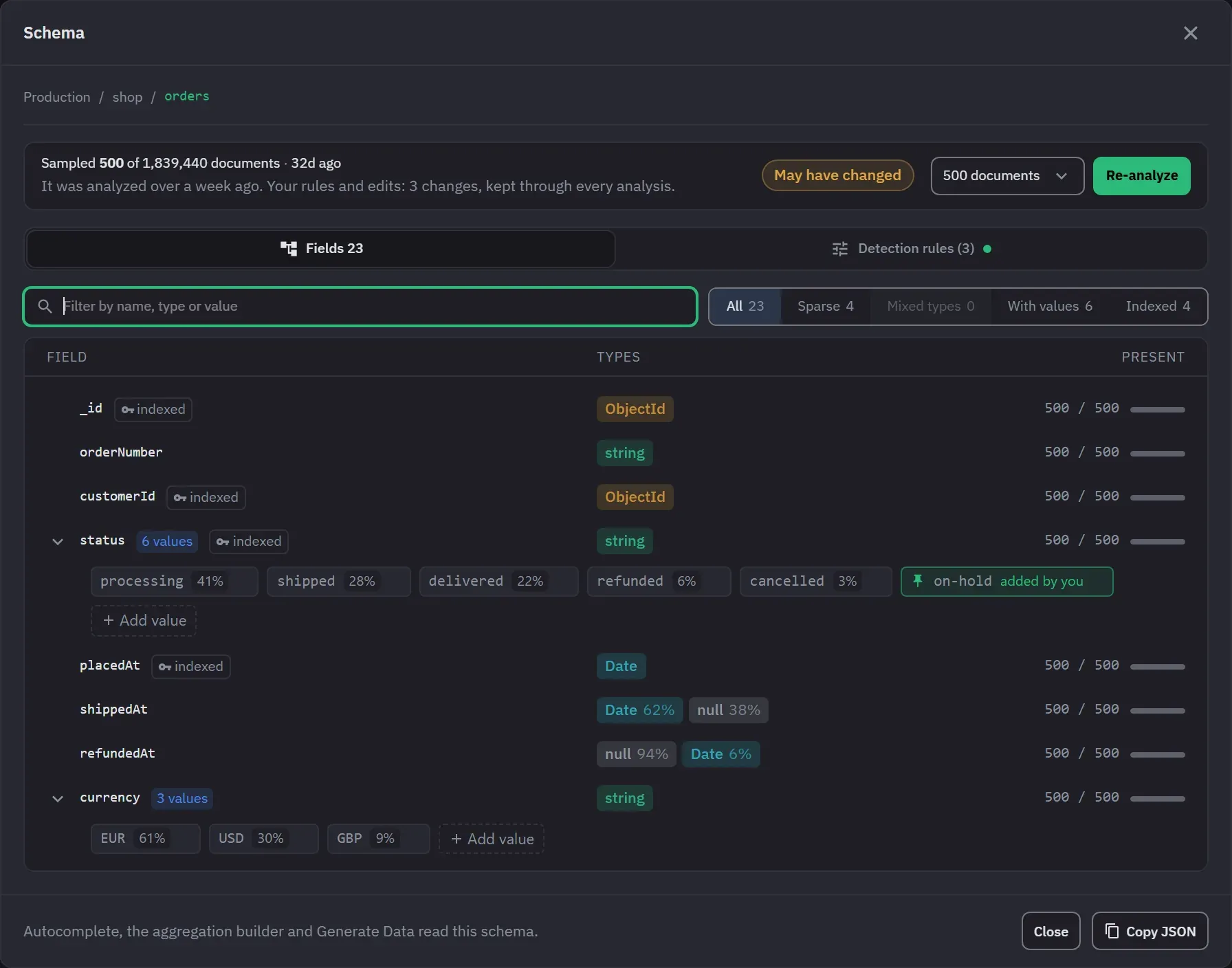
MongoDB does not tell you what is in a collection, so Monghoul samples it and works the shape out. Schema, in a collection’s context menu, opens the Schema view. It shows the fields, their types and how often each one appears. Autocomplete, the aggregation builder and Generate Data read the same schema.
Running an analysis
The status strip at the top of the Schema view says how many documents were sampled out of the collection’s total, and how long ago. Beside it are a sample size menu and the Analyze button, which reads Re-analyze once a schema exists.
- The sample size menu offers 100, 500, 1K, 5K and 10K documents. An analysis you start here takes at least 100 documents.
- Free analyzes up to 500 documents per run, from the Schema view, the editor strip and the
analyze_schemaAI tool. A larger size is disabled in the menu and marked Pro. - Progress shows in the strip, and Cancel stops the run. The previous schema stays on screen while a new analysis runs.
- A run you start is listed in the footer’s current operations under the collection’s name. Closing the tab that started it stops it.
- A collection with no documents says that none were found. Nothing is stored for it.
The result is stored, so the Schema view shows it again after a restart without a new run. Copy JSON, in the footer, copies the whole schema.
What you get back
The Fields tab lists the fields with _id first and the rest by name. Nested objects and arrays
expand in place. Three columns describe each field.
- Field is the name. Indexed fields carry an index badge that names the indexes.
- Types shows a badge for each BSON type found, with its share of the field’s values. Types are
the BSON names, so Int32 and Double are two types and a Binary of subtype 4 is a UUID. An array
shows its element types, so a mixed array reads as
array<number|string>. An empty array counts as empty, not as a type. - Present is an exact count, such as 118 / 500, and a bar. A top-level field counts against the sampled documents, a field of a sub-document counts against the documents that have it, and a field inside an array counts against the array’s items. 499 of 500 is shown as sparse and is never rounded up.
A field with more than one type, nulls aside, is marked Mixed types. It is the only warning the list shows.
New paths stop being followed at 2,048, and the view says so. This keeps a collection whose keys are data from filling the stored schema.
The strip says May have changed when Monghoul wrote to the collection since the analysis, when the document count moved by a fifth, or when the schema is more than a week old. Monghoul counts a query or a result edit that writes, an import, and Generate Data as writes.
Finding a field
The filter box matches a field’s name, its dot path, one of its types, or one of its values. The chips narrow the list further, and each one shows its count.
- All
- Sparse
- Mixed types
- With values
- Indexed
Each field row can copy its dot path, insert the path at the cursor of the query editor you used last, and add a value to the field.
Values
A field gets values when it holds a small, repeated set of them. The values feed autocomplete in queries and in the aggregation builder, the result viewer’s editor and Generate Data. They show under the field as chips, each with its share of the sample.
The Detection rules tab holds the rules. They are saved with the collection and apply to every analysis, whoever starts it.
- Detect fields with a small set of repeating values turns detection on or off.
- A field gets values when it has at most 20 distinct values, each seen 5 times or more on average. You can change both numbers. A field can have 50 distinct values at most, because the analyzer keeps no more.
- Numbers too and Array items include numeric fields and the items of arrays. Both are on by default. A string and a number with the same text count as different values.
- Always collect values and Never collect values are lists of field paths. A field in Always keeps every tracked value, 50 at most. A field in Never gets none.
_idnever gets values. Nulls do not count as values seen. A value longer than 200 characters is text, not a category.
The tab previews which fields a rule change adds or drops, using the stored sample, and a new sample is not needed. If the stored schema is older than the value counts, the tab asks you to re-analyze.
Editing values
Add a value to any field, or hover a chip and remove it. An edit is kept through every later analysis, and the chip says “added by you”. The tab lists each edit under Your value edits with an Undo button. A schema analyzed before these rules keeps its values, and the first new analysis keeps any value the new sample did not see as an added edit, marked “kept from an older analysis”.
When analysis runs
Automatic analysis runs in the background for the collections that an active query tab references and that have no schema yet. It runs again when a schema is a day old, when Monghoul wrote to the collection, or when its document count moved by a fifth. Background runs sample within a byte and time budget, run one at a time for each connection, and back off after a failure. They are not listed in current operations, and a failed one raises no error.
Automatic analysis is on by default, at 50 documents. Both settings are global. The global sample size offers 50, 100 or 500 documents. Each connection can inherit them or override them, forcing automatic analysis on or off and setting the sample to 50, 100 or 500.
A collection reached through $lookup.from, $graphLookup.from, $unionWith, $merge.into or
$out is analyzed automatically, because a pipeline that names it needs its fields too.
Where a schema is missing, a strip under the editor says so and analyzes it in one click. The strip appears in the aggregation builder as well as the code editor. It also offers Open schema, and you can dismiss it until the schema changes. A collection with no documents says it has nothing to analyze instead of reporting a missing schema.
A Database Map scan also writes schemas. A scan that samples more documents than a collection’s stored schema was built from replaces that schema.