AI access
The built-in MCP server: which clients connect, what they are allowed to reach, and what needs approval first.
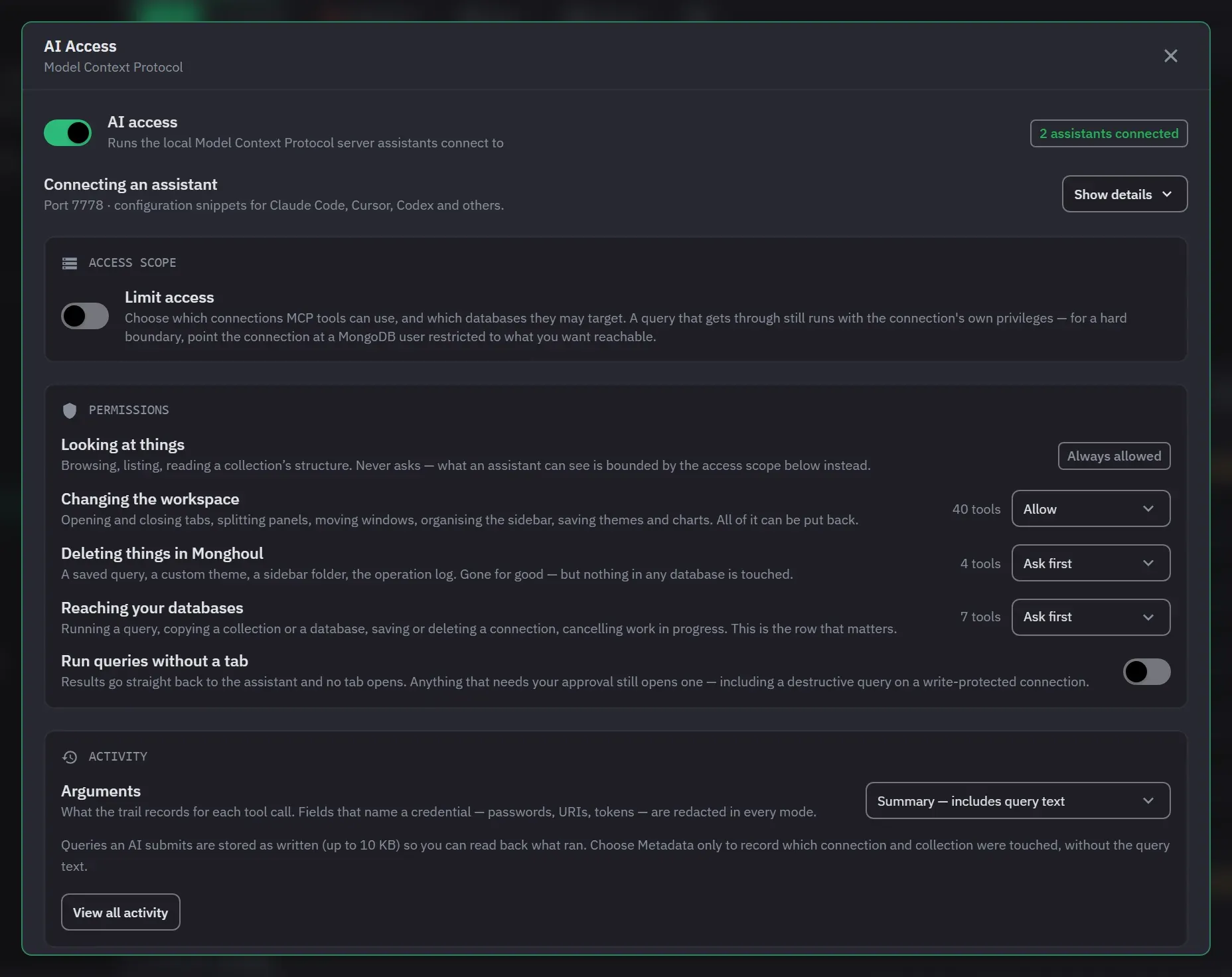
AI access lets assistants work with Monghoul over the Model Context Protocol (MCP). Monghoul runs the server; the assistant connects to it and calls tools. It works with Claude, Cursor, Windsurf and any MCP-compatible client, and there are 82 tools in 16 groups. The status bar shows AI access as AI, its panel is AI Activity, and its settings window is AI Access. For a step-by-step walk through, see Set up AI access.
Setting it up
Setup is a three-step flow, in that order on purpose: Choose what it can reach, Decide what it may never touch, then Start AI access. The controls that bound an assistant come before the control that starts one, and nothing is saved until you start it. A new setup begins with nothing selected.
The address, the token and the ready-to-copy client snippets appear once access is running, and not during setup. The server has not bound a port until you start it, so there is no address to paste before that. Closing the window part-way changes nothing.
Once access is running you can switch the server off and on, choose its port, and generate or replace its authentication token.
- Port. The valid range is 1024 to 65535, and an empty field lets the system choose. Monghoul saves the port when you leave the field, and it refuses a value outside the range with a message. If your port is not free at startup, the server uses another port for that run and says so. It keeps your stored choice.
- Token. Monghoul creates the token the first time you open the settings. Replacing it takes effect at once, and every client that still uses the old token is refused until you update its configuration.
- Snippets. The Connect from picker has Claude Code, Claude Desktop, Cursor, Windsurf, Codex and
Gemini CLI. Each snippet sends the token in an
Authorization: Bearerheader where the client can set one. The address that Monghoul shows has no token in it. A snippet for a client that cannot set headers appends the token as a query parameter and says why.
The service accepts a browser request only from the app itself and from loopback addresses. A request with no browser origin, which is every command-line client, is accepted. A request with a missing or wrong token is refused as unauthenticated, and one that arrives while AI access is off is refused as disabled. Up to 50 assistants can be connected at once, and a further connection is refused. A session that has been idle for four hours is dropped.
When an assistant connects, a toast names the client. That handshake is the first thing an assistant does, so it is worth seeing. The settings and the snippet area count the connected assistants.
What an assistant can reach
Access is unrestricted or limited to selected connections and databases. Anything outside that is hidden from discovery, and an action aimed at one is refused.
Connection-wide access includes databases discovered later. Database-specific access does not, which is the difference to reach for when a connection will grow.
These limits organize what the assistant reaches. They do not replace MongoDB permissions.
Permissions and approvals
Permissions are one row per kind of change: Looking at things, Changing the workspace, Deleting things in Monghoul, and Reaching your databases. Each row is Ask first or Allow, and it shows how many tools it governs. Tools that are switched off are not counted.
Reads always run, and Looking at things shows Always allowed. Workspace changes are allowed by default. Deletions inside Monghoul and anything touching a database ask first. Setting Reaching your databases to Allow shows a warning, because Monghoul cannot inspect a query in advance.
- Changing the workspace covers tabs, panels, windows, the sidebar’s organisation, themes and charts. You can put all of it back.
- Deleting things in Monghoul covers a saved query, a custom theme, a sidebar folder and the operation log. It is permanent, and no database is touched.
- Reaching your databases covers running a query, copying a collection or a database, saving, testing or deleting a connection, and cancelling work in progress.
Any single tool can be set to Ask first or Allow, whatever its row says. Open a tool group, and each tool has a menu with Default, Ask first and Allow. Default follows the row and shows its current answer. An exception survives a restart. The Permissions section names every tool that has its own answer, and Clear puts them all back. A read-only tool has no such menu.
An approval names the operation, what it lands on, and any destructive methods found in submitted code. The heading of the card names the action, for example “Delete saved connection ‘Production’”, and the confirming button carries the same verb.
An assistant’s call waits about a minute for your answer. A quick decision returns the real result on
the original call. After that, the request becomes a pending approval, and the assistant asks again
with check_approval. Ignored, the approval declines itself after ten minutes and nothing runs. The
result of a decision stays readable for ten minutes. Approving after the assistant stopped waiting
still runs the operation. Approvals do not survive a restart of Monghoul. Switching AI access off
declines every request that is still waiting.
At most 25 operations can wait at once, and a further request is refused. An assistant that repeats a request that is still waiting joins the first one, and your one decision answers both. The AI Activity panel can decline everything that is waiting in one action, after a confirmation.
A non-destructive tool can be approved with Allow for session. The grant stops that tool from asking again until the assistant disconnects. It also ends after four hours of idle time and when AI access is switched off. Monghoul keeps it in memory and never writes it to disk. A destructive tool is never offered it, and it never covers a write-protected target or a tool you switched off.
An operation that the access scope refuses never becomes an approval. Monghoul checks an approved operation against the scope again when it runs, so narrowing access after you approve still stops it. A query that you opened in a detached window can be approved only from that window. You can decline it anywhere.
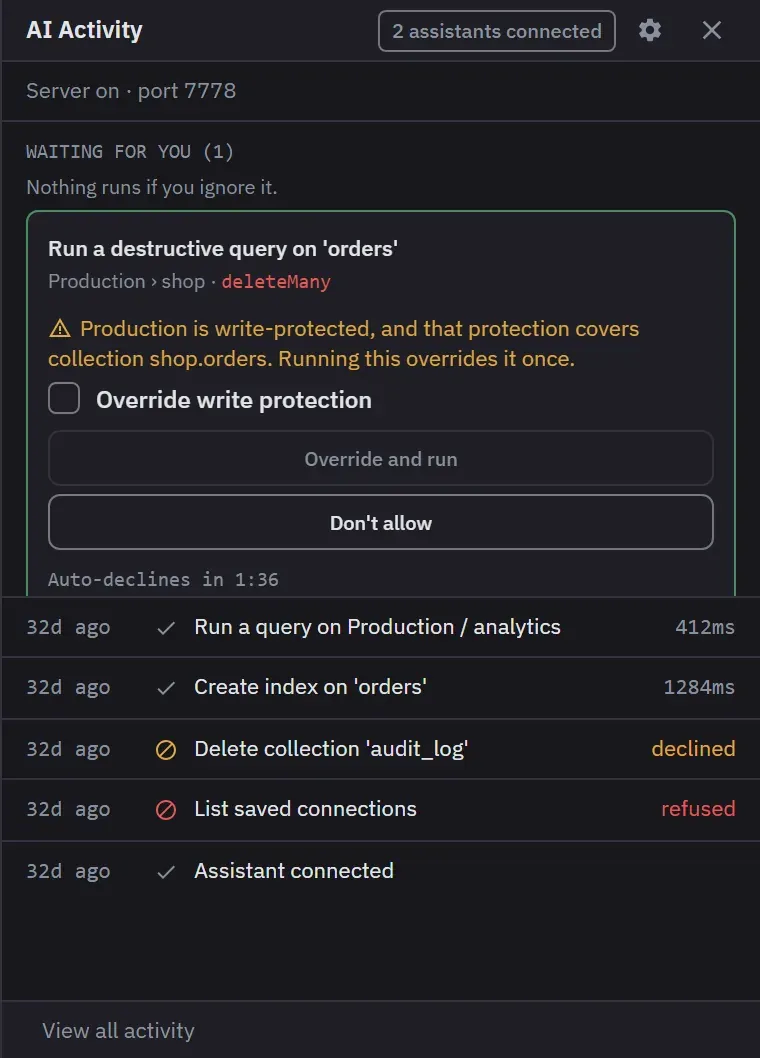
A destructive query against a write-protected target, or a copy into one, always asks, whatever the permissions say. Its confirming action stays unavailable until you tick the override beside it. Reading a protected connection and copying out of one are not asked about.
A query an assistant asks to run opens as a tab you can read and edit. Approving runs exactly what is on screen, and the banner marks the query as edited when you have changed it. Declining leaves the tab in place as an ordinary tab, and closing the tab declines the request.
Run queries without a tab, off by default, lets an assistant’s queries run with no tab. A query that needs your approval still opens its tab.
The tool catalog
The AI Activity panel docks beside the workspace, showing what is waiting, a live feed of recent activity, and how many assistants are connected.
Tools are organized into 16 capability groups. A group, or a single tool inside one, can be switched off in the Tools section of the settings. It is then refused for an assistant that is already connected, not only for the next one. An assistant that asks for a group you switched off, or asks for every group, is refused that group. Switching off a group makes the switches inside it inert, and the assistant is told when the rest of a group still works.
Ten tools are always available: list_connections, sync_databases, sync_collections,
execute_query, get_tab_result, create_query_tab, get_workspace, update_tab_code,
activate_tab and show_toast. So are the discover_tools, enable_tools, disable_tools and
check_approval meta-tools, which is how a client discovers and toggles the optional groups itself.
You cannot switch these two groups off. A newly enabled tool is callable on the client’s next turn.
| Group | Tools |
|---|---|
| Queries and results | list_connections, sync_databases, sync_collections, execute_query, get_tab_result, create_query_tab, get_workspace, update_tab_code, activate_tab, show_toast |
| Request status | discover_tools, enable_tools, disable_tools, check_approval |
| Collection structure | sync_indexes, analyze_schema, calculate_db_size, calculate_collection_stats, and the six Database Map tools below |
| Tabs | search_tabs, get_tab, restore_tab, create_markdown_tab, set_editor_split_size, set_result_fullscreen, remove_tab, clone_tab, reorder_tabs |
| Split panels | split_and_move_tab, split_panel, move_tab_to_panel, remove_panel, resize_panels |
| Separate windows | get_detached_windows, detach_tab, reattach_tab, update_window_bounds |
| Charts | save_chart_config |
| Saved connections | test_connection, add_connection, delete_connection |
| Pinned collections | list_pinned_collections, pin_collection, unpin_collection |
| Saved queries | list_favorite_queries, save_favorite_query, remove_favorite_query |
| Operation log | list_operation_logs, get_log_response_storage_config, set_log_response_storage_config, clear_operation_logs |
| Background tasks | list_running_tasks, get_task_progress, cancel_task |
| Copying data | clone_collection, clone_database |
| Appearance | list_themes, get_active_theme, get_theme_schema, set_active_theme, create_theme, update_theme, delete_theme |
| Sidebar | list_sidebar_tree, navigate_to_collection, navigate_to_database, navigate_to_connection, expand_in_sidebar, collapse_in_sidebar, toggle_sidebar, create_sidebar_folder, rename_sidebar_folder, move_sidebar_node, reorder_sidebar_nodes, toggle_sidebar_folder_collapsed, remove_sidebar_node |
| Replica set status | get_replica_set_status |
Nine tools are permanent in effect. execute_query, delete_connection, cancel_task,
clone_collection and clone_database reach a database. remove_favorite_query,
clear_operation_logs, delete_theme and remove_sidebar_node do not leave Monghoul. Closing a tab
counts as reversible, because restore_tab brings it back. enable_tools and disable_tools count
as writes, because they change what the assistant can reach.
An assistant can read which connections are write-protected, and what the protection covers, when it lists connections. It cannot change the setting. A protected database that the access scope hides is not named.
Database Map tools
The Collection structure group holds six tools for the
Database Map. All six are read-only except open_database_map,
which opens or focuses a tab, and set_relationship_verdict, which writes to the Database Map only.
get_database_mapanswers from the last Database Map scan and never starts one. It takesconnectionIdanddbName. The optionalcollectionNamelimits the answer to that collection and its neighbours withinhops(1 to 3, default 1).minTierisverified,likely(the default) orpossible, andincludeFieldsadds each collection’s fields and types.scan_database_mapstarts the same budgeted scan the tab runs, and returns at once. Callget_database_mapto read the progress. It takesconnectionId,dbName,sampleSize(1 to 1000) andresumeto continue a stopped scan. A scan that is already running is not started twice.open_database_mapopens the map’s tab, or brings it to the front. The optionalcollectionNameorrelationshipIdselects that item.find_join_pathreturns the shortest chain of references between two collections and its$lookuppipeline as text. It runs nothing. It takesfromCollectionandtoCollection, andmaxHops(1 to 4, default 3).get_database_findingsreturns the Findings view’s list, in the same words.kindlimits it to one kind of finding, andincludeHiddenadds the findings you hid.set_relationship_verdicttakes anactionofconfirm,dismiss,clearoradd. The first three take arelationshipId.addtakesfromCollection,fromField,toCollection,toField(default_id) and anoteof up to 500 characters that you read in the map.
The map shows which assistant gave a verdict or added a relationship, by the name its client gives. A relationship an assistant added counts as Likely until you confirm it.
The activity trail
The AI Activity window keeps the newest 1,000 calls across restarts, filtered by tool, outcome, risk, connection, time and text. When more than one assistant has been active, it also filters by assistant. View all activity opens it, and its list works from the keyboard like the Operation Logs list.
Each entry records which assistant asked, the arguments, the outcome, your decision and how long it took, with links to the operation log and to the tab it opened. A call the protocol refused before any handler ran is recorded too, so an assistant reporting a failure always has a row to match against.
An operation log an assistant caused links back to its call with View in AI Activity. That link opens AI Activity on top of Operation Logs, and Open operation log does the reverse. Closing the window on top returns the one below to the same filters, page, selection and scroll position. A link back to the window below closes the top one, so the two never stack a second copy.
The Arguments setting has three levels. Summary, which includes query text, is the default. It keeps targets and the query code as written, up to 10 KB, and reduces every other value to its shape. Metadata only drops the query text too. Full arguments is an explicit choice with a warning. Fields whose names identify a credential, such as URIs, passwords and tokens, are redacted at every level and at any depth. Redaction reads field names, so a secret typed into query text is not caught.
The trail keeps 1,000 entries, and that size is not a setting. The outcome of an entry is the tool’s
own verdict: success, error, refused by the access scope, rejected, expired, or still waiting. An
approved call reads running while it runs. Polling calls to check_approval and get_tab_result are
left out when they succeed.
Only you can clear the trail. No MCP tool can, and clearing the operation log leaves it untouched. Work an assistant did is attributed to it in the operation log, and tabs it opened are marked in the tab strip.
Boundaries
An AI-initiated query has no network access: fetch is withdrawn for it. A query you approve and
run yourself is unaffected.
AI-initiated query and chart changes appear in the open app without a manual refresh.
Expired Pro access switches the server off and keeps the configuration, along with every activity entry already recorded.