Data generation
Generate test documents from 17 Faker categories, previewed before anything is written.
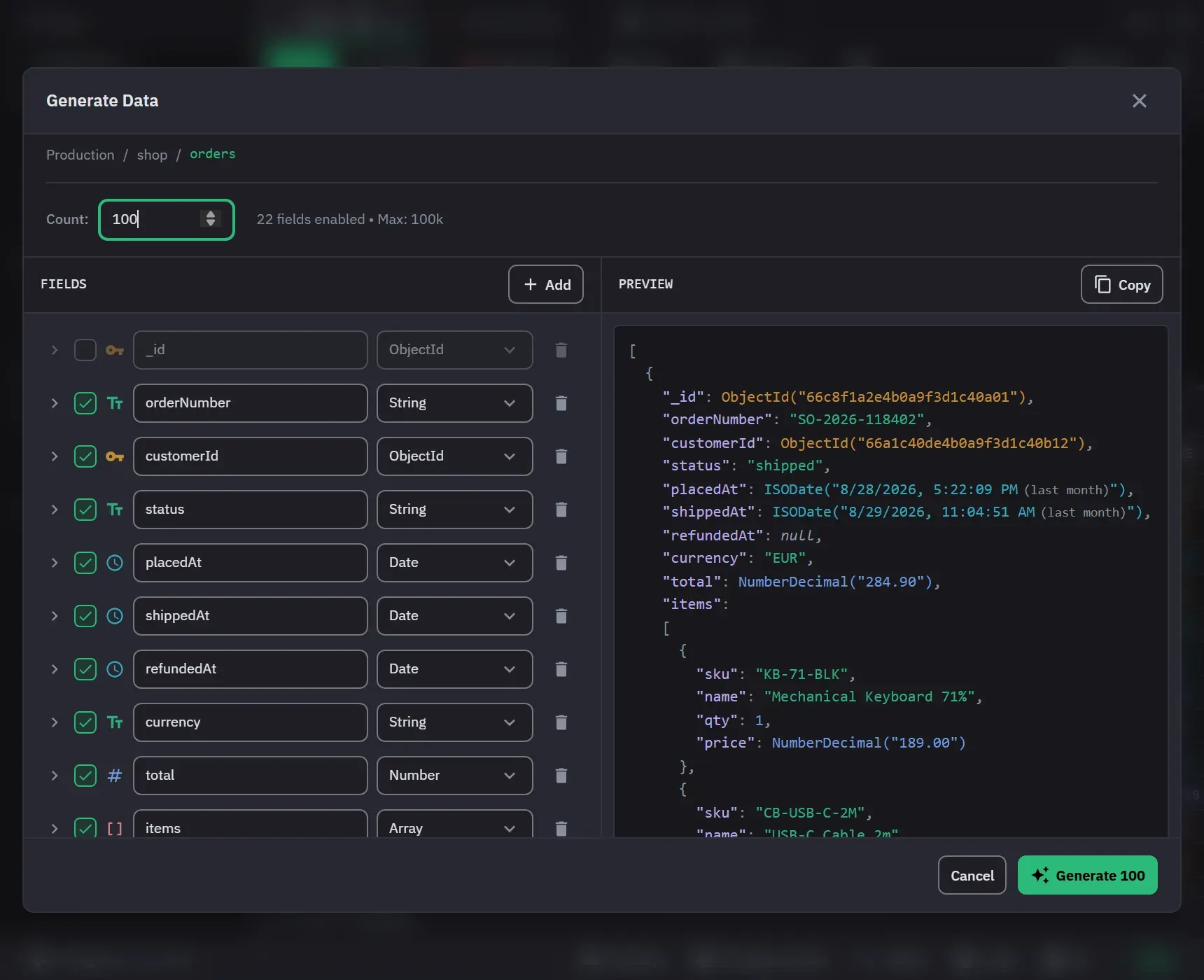
Generate Data, in a collection’s context menu, opens a visual schema builder instead of a script. You lay out the document structure, choose how each field gets its value, preview a sample, and only then generate. The Count box sets how many documents to write. It accepts 1 to 100,000, and Free is limited to 500, which the dialog states beside the count with an upgrade link. The header counts the enabled fields at every depth, and you cannot start with no field enabled.
Describing a document
Add, in the Fields pane, adds a field at the top level. A field can also be added inside an object or as an element field of an array. Each field can be turned on or off, renamed, given another type, or deleted.
Fields can be String, Number, Boolean, Date, ObjectId, Object for nesting, or Array. An array takes a minimum and a maximum length and an element type. Object elements have their own child fields, and an array element can itself be an array.
Each field takes its value one of four ways. Faker draws from a provider. Literal writes the same value every time. List picks at random from a set you give it, written as values separated by commas. Range covers numbers only, with a minimum, a maximum and a decimal count. Any field can also carry a Null % from 0 to 100, which is how you get realistically sparse data instead of documents where everything is filled in.
The Faker catalog is grouped into 17 named categories: personal names, internet and email, location and address, phone numbers, company, commerce, finance, lorem ipsum, numbers and Booleans, dates and times, database ids, random data, images, vehicles, music, system and files, and Git.
Starting from a real collection
The field tree starts from the target collection’s sampled schema, with _id turned off because
MongoDB fills it in. A collection with more than eight top-level fields opens with the tree
collapsed. The tree keeps each field’s real type, including array element
types, Long, Int32, Double and Decimal128, and fields that are only sometimes null.
A string field’s generator is then chosen from the field’s name, where the name is a conventional
one. email, firstName, lastName, name, phone, avatar, image, city, state, country,
street, zip and price, with their common spellings, start on a matching provider instead of
lorem ipsum. Matching is on the whole name and ignores case and separators, so
first_name and firstName are the same field while username is not a first name. A name the
catalog does not know keeps the type’s own default, and only strings are matched at all.
Data the target will actually accept
Generation respects the constraints already on the collection. A field covered by a unique index is generated so that no two documents in a run repeat a value. Every field of a compound unique index is generated without repeats, which is stricter than the index needs and always satisfies it. A run into a collection that already holds documents continues the series past them, so generating twice into the same collection does not collide.
A document that the target refuses for a duplicate key does not fail the run. Monghoul skips it, and the finished run says how many it skipped and why. Any other rejection, such as a validation rule or a lost connection, fails the run.
A GeoJSON coordinates field is generated as the shape its own geometry needs: a pair for a
Point, two for a LineString or MultiPoint, and a closed three-vertex ring for a Polygon or
MultiPolygon. Monghoul reads the geometry from the type field beside the coordinates, which needs
the detected values of that field. A collection that mixes
several geometries falls back to the line shape. That is what makes a 2dsphere index accept the
output. Longitude and latitude get their own ranges, so a generated point can sit anywhere on the
globe.
Generating
The Preview pane shows two sample documents, and Copy copies them. The preview refreshes shortly after
the tree stops changing. Each refresh makes new values, so turning a field off and on again gives
fresh ones. A preview that fails is reported in place, and the earlier documents are cleared. The preview reads like a
document rather than like storage: an ObjectId shows as ObjectId(…) and a date as ISODate(…),
not as { "$oid": … } and { "$date": … }.
A run generates up to 100,000 documents on Pro and 500 on Free. Progress shows in the dialog and in the footer’s current operations. Cancel Generation stops the run, and the documents already written stay in the collection. The collection’s stored schema is then marked as possibly changed. The operation log records the run with its outcome.