Query editor and environment
A Monaco editor over the MongoDB Node driver, with a JavaScript sandbox around it.
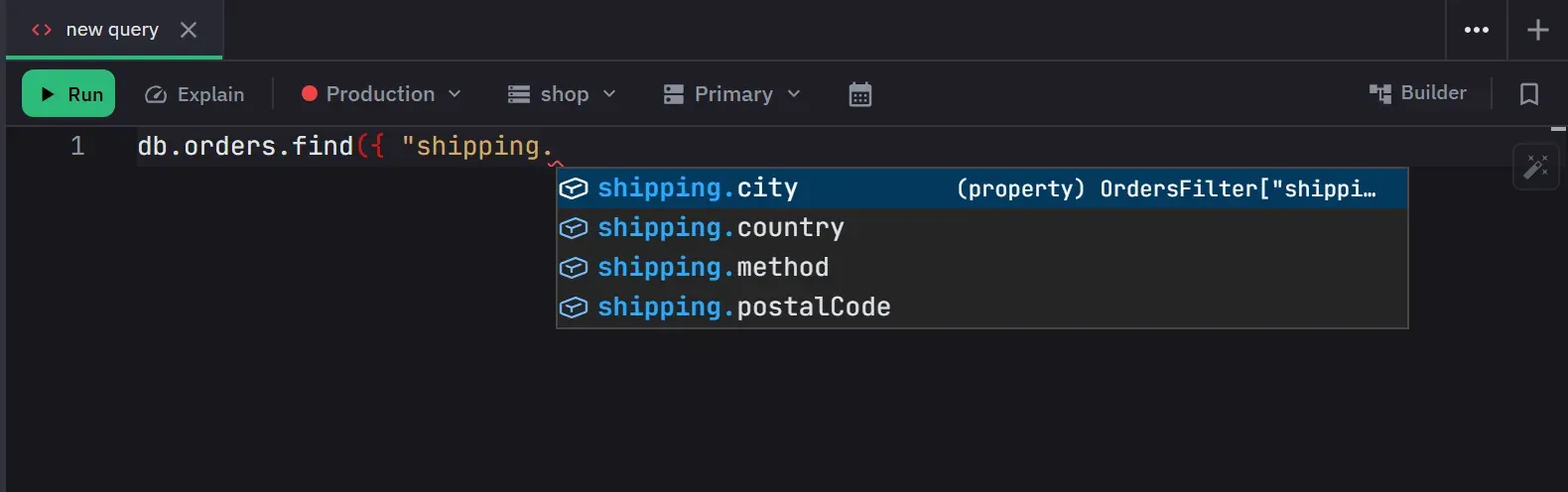
Queries are written in a full Monaco editor, the same one VS Code uses, with JavaScript syntax highlighting, a configurable font size and theme-aware styling. What you write runs against the MongoDB Node driver, and the editor checks it against that driver’s own declarations rather than against a generic JavaScript scope.
What the editor knows
Syntax and type errors are underlined as you type. Because the declarations come from the query
environment, the errors are about the thing you are actually writing: a projection passed as
find’s second argument, the shell’s syntax, is refused with a message naming the driver
spellings, instead of being silently ignored the way the driver would ignore it.
db.orders is shorthand for db.collection('orders'). It chains and writes the same way as the
explicit form. It yields to real driver members, so a collection named stats, admin, command,
aggregate, collection or databaseName, or named like one of the shell helpers below, needs the
explicit form. The editor understands the shorthand as well: typing db. suggests the collections,
and db.orders carries the same analyzed document type that the explicit form does.
ObjectId(123) is reported where you type it. The driver has never accepted a number there, so the
editor says so rather than letting the query fail when it runs. Use
ObjectId.createFromTime(seconds) for a time-based id.
A top-level return is not an error. A name that another tab also declares at its top level is not
an error either, because each tab is checked on its own. A field that the sampled schema never saw is
not an error, because the schema is an open set. A field that the schema does know carries its type,
so misusing it is reported, and the message names the type the editor expects.
In the aggregation builder, a stage body with more than one key is valid and is not underlined.
The query environment
A single expression returns its value automatically, even when it ends in a comment or a semicolon,
or spans several lines. A promise that it produces is awaited. A multi-statement script runs in
order and returns whatever you return explicitly. Without a return, a script shows no result value.
A query is not reported as finished until the database operations it started have finished.
Incomplete code is refused as a syntax error, so db.collection('orders').deleteMany( deletes
nothing. A query that holds only comments runs, does nothing and reports no error.
A second argument to find or findOne that is a real options object runs as written. A key that is
both a projection field and a driver option is read as the option, so find({}, { limit: 1 })
limits the query.
The sandbox provides these names:
db,abortSignal, and the BSON constructorsObjectId(with itsid()shorthand),ISODate,NumberLong,NumberInt,NumberDecimal,Long,Int32,Double,Decimal128,BinData,UUID,Timestamp,MinKey,MaxKey,CodeandDBRef. The constructors work with and withoutnew.BSONgives access to the rest of the BSON library.print,printjson,tojsonandtoEJSONfor output and Extended JSON text.sleep,setTimeout,setIntervaland their clear functions. A timer that a query leaves running is cleared when the query ends.URL,URLSearchParams,TextEncoder,TextDecoder,atob,btoa,crypto,Blob,AbortController,AbortSignalandfetch.faker,luxon,dayjs,_(Lodash),_fp(Lodash FP) andz(Zod).
A query that an AI assistant runs has no fetch. It gets a message that says so, and the same code
works when you run it from a tab.
The shell’s database helpers are there too: getCollection, getSiblingDB, getCollectionNames,
getCollectionInfos, runCommand, adminCommand, version and getName. They return promises,
so await them. getCollectionNames returns bare names and getCollectionInfos returns the full info
documents. A database from getSiblingDB is a full database object, and it keeps the connection’s
write protection. db.aggregate([...]) runs a database-level pipeline under the same rules as a
collection pipeline.
BSON numeric constructors keep their type and precision. A value the type cannot hold is rejected rather than truncated.
Console and print output appears with the result. The levels log, warn, error, info and debug are
all captured with a time, objects are expanded, and a value that refers to itself is marked as
circular. Warnings and errors are emphasized. Output is capped at 500 entries per run, and the cap
adds a final warning entry. Output that a query wrote before it failed is shown with the error.
Formatting
Prettier formats the code from Ctrl+S (Cmd+S on macOS), from the format button that shows in the editor’s top corner while the editor has focus, or with Shift+Alt+F inside the editor. Shift+Alt+F cannot be rebound. The result uses single quotes, semicolons, two-space indentation, a 100-character width and no trailing commas. A chain of three or more calls breaks one call per line without changing what it does. Formatting is one undo step. Code that cannot be parsed stays as written, and nothing is reported. Generated code is formatted when its tab is created.
Date helper
The date helper in the toolbar builds a date expression and copies it. It writes either a new Date
or an ISODate call. It opens in range mode, writes new Date, and starts in UTC. A range with two
ends gives a { $gte, $lte } document. A range with only a start gives one date expression.
- Single-date presets are Now, Today, Yesterday, Start of week, Start of month, End of month and Start of year.
- Range presets are Today, Yesterday, This week, Last week, This month, Last month, This quarter, Last quarter, Last 7, 30 and 90 days, and This year.
- A preset is worked out in the time zone you picked. The week starts on Monday. A preset that ends today ends at 23:59:59.999.
- The time zone list holds UTC, the machine’s zone, whole UTC offsets and named cities with their current offsets.
- Range mode shows two calendars that move independently. Hours, minutes and seconds take the arrow keys, the mouse wheel or typed digits.
The output colours the expression by type, the way a result row is coloured. A line underneath reads the same instant back in the time zone you picked, and a range also states how long it lasts. When the toolbar is too narrow, the helper is hidden and its state is discarded.
Running a query
Run with Ctrl+Enter or Ctrl+R (Cmd+Enter or Cmd+R on macOS). Run turns into Stop while the query runs, Explain sits beside it, and the result panel counts the elapsed seconds. A query cannot run until a connection and a database are chosen, and not from an empty editor. Explain follows the same rule, and it is also unavailable while a query runs.
Cancellation stays available while the connection is still being established, not only once the query is in flight. A stopped query is recorded as cancelled, not as an error. Closing a tab cancels the query, preview or explain that it still runs. Result timing is reported in four parts: query, connection, server and total.
The toolbar has a connection selector and a database selector. On a replica-set connection it also has a read preference selector: primary, primary preferred, secondary, secondary preferred or nearest. The selectors are disabled while a query runs. Choosing the empty read preference returns to the connection’s default. Changing a tab’s connection keeps the selected database only when the new connection has one by that name.
Three settings belong to the connection, so a query uses the ones of the connection its tab targets.
The timeout is 30 seconds by default and accepts 1 to 3600 seconds. The result cap is 1,000
documents by default. A .limit() that the query really applies replaces the cap. A .limit() inside
a comment does not, and a .skip() alone does not. Auto-run on open runs a tab’s code once, the
first time you open a query tab that has code. It never runs a restored tab, a tab that an AI client
made, or a tab that the result viewer generated. See
Connections and security.
On a write-protected connection, a query whose text holds a destructive operation asks for confirmation first. The check reads the editor as it is at that moment, whether you start the query from the toolbar or from the keyboard. A write that the text does not show, such as a method reached by bracket notation, is still refused when it runs.
Queries and notes autosave. A query can be saved to, synced with, or removed from favorites straight from the toolbar, and Ctrl+Shift+S (Cmd+Shift+S) saves or updates the favorite. An empty query is refused with a message. On Free, saving beyond the favorites limit offers an upgrade. When the toolbar narrows, the button labels go first, then the date helper, then the selectors. Run and Stop stay. The interface settings can hide Explain, the selectors, the date helper, the Builder button and the favorites controls.
The toolbar’s Builder button opens the aggregation builder on the tab, and a second click returns to the code editor. A pipeline you edited in the builder comes back formatted, and Ctrl+Z (Cmd+Z on macOS) in the editor undoes the change.
Each tab keeps its own editor contents and its own code or builder mode. Both survive a switch to another tab and back.