Command palette
One fuzzy search over every command, connection, database, and collection.
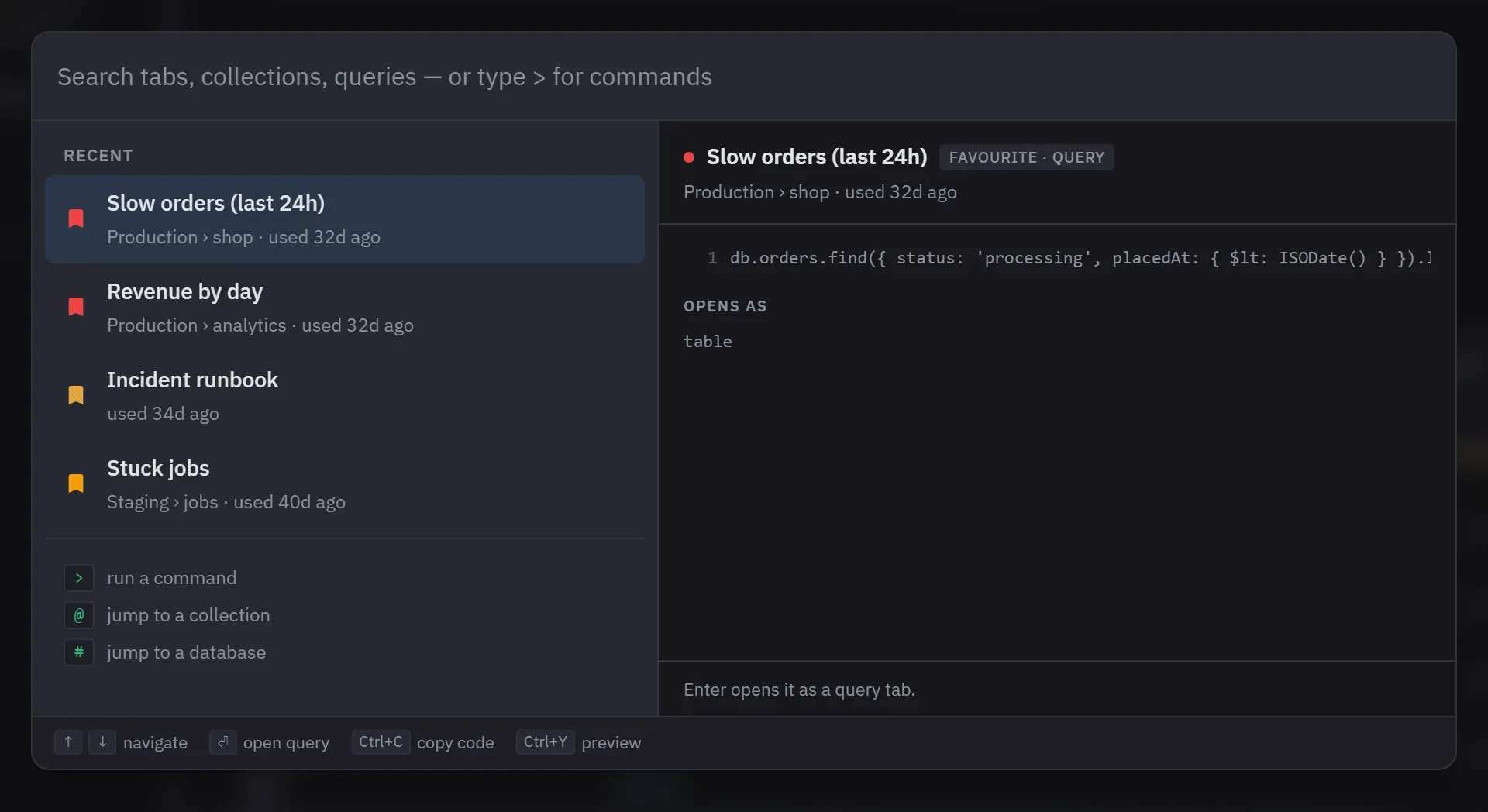
Ctrl+K or Cmd+K opens the palette from anywhere in the app, text fields included. It searches open tabs, recently closed tabs, connections, databases, collections and favorites at once, with fuzzy matching. Ctrl+K, Escape or a click outside closes it.
Searching
Tab and favorite search reads the query code as well as the title, from three characters up, and matches a literal run of text rather than scattered letters.
Results are grouped by kind and ordered so the best match is the first row, and Enter opens it. Matching text is highlighted. A row that matched on its path or inside its code, and not on its own name, says so. At most 50 are listed; past that the palette says how many matched and asks for a narrower term. Pinned collections rank above unpinned ones, and a category filter with live counts narrows the list further.
With no search term at all, the palette shows one recency-ordered list mixing open tabs, recently closed tabs and favorites.
Prefixes
Three prefixes narrow what is being searched: > for commands, @ for collections, # for
databases. A prefix on its own, with no term after it, browses everything of that kind instead of
searching.
Commands only ever appear behind >, so they never crowd an ordinary search. The list shows the
commands that can actually run at that moment, each with its current shortcut, and Enter runs one.
A rebound command shows the key you set. The list leaves out Global search, Escape and the tab
number keys, because none of them is a single action.
Telling rows apart
Every row carries the thing that distinguishes it from another row with the same name: which panel an open tab is in, how long ago a tab was closed, when a favorite was last used, and what a favorite’s description says.
A preview pane shows the selected result before you open it. A tab or favorite previews its code with the search term highlighted. A collection previews its document count, size, indexes and analyzed fields. A database previews its collections. Ctrl/Cmd+Y hides the pane.
Acting on a result
Choosing an item switches to it, opens it, restores it, or reveals it in the sidebar, whichever applies to that kind of row.
The footer lists the actions available on the selected row. Ctrl+Enter or Cmd+Enter runs the
second action. Only two kinds of row have one: a database (Load collections, or Reload collections
when they are already loaded) and a connection (Refresh databases). For those two, Enter reveals the
row in the sidebar. Ctrl/Cmd+C copies the query, or a collection’s database.collection path, without
closing the palette. If part of the typed text is selected, Ctrl/Cmd+C copies that text instead.
Tab and Shift+Tab cycle through the category filter, and the footer shows how many rows the filter
shows out of the total.