Export a MongoDB collection to CSV or Excel
Two ways out: mongoexport from the command line, which needs --fields for CSV, or the export dialog. Both lose BSON types, and this says where.
There are two ways to get a MongoDB collection into a spreadsheet, and they fail differently.
mongoexport ships with the database tools and runs anywhere. The export dialog in this app does
the same job with the filters and formats already filled in. Both write CSV as text, so both lose
the BSON types, and the second half of this page is about where that bites.
With mongoexport, on any MongoDB
mongoexport --uri="mongodb://localhost:27017" \
  --db=shop --collection=orders \
  --type=csv --fields=_id,customer.email,total,placedAt \
  --out=orders.csv
--fields is not optional for CSV. MongoDB’s own documentation is explicit: with --type=csv
you must pass either --fields or --fieldFile, because a CSV needs a fixed column list and
documents do not have one. Name a field inside a sub-document with dot notation, as
customer.email above, and it becomes its own column.
Narrow it with a query, in Extended JSON and in single quotes:
mongoexport --uri="mongodb://localhost:27017" \
  --db=shop --collection=orders \
  --type=csv --fields=_id,total \
  --query='{ "placedAt": { "$gte": { "$date": "2026-01-01T00:00:00Z" } } }' \
  --out=january.csv
Two warnings worth carrying:
--sortwithout an index caps out at 32 MB. The documentation states that an unindexed sort has to fit the results in memory, so a large sorted export needs an index on the sort key or it fails partway.mongoexportis not a backup tool. MongoDB says so directly, more than once, on that page. It writes documents, not indexes or collection options. For a backup, or for anything you intend to restore, that ismongodump, and copying a collection covers the difference.
In the app
Two different things are called export, and picking the wrong one is the usual mistake.
- Export the result you are looking at, with the Export button in the result header. It writes JSON, CSV or Excel.
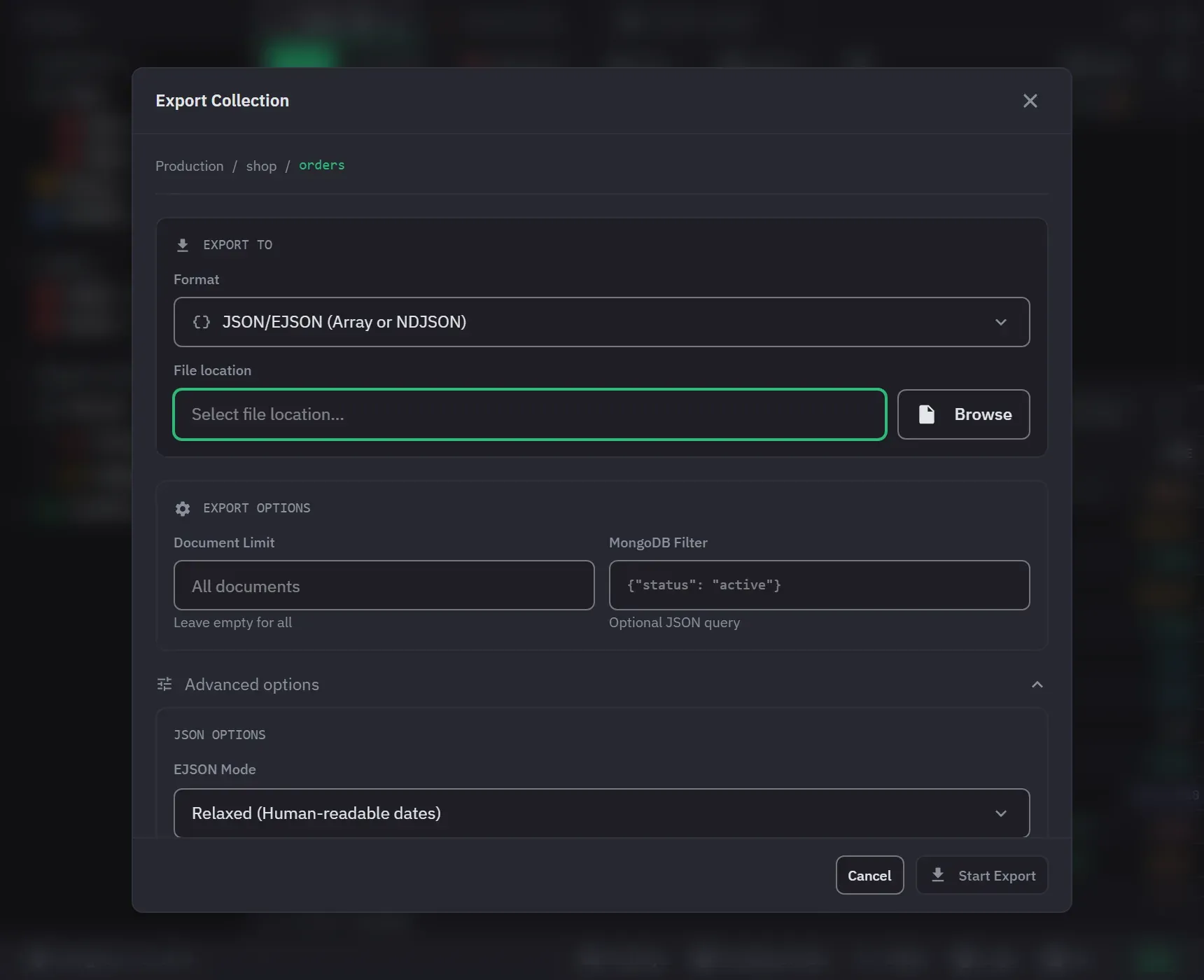
- Export the collection, with Export Collection in the collection’s right-click menu in the sidebar. It has more options, including a document limit, a filter and Extended JSON mode.
Export a result
- Run the query. The Export button is off, and its tooltip says why, while the result is empty.
- Click Export above the result.
- Choose the scope: Loaded or All matching. The line under the toggle says how many documents each one writes.
- Choose JSON, CSV or Excel (Pro), then pick where to save the file.
Loaded writes the documents on screen. All matching re-runs the query as a stream with the
tab’s .limit(), .skip() and result cap dropped, so a 2 million document export does not have to
fit in memory. It asks for confirmation first, because it can read an unbounded number of
documents, and it shows progress that you can cancel. A result that is a count, a single value or a
write outcome has no All matching scope.
Export a collection
- Right-click the collection and choose Export Collection.
- Set Format to JSON/EJSON (Array or NDJSON), CSV/TSV Files or Excel Files (Pro).
- Set the File location.
- Optional: set a Document Limit and a MongoDB Filter. Open Advanced options for the format settings below. Excel has none.
- Click Start Export.
Choose the right format
| Format | Use it for | Watch out for |
|---|---|---|
| Extended JSON, canonical | Anything going back into MongoDB | Verbose. Collection export only |
| Extended JSON, relaxed | Reading, and most tooling | Lossy for 64-bit integers, by specification |
| NDJSON | Streaming into another tool | One document per line, no enclosing array |
| CSV | A spreadsheet, or a colleague | Values are written as text, dates as ISO strings |
| Excel, Pro | A colleague who will not open a CSV | Same as CSV: no BSON typing |
Where the canonical choice lives matters. EJSON Mode, with canonical beside relaxed, is
offered in one place only: the collection export dialog’s advanced JSON options. Database
export and both result-export scopes have no such choice and always write relaxed.
And the loaded-results JSON export is not Extended JSON at all. It strips every type wrapper: a 64-bit integer or a decimal is written as a JSON string, a binary as base64 text, and a timestamp or regular expression as a readable label. It is a readable export, not a re-importable one.
So: if the data has to come back exactly, export the collection and choose Canonical. Relaxed exists for readability, and it is already wrong for a 64-bit integer above 9,007,199,254,740,992 before the file leaves your machine. Extended JSON and BSON has the full story.
What CSV costs you, whichever tool wrote it
A CSV column holds text. Every BSON type on the way out becomes a string, and nothing in the file records what it used to be.
- An ObjectId becomes its 24 hex characters, and reading the file back gives you a string that
no longer matches the
_idit came from. - A date becomes an ISO string, and a spreadsheet will reinterpret it in the local timezone the moment it opens.
- A Decimal128 becomes a decimal string, which is safe to read and unsafe to round-trip through anything that parses it as a float.
- An array has no column to go in.
mongoexportexports the field you name; this app can flattenitems[0].skuinto its own column, which is the same information in a shape a spreadsheet understands, and still not an array.
If the file is going to a person, none of that matters. If it is going back into a database, use Extended JSON in canonical mode and not CSV.
Options worth knowing
All of these are in Advanced options in the collection export dialog.
- Delimiter for CSV: comma, tab, semicolon or pipe, so a semicolon locale opens cleanly.
- Expand Arrays by Index for CSV, which turns
items[0].skuinto its own column. Without it, an array is written as text. - Compress (.gz) on both JSON and CSV, applied as it streams.
- Pretty Print (Indented) on JSON, on by default, if a human is going to read it.
- Format on JSON: JSON Array or Newline-Delimited JSON.
- UTF-8 BOM, on by default for CSV, because without it Excel reads a non-ASCII file in the system codepage. The result export always writes it.
CSV and Excel take their columns from a sample of the documents. If a field first appears after that sample, it gets no column, and the export names those fields when it finishes.
Export a whole database
Right-click the database and choose Export Database (Pro). Set Export Mode to Export to
Files, pick the collections, choose an Export Directory and a Format (JSON/EJSON or
CSV/TSV), and start. It writes one file per collection, named after the collection. Excel is not
offered here, and the system.* collections are left out.