Sidebar and navigation
The connection tree, search across the whole hierarchy, pinned collections, favorite queries, and folders.
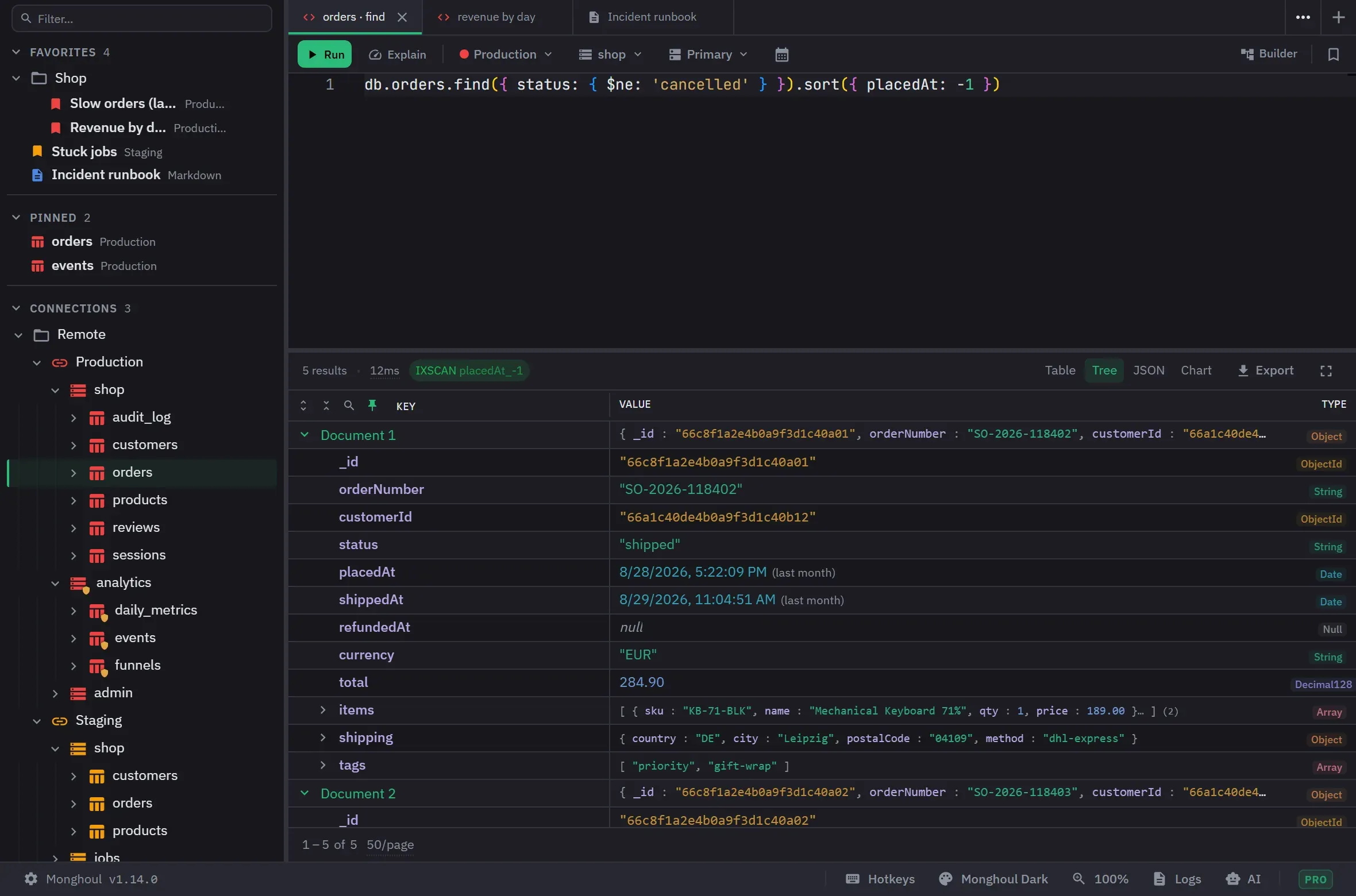
The sidebar is the one place that shows everything you have connected to, and it is where most work starts. It has three collapsible sections: Favorites, Pinned and Connections. Each shows how many items it holds, and the collapse state is remembered. Until you save the first connection, the sidebar shows a get-started panel with an Add Connection button instead. The panel also holds the switches for analytics, tips, automatic updates and background schema analysis, so you can set them before you connect.
The tree
The hierarchy runs Connections, Databases, Collections, and then each collection’s Indexes, Schema and Validation. A Schema row appears once you analyze the collection. A Validation row appears once the collection has a validator. Levels load as you expand them rather than up front. Databases are sorted by name without regard to case, and collections alphabetically inside each database. A connection whose password is not stored asks for it when you expand it. Databases and collections that the connection’s filters hide do not appear.
Search runs over the whole hierarchy as you type, on connection, database and collection names. Matches expand themselves and the matched text is highlighted. The field reports how many rows matched. Escape or the clear button empties it, and the tree returns to how you had it. The search term is remembered between sessions. While a term is active, folders are not drawn and rows cannot be dragged. Ctrl+F or Cmd+F focuses the field when focus is inside the sidebar.
One click focuses a collection and a double-click opens it in a query tab. Refresh pulls a collection again with its statistics and indexes; with nothing focused it refreshes the active query tab’s collection instead. Connection, database and indexes rows show a refresh button on hover, and F5 refreshes the focused row.
The icon of a connection shows whether Monghoul holds an open client for it: a whole link when it does and a broken link when it does not. A shield mark on a connection, database or collection means write protection covers it.
The tree is a single keyboard stop. The arrow keys move, Right expands a closed row, Left collapses an open row or moves to the parent, Enter expands or collapses the focused row, Space opens a collection in a query tab, and Home and End go to the ends. Shift+F10 or the Menu key opens the context menu of the focused row.
Hover previews
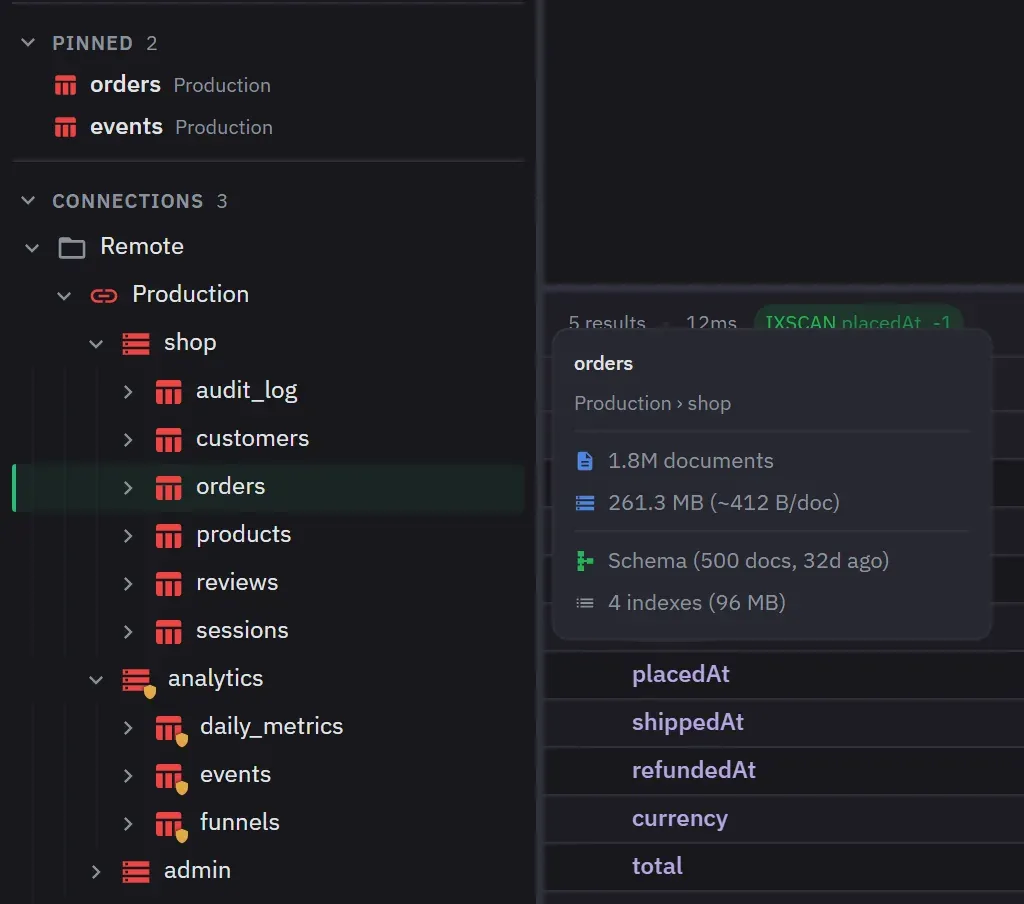
Hovering a row opens a card about it, and the cards follow the keyboard cursor as well as the pointer.
A connection shows its host, its database and collection counts, data size, topology, authentication method, transport security and write-protection scope. A collection shows its document count, data size with the average per document, schema status, index count and size, and validator information. Databases, indexes and schema nodes each get their own detail.
Context menus and snippets
Every level has a right-click menu, from create database and refresh down to rename, clear and drop. A pinned collection row has the same menu as a collection row. On Pro the menus also carry Cluster Monitor, user management, database import and database export, and a collection can be copied to another collection from its export flow. On Free these items carry an upgrade badge and explain the upgrade when you choose one. Dropping a database, dropping or clearing a collection, deleting a connection, dropping an index and removing validation ask for confirmation first.
The size action reads Calculate Size until statistics exist, then Recalculate Size. The pin action reads Pin to Favorites or Unpin from Favorites.
The snippets submenu holds query templates you control. It lists every snippet except the default
one, and ends with Customize…, which opens the snippets manager. A snippet has a name, an optional
description and code, and {{collectionName}} in the code becomes the name of the collection you
open it on. Add, remove, edit and drag to reorder snippets, and star one to make it the default. The
default snippet is what opening a collection writes into a new tab, and you cannot delete it.
Restoring the defaults replaces every snippet with the built-in set, asks first, and cannot be undone.
Pinned collections, favorites and folders
Pinned collections get their own section and keep the context menu and hover preview a normal collection row has.
Ctrl+Shift+S or Cmd+Shift+S saves a favorite query, preserving its code, view type, chart configuration, table state, page size and read preference. Markdown notes save as favorites too and reopen as markdown tabs.
On Free you can keep 5 favorites and 5 pinned collections. Pinning a collection a second time changes nothing, and the same name in another database or connection is a separate pin. Opening a favorite restores its saved state and reuses its tab if it is already open. Removing a favorite leaves any tab saved from it open. The search field filters both sections by item name and by connection name.
A favorite can carry a description of up to 500 characters saying what it is for. The row opens an editor for both its name and its description, and the tooltip shows the description under the name. That description is what tells two similarly named favorites apart in the command palette.
All three sections take folders, nested to any depth, renamed in place, with item-count badges. A folder name can have up to 100 characters. Create one from the section header, or as a subfolder from a folder row. Folders hold only items from their own section, and you cannot move a folder into itself. Deleting a folder asks first and returns its contents to the section root instead of deleting them. Only its direct children move, so a deleted folder loses that level of nesting.
Drag and drop
Connections, favorites and folders reorder by dragging, with three-zone drop detection.
On Pro, dragging a collection or a database onto another destination opens the copy dialog with it preselected. Only a destination the copy could actually use lights up, which means another connection, or another database on the same one.
The panel itself
Sticky headers keep connection and database rows visible while you scroll their contents. The active tab’s collection is marked in the tree, and a disconnected connection is dimmed. Pin and favorite changes appear in every open Monghoul window.
The sidebar resizes and hides, and its width, order and expansion state persist. Ctrl+B or Cmd+B toggles it.
Opening a side drawer never hides the sidebar. The drawer narrows the workspace to make room and covers nothing, so the whole workspace stays visible while a theme is being edited.
Reaching a Free capacity limit explains the Pro upgrade rather than failing quietly.