Generate test data for MongoDB
A mongosh loop covers a thousand rows of nothing. Keeping the real types, the nullable fields and the unique constraints is the part that takes a generator.
The quickest version of this needs no tool at all:
const docs = Array.from({ length: 1000 }, (_, i) => ({
  email: `user${i}@example.com`,
  createdAt: new Date(Date.now() - Math.random() * 3.15e10),
  total: Math.round(Math.random() * 10000) / 100
}))
db.orders.insertMany(docs)
That is enough to check a query plan or fill a screen. It stops being enough as soon as the data has
to look real, keep the types the real collection uses, or respect a unique index, because every
field above is either a counter or Math.random(), and total is a JavaScript double where the
real column may be a Decimal128.
Generating data that survives contact with your own schema is what the rest of this page is about.
Start from a real collection
Do not build the schema by hand. Seed the generator from a collection you already have, and it
keeps each field’s type: array element types, Long, Int32, Double, Decimal128, and fields
that are only sometimes null.
It also reads the field names. A customers collection opens with email on an email generator,
phone on a phone number and address.city on a city, rather than every string on lorem ipsum.
The fields you have to adjust are the ones only you could know about.
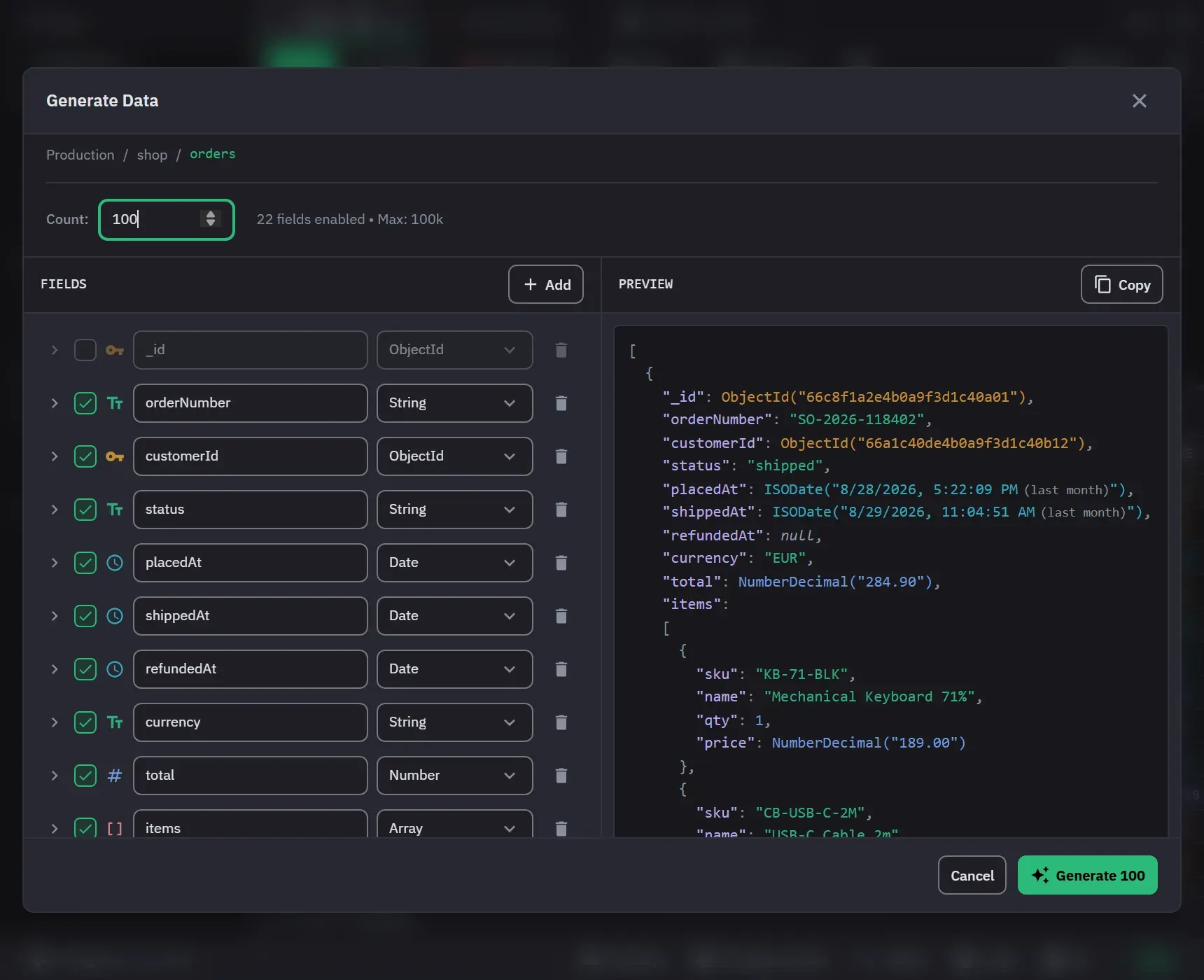
- Right-click the collection in the sidebar and choose Generate Data. The collection can be empty, but see the note below.
- Read the Fields tree on the left. The app seeds it from the collection’s sampled schema, and
it leaves
_idoff because MongoDB fills it in. A collection with more than eight top-level fields opens with the tree collapsed. - Adjust the fields you care about. Each field can be switched off, renamed, retyped or deleted, and Add puts in a new field. The header counts the fields that are enabled.
- Set Count, then read the Preview on the right. It shows two documents and refreshes when you change a field. Copy puts them on the clipboard.
- Click Generate. The button shows the count, for example Generate 1000.
The tree stays empty, with No fields configured, when the app has not analyzed the collection yet, for example a new empty collection. Open Schema on a collection that holds documents first, or build the tree with Add Field.
While it runs, the progress bar shows the count. Cancel Generation stops the run, and the documents already written stay in the collection. When it ends, the app says how many documents landed and how many it skipped for a duplicate key. Open the collection to check them.
The two things that usually break generated data
A unique index. A field covered by one is generated so no two documents repeat a value, and a second run continues the series rather than replaying the first. So you can top up a collection without a duplicate key error.
GeoJSON. A coordinates field is generated as the shape its own geometry needs: a pair for a
Point, two for a LineString, a closed ring for a Polygon. A 2dsphere index will accept the
result.
Making it look real rather than random
- Faker, across 17 named categories, for names, emails, addresses, companies, commerce, finance, dates, vehicles and more. Each generator shows an example value, and a conventional field name is already on the right one when the tree is seeded from a collection.
- List, to pick at random from a set you define, written as
val1, val2, val3. This is how you get astatusfield with the five values your app actually uses. - Range, for a numeric minimum and maximum with a decimal place count. It is offered for number fields only.
- Literal, for a value that has to be the same on every document.
- Null % per field, from 0 to 100 percent, because real collections are sparse and code that has never seen a missing field will meet one in production.
Limits
Up to 100,000 documents per run on Pro, and 500 on Free. The dialog states the Free limit beside Count, with an upgrade link. Generation cannot start with no field enabled. It runs in the background with progress, so a large run does not lock the window.
Next
- Data generation reference
- Schema analysis, which is where the seeded shape comes from