Tabs and workspace
Tabs, split panels, detached windows, and what the app restores when you reopen it.

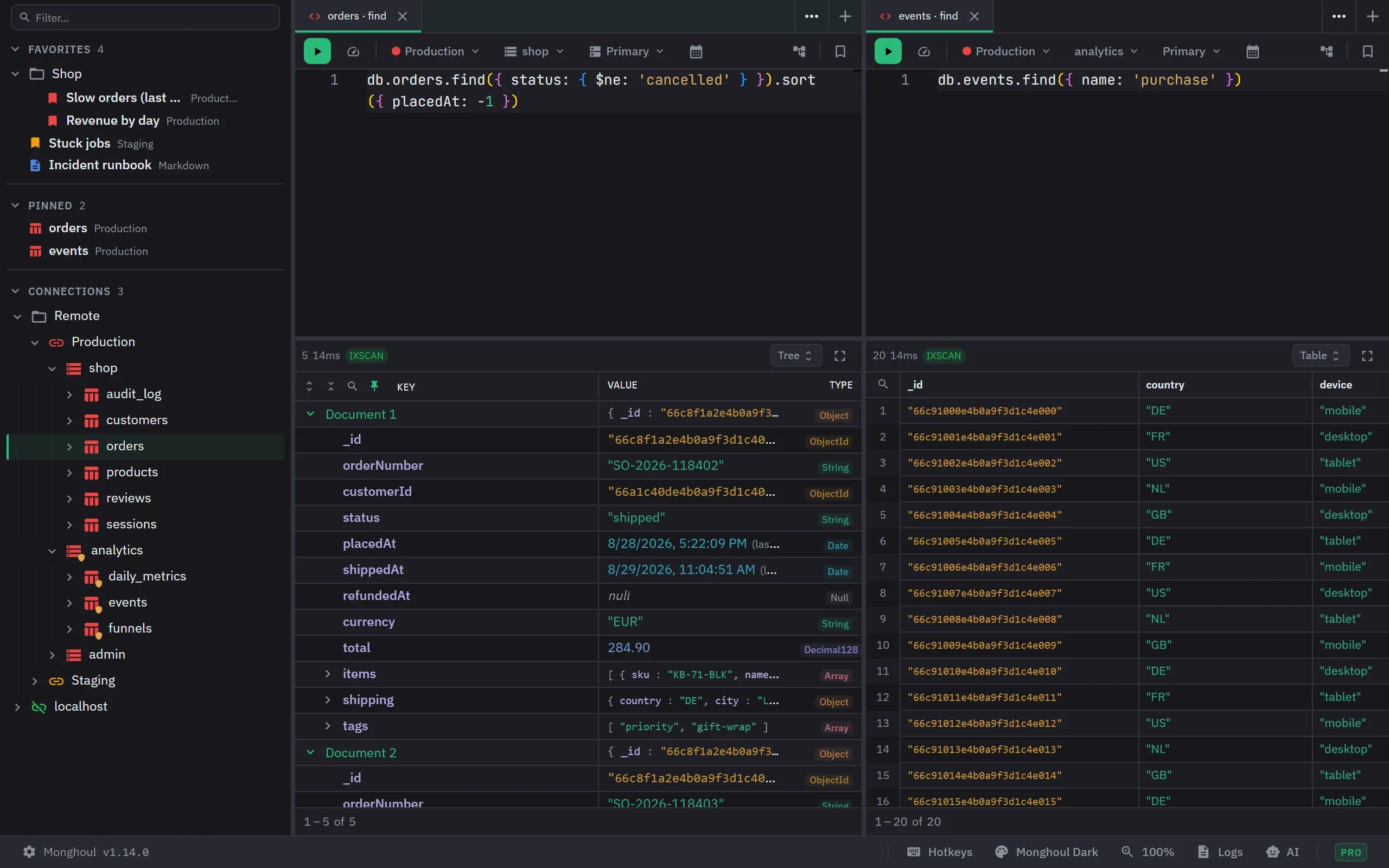
The workspace is a set of panels, each holding a strip of tabs. A tab is a Query, a Markdown note, a Database Map, or a JSON Viewer showing a read-only tree. On Pro a tab can also be a Cluster Monitor or a Users and Roles view. There is no limit on tabs or panels, on Free or on Pro.
Opening tabs
A query tab needs a connection and a database, so there is no blank one. Double-click a collection, use the collection’s context menu, open a favorite, or press the add button on the tab strip. The add button opens global search, where you pick a collection. A new query tab without code starts with a find query. A Markdown tab opens empty and untitled from the add button. Cluster Monitor and Users and Roles tabs open from a connection’s context menu, one per connection. A Database Map tab opens from a database’s or a collection’s context menu, one per database. No menu creates a JSON Viewer tab. An integration or the app opens it.
The add button opens into its own panel. A query that a result view generates lands right after the tab it came from. Any other tab lands in the original panel of the workspace. When the connection has Auto-run on open turned on, a query tab that you open runs at once. A restored tab, a tab from the closed list, a tab that an AI client opened, and a generated query never run by themselves.
Markdown notes
A markdown tab edits, splits side by side, or shows a preview, with a formatting toolbar, GitHub-flavored Markdown and task lists. An empty note opens in the editor; one that already has content opens in preview.
The preview renders Markdown only. Embedded HTML is not rendered, so write an image or a GIF as
 rather than pasting an <img> tag.
Notes autosave, and they save to favorites the way query tabs do.
Moving tabs around
Tabs drag to reorder within a panel and across panels. Dropping one on a panel’s left, right, top or bottom edge splits that panel and opens the tab in the new half, which is previewed and named before you let go.
The strip is also a proper keyboard tab list. It is one stop in the tab order. Left and Right move, Home and End jump to the ends, Enter opens, Delete closes, and F2 renames. A screen reader hears one set of tabs with the selected one named.
Reordering works from the keyboard as well. Space picks the focused tab up, Left and Right move it, Space or Enter drops it, and Escape puts it back where it was. A screen reader is told which tab was picked up and where it landed.
Every tab carries one icon for its kind, and that icon takes the colour of the connection the tab belongs to. So a strip tells you what each tab is and which connection it is pointed at, without a separate dot for the colour.
Query tabs get Execute Query (Stop Query while it runs), Clone Tab and Reveal in Sidebar. Markdown tabs get Clone Tab. Every tab gets Rename Tab, Rename Panel, Open in New Window and Close Tab. Split Right, Split Down and Close Other Tabs appear only when the panel holds more than one tab. Move to appears only when another panel exists. When an AI client has opened tabs, the menu also offers to close all of them. Clone Tab copies the tab, with its result, to the position after the original. Reveal in Sidebar shows the first collection named in the query code. If there is none, it shows the collection of the last result, and then the database.
A title renames in place on a double-click or with F2. Enter saves the name and Escape restores the old one. Renaming a tab that is linked to a favorite renames the favorite too. A middle-click closes a tab. Closing a tab cancels the query it was running. Closing a panel’s last tab removes the panel, except the original panel and the last remaining panel.
What survives
Up to the 100 most recently closed tabs can be restored, newest first, with their title, code and view configuration. The result is not kept, so the query runs again.
Moving a tab between panels preserves its editor text, result, pagination, preview and toolbar state. Undo history, caret position, folds and scroll position are not carried across. Leaving a tab does not cancel a running query or a background operation: that work stays cancellable from the footer, while inactive tabs pause their own polling and timers.
Panels and windows
Panels split horizontally and vertically, nest, resize at their dividers, and take custom names. Use Rename Panel in the tab menu. A name has up to 100 characters. The name appears in the Move to menu and beside a tab in the command palette. An unnamed panel shows its position in the layout. A panel cannot shrink below a tenth of its container.
On Pro any tab detaches into its own window with Open in New Window. A detached window shows one tab. It has the tab’s toolbar, dialogs, interface zoom and Format code, but the tab, panel and query-run shortcuts belong to the main window. A control in its title bar merges the tab back into the original panel. Closing a detached window closes its tab, and you can restore it like any closed tab. The size and position of each detached window are remembered. Windows that were detached when you quit open again at launch. On Free the menu item is badged and explains the upgrade. The main window’s bounds are saved and restored on launch.
Only the active tab of each panel is live. Other tabs wait until they become active again.
Only one side drawer is open at a time. Opening Settings, AI Activity or the theme editor closes whichever was open, and a drawer takes its own width or a third of the window, whichever is smaller, so it can never leave the workspace with no room.