Operation logs
Every operation the app ran, searchable, with its duration and its outcome.
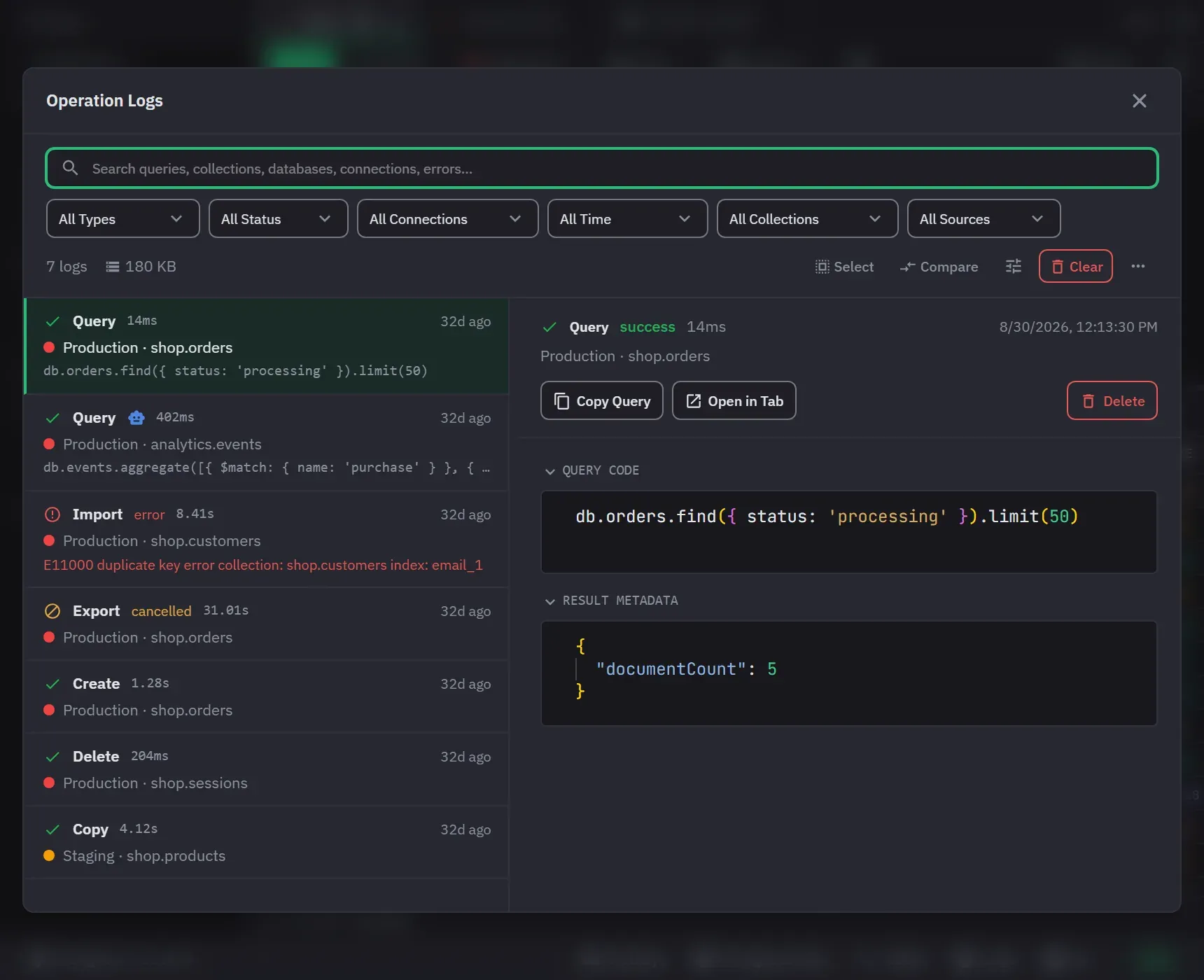
The operation log is both an audit trail and your query history. It records queries, imports, exports, copies, renames, creates, deletes and the other mutations, and it opens from the Logs button in the status bar. Open operation log in the AI Activity window also opens it, on that entry.
Each record holds the operation, its connection, database and collection context, the query itself, the duration, the status, any error, the result metadata, an optional response, and whether you or an AI assistant caused the work. The operation type is query, export, import, rename, copy, delete, create or other. The status is success, error or cancelled. A record keeps the connection’s name as it was when the work ran, so entries from a deleted connection still name it.
The list refreshes itself every few seconds, so work logged while the window is open appears without reopening it. It is a split: entries on the left and the selected entry’s detail on the right. Drag the divider, or move it with the arrow keys.
Finding an entry
Search runs across query text, connection, database, collection and errors, matching any part of a value. It waits a moment after you stop typing, goes back to the first page, and highlights the match in the rows. Filters narrow by operation type, status, connection, collection and time range. The time ranges are All Time, Last Hour, Last 24 Hours, Last 7 Days and Last 30 Days. The collection filter is picked from a list of names and matches exactly. The list names every collection the logs mention and narrows with the other filters. Changing a filter goes back to the first page. Reset appears while any filter is set and says how many are.
A source filter separates your own work from work an AI assistant caused, and AI records carry an assistant icon. A record with no source counts as yours. The filter shows only where AI access is available or where AI records already exist. The detail of an AI record links to the call that caused it with View in AI Activity. If that call is no longer in the trail, a message says so.
Each row shows its status as a shape: a check for success, an exclamation mark for an error, and a slashed circle for a cancellation. An error or a cancellation is also named in words. The dot beside the connection name is the connection’s colour.
The list works from the keyboard. The first entry of a page is selected when the page arrives. Down arrow in the search box moves into the list, up arrow on the first entry moves back, the arrow keys move the selection and keep it in view, and Page Down and Page Up turn the page. Escape deselects the entry and leaves the window open. The keyboard shortcuts page has the full list.
Select, in the toolbar, puts a tick on each row. It offers Select page and Clear selection, and it deletes the ticked entries after a confirmation, up to 500 at a time. Done leaves the mode.
The More menu holds Export logs as JSON, Download server logs and Report an issue. Export writes the entries on the current page to a JSON file named for today’s date. Each entry has its id, operation type, connection name, database, collection, query, duration, status, error, result metadata and time. The file leaves out the stored response. With no entries, Export says so and writes nothing.
Delete, in the detail pane, removes one entry after a confirmation, and a deleted entry cannot be restored. Clear removes every entry after a confirmation. A list that cannot be read shows the error and a Try again button.
Reading an entry
The detail states the operation, status, duration, time, connection and namespace. A rename shows the old and the new name. An error comes first, above the query. The query, response, error and metadata sections each copy and collapse on their own, and a collapsed section shows the start of its content. Copy Query and Copy Response are also buttons. The stored response is read when you select the entry, and the rest of the detail stays on screen while it loads.
Compare, in the toolbar, picks two query logs, A and then B, and shows them side by side in a Monaco diff editor with line-level highlighting. Each side is named by its type, duration and time, and a log with no query cannot be picked. Exit comparison leaves the mode.
Open in Tab reopens a log as a query tab when its connection still exists, and the window then closes.
What gets stored
Response storage has three settings: none, stripped with representative content, or full. Stripped is the default. Stripping shortens arrays to three items, nesting to three levels, and strings to 500 characters. Any stored response is truncated above a size cap you choose between 5 KB and 1 MB, and the cap is 10 KB by default. A response over the cap is replaced with a truncation marker, and the detail says so. The size control is hidden while the setting is none. With none, the detail of a query says that it stored no response and where to change that.
Full storage keeps sensitive data on this device, so choosing it carries a warning. Passwords typed into Monghoul’s own forms are never logged, but query text and response fields are not classified or redacted, so a credential written into a query is stored as written.
Retention is 100, 250, 500, 1,000, 2,000, 5,000 or unlimited entries, 500 by default, and a change applies immediately.
The Free window
On Free the list and its pager stop at the 250 most recent entries. Nothing is deleted by the tier: retention is a separate setting and still decides what is kept. When that limit is the one that applies, a line under the entry count says so, and the settings pane always says so.
That window is 250 entries in total, not 250 for each filter. A filter narrows those 250 and cannot reach an older entry, and the collection dropdown offers only the collections the window still holds. Pro reads the whole store.
Storage and reporting
Approximate log storage is shown beside the entry count. Above 50 MB a warning appears, and it opens the log settings. The list shows 50 entries per page, and the pager shows the range of entries against the total.
Download server logs saves the last 1 MB of the app’s own log file. Report an issue opens a report that can carry the app version, licence tier, platform and recent logs.
Report an issue and the AI Activity window open on top of Operation Logs. When you close them, Operation Logs keeps its filters, page, selection, folded sections, divider position and scroll position. If you opened Operation Logs from AI Activity, View in AI Activity closes it and returns you there, so the two windows never stack a second copy.