Current operations
What Monghoul is running right now, and how to cancel it.
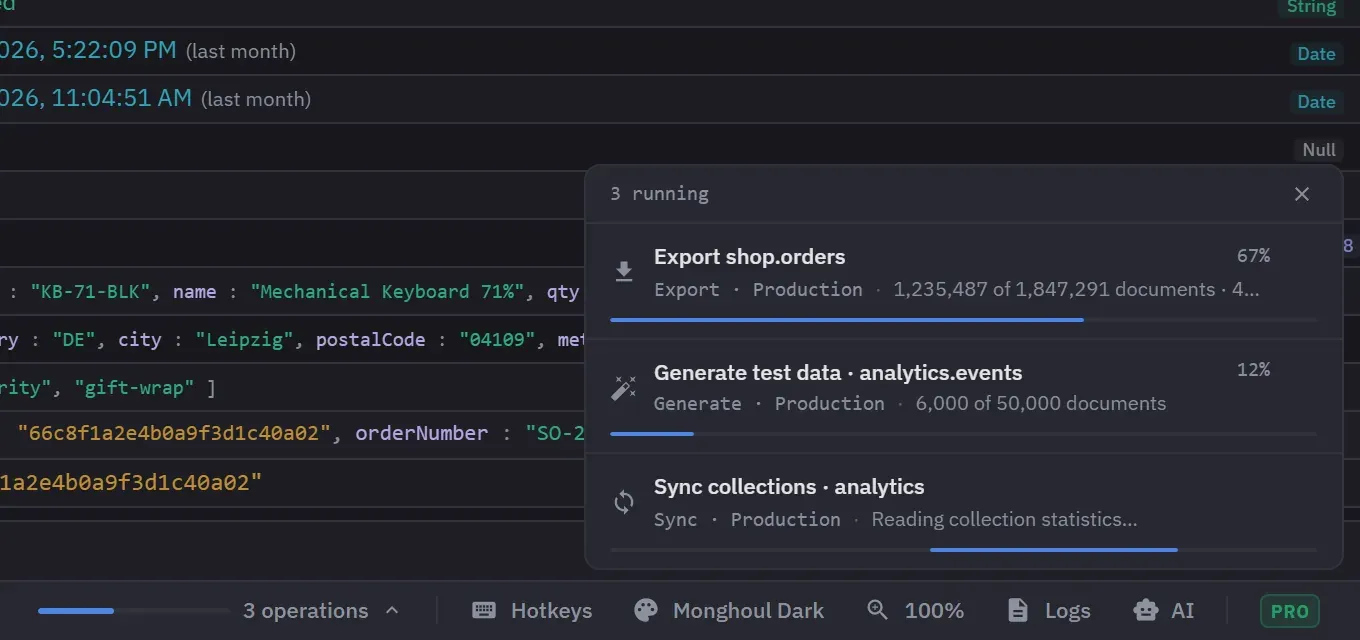
One panel lists every operation the app is running against a server, from imports and exports down to stage previews, connection tests and inline edits. It opens from the Current operations item in the footer.
Imports, exports, copies, generation and a requested schema analysis keep running whether their dialog is open or not, which is the reason the panel exists: the work outlives the window that started it. Closing a progress dialog does not cancel its task.
What is listed
Each row carries a kind label. The kinds are Export, Import, Generate, Copy, Schema, Map, Query, Preview, Explain, Generated write, Connect, Test connection, Stats and Sync.
- Map is a Database Map scan. Stats is a size or stats calculation. Sync is a sidebar refresh.
- Schema is an analysis that you asked for. Automatic background analysis is not listed.
- The Cluster Monitor’s periodic refreshes are not listed, so an open monitor tab does not fill the panel.
- An operation appears only after it has run for about half a second, so fast ones never flash.
What a row shows
Each row names the operation and its connection, with a progress percentage where the work can be measured and a moving bar where it cannot. A bar can switch to a percentage partway through. If the connection was deleted while its work ran, the row shows the connection’s identifier. An operation with no saved connection, such as a test from the connection form, names none. Rows are ordered oldest first.
Operations started in another Monghoul window, or by an AI assistant, appear here too. The footer item shows how many operations are listed. While any are running it also shows their aggregate progress, which is the average of the running operations that report a percentage.
When nothing is running, the item stops moving and its tooltip reads Recent operations. The panel header counts the running rows, and the finished rows still on show. The footer item is there only while at least one row is listed. The panel closes with its close button, with Escape, or with a click outside it. It closes itself when its last row goes, and it never opens by itself.
If you hide the Current operations footer item, the indicator and the panel go. Operations are still tracked and still cancellable from their own progress dialogs. A detached tab window has no footer, and the work it starts is listed in the main window.
Cancelling
Cancellation stops the work rather than just the progress bar, and it ends the operation on the server as well. Every listed operation has a Cancel button. If the cancel request itself fails, an error notice says so and the operation keeps running.
What a cancelled operation leaves behind depends on what it was.
- A cancelled collection export or query export removes its incomplete file.
- A cancelled import, copy, duplication or generation keeps the documents already written.
- A cancelled database export or duplication stops at the next collection boundary. It keeps the collections already written, and its status says how many of the total it reached.
- A cancelled connection attempt releases the SSH tunnel and the client it was opening.
Closing a tab cancels the work that tab started, such as its query, preview, explain, generated write or schema analysis. Work started by other tabs is untouched. Quitting the app stops everything that is still running, without notices.
Only a running operation can be cancelled. A finished one stays listed briefly with its outcome, Done, Failed or Cancelled. A done or cancelled row stays for about five seconds, and a failed row stays for about ten so that you can read its error. A cancelled operation is recorded in the operation log as cancelled, with how much of the work completed, rather than as a success or a failure.
A background task that you cancel raises a notice that names it, and a failure raises an error notice with the reason. A query, a preview and the other work that you wait on raise no notice, because the error shows where you started the action.
AI assistants
With AI access, which is Pro, an assistant can list the operations in flight, read the progress of one, and cancel one. It can reach only the connections and databases that its access scope allows. See AI access.