Keyboard shortcuts
Every shortcut in the app, and how to rebind one.
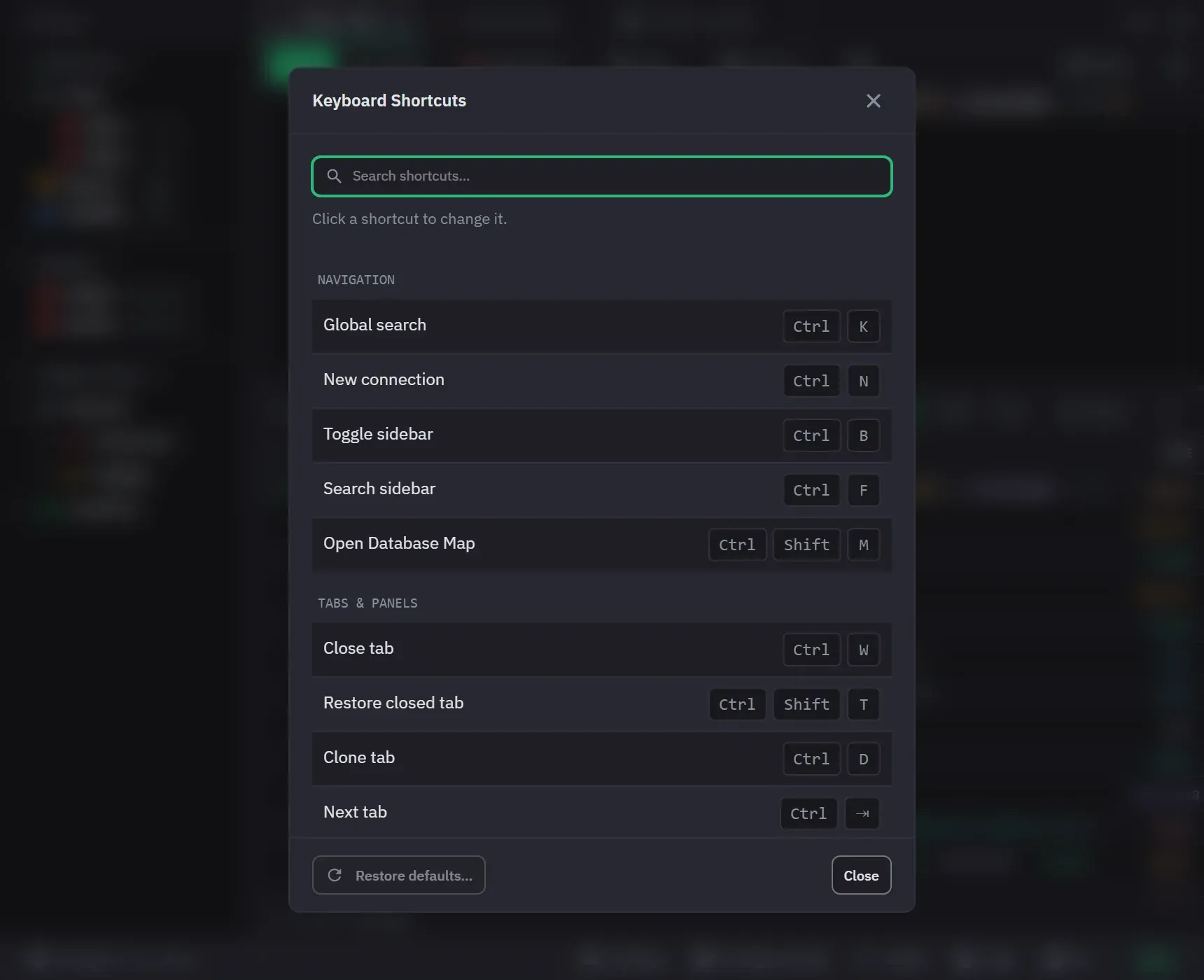
The Hotkeys button in the status bar opens the Keyboard Shortcuts dialog. It lists every command with its current keys, and you can search it by title, description or keys.
A shortcut only fires while the surface that performs it is on screen. Result-viewer shortcuts need a result grid, Execute query needs a query tab, and Search sidebar needs the sidebar. A command can also decline a key rather than swallow it, in which case whatever else was listening still receives it: Format code on a note tab declines, and the theme editor’s own save gets the key.
Shortcuts do not fire while you are typing in a plain text field. The exceptions, which fire anywhere, are Global search, Close tab, Restore closed tab, the three zoom commands, Focus approval requests, and Escape.
A detached tab window answers only the zoom commands and Format code. Tab, panel and workspace shortcuts belong to the main window.
Global
- Ctrl+Enter / Cmd+Enter: run query (or Ctrl+R / Cmd+R)
- Ctrl+K / Cmd+K: open command palette
- Ctrl+N / Cmd+N: open the add-connection dialog. On Free at the connection limit, it opens the upgrade dialog instead
- Ctrl+Shift+M / Cmd+Shift+M: open the Database Map of the active tab’s database
- Ctrl+F / Cmd+F: when focus is in the sidebar, focus its search field
- Ctrl+S / Cmd+S: format the code of the active query tab. Shift+Alt+F also formats, from inside the editor
- Ctrl+Shift+S / Cmd+Shift+S: save or update a favorite, on a query or note tab
- Ctrl+B / Cmd+B: toggle sidebar visibility
Tabs and panels
- Ctrl+W / Cmd+W: close active tab
- Ctrl+Shift+T / Cmd+Shift+T: restore last closed tab
- Ctrl+D / Cmd+D: clone the active query or note tab
- Ctrl+1-9 / Cmd+1-9: switch to tab by position
- Ctrl+Tab / Ctrl+Shift+Tab: next/previous tab
- Ctrl+Alt+Arrow / Cmd+Option+Arrow: next/previous panel
- Ctrl+Plus / Ctrl+Minus / Ctrl+0, numeric keypad included: zoom in, out, reset. Cmd on macOS. Ctrl or Cmd with the scroll wheel zooms too, in any window
Next tab and Previous tab use a literal Ctrl on every platform, macOS included.
Working with a result
- Ctrl+F / Cmd+F: search the focused sidebar, result view, or code editor
- Ctrl+Shift+A / Cmd+Shift+A: open the AI panel on the first request waiting for you
- Ctrl+E / Cmd+E: edit the focused document. On a note tab, Ctrl+E / Cmd+E switches to editing and Ctrl+P / Cmd+P to preview, while the caret is not in the note
- Ctrl+C / Cmd+C: copy the focused cell or selected rows
- Ctrl+A / Cmd+A: select every row in the focused result view
- Ctrl+I / Cmd+I: toggle the preview drawer
- Ctrl+Shift+R / Cmd+Shift+R: refresh the focused or active collection
- Escape: cancel or close the active transient UI
Inside a list
- In the tab strip: Left and Right move, Home and End jump to the ends, Enter opens, Delete closes, F2 renames
- To reorder a tab: Space picks it up, Left and Right move it, Space or Enter drops it, Escape puts it back. Enter still opens a tab that has not been picked up
- In the connection tree: arrow keys move, expand, and collapse, Home and End jump to the first and last row, Enter expands or collapses, Space opens the focused collection, F5 refreshes the focused row, and Shift+F10 or the Menu key opens its context menu
- In a segmented toggle, such as the Cluster Monitor’s view switch or Users and Roles: the whole toggle is one stop in the tab order, and the arrow keys move between its options
- In a menu: Up and Down move, Right opens a submenu and Left closes it, Home and End jump to the ends, Enter or Space picks the item, and Escape closes the menu
- In the command palette: the arrow keys move, Enter runs the row, Ctrl+Enter / Cmd+Enter runs its second action, Ctrl+C / Cmd+C copies it, and Ctrl+Y / Cmd+Y shows or hides the preview. Tab and Shift+Tab change the category, and Escape closes the palette
- In the table view: the arrow keys move the focused cell, and Tab and Shift+Tab step cell by cell. Home and End go to the first and last column, and with Ctrl or Cmd to the first and last row. Shift with Up or Down extends the selection, Enter edits a value, Enter or Space expands a nested value, and Escape clears the focused cell and the selection
- In the tree view: Up and Down move, Right and Left expand and collapse, Enter expands or collapses, Shift with Up or Down extends a selection, and Escape clears the selection
- In the Operation Logs and AI Activity lists: Down arrow in the search box moves into the list, and Up arrow on the first entry moves back. Up and Down move the selection, and the list scrolls to keep it in view. Page Down and Page Up turn the page, and Escape closes the window
- In Operation Logs, Space or Enter ticks the selected entry in Select mode and picks it in Compare mode
- On a resize divider, such as the Operation Logs split or the preview drawer’s edge: Left and Right move it, Shift moves it further, and Home and End take it to its limits
Space is the pick-up key in the tab strip, which is why it no longer opens a tab there. In the connection tree it still performs the row’s primary action.
Inside an editor
- In an aggregation stage editor: Ctrl+Enter / Cmd+Enter runs that stage’s preview. Execute query does not fire there
- In the aggregation builder: Ctrl+Z / Cmd+Z undoes a pipeline edit, and Ctrl+Shift+Z / Cmd+Shift+Z or Ctrl+Y redoes it. In a text field or a stage editor, the keys undo that field’s typing instead
- In the stage picker: Up and Down move through the stages, Enter adds the highlighted one, and Escape closes the picker
- On a stage’s drag handle: Space or Enter picks the stage up, the arrow keys move it, Space or Enter drops it, and Escape puts it back
- In the theme editor, while a theme is open for editing: Ctrl+Z / Cmd+Z undoes an edit, and Ctrl+Shift+Z / Cmd+Shift+Z or Ctrl+Y redoes it. The keys act only while the focus is in the editor, so a query tab behind it keeps its own undo. A text field in the editor keeps its own undo too
- In the theme editor, Ctrl+S / Cmd+S saves the theme you are editing. While a query tab is active, Format code takes the key instead
Rebinding
Most global shortcuts can be searched and rebound, and a conflict is confirmed before the reassignment goes through. Rebinding replaces all of a command’s defaults with the single new combination rather than adding to them.
You can reset one binding or all of them. Changes take effect immediately and persist per installation.
Click the keys of a command to record a new combination, and press Escape to cancel the recording. A combination that another command already holds is flagged and names that command. Saving takes it from that command. Go to tab 1 to 9 and Close dialog are reserved. They cannot be rebound, and a combination they hold is refused.
Some keys are fixed: Escape, tab-index switching, the zoom scroll gesture, Shift+Alt+F, a note tab’s edit and preview keys, and every key under Inside a list and Inside an editor.
Shortcut labels adapt to the operating system, and where two commands share a binding the active UI context decides which one receives it. Result-view shortcuts work in both Table and Tree and are rebindable in either.