Connect to a cluster
Create your first connection from a URI or from individual fields, and turn on write protection before you point it at production.
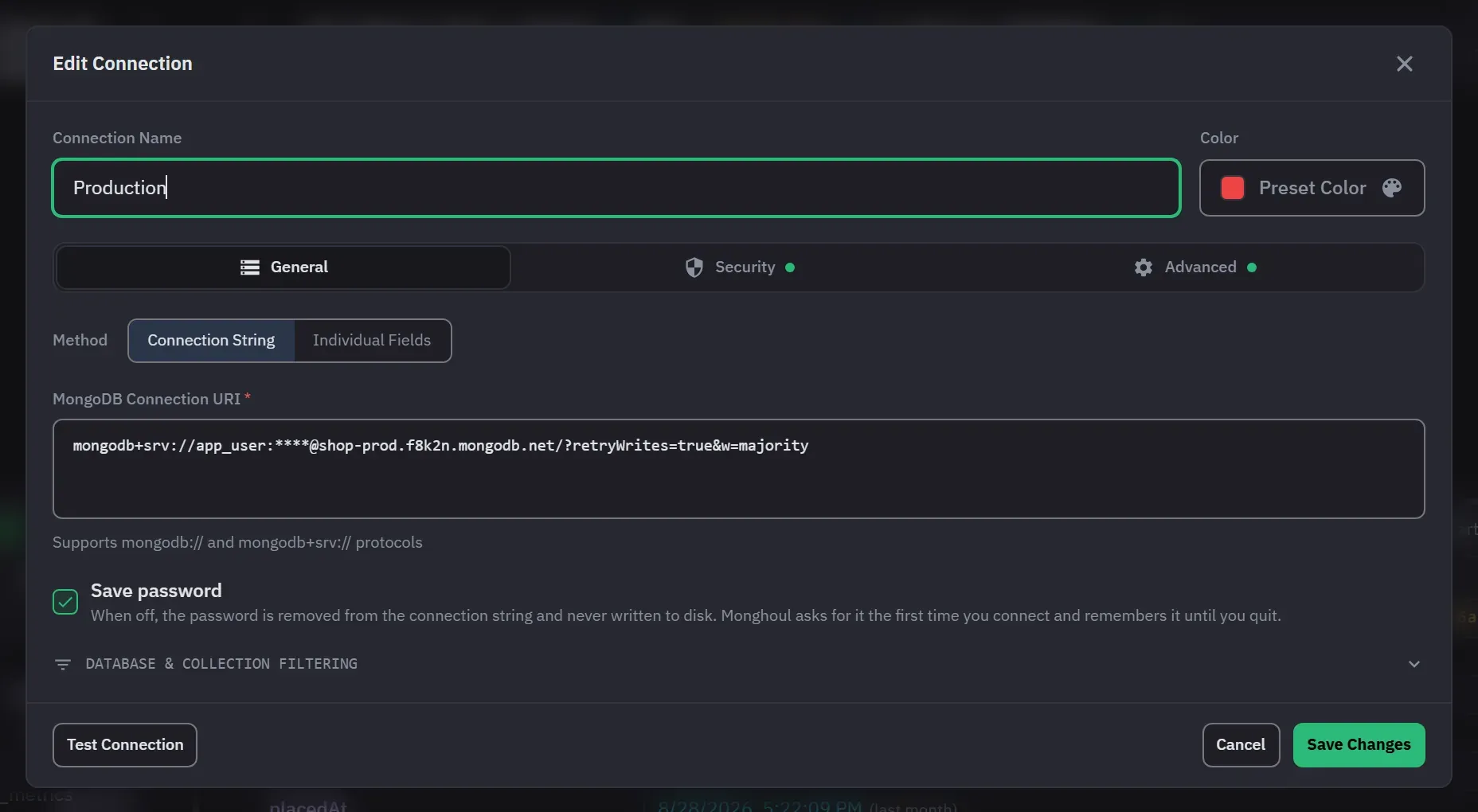
A connection profile is saved, named and colour-coded. You can have as many as you like on Pro, and up to 8 on the free tier. At the limit, Monghoul warns you and opens the licence view instead of the dialog.
Open the dialog
Click Add Connection in the sidebar, or press Ctrl+N (Cmd+N on macOS). On a new install
the empty window has the same button. The dialog has three tabs: General, Security and Advanced.
From a connection string
On the General tab, keep Connection String selected and paste a mongodb:// or
mongodb+srv:// URI. Monghoul fills in the host, port, credentials, authentication mode, TLS,
replica set and read preference from it, so an Atlas string usually needs nothing else. Text that is
not a MongoDB URI is reported as unreadable.
If you want to see what a URI actually says before you paste it anywhere, the connection string parser runs in your browser and never sends it anywhere.
From individual fields
Select Individual Fields when you need something the URI does not carry cleanly: an X.509 certificate file or a Kerberos service name. The SSH tunnel and the TLS settings are on the Security tab.
Individual Fields describes one host. If you switch from a URI that names several hosts, Monghoul
keeps the first and tells you which it dropped. Stay in Connection String mode to keep the whole
host list. A SOCKS5 proxy has no field either. Put proxyHost and proxyPort in the URI.
The eight authentication modes are listed on Connections and security. Four of them are Pro: X.509, LDAP, Kerberos and AWS IAM.
The Authentication Database field holds the database where the user is defined. From a pasted
URI it is the authSource option, else the database in the URI path, else admin.
AWS IAM can take the credentials already on the machine instead of a key pair. Leave both key fields empty and Monghoul uses the instance role, single sign-on session or AWS profile you have configured, the way the AWS command line does.
Decide whether to save the password
Save password can be turned off for username and password, for SCRAM, and in Connection String mode whenever the string holds one. With it off the password is written nowhere on disk, and Monghoul asks for it once per app session.
In Connection String mode, unticking it also takes the credential out of the stored string. That is
the only gesture that forgets a password here. Deleting :password from the string by hand does
not, because a string naming no password is read as leaving the stored one alone.
A password you do save is encrypted with a key your operating system holds. Where your credentials are kept covers what that protects and what it does not.
Turn on write protection first
Do this before you connect to anything that matters. It is on the Advanced tab.
Write protection is per connection, and it can be narrowed to specific databases and collections. It covers inserts, updates, deletes, bulk writes, drops, renames, index changes and aggregation stages that write. A protected operation asks for explicit confirmation at every entry point, including the keyboard and the aggregation builder’s own stage preview.
The important part is where it is enforced. The confirmation is raised by reading your query, but the block itself happens at the driver, so a destructive call that the text could not reveal is still refused when it runs.
Write protection explains what that means in practice.
Test before you save
Press Test Connection to check the host and the credentials, and watch for “Connection Successful” or “Connection Failed”. A toast gives the server’s own reason. Press Cancel to stop a test that is slow.
Create Connection runs the same test first. If the test fails, the profile is not saved and you see “Connection test failed”. Save Changes on an existing profile does not test again, so press Test Connection yourself after you edit one. Connection problems lists the errors and their fixes.
The connection timeout is 30 seconds by default. Change it under Timeout Duration on the Advanced tab, from 1 to 3600 seconds.
Open and close a connection
A saved connection is not open until something needs it. The sidebar shows a connection that is not open with a different icon. Expand it, open a collection, or choose Connect from its context menu. Choose Disconnect to close it. If the password is not saved, Monghoul asks for it once and keeps it until you quit.
Give it a colour
Pick a colour in the dialog. Connection colours propagate to the tab strip and the sidebar. On a machine with production and staging open at once this is the cheapest safety feature in the app, so it is worth the ten seconds.