Connect MongoDB to Claude or Cursor with MCP
The official server is one npx line and writes by default. This covers that setup, what --readOnly actually restricts, and the scoped alternative.
There are two ways to put a MongoDB database in front of an assistant. MongoDB publishes an MCP server you point at a connection string. This app runs one against the connection profiles you already have. The setup differs; the question does not, and the question is what the assistant can reach.
The official MongoDB MCP server
Add it to your client’s configuration. For Claude Desktop and the clients that copy its format:
{
  "mcpServers": {
    "MongoDB": {
      "command": "npx",
      "args": ["-y", "mongodb-mcp-server@latest", "--readOnly"],
      "env": {
        "MDB_MCP_CONNECTION_STRING": "mongodb://localhost:27017/myDatabase"
      }
    }
  }
}
Three things about that snippet, read from the project’s own documentation on 13 September 2026.
--readOnly is not the default. Leave it out and the server exposes insert-many,
update-many, delete-many, drop-collection and the rest. The flag restricts the server to read,
connect and metadata operations. Start with it, and take it off deliberately if you ever need to.
The connection string belongs in env, not in args. The project says so directly, because
command-line arguments are visible in process lists and get logged in several places. A connection
string usually carries a password.
The confirmations depend on the client. The server asks before drop-database,
drop-collection and delete-many when the client supports elicitation. A client that does not
support it does not get the prompt, and that is a property of the client rather than of your
database.
One more thing worth knowing before you point it at anything: with Atlas credentials the server also
exposes Atlas tools, including atlas-create-db-user and atlas-create-cluster. --readOnly filters
those out along with everything else typed create, update or delete, so the snippet above does not
expose them. Take the flag off and it does, and they are not bounded by the database you named.
The scoped alternative
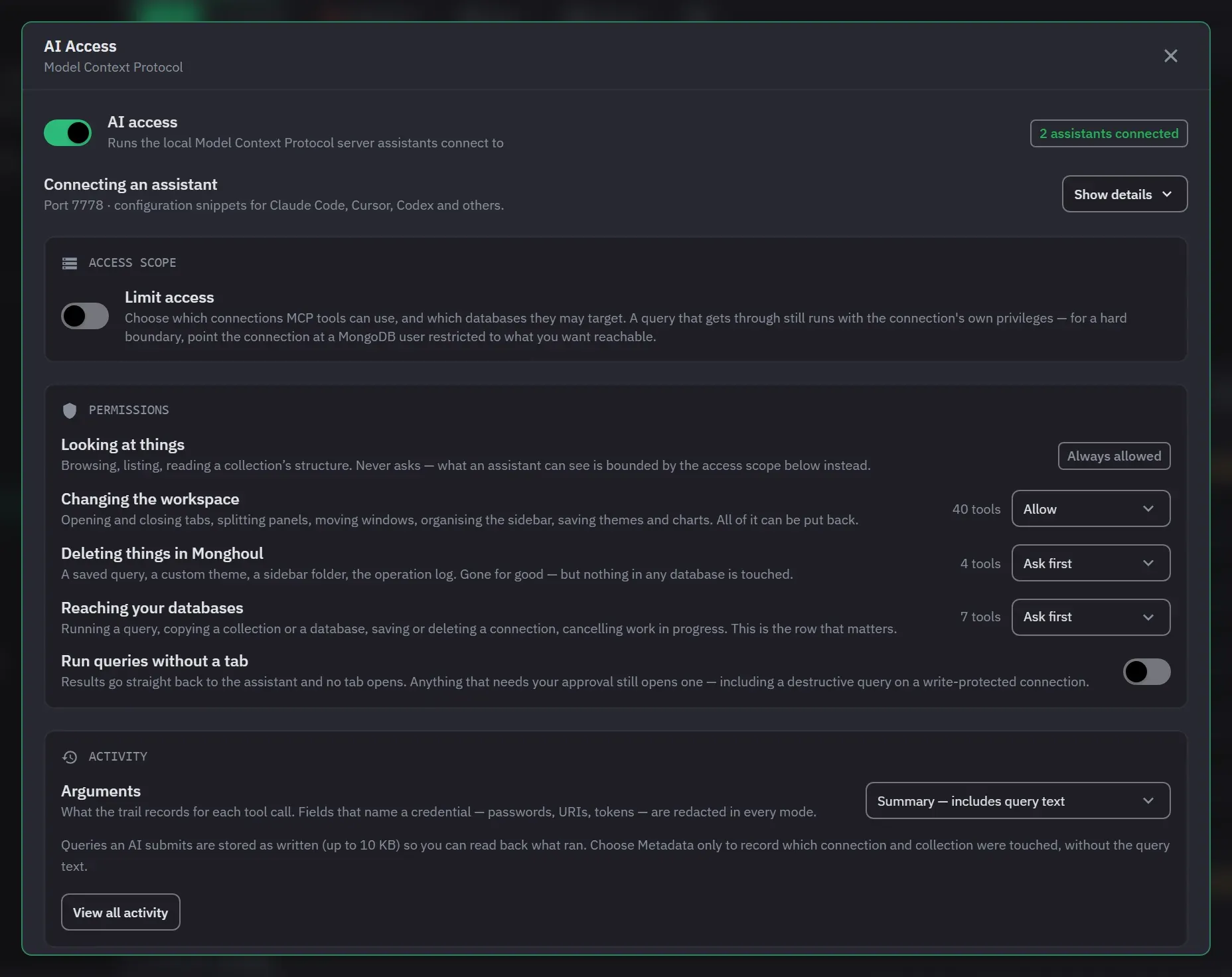
Monghoul runs a Model Context Protocol server with 80+ tools, so an assistant queries your databases through the connection profiles you already have. The server is loopback only and authenticated with a token.
The interesting part is not the tools. It is deciding what an assistant can reach.
The three-step setup
AI access is a Pro feature. Click AI in the status bar to open AI Access. A new setup starts with nothing selected, which is the right default and means you cannot enable this by accident.
- Choose what it can reach. Turn on Limit access, then tick the connections and databases. Turn it off to make every saved connection reachable.
- Decide what it may never touch. Optional, and it switches whole tool groups out of reach.
- Start AI access. Nothing is saved until you click it. The address, the token and the ready-made client snippets appear once it is running. The server has not bound a port before that, so there is nothing to paste yet.
After you start, open Connecting an assistant and click Show details. Pick your client,
copy its snippet into the client’s configuration. Each
snippet sends the token in an Authorization header. The Auth token field has a Regenerate
button, and a new token refuses every client that still holds the old one.
When an assistant connects, a toast names the client. That handshake is the first thing an assistant does, so it is worth seeing it happen rather than finding it in the trail later. If you see no toast, check the client’s configuration and the token first.
Decide the scope before the permissions
Access is either unrestricted or limited to selected connections and databases. Anything outside the scope is hidden from discovery, and an action that targets it is refused rather than failing oddly.
One behaviour worth knowing: connection-wide access includes databases discovered later. Database-specific access does not. If you grant a whole connection today, a database created next month is in scope.
This organises what the assistant reaches. It does not replace MongoDB permissions. For a real boundary, connect with a MongoDB user that only has the roles you want.
Then the permissions
Permissions are one row per kind of change in the Permissions section of the running view, each set to Ask first or Allow:
| Kind | Default |
|---|---|
| Looking at things | Reads always run |
| Changing the workspace | Allowed |
| Deleting things in Monghoul | Ask first |
| Reaching your databases | Ask first |
Any single tool can be set to Ask first or Allow, whatever its row says.
What an approval looks like
It names the operation, what it lands on, and any destructive methods found in submitted code. It declines itself after ten minutes if you ignore it, so a forgotten prompt does not sit open.
A non-destructive tool can be approved for the rest of the session. That grant ends with the
assistant and is never written to disk. execute_query is not one of them: it is classed
destructive, so while its row is Ask first it asks every time, however many times in a row you
have said yes.
This is the whole loop, recorded against a real assistant over the real server. It asks three times, and between the asks it charts what it got, writes a report and arranges the workspace. None of that needs approval, because those change things you can put back.
Afterwards
The AI Activity window keeps a local record of the assistant’s calls, the newest 1,000 of them. Read it the first week. It is the fastest way to find out whether the scope you chose was the scope you meant.
Next
- AI access reference
- Read-only access, and what still gets through
- Write protection, which applies to assistants too