Connections and security
Connection profiles, the eight authentication methods, TLS and SSH, and the write protection that sits in front of every destructive operation.
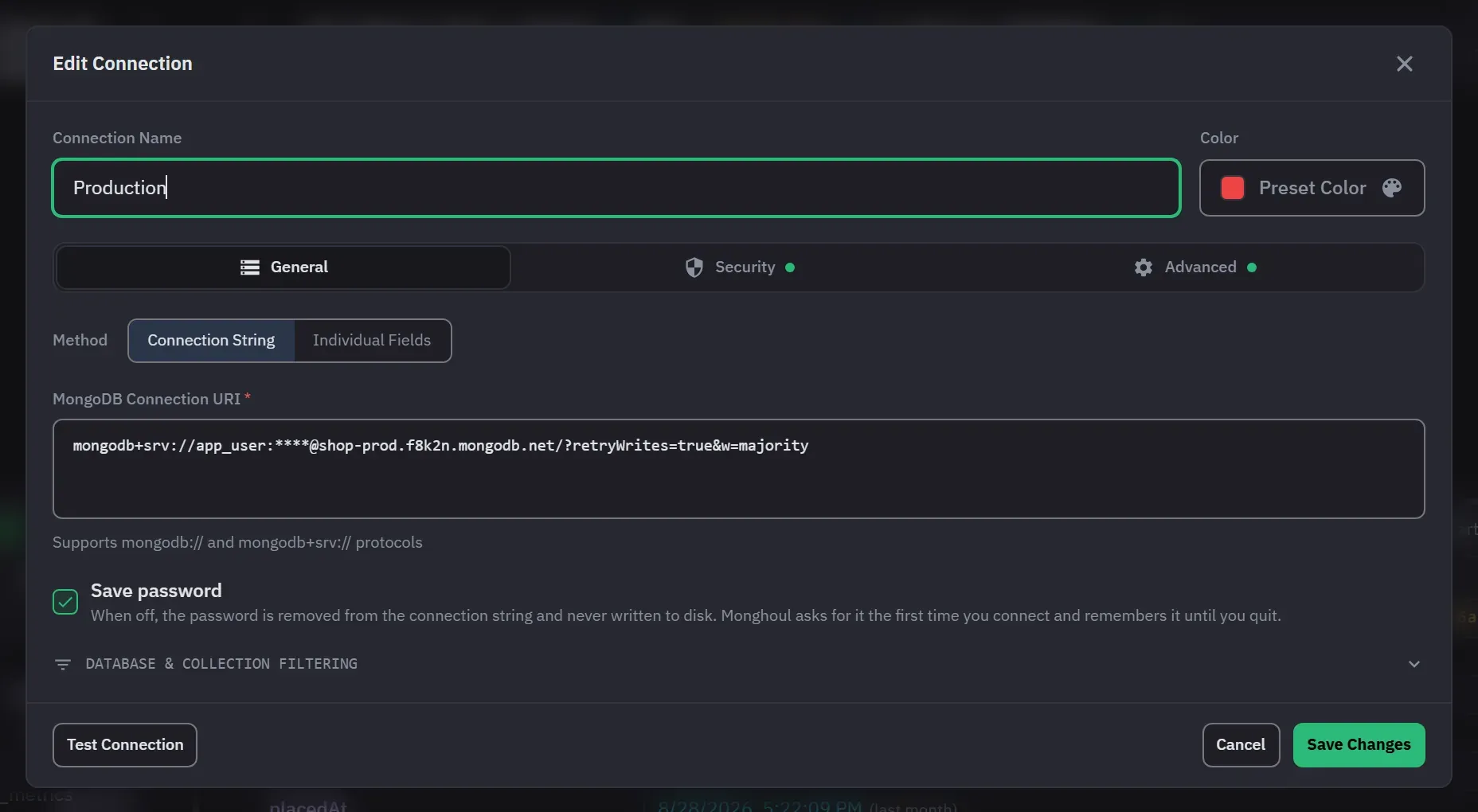
A connection is a saved profile: where the server is, how to authenticate, how to reach it, and what Monghoul is allowed to do once it is there. Everything on this page is per connection, so one profile can be read-only against production while another is wide open against a local server.
Defining a connection
You can paste a connection string or fill in individual fields. Pasting a URI fills in the host,
port, credentials, authentication mode, TLS, replica set and read preference, so the two modes are
the same profile seen from different sides. Both mongodb:// and mongodb+srv:// are accepted. In
Individual Fields mode, the SRV record option replaces the host and port with one DNS seed hostname.
Pasting text that is not a connection string reports that it could not be read. Individual Fields
describes one host. If the string names several hosts, the switch keeps the first one, reports the
others as dropped, and points you back to Connection String mode to keep the whole seed list.
Options the fields do not model, such as retryWrites, w and appName, survive the switch.
Each profile has a name of up to 100 characters. If you leave it empty, Monghoul builds one from the host, the port when it is not the default, and the default database. It adds a number when that name is taken. The name is shown in the field after you save, and names must be unique.
The fields are Host, Port (27017 by default) and an optional Default Database.
MongoDB server 4.4 or newer is required. An older server fails with an error instead of opening.
Authentication
There are 8 authentication methods: no auth, username and password, SCRAM-SHA-1 and SCRAM-SHA-256, and on Pro, X.509, LDAP, Kerberos and AWS IAM. On Free the four Pro methods are listed and labelled, and picking one opens the upgrade dialog.
The authentication database is a field for username and password and for the two SCRAM modes. Read
off a pasted URI it follows the driver’s rule: the authSource parameter, then the database named
in the URI path, then admin. Authentication mode and credentials are set in Individual Fields
mode. A connection that you define with a string carries its credentials in the string.
Username and password lets the server negotiate the mechanism. The two SCRAM modes ask for their mechanism explicitly. X.509 takes a client certificate file and an optional passphrase, and LDAP takes a username and a password.
Kerberos takes a principal, a service name that defaults to mongodb, and an optional
credential-cache file. The cache path is stored for your reference only. Kerberos reads the cache
from the KRB5CCNAME environment variable, and Monghoul does not pass the path to it.
Host canonicalization is a separate control: Default, Off, Forward, and Forward and reverse. Default is the older rule, where a filled-in cache path turns canonicalization on. A connection saved before the control existed has this setting, and it connects as it did before.
AWS IAM takes an access key ID, a secret access key and an optional session token. Leave both key fields empty and Monghoul uses the AWS credentials already on the machine: an instance role, a single sign-on session, a web identity token, or a configured profile. One field filled on its own is refused, and the message tells you to clear both. An Atlas connection string pastes as it comes, with the access key in place of the username, and switching it to individual fields moves the key, the secret and any session token into the AWS fields.
Each mode checks its required fields before dialling and names the one that is missing. A certificate file that cannot be read is reported as missing rather than attempted. File fields take a typed path or a file browser. Cancelling the browser leaves the field as it was.
Transport
TLS is the Enable SSL/TLS encryption option on the Security tab. It takes an optional CA certificate file, and an Allow invalid SSL certificates option for self-signed setups. That option also accepts expired certificates and a certificate whose hostname does not match, so do not use it against production. A CA path that cannot be read is reported by name before dialling.
SSH tunnels are on the Security tab. They take a host, a port that defaults to 22, a username, and either a password or a private-key file. The form has no field for a key passphrase. A tunnel that cannot be established reports why, and the connection does not open. Tunnels close when the connection or the connection test that owns them ends.
A connection can also reach the server through a SOCKS5 proxy. There is no form field for it: name
it in the connection string the way the driver spells it, with proxyHost and, where the proxy asks
for them, proxyPort, proxyUsername and proxyPassword.
Saving a password
Save password can be turned off for username and password, for SCRAM, and in Connection String mode whenever the string or the saved connection holds one. With it off the password is written nowhere on disk, and Monghoul asks for it once per app session. The prompt names the connection, an empty password is a valid answer, and cancelling stops without connecting. The prompt appears the first time something needs the connection, such as connecting from the context menu or expanding it in the tree. A rejected password is asked for again, up to three attempts per connect. Disconnecting forgets the remembered password.
In Connection String mode, unticking it also takes the credential out of the stored string and
forgets one an earlier save had kept. That is the only gesture that forgets a password here.
Deleting :password from the string by hand does not, because a string that names no password is
read as leaving the stored one alone.
Where credentials are stored
Saved passwords, certificate passphrases, AWS secrets and SSH passwords are encrypted on the machine that saved them. The encryption key is held by your operating system: Keychain on macOS, Credential Manager on Windows, Secret Service on Linux. It is not kept in Monghoul’s own database, so a copy of that file cannot be read on another machine. On macOS and Linux the data folder and the database file are owner-only.
A saved connection string does not keep the user:password@host credential inside it. The
credential is taken out when the connection is saved and put back when it is opened, whichever way
the connection was defined. A password supplied through a connection-string option instead, such as
proxyPassword or tlsCertificateKeyFilePassword, is kept the same way and written back only while
the URI still names the option it belongs to.
Linux without a Secret Service running falls back to a weaker key derived from Monghoul’s own data.
The connection string still gives up its password there, because taking a credential out of a URI
needs no key at all. Only the choice of key changes, and the Security line in Settings says which of
the two is in use. MONGHOUL_KEYRING names which collection to store the key in, for a session
whose default collection is missing or locked.
A secret that cannot be decrypted, after moving a profile between machines for example, is treated as empty and left untouched. Monghoul prompts for the password instead, and editing the connection for any other reason does not destroy the stored value.
Editing a connection string so that it names another server drops the stored password rather than sending it to the new host, on connect and on Test alike. An SSH password behaves the same way when the tunnel moves. In Individual Fields the password is on screen, so it is saved as shown.
Query text, saved queries and stored results are not encrypted. A password typed into the editor is on disk as written. The full explanation is in Where your credentials are kept.
Topology and query behaviour
These settings are on the Advanced tab.
A connection is direct or replica-set. A replica-set connection needs a replica set name, and it takes a read preference of primary (the default), primaryPreferred, secondary, secondaryPreferred or nearest. Monghoul keeps the name and the preference only while the topology is replica set.
Timeout Duration is 30 seconds by default and can be 1 to 3600 seconds. It limits how long the driver waits to reach the server, the connection test, and the run time of a query. A query that passes it stops with a message that names this setting.
Each connection carries its own result cap, 1,000 documents by default. An explicit .limit() wins
over the cap even when it asks for more. Auto-explain is on by default. Read queries then collect
plan statistics as they run, and you can turn it off per connection. Auto-run on open is off by
default. When it is on, a query tab runs its code the first time it is opened in a session.
Auto Schema Analysis (Default, On or Off) and Schema Sample Size (Default, 50, 100 or 500 documents) override the global settings for this connection. Default means the global setting.
Save query results is on by default. When you turn it off, result documents stay out of the local database and the operation log. Rows still show while the app is open. After a restart a tab comes back with its code, its timings and its saved chart, and you run the query again to see rows.
Queries are cancellable. Stopping one, by hand or by timeout, also ends the operation on the server. Switching to a query tab opens its connection in the background, so the first query does not wait for connection setup.
Hiding databases and collections
The Database & Collection Filtering section of the editor has one filter for databases and one for collections. Each works in ignore mode (Hide Selected), which hides what it lists, or allow mode (Show Only Selected), which shows only what it lists. Names match exactly, and the lists are not patterns. A collection filter matches by name in every database of the connection. Show Only Selected with an empty list is the same as no filter.
A new connection starts with admin, config and local in its hidden list. Editing an existing
connection never adds them. The filters apply to the connection tree, to the tab’s database
selector, and to actions that start from those.
These filters are organizational. They are not a security boundary, they do not change MongoDB permissions, and they do not stop raw query code from naming a hidden collection.
Write protection
Write protection is the option Require confirmation before executing destructive queries on the Advanced tab. It covers the whole connection. To narrow it, add databases or collections to the Protected Databases and Protected Collections lists. An empty list means all. It covers inserts, updates, deletes, bulk writes, drops, renames, index changes, creating a database or a collection, and the aggregation stages that write. Copying a collection or duplicating a database into a protected target asks the same question.
Protected operations need explicit confirmation at every entry point, including the keyboard and the aggregation builder’s stage preview. The confirmation is raised by reading your query, but the block is enforced at the driver, so a destructive call the text could not reveal is still refused when it runs. Protected connections, databases and collections are marked in the sidebar and in previews.
Write protection explains the reasoning and the exact scope rules.
Managing connections
Creating a connection tests connectivity and credentials first, and a failed test cancels the save. Saving an edit does not test again, but Test Connection can run at any time. A test always sends the password shown on screen, even when the connection does not store one. You can cancel a test, and the cancel also stops the attempt on the server. You cannot close the dialog while a test or save runs.
The editor has General, Security and Advanced tabs. Security and Advanced mark themselves when they hold settings that are not the default. A validation failure returns you to General and marks the field that failed.
On Free you can save 8 connections. Adding another opens the upgrade dialog. See Licensing and trial.
Connections take a colour from 12 presets or a custom picker, and the colour follows the connection onto its tabs and sidebar entries. Deleting a connection asks for confirmation. It closes the connection and its tabs, removes its pins and favorites, and forgets any password held for the session. Its log history is kept.