Index management
Create, inspect, rebuild and drop indexes, with usage counts on each one.
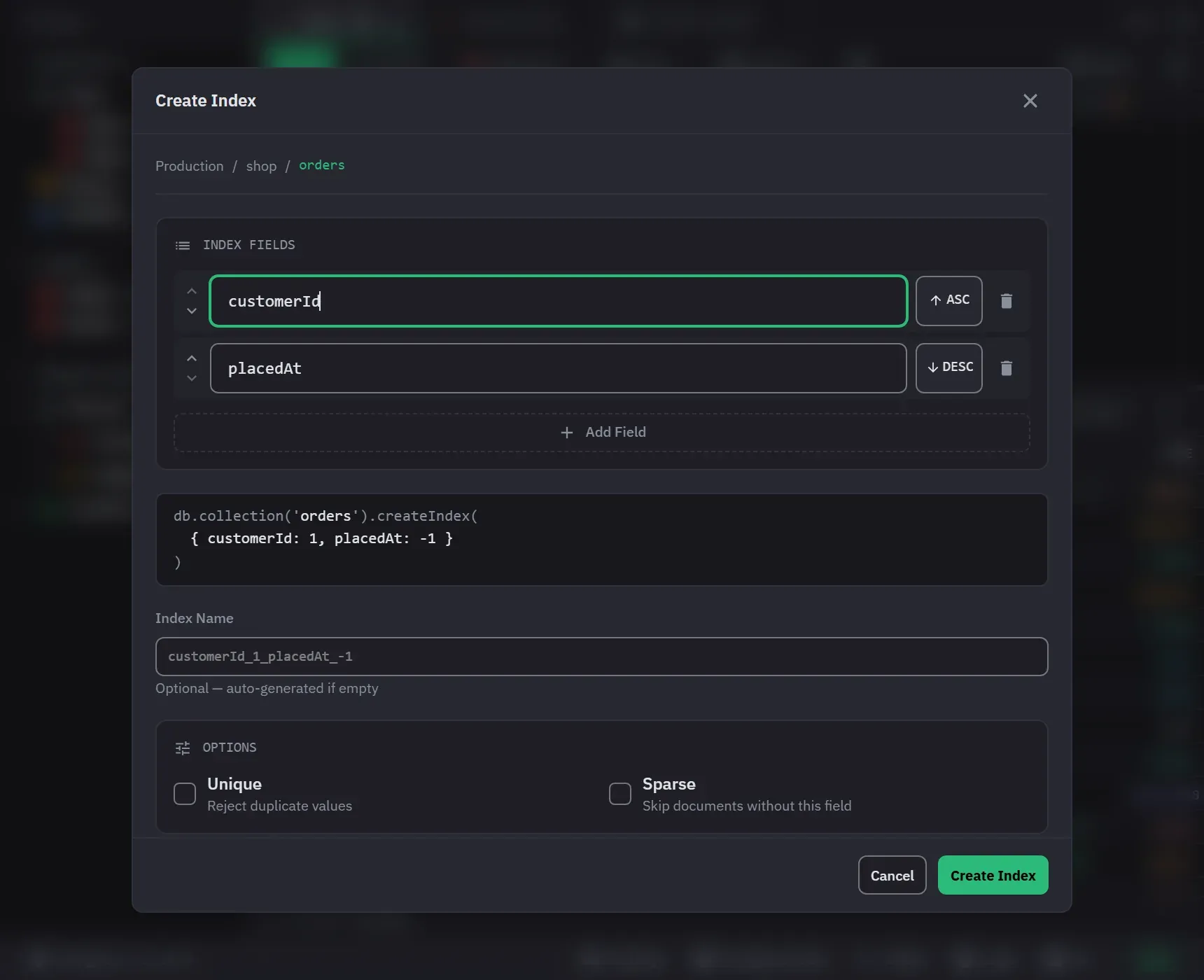
Indexes are created, inspected, rebuilt and dropped from the collection’s Indexes node in the sidebar. Each one carries the statistics the server reports for it, so you can see which indexes are doing work and which are only costing you writes. Index management is on every tier, with no Pro-only option and no count limit.
Creating one
Create Index opens from the collection’s context menu and from the Indexes node. A compound index is built by adding fields, reordering them with the move buttons, and setting each one ascending or descending. Order matters for a compound index, which is why it is a list you arrange rather than a set you tick. The form needs at least one field and refuses a field name that appears twice.
Field names autocomplete from the collection’s schema, nested paths included, and each suggestion shows its detected types. You can still type a path the schema does not know.
The options are a custom name, Unique, Sparse, and a Partial Filter Expression written as JSON. The name field previews the name MongoDB will generate for the keys you have chosen, so you can see what you are about to get before you decide to override it.
A partial filter that is not valid JSON is reported while you type. The field marks itself, says what is wrong, and holds the Create Index button until you fix it.
The exact createIndex() command is shown before anything is created. Create Index waits until the
server finishes the build, then closes the dialog and reports the name of the new index. If the build
fails, the form stays open with the error. On a write-protected collection, it asks for confirmation
first.
The form does not offer TTL, collation, text, wildcard, hidden or geospatial options. A rebuild or a copy of the collection keeps those options on an index that already has them.
A suggestion from an explain plan opens this form with the fields already ordered by the ESR rule, which is usually the ordering you want and is easy to get wrong by hand.
Reading the list
Each index shows its key fields with their direction, its flags and options, and its size. Unique, sparse, partial-filter and TTL indexes carry a visual marker with a tooltip. The details add the TTL expiry and the partial filter when the index has them.
Size and usage come from $indexStats, alongside the time usage tracking started. That start time
matters: an operation count of zero means nothing without knowing how long the server has been
counting. Figures are absent where the server does not report them rather than shown as zero.
Hovering the Indexes folder previews the whole list with its total size and total operations.
Maintaining them
An index row has Rebuild Index and Drop Index in its menu. Refresh Indexes, on the Indexes node, reloads the definitions and statistics from the server. This is how you pick up an index somebody created outside the app. The list also refreshes after you create, drop or rebuild an index.
Drop Index always asks for confirmation. Rebuild Index drops the index and creates it again under the same name with the same options, so it asks only when the collection is write-protected.