Users and roles
Database users, the roles they hold, and custom roles.
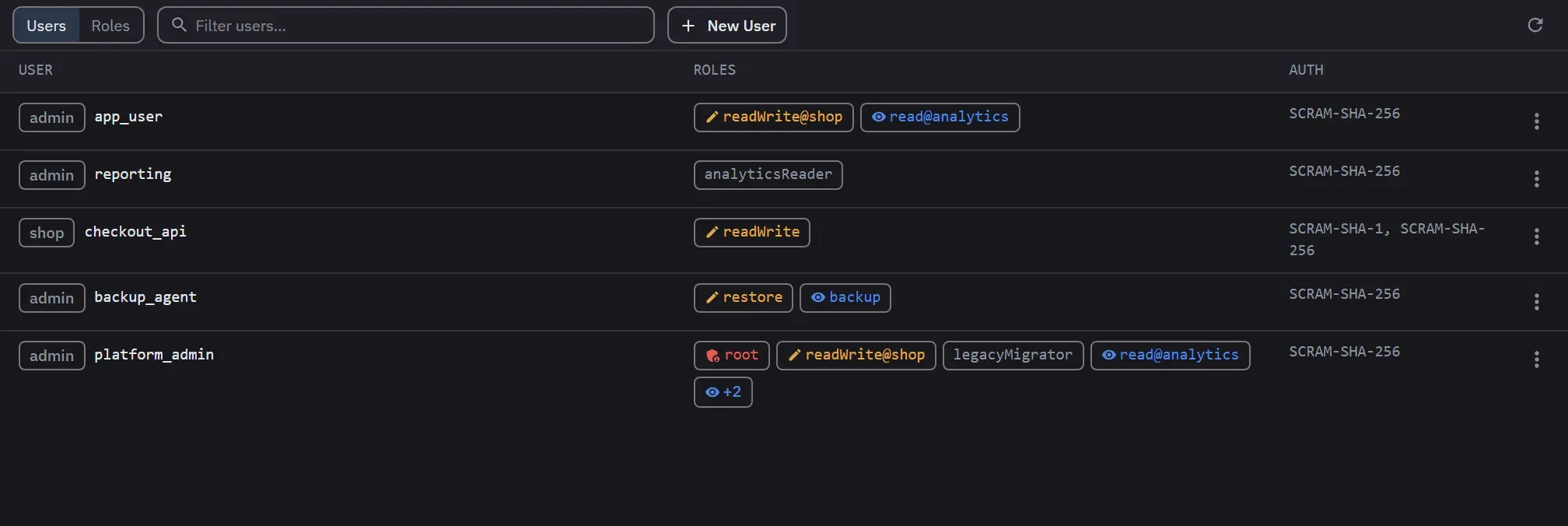
User and role management is a Pro workspace scoped to one connection. It works through the connected account’s own effective permissions, so what you can do here is whatever that account can do in MongoDB.
Manage Users, in a connection’s context menu, opens the workspace as a tab titled
Users: <connection>. Each use opens another tab. On Free the entry carries an upgrade badge and
opens the upgrade dialog, and the app refuses every user and role request.
The workspace has two views, Users and Roles, chosen with a switch. Each view has its own filter box. The view and both filters stay when you move the tab to another panel. Roles loads nothing until you open it the first time. Refresh reloads the access check, the list on screen and the open role.
Users
The users table shows each user’s authentication database, name and full <database>.<name>
identity. It also shows the roles as badges, with a role from another database written
role@database and any role after the first four folded into a +N badge. The last column gives
the authentication mechanisms: external for an $external user, and a dash when the server reports
none. Both lists are sorted by database and then by name, so a refresh never reorders them.
A kebab button or a right-click opens the row actions. The menu offers only the actions your access allows.
- Edit Roles shows the pending change as
+role@dband-role@dbbadges before you save. The role picker is searchable and leaves out the roles the user already has. - Change Password is never offered for an
$externaluser. Those credentials live in x.509, LDAP or Kerberos, and the server refuses the change. - Delete User warns when the user looks like the last user administrator. The warning also appears when the account cannot tell, because it cannot read the user or list the others. The server checks again and can ask for a second confirmation. Declining either one keeps the user.
Create User needs a username and, unless the authentication database is $external, a password.
Identities from normal authentication databases and from external authentication both work. The
username and the authentication database are fixed after creation, and the edit and password forms
lock them. In the edit form, leave the password blank to keep the current one.
A password user can have a secure password generated and revealed: 20 characters, from an alphabet
with no ambiguous letters. A typed password that contains any of : / ? # [ ] @ is flagged, because
those characters must be percent-encoded in a connection string.
Role and privilege changes are sent as grants and revocations, not as a rewrite of the whole list. A role or an action that another client set at the same time is not lost.
Roles
The roles table shows each role’s name, whether it is built-in or custom, its database, and how many roles it inherits directly. Role assignment distinguishes built-in roles from custom ones and shows cross-database scope.
Built-in roles are read-only. Custom roles can be created, edited and deleted, and support resource-scoped privileges, grouped action selection, and inherited roles. A role’s name and database are fixed after creation.
- A privilege row targets a database and collection, where a blank collection means every collection.
It can also target the whole cluster or
anyResource. The last two are marked as admin-scoped and powerful, and choosing either shows a warning. - Actions come from a checklist that is grouped and collapsed by default, with select-all for each group. A privilege row with no action selected is not sent.
- A role on a database other than
admincan only grant privileges on that database and inherit roles from it. The form says so. - An invalid cross-database or cluster privilege scope is refused, with the offending scope named rather than the whole form rejected. This holds on Atlas too, before the request reaches Atlas.
- Deleting a custom role warns that it will be revoked from every user and role that references it.
Clicking anywhere in a role’s row, or pressing Enter or Space on it, opens its detail under that row, so the table keeps its width on a narrow panel. Selecting the same role again closes the detail. It also closes if the role is deleted, and it stays open while you type in the filter box.
The detail shows the role’s effective privileges, each action marked granted or inherited, with the total number of actions and how many are inherited. It also shows the roles it inherits from, and which users and roles hold it. The holders list covers direct references only. A role reached through another role’s inheritance is not listed. The users half is left out when the account may not list users.
Privileges are grouped by the resource they apply to rather than listed action by action, which keeps a role with many of them readable. Each section fills in as its own answer arrives, so the detail does not wait on its slowest read. A failure to read one section leaves the other sections on screen.
The mongosh equivalent
Create User and Create Role both show the equivalent mongosh command, collapsed and copyable. The
command uses passwordPrompt() in place of the password you typed, so it can be pasted into a
terminal or a runbook without carrying a credential into it. Edit forms show no command, because the
command differs. Atlas-managed connections show none either, because Atlas creates users and custom
roles through its Admin API and does not allow the shell equivalents.
MongoDB Atlas
Atlas connects with a project API key, which has a public and a private key. It also connects with a service account, which has a client ID and a secret that Atlas authenticates with OAuth2. The secret half is stored encrypted on this device and can be disconnected at any time. Switching from one kind to the other removes the credential it replaces. A service account secret shows its expiry date and warns within 30 days of it. Once the secret has expired, the dialog says so.
Monghoul recognises Atlas by the connection’s host. A database name or a parameter that contains
mongodb.net does not put a self-hosted connection into the Atlas modes.
On Atlas the user form gains a description, a temporary-user expiry date, and scopes. A scope is a type, Cluster, Data lake or Stream, and a name. Empty scopes mean every cluster in the project, which is the Atlas default, and clearing the scopes of an existing user restores it. A blank scope row is ignored. The users list covers every database user in the project.
The role form offers only the actions Atlas can grant, and anyResource is not among them. Atlas
custom roles belong to the project and show against the admin database. Atlas reports no
authentication mechanisms for its database users.
When access is limited
The workspace adapts to the access it has. A short chip in the toolbar names any mode other than full administration, and its tooltip gives the full explanation. Full administration shows no chip.
| Mode | Chip | What you can do |
|---|---|---|
| Full administration | none | Manage users and roles. |
| View only | read-only · self |
See the connected account alone. Deleting is unavailable, and the only editable row is your own identity. |
| Atlas read-only | read-only · atlas |
See the connected account alone, with a Connect Atlas API keys button until credentials are connected. |
| Atlas managed | atlas |
Manage users and roles through Atlas. The chip names the cluster, and clicking it reopens the credential dialog. |
| No access control | no auth |
Manage users and roles, with a warning. |
The Roles view in a mode that cannot list roles says that browsing roles needs user-administration privileges. It does not show an empty table. A tab that cannot load says so and offers a retry.
Every user and role mutation is recorded in the operation log. Passwords never are.