Interface and display
Zoom, date display, and the other settings that change how the app reads.
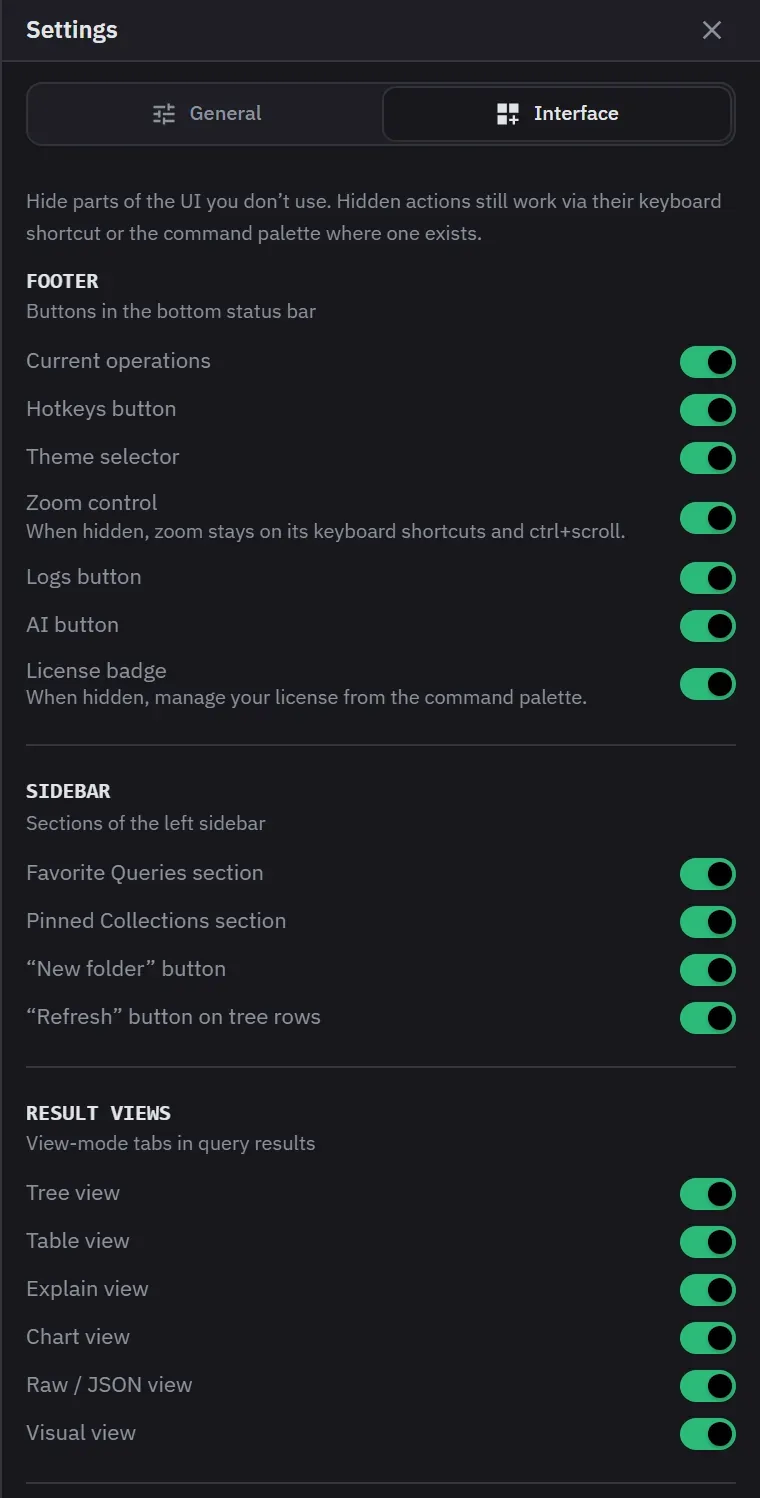
Most of the app’s chrome can be hidden if you do not use it, and what you hide is remembered per installation. Everything is visible by default. Monghoul stores only what you hide, so a feature that a later update adds appears for you.
Hiding what you do not use
Footer items, sidebar sections, result views, result-header actions, query-toolbar actions and secondary context-menu actions can all be turned off. The result header goes whole or item by item. The switches are on the Interface tab of Settings, which the Monghoul button at the left of the status bar opens. The tab groups them by where the feature appears.
- Footer: Current operations, Hotkeys button, Theme selector, Zoom control, Logs button, AI button and License badge.
- Sidebar: the Favorite Queries section, the Pinned Collections section, the new folder button and the refresh button on tree rows. A hidden refresh button still shows its spinner while a row is busy, and F5 and the menu still refresh.
- Result views: Tree, Table, Explain, Chart, Raw and Visual.
- Result header: the entire header, the view switcher, result count and timing, Export, Fullscreen and the Load more bar.
- Query toolbar: Explain, the connection and database selectors, the date helper, the aggregation builder toggle and Save to favorites.
- Right-click menus. Sidebar tree: Import, Export, Generate data, Schema, Calculate size, Create index, Validation rules, Pin or unpin, Snippets, Cluster Monitor and Database Map. Tabs: Clone, Split, Move to panel, Detach and Reveal in sidebar. Result documents: Copy key or path, Filter by value, Unset field, Edit field, Clone or insert a document, Show diff, Set default view, and Confirm reference or Add relationship. A menu section with every item hidden disappears.
Two things are always kept: the connection tree and the app-menu entry. At least one non-chart result view has to stay enabled, and hiding the one you are looking at selects another rather than leaving the panel empty.
Hiding an action leaves its keyboard shortcut or command-palette entry working, where it has one. Hiding the zoom control, for example, leaves its shortcuts and the scroll gesture working. Hiding the License badge leaves licensing reachable from the command palette.
Zoom
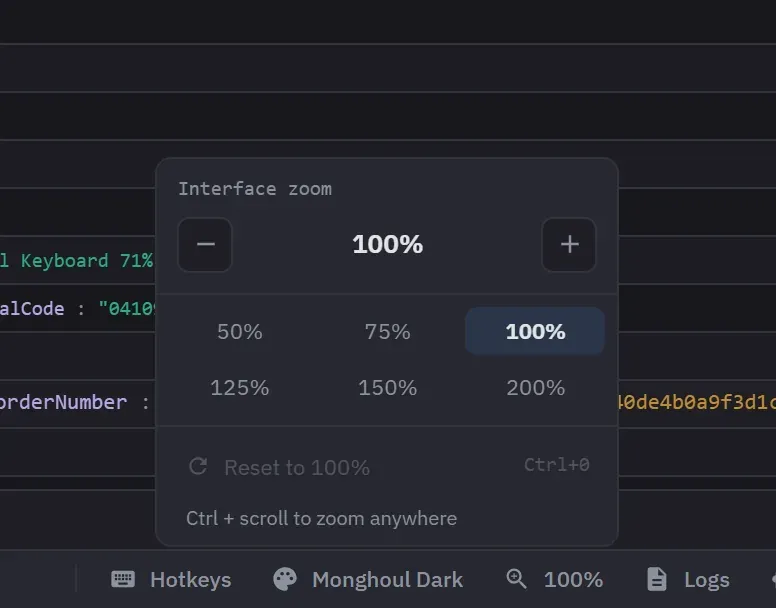
UI zoom runs from 50% to 200%, with a reset, and Ctrl or Cmd with the scroll wheel changes it. The keyboard shortcuts are Ctrl or Cmd with Plus, Minus and 0. It moves in fixed steps: 5% apart from 50% to 130%, then 140%, 150%, 160%, 175% and 200%. There is one app-wide level, so a detached window follows the main one.
The status bar shows the current zoom and opens a control with step buttons, six presets from 50% to 200%, and a reset that names its shortcut.
Drawers and notifications
One side drawer is open at a time. Opening Settings, AI Activity or the theme editor closes whichever was open, and a drawer takes its own width or a third of the window, whichever is smaller. A drawer narrows the workspace to make room rather than covering it, so the sidebar stays visible.
Notifications rise from the bottom centre of the window, newest first. They stack in one column, sharing a width and a left edge instead of each sizing itself to its own text.
Display settings
These are on the General tab of Settings. It also shows the version, the Check for Updates button, the GitHub and Leave a review links, and a Security line that says how your saved credentials are protected.
- Date display format: ISO 8601, Local, Relative or Unix (ms). ISO 8601 is the default. It sets how dates look in result views. A relative time such as “2 days ago” always shows next to the date.
- Anonymous usage analytics: on by default. Turning it off takes effect at once.
- Show contextual tips: on by default. A tip shows once, and turning tips off and on again does not bring back tips you have seen.
- Automatic updates: on by default. See Updates, privacy and support.
- Auto schema analysis: analyzes the schemas of the collections a query uses, in the background. It re-analyzes a schema that is a day old or has changed. The schema sample size beside it is 50, 100 or 500 documents, and 50 is the default. A connection can override both. See Connections and security.
A setting that cannot be saved goes back to its old value on screen and reports the failure.
Visibility and zoom settings persist per installation.