Join two MongoDB collections with $lookup
MongoDB has no JOIN keyword. $lookup does it inside an aggregation, returns an array, and fails quietly when the two key types differ.
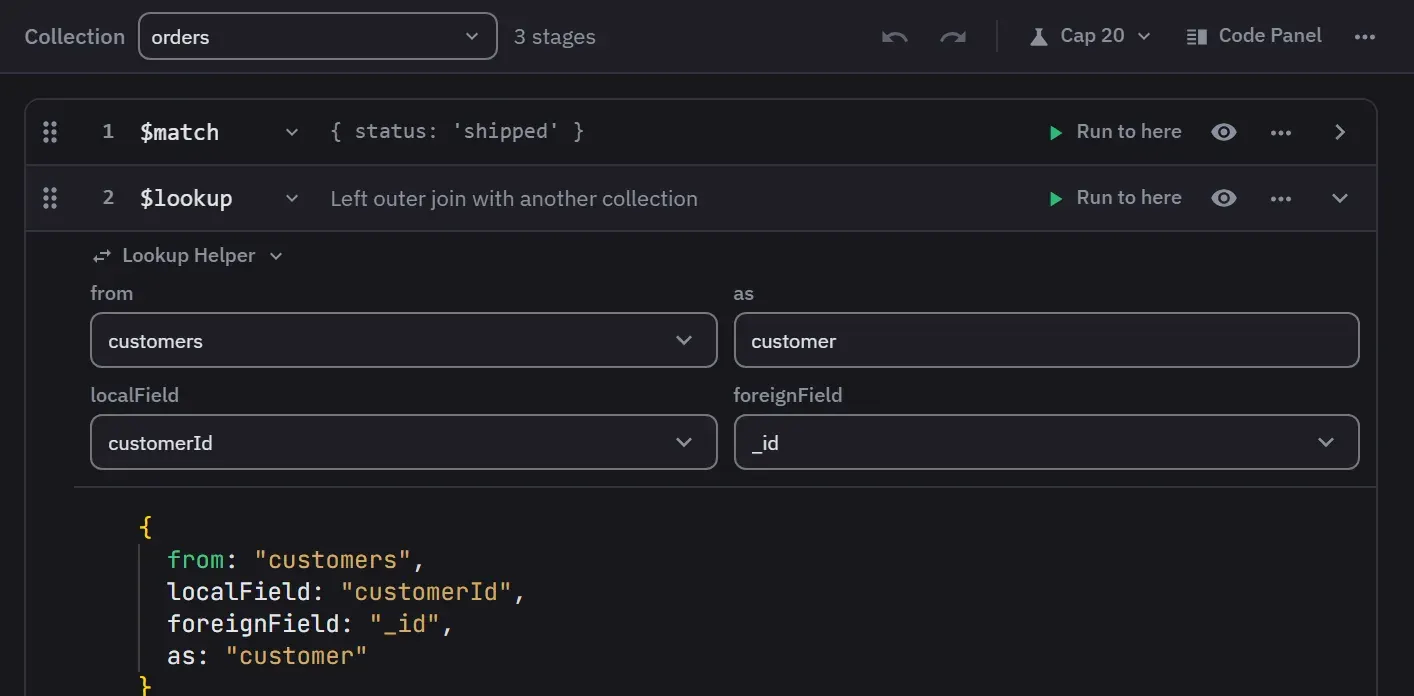
MongoDB has no JOIN keyword. The join happens inside an aggregation pipeline, where the $lookup
stage reads a second collection and attaches the matching documents to each document passing
through, as an array field you name.
It behaves as a left outer join: a document with no match still comes through, carrying an empty
array. That is why a broken $lookup returns rows rather than an error, and why the usual symptom
is an array that is empty everywhere.
The stage
db.orders.aggregate([
  {
    $lookup: {
      from: 'customers',
      localField: 'customerId',
      foreignField: '_id',
      as: 'customer'
    }
  }
])
as is an array, always, even when exactly one document matched. To work with it as a field rather
than a list, follow the stage with $unwind:
{ $unwind: { path: '$customer', preserveNullAndEmptyArrays: true } }preserveNullAndEmptyArrays is the part to get right. Without it, $unwind drops every input
document whose array came back empty, which silently turns your left outer join into an inner join.
With it, unmatched documents survive and the field is simply absent.
The two things that go wrong
The key types do not match. An ObjectId in one collection and the same value as a 24-character
string in the other will never join, and both look identical in a tree view. This is the single most
common cause of an empty result. Check it by reading the raw JSON on both sides: one of them is
{"$oid": "..."} and the other is a plain string.
There is no index on the foreign field. MongoDB’s documentation is unusually direct about this:
an equality-match $lookup “will likely have poor performance” without an index on foreignField.
The server has more than one way to execute a join and picks among them, so the cost is not a single
fixed shape, but the index is what lets it pick a good one.
db.customers.createIndex({ _id: 1 })   // already there
db.orders.createIndex({ customerId: 1 })
The index that matters is on the collection named in from, on the field named in foreignField.
The Database Map looks for both problems in a sample of the data. Its Findings view reports 24-character hex strings in a field that holds ObjectIds, and a reference whose field no index leads with.
When the join needs a condition
For anything other than an equality match, $lookup takes let and pipeline, so the joined
collection can be filtered with values from the input document:
{
  $lookup: {
    from: 'orders',
    let: { customerId: '$_id' },
    pipeline: [
      { $match: { $expr: { $eq: ['$customerId', '$$customerId'] } } },
      { $match: { total: { $gte: 100 } } },
      { $sort: { placedAt: -1 } },
      { $limit: 5 }
    ],
    as: 'recentLargeOrders'
  }
}
The $$ prefix reads a variable declared in let; a single $ reads a field of the foreign
document. Getting those the wrong way round is the second most common reason for an empty array.
MongoDB 5.0 added a concise form that lets localField and foreignField sit alongside let and
pipeline, so the equality match no longer has to be written out inside $expr.
Two limits worth knowing
- The
fromcollection can be sharded from MongoDB 5.1. Before that it could not, which is why older answers say a$lookupcannot touch a sharded collection. From 8.0 it also works inside a transaction against one. - The joined documents land inside the input document. Each document the pipeline returns is subject to the 16 MB BSON limit, so a key matching thousands of foreign documents can push the result over it. If it does, BSONObjectTooLarge explains what the number actually measures.
Whether to join at all is a separate question, and we measured it: $lookup against embedding on 10 million documents.
Building it in the app
$lookup is the stage people write wrong most often, mostly because nothing tells you whether the
field names are right until the pipeline returns an empty array.
- Open a query tab on the collection you are joining from.
- Click Builder in the toolbar.
- Click Add Stage and pick
$lookup. The empty builder also offers a Join Collections quick start that adds the stages for you. Expand the stage, and its Lookup Helper form asks forfrom,as,localFieldandforeignField, and names the output after the collection you pick until you name it yourself. The form changes only the field you edit, so alet, apipelineand your comments stay as written. - Click Run to here on the stage. Auto preview is off by default. Turn it on in the preview
settings in the builder’s header, and the preview runs again 1.5 seconds after you stop typing.
Each stage previews its own output, so you see the joined array appear rather than finding out
at the end. The preview shows the first 10 documents. A matched document carries the joined
array, and an unmatched one carries
[]. The Output cap limits a preview to 20 documents unless you turn it off.
Let the Database Map write the stage
If the Database Map has scanned the database, autocomplete orders the $lookup suggestions by the
relationships it found. from lists the related collections first, and once it names one,
localField and foreignField put that relationship’s two fields first. The Lookup Helper’s
collection and field lists use the same order.
Where a stage belongs, a snippet such as “customers via customerId” writes the whole stage. Its
“one document” variant adds an $unwind that keeps the documents with no match, which is the
preserveNullAndEmptyArrays form above. A relationship that points at the queried collection is
offered as a reverse join, such as “payments of each order”.
The map’s inspector also shows the $lookup stage that follows a reference, and you can copy it or
open it in a query tab.
The part that pays off afterwards
Once the $lookup is in the pipeline, autocomplete offers the fields it produced. Type the output
name and a dot, and you get the foreign collection’s schema, nested paths included.
That keeps working through the stages that reshape documents: $project, $group, $count,
$facet, $bucket and $unset. A field an earlier stage created is still offered eight stages
later, which is the thing this editor does that a plain shell does not. Where a stage’s output
cannot be derived, a computed $replaceRoot for example, the whole document is kept instead.
Switch back to code whenever you like
Visual and code modes round-trip a pipeline the builder can read, so you can start in the form and finish by typing. Click Builder again to return to the code editor. The switch writes your last edit into the code first, and formats it.
Two limits are worth knowing. A pipeline the builder cannot fully read is reduced to the part it
understood, and that reduction is written back on your first edit, so surrounding statements,
comments, a trailing .explain() and a second options argument do not survive the trip. And
the pipeline’s undo covers structural edits only: adding, moving, duplicating, skipping,
removing and clearing a stage, up to 50 entries. Ctrl+Z undoes, and Ctrl+Shift+Z or Ctrl+Y redoes.
Inside a stage body or a Lookup Helper field, the same keys undo that field’s typing instead.
Watch the plan
Whether the join found an index is in the plan rather than in the pipeline. Click Explain in the toolbar and check. In builder mode, Explain runs the pipeline as last synchronized, so edit the pipeline at least once first, or it explains the tab’s original query. Reading an explain plan covers what to look for.
Next
- Aggregation builder reference
- Map an unfamiliar database, which finds the references to join on
- The aggregation cheat sheet, which runs in your browser