Copy a collection to another database
Same server: $out, which does not bring the source indexes with it. Another server: mongodump piped into mongorestore. Or copy it from the app.
Where the two databases live decides the method. On one server an aggregation does it. Across
servers you need the database tools or a client that holds both connections open. The old
db.collection.copyTo() and cloneCollection are gone, which is why so many answers to this
question no longer run.
On the same server: $out
db.getSiblingDB('shop').orders.aggregate([
  { $match: {} },
  { $out: { db: 'shop_archive', coll: 'orders' } }
])
$out takes a database name as well as a collection name, so the copy can cross databases without
leaving the server. Three things about it are worth knowing before you run it on anything you care
about:
- It does not bring the source collection’s indexes with it. This is the one to read twice,
because MongoDB’s wording invites the opposite reading.
$outbuilds a temporary collection, copies the index definitions “from the existing collection”, inserts the documents, then renames the temporary collection over the destination. The existing collection there is the destination being replaced, not the source you are reading. So replacing a collection keeps that collection’s own indexes, and writing to a destination that does not exist yet gives you a collection with nothing but its_idindex. Create the rest yourself afterwards. - It replaces the destination, atomically. If the target collection exists, it is dropped by the
rename at the end. There is no merge and no upsert. If you want those, the stage is
$merge. - It will not write to a sharded collection, cannot run inside a transaction, and cannot appear
in a view definition or inside
$lookup,$facetor$unionWith. A sharded destination is$mergeagain.
The $match: {} is there to make the shape obvious. Put a real filter in it and you have copied a
subset.
Across servers: mongodump into mongorestore
mongodump --uri="mongodb://source:27017" \
  --db=shop --collection=orders --archive |
mongorestore --uri="mongodb://target:27017" \
  --nsFrom='shop.orders' --nsTo='shop_archive.orders' --archive
--archive writes one binary stream instead of a directory of BSON files, and with no filename it
writes to standard output, so the two tools pipe into each other and nothing touches your disk.
--nsFrom and --nsTo rename the namespace on the way in, which is what makes this a copy rather
than a restore of the same name.
This route carries the index definitions and the collection options, and mongorestore rebuilds the
indexes at the end unless you pass --noIndexRestore.
One caveat that catches people on a live system. A dump taken while writes are happening does not represent a single moment in time, and MongoDB’s documentation says so plainly.
The usual answer to that is --oplog, and it does not apply here: --oplog requires a full dump of
a replica set member and fails outright if you pass --db, --collection, --query or
--dumpDbUsersAndRoles. The copy above uses two of those. So for one collection off a busy system
your options are to stop writing to it, to accept that the copy is smeared across the time the dump
took, or to reconcile afterwards on a timestamp field.
In the app
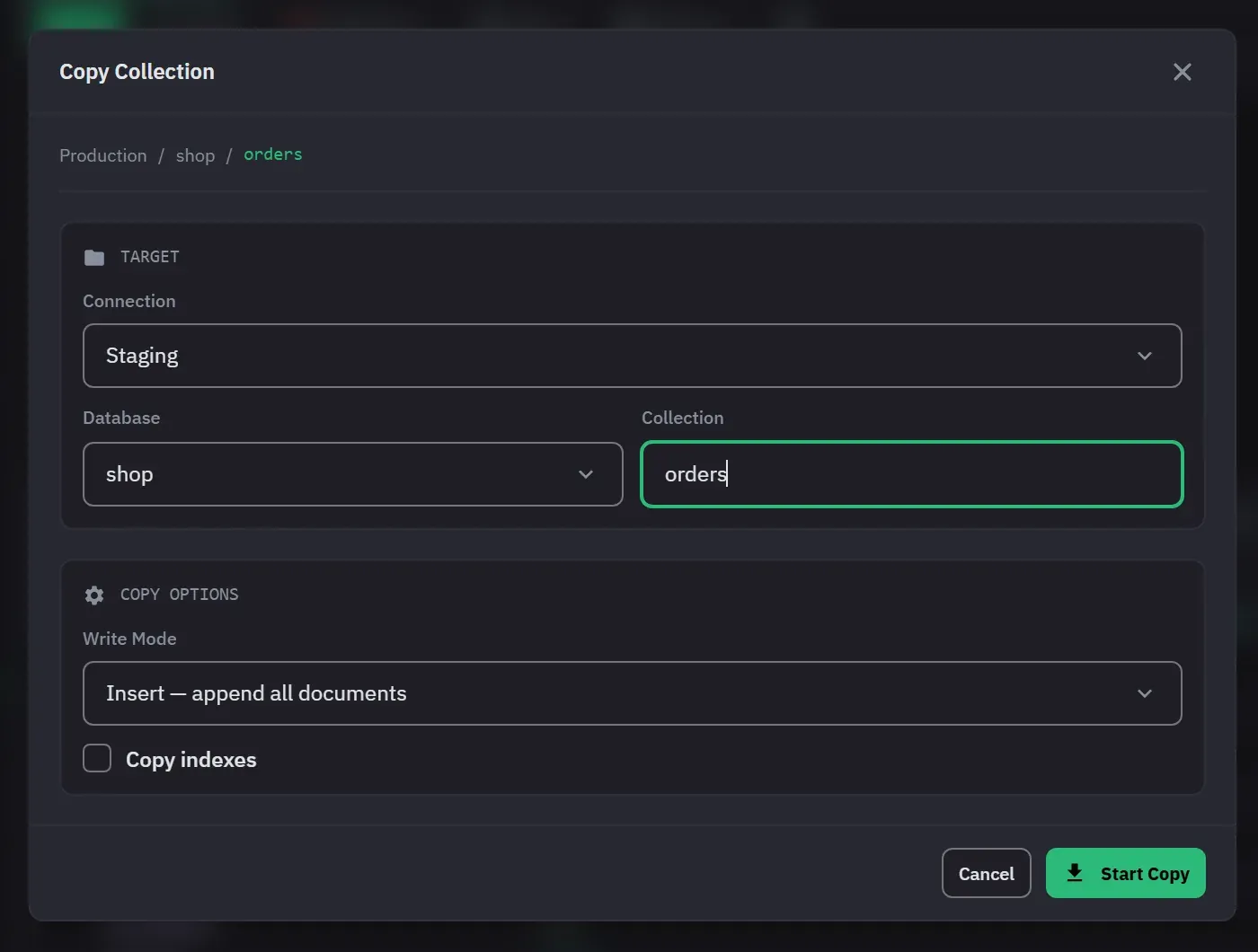
Copying between instances is a Pro feature and it goes directly, without you exporting to a file and importing it back.
Copying lives inside the export flow, which is the part people do not guess.
- Right-click the source collection in the sidebar and choose Export Collection.
- In the dialog, set Format to Another Collection rather than a file format.
- Under Target, pick the Connection, the Database and the Collection. The collection can be a new name.
- Under Copy Options, set Write Mode: Insert, Upsert (matches on
_id, and keeps a field the target has and the source lacks) or Insert only (skips documents the target already holds). Tick Copy indexes to carry the other indexes across. - Click Start Copy. The dialog title reads Copy Collection.
Free shows Another Collection (PRO) in the list, and choosing it does nothing.
You can also drag a collection or a database onto a destination in the tree, which opens the same dialog with that destination already chosen. Only a destination the copy could actually use lights up: another connection, or another database on the same one. A copy onto the same connection, database and collection name is refused.
The copy builds a missing target with the source’s validator, capped settings, collation and TTL. A target that already exists keeps its own options. An empty source still creates the target. A view is copied as the documents it returns, into an ordinary collection.
When the copy ends, it reports how many documents landed and how many the target skipped. Open the target and compare the document counts. If you cancel, the documents already written stay in the target, and the copy does not roll them back.
Duplicating a database
Right-click the database and choose Export Database (Pro). Set Export Mode to Copy to
Another Database, pick the collections, then set the target Connection and Database Name.
The name starts as the source name with _copy added. The copy recreates views as views and builds
each collection’s indexes after its documents. It leaves out the system.* collections.
What write protection does here
If the target connection, database or collection is write protected, a Copy Into a Protected Collection dialog asks you to confirm with Copy Anyway. This is the same confirmation any other destructive operation asks for. Copying out of a protected connection writes nothing to it, so the source is never questioned.
That matters because the direction is easy to get backwards, and the confirmation names the target. Read it.
Which one to use
| Situation | Use |
|---|---|
| Both databases on one server | $out, or $merge if the destination must survive. Recreate the indexes either way |
| Two servers, both reachable from your machine | mongodump piped into mongorestore, or the app |
| Two servers, not reachable at the same time | Export to a file, move it, import it |
| You need to transform documents on the way | An aggregation ending in $out or $merge |
| The destination is sharded | $merge |
When to use export and import instead
- The two clusters cannot both be reached from your machine at the same time.
- You want the intermediate file, for a backup or for a colleague.
- You need to transform the documents on the way through.
For those, export to a file and import it on the other side. Use Extended JSON, not CSV, or the types will not survive.