Where your credentials are kept
Monghoul encrypts your saved connection passwords with a key your operating system holds. What that protects against, what it does not, and how it differs by platform.
Monghoul has no server. Your connections live in a SQLite file on your machine, and the passwords in them are encrypted. The part worth understanding is where the key to that encryption is, because that is what decides whether the file is worth anything to someone who copies it.
The key is not in the database
Your operating system holds it:
| Platform | Where the key lives |
|---|---|
| macOS | Keychain |
| Windows | Credential Manager |
| Linux | Secret Service (gnome-keyring, KWallet) |
The database file holds only the encrypted values. Copying it to a USB stick, syncing it to a cloud folder or restoring it from a backup gets someone the ciphertext and nothing to open it with.
Before version 1.12.0 the key was derived from a value stored in that same file, so a copy of the database carried both halves. If you are upgrading, the move happens once, on the first launch after the update.
Monghoul tells you which key it is using. Open Settings and read the Security line.
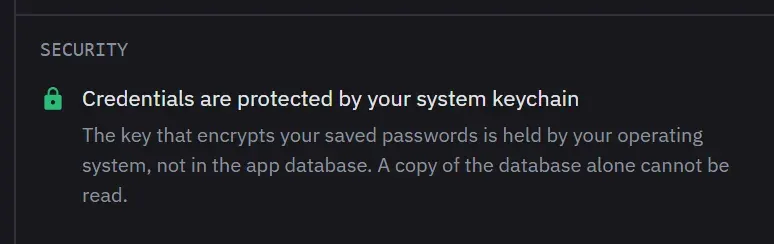
The connection string does not hold your password either
A MongoDB URI can carry a password in the user:password@host position, and Monghoul used to save
it that way. It does not any more. Whether you paste a full connection string or fill in the
fields, the credential is taken out before the connection is written to disk and kept only in the
encrypted field. It goes back into the string when you open the connection, so nothing about
connecting changes.
This half needs no keychain, so it happens on every machine, including one with no credential store at all.
One exception, and it is worth knowing if it applies to you. A URI can also carry a password in
an option rather than in that position, as proxyPassword or tlsCertificateKeyFilePassword.
Those are stored as you typed them. If you connect through an authenticated proxy, treat the app
database as holding that password in plain form.
A stored password does not follow a connection
Point a saved connection string at a different scheme, user or host and Monghoul drops the stored password rather than sending it to the new server. That holds when you connect and when you press Test. An SSH password behaves the same way when the tunnel moves to another host.
In Individual Fields the password is on screen, so it is saved as shown. The rule covers the case where you cannot see what is being sent.
What this protects, and what it does not
What it protects is the file at rest: a backup, a synced folder, a shared machine, a stolen laptop with the disk unlocked but the account logged out. On macOS and Linux the data folder and the database file are owner-only as well, so another account on the same machine cannot read them.
What no local application can fully defend against is a program running as you, on your machine, while you are logged in. One that claims to is describing something else. How much such a program gets differs by platform, and it is worth being exact:
- macOS. It cannot read the key quietly. The keychain item is restricted to the applications on its access list, so anything else raises a system dialog asking for your login keychain password, and the read waits until you answer. Denying it stops the read.
- Windows. Credential Manager scopes the entry to your user account, so a program running as you can read it.
- Linux. It can read the key with no prompt, the same way Monghoul does.
What is still stored in the clear
Query text, saved queries, snippets and stored results are kept as you wrote them. If you type a
password into the query editor, in a db.createUser() call for example, that text is on disk in
plain form. The encryption described here covers connection credentials and Monghoul’s own AI
access token, not everything you type.
Two things soften that, and neither is encryption. The operation log is the one place Monghoul
records your query text by itself, and from 1.12.0 it takes the credential out first: a pwd: value
and the password inside a mongodb://user:password@host string are replaced before the row is
written. A favorite or a snippet is the opposite case, because you chose to save it and expect
to run it again, so Monghoul stores it exactly as you typed it and tells you once that it holds
something that looks like a credential.
Stored responses have a control of their own, and it is not in Settings: open the Logs panel from the status bar and set the response mode to None, which keeps the query code and the metadata and drops the response. Stripped, the default, truncates arrays to three items and strings to 500 characters. The query code itself is stored either way.
When there is no keychain
Some Linux setups have no Secret Service running. Headless servers usually do not, and a minimal desktop install may not either. Monghoul still encrypts the same fields, but it derives the key from its own data, which is the weaker arrangement it used before 1.12.0. The Security line says so rather than pretending otherwise.
To get the stronger one on Linux, install and run gnome-keyring or kwallet. If you already have
and Settings still reports reduced protection, see
Keychain and saved passwords.
Related
- Keychain and saved passwords for what to do when a saved password cannot be read.
- Connections and security for the eight authentication methods, TLS and SSH.
- Updates, privacy and support for what leaves your machine.