Keychain and saved passwords
What to do when Settings reports reduced protection, when a saved password cannot be read, or when Monghoul asks for a password it used to know.
Every problem on this page shows up in one place first. Open Settings and read the Security line: it names which key is protecting your saved passwords, and whether Monghoul can read what it has. Where your credentials are kept explains why there is a key at all.
Nothing here loses a password by itself. Monghoul never overwrites a stored credential it cannot read, so a key that comes back can still open it.
The Security line has five readings besides the normal one, “Credentials are protected by your system keychain”. Each has its own section below:
| The line says | Section |
|---|---|
| Credentials are stored with reduced protection | Settings says reduced protection |
| Some saved credentials cannot be read | A saved password cannot be read |
| Saved credentials were encrypted with a different key | A saved password cannot be read |
| Saved credentials cannot be read on this device | A saved password cannot be read |
Settings says reduced protection
Monghoul could not get a key from your operating system, so it derived a weaker one from its own data. Everything works; the protection is the arrangement that shipped before 1.12.0.
On macOS and Windows this is unusual and the log says why. On Linux it is the common case, because a Secret Service is a separate thing that may not be running.
sudo apt install gnome-keyring # or your distribution's packageSettings still says reduced protection, with a keyring running
A Secret Service can be running and still have nothing Monghoul can write to. It stores the key in your default collection, and a session with no unlocked login keyring has none. This is what a fresh account, a headless box or WSL usually looks like.
Two ways out.
Unlock your login keyring. A desktop does this at sign-in, so this is mostly about sessions that did not come from one.
Or name a collection that does exist, with MONGHOUL_KEYRING:
MONGHOUL_KEYRING=login monghoulKeep the variable set once you use it. The key goes into the collection it names, so removing it later looks to Monghoul exactly like a keychain that lost its entry: it creates a new key and asks you for every saved password again.
Monghoul takes a long time to start, or asks to unlock a keyring
Answer the dialog and it carries on. Monghoul waits up to 30 seconds for the credential store, and if nothing answers it starts with the weaker key rather than waiting, with the reason in the log.
A saved password cannot be read
Two situations look alike and behave differently. The Security line tells them apart, and the difference decides what you should do.
“Some saved credentials cannot be read”
The keychain has a working key and it opens most of your passwords. A few were written under a different key, or their stored form is damaged. Monghoul leaves them untouched. Enter each affected password when you connect. A database brought back to the machine that first wrote it, or a partial restore, can cause this.
“Saved credentials were encrypted with a different key”
This device has a working key, and the stored passwords were written under a different one. New passwords save normally. Enter each old one once when you connect and it is saved under the current key.
You get here two ways:
- You moved the database to another computer, or restored it from a backup taken on one.
- The keychain entry was deleted. Monghoul creates a fresh key when it finds none, so the old one is gone rather than missing.
A deleted keychain entry cannot be undone. The key it held is the only thing that could read those passwords, and nothing else has a copy.
“Saved credentials cannot be read on this device”
No key reached Monghoul at all, because the credential store is not running or could not be opened. Stored passwords cannot be read, and new ones cannot be saved either.
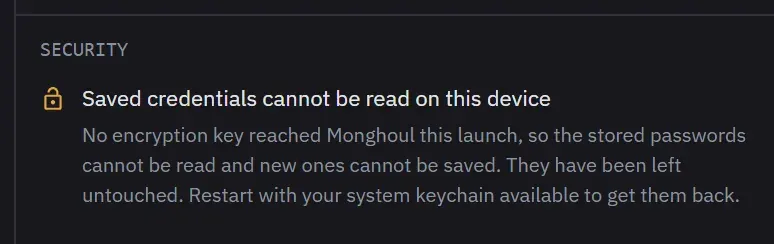
While this state lasts, saving a new certificate passphrase, AWS secret, proxy password or SSH password fails with “This credential cannot be saved while the stored secrets are unreadable. Restart with your system keychain available and try again.” Those fields have no prompt of their own, so Monghoul refuses the save rather than drop what you typed.
This one is recoverable. Start Monghoul with the credential store available and every saved credential works again. Nothing was overwritten while it could not be read.
Monghoul asks for a password on a connection that used to save it
Expected in either state above: Monghoul asks when it connects, and remembers the answer until you quit. It is the same prompt a connection saved with Save password turned off has always used.
If it asks on a connection you have not moved and whose keychain is healthy, check whether the connection string was edited to name a different server. A stored password does not follow a connection to a new host, by design.
A connection reports a missing field instead of asking
One prompt does not cover everything. A certificate passphrase, an AWS secret and an SSH password have no prompt of their own, so a connection that cannot read one reports the field as missing rather than asking for it. Open the connection and re-enter that field.
Related
- Where your credentials are kept for what the key protects and what it does not.
- Connection problems for failures that are not about credentials.