SQL drafts and results
Which statement Run takes, completion, Format, parameters, scripts, Stop, Explain and the result grid, for PostgreSQL, ClickHouse and SQLite.
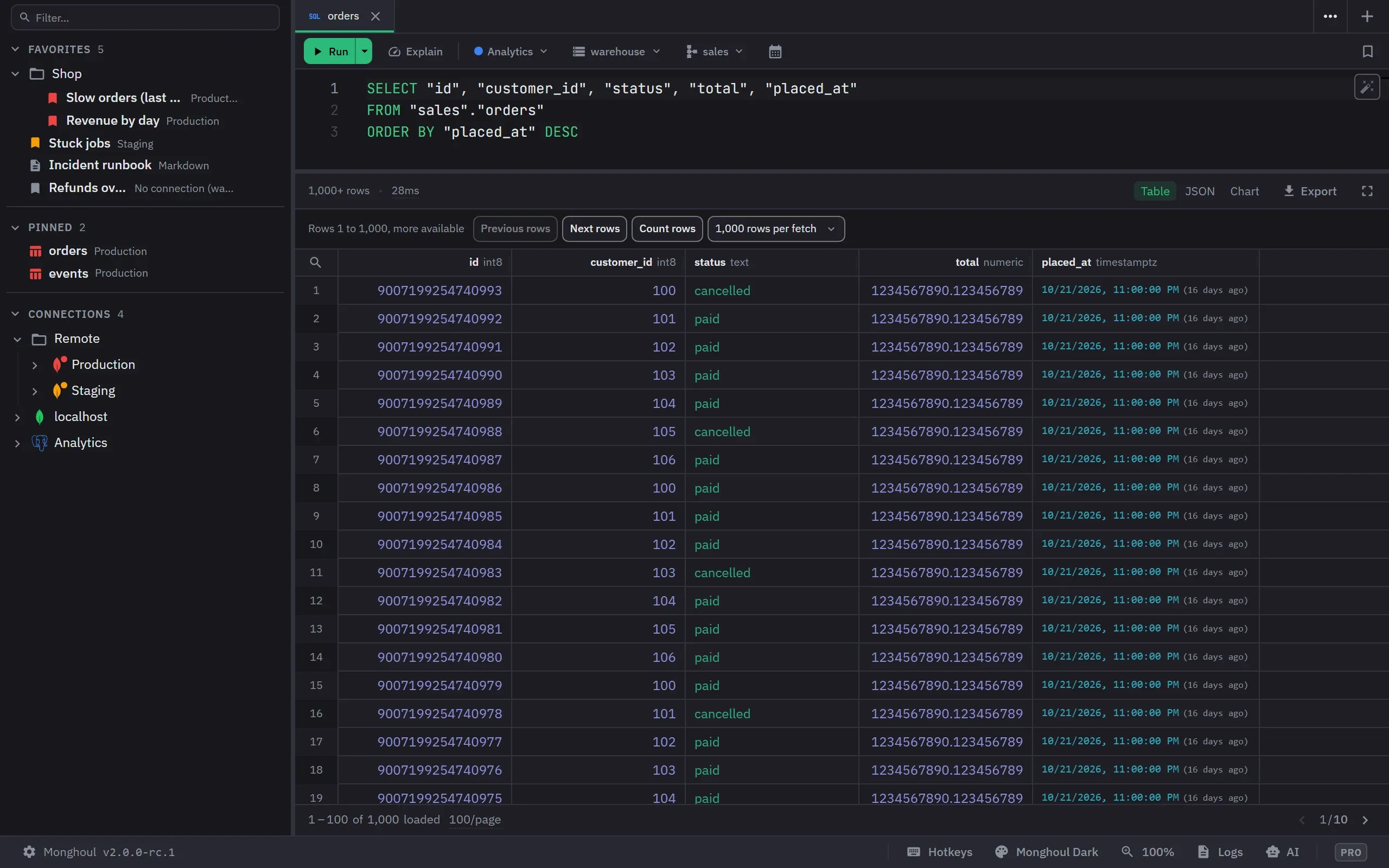
A PostgreSQL, ClickHouse or SQLite query tab is a SQL draft. Its toolbar picks the database, and on PostgreSQL also the schema. It has Run with its menu, Stop, Explain and Format.
Which statement runs
| The draft holds | Run takes | The button says |
|---|---|---|
| A selection | the selection | Run selection |
| Two statements or more | the statement at the cursor | Run statement |
| One statement | the whole draft | Run |
A tinted band marks the statement Run will take, and a play button beside each statement runs only that one. Several selections turn Run off, with the reason.
Completion and Format
Completion reads the lists the tree already loaded, and asks the server nothing as you type. It
offers the columns of a relation after alias., relations, schemas and CTEs after FROM and JOIN,
up to 8 joins from foreign keys and the Database Map after JOIN, the engine’s functions with their
signatures, and an enum’s labels inside a compared string. On SQLite it offers the file’s tables and
the browsed table’s columns.
Format formats the selection, or the whole text, in the draft’s own dialect, as one undo step. Only white space changes.
Parameters
| Engine | Form |
|---|---|
| PostgreSQL | $1, $2 |
| ClickHouse | {name:Type} |
| SQLite | ?, ?1, :name, @name, $name |
While the text uses a parameter, a strip above the editor has a value for each one. Enter in the strip runs. A run with a value missing says which one and moves to it.
Scripts
Run all statements (Alt+X) checks the whole script first, so a statement Monghoul refuses stops it before anything runs. A script runs at most 200 statements. On error is Stop at the first error or Continue. The result is a Statements list with each statement’s status, rows, time and message, and a Result tab for each grid, at most 20 grids and 8 MiB.
Stop and the queue
A connection runs at most four queries at a time. A further run waits, and the result panel says “Waiting for a slot”. Stop cancels a statement on PostgreSQL, kills it on ClickHouse, and ends the background process on SQLite.
Keys
| Action | Key |
|---|---|
| Run | Mod+Enter or Mod+R |
| Stop | Mod+Shift+. |
| Explain | Mod+Shift+E |
| Run all statements | Alt+X |
| Format | Mod+S |
Every key can be rebound.
The result grid
A cell holds the server’s exact text, so a large integer and a numeric keep every digit. NULL shows as an italic NULL. The connection’s result cap ends a read, and a result stops at 8 MiB; a value over 1 MiB is cut and carries a cut badge.
A read shows its rows in windows, such as “Rows 1,001 to 2,000, more available”, with Previous rows, Next rows and 1,000, 5,000 or 10,000 rows per fetch. Count rows counts every row of the statement as a read of its own, and never runs by itself.
A cell’s menu has Filter by This Value and Exclude This Value, which add the condition to the statement’s WHERE through a parameter and run it again. A header’s menu has Sort Query Ascending and Descending. Results show as Table, JSON and, on Pro, Chart. Export writes JSON, CSV, TSV or, on Pro, Excel: the loaded rows, or all rows by running the query again without its own LIMIT.